The operational hurdles are significant. Custom apps require dedicated IT resources, ongoing maintenance, app store compliance, and frequent compatibility updates. Meanwhile, food and drink apps struggle with retention — Android Food and Drink apps saw just 2.9% day-30 retention in Q3 2024, according to Statista — meaning most students who download a cafeteria app will stop using it within a month.
The good news: a native app is not the only path to modern, convenient campus dining. Several proven alternatives deliver the same speed and flexibility without the development overhead. This article covers the five best options, how they compare, and how to choose the right fit for your campus.
Key Takeaways
- Mobile apps are not the only way to modernize campus dining ordering
- Leading alternatives include QR code web ordering, self-service kiosks, browser-based platforms, smart food lockers, and delivery robots
- Cost, infrastructure needs, and student experience vary widely across each option
- QR code ordering has the lowest barrier to entry — no app download, no hardware, minimal setup
- The right choice depends on campus size, budget, and existing tech infrastructure
Why College Cafeterias Are Moving Beyond Mobile Apps
App adoption data tells a clear story: students download, then abandon. An app that goes unused within weeks generates zero operational value and leaves IT teams managing updates, patches, and compatibility issues for a tool nobody opens.
The demand for digital ordering is real, though. CBORD's 2023 Student Experience Survey found 90% of students were interested in using their smartphones to purchase food and access campus services, and 88% of C-level administrators were very interested in building a connected campus. Students want phone-enabled convenience — they just do not necessarily want another single-purpose app to manage.
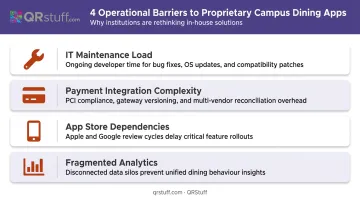
Beyond student fatigue, university-specific operational barriers make proprietary apps particularly difficult:
- IT maintenance load — apps require version updates, OS compatibility patches, and ongoing bug fixes
- Payment integration complexity — connecting to campus card or meal plan systems is rarely plug-and-play
- App store dependencies — Apple and Google approval processes add delays and compliance requirements
- Fragmented analytics — most institutional app deployments lack the scan-level, location-specific data administrators actually need
Campus dining operators are increasingly asking a different question: not "which app should we build?" but "what frictionless alternative keeps students engaged without adding to their digital load?" That shift is driving real interest in browser-based and QR-driven ordering systems that require no download at all.
Top Alternatives to Mobile Ordering Apps for College Cafeterias
Each alternative below was considered across four practical dimensions: ease of implementation, student adoption friction, cost-effectiveness, and compatibility with campus dining operations.
QR Code-Based Web Ordering
Students scan a printed QR code — placed at a table, counter, or pickup station — and land directly on a mobile-optimised web ordering page. No app download. No account creation barrier. No app store.
This is currently the lowest-friction ordering alternative available. Both iOS (11+) and Android (8.0+) devices scan QR codes natively through the built-in camera app, meaning virtually any student with a smartphone can use it immediately.
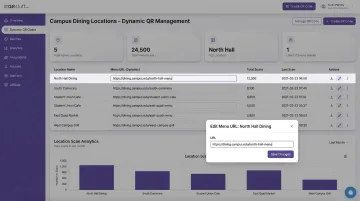
For cafeteria managers, dynamic QR codes — as opposed to static ones — solve a persistent operational headache. The linked menu URL can be updated anytime without reprinting physical signage: if an item sells out, prices change, or a new platform is adopted, the code stays the same and only the destination changes.
Platforms like QRStuff support this workflow directly. Cafeteria managers can update linked menu URLs in real time, track scan volume by location and time of day, and monitor device type breakdowns — all from a single dashboard.
For universities managing multiple dining halls, QRStuff's project-based organisation lets administrators separate analytics by location while maintaining one central account. The Full Suite plan ($25/month) covers 250 dynamic QR codes with bulk generation; the Enterprise plan ($250/month) supports unlimited batch processing across large multi-location deployments.
| Best For | Cafeterias wanting a low-cost, app-free ordering solution with instant menu updates |
| Key Feature | Dynamic QR codes that redirect to a web menu — no reprint needed when menu changes |
| Implementation Complexity | Low — requires a QR code tool, a mobile-optimised ordering page, and printed signage |
Self-Service Ordering Kiosks
Touchscreen kiosks at cafeteria entry points let students browse menus, customise orders, and pay — mirroring the experience at McDonald's or Chipotle. They serve walk-up traffic without requiring any device at all.
The primary operational benefit is throughput. During peak lunch hours, kiosks absorb ordering volume that would otherwise create cashier bottlenecks. Students input their own customisations directly, which reduces back-and-forth communication errors. Most modern kiosk systems integrate with campus card and contactless payment, making meal plan redemption seamless.
Grubhub Onsite specifically supports on-site kiosks as part of its campus dining offering, and CBORD's 2023 report includes an anecdote where a university's kiosk upsell option alone covered the cost of the entire system installation.
One caution: a 2024 report from Pitt News documented student complaints about longer wait times and errors following a new campus kiosk rollout. Before committing to hardware, evaluate POS integration depth, pickup zone layout, and menu structure — those variables determine whether kiosks speed things up or create new friction points.
| Best For | High-volume cafeterias with consistent peak-hour crowds and available floor space |
| Key Feature | POS-integrated touchscreen ordering with campus card and contactless payment support |
| Implementation Complexity | Medium-High — requires hardware purchase or lease, POS integration, and staff training |
Browser-Based Online Ordering Platforms
These are web platforms accessed through any browser — phone, tablet, or laptop — that allow students to pre-order meals for pickup or delivery. No app download, no hardware investment.
Established campus-verified platforms include:
- CBORD GET — a web portal where students manage dining funds and place food orders by institution
- Transact Web Order — a browser-accessible ordering portal deployed at multiple universities including Fairleigh Dickinson University
- Nutrislice — a higher-ed digital dining platform offering contactless ordering and digital menu management
The pre-order capability is where browser platforms genuinely differentiate. Students can order from a dorm room, library, or between classes, then pick up food at a scheduled time. This distributes demand across the lunch window instead of concentrating it at 12:15 pm.
Dining administrators gain an order management dashboard without building anything from scratch — most platforms offer menu setup and configuration as part of the subscription.
| Best For | Campuses wanting pre-ordering and delivery without building or licensing a native app |
| Key Feature | Web-based ordering with pre-order scheduling, online payments, and order tracking |
| Implementation Complexity | Low-Medium — requires platform subscription and menu setup; no hardware investment |
Smart Food Lockers with Pre-Order Integration
Students pre-order via a web or kiosk interface, kitchen staff prepare the order and load it into a temperature-controlled locker compartment, and the student retrieves their meal using a unique code — in under 30 seconds.
CampusIDNews reported that Case Western Reserve University reduced food pickup to less than 10 seconds at a location processing 110–125 mobile orders per hour during peak lunch and dinner, using Apex smart lockers integrated with Transact mobile ordering.
Apex lockers are now deployed at 60+ campuses and integrate with Grubhub Campus, Transact Mobile, and Tacit.
Beyond speed, lockers extend dining access beyond cafeteria operating hours. Refrigerated units can serve students who miss the lunch rush or need a meal between late-evening classes — without requiring additional staffing.
| Best For | Campuses prioritising contactless pickup, after-hours dining access, and reducing line congestion |
| Key Feature | Temperature-controlled, code-access lockers integrated with pre-order systems and meal plans |
| Implementation Complexity | High — requires locker hardware installation, space allocation, and pre-order platform integration |
Autonomous Delivery Robots
Wheeled, GPS-guided robots pick up food from a campus dining location and deliver it directly to a student's dorm, study space, or outdoor location. Starship Technologies is the dominant operator in this space.
The numbers behind Starship's deployment are hard to dismiss. Starship's campus impact report documents operations on 65 U.S. college campuses with nearly 7 million campus orders completed since 2019 — including 1.2 million in 2025 alone.
Student approval sits at 97%, with 60% of users saying robots help them avoid skipping meals and 51% reporting they save meaningful time.
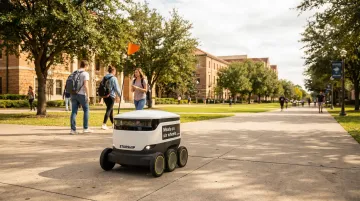
Campus dining partners include Aramark, Chartwells Higher Education, Grubhub, and Sodexo — meaning robots increasingly slot into existing dining management relationships rather than requiring standalone vendor negotiations.
The main constraint is physical. Robot delivery works best on pedestrian-friendly, spread-out campuses where the walking distance between buildings justifies automated delivery. Dense urban campuses with limited outdoor navigation paths are harder to serve.
| Best For | Large campuses with pedestrian-friendly layouts seeking a fully automated delivery solution |
| Key Feature | GPS-navigated autonomous delivery with real-time tracking and contactless order handoff |
| Implementation Complexity | High — requires vendor partnership, campus navigation mapping, and dedicated launch zones |
How to Choose the Right Alternative for Your Campus
No single solution fits every campus. Three practical filters narrow the field quickly.
Filter 1: Budget
| Budget Range | Best Fit |
|---|---|
| Low (under $500 to start) | QR code web ordering |
| Low-Medium | Browser-based ordering platforms |
| Medium-High | Self-service kiosks |
| High (capital investment) | Smart food lockers or delivery robots |
Filter 2: Physical Layout
- Dense, single-building dining hub → Kiosks or smart lockers
- Multiple dining locations across campus → Browser ordering or QR code ordering
- Spread-out campus with long distances between buildings → Delivery robots
Filter 3: Existing Tech Infrastructure
Check POS compatibility and campus card integration before committing to any platform. Web-based ordering systems and kiosks generally offer the most integration flexibility with existing dining management software. Robots and lockers require deeper vendor partnership and operational setup.
Common Implementation Mistakes
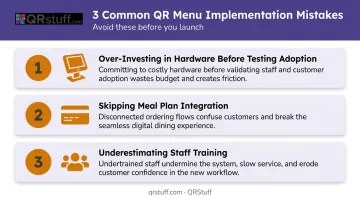
Even the right technology fails without proper rollout. These three mistakes account for most failed pilots:
- Over-investing in hardware before testing adoption: Run a pilot in one location for a full semester before expanding campus-wide.
- Skipping meal plan integration: Students who can't pay with their campus card will find workarounds or abandon the system entirely.
- Underestimating staff training: Any new ordering workflow affects kitchen staff, not just students. Their buy-in determines whether the system actually works.
NACUFS guidance on campus dining technology consistently emphasizes stakeholder buy-in, training plans, and clear exit criteria if a system isn't delivering — treating ordering technology as an operational system rather than a front-end software purchase.
Conclusion
College cafeterias have more practical options than ever for meeting Gen Z's demand for fast, convenient ordering — without building or maintaining a native mobile app. From zero-friction QR code ordering to smart locker networks and delivery robots, the right solution exists at every budget level.
If you're starting from scratch, begin with dynamic QR codes linking to a mobile-optimized menu. It's the fastest path to modernising the ordering experience with no student friction, no app download, and no hardware investment. When the menu changes, the QR code doesn't.
QRStuff lets you generate, manage, and track dynamic QR codes across multiple cafeteria locations from a single dashboard, with branding customization, per-location analytics, and bulk generation included. It's a practical first step that scales with your dining program as needs evolve.
Ready to enable app-free, updatable menu access across your campus dining locations? Explore QRStuff's dynamic QR code platform and get started in minutes.
Frequently Asked Questions
What software do restaurants use to take orders?
Campus dining operations typically use POS and ordering platforms like CBORD, Grubhub Onsite, Transact, or Nutrislice, all of which have verified higher-ed deployments. Broader restaurant contexts also include Toast and Square for QR and online ordering. The best choice depends on whether the venue needs meal plan integration, pre-ordering, or kiosk support.
Do students need to download an app to use QR code ordering?
No download is required. Students point their smartphone camera at the QR code, and it opens a mobile browser page where they can view the menu and place an order. This works on iOS 11+ and Android 8.0+ without any additional setup.
How much does it cost to set up a kiosk ordering system for a college cafeteria?
Costs vary significantly by vendor and configuration. Basic kiosk hardware typically starts in the low thousands per unit, with POS-integrated models running higher, plus ongoing software subscription fees. CBORD and Grubhub Onsite are worth contacting directly for current institutional pricing based on your specific campus setup.
What is the easiest dining technology to implement for a small college cafeteria?
QR code-based web ordering and browser-based ordering platforms have the lowest barriers. Both require no hardware beyond printed signage, no custom app development, and no significant IT investment — most setups can go live within a day or two.
Can campus meal plans be used with non-app ordering systems?
Many alternatives, including web-based platforms and kiosks, support campus card and meal plan payment integration. Compatibility depends on the specific platform and the institution's existing POS or dining management system, so confirm integration capabilities with vendors before committing.
What are the benefits of smart food lockers over traditional cafeteria pickup?
Smart lockers eliminate wait times (pickup in under 30 seconds), extend food access beyond regular cafeteria hours through refrigerated units, and reduce crowding at service counters during peak periods. They're especially effective on busy campuses where students need to grab meals between back-to-back classes.