Introduction
Customer service has a scaling problem. Zendesk's CX Trends 2026 report found that 74% of consumers expect 24/7 service and 88% expect faster response times than the year before — yet hiring enough agents to meet that demand around the clock is expensive and increasingly difficult. ICMI research found 87% of contact centers planned to fill vacancies in 2024, with 50% reporting agents left for better opportunities elsewhere.
QR codes offer a practical way to close that gap — deflecting routine support volume, surfacing feedback in context, and generating scan data that pinpoints where service breaks down.
This guide covers the three core advantages of QR codes for customer service, what's lost without them, and how to apply them for results that compound over time.
Key Takeaways
- QR codes act as on-demand service touchpoints — one scan delivers help, feedback forms, or product information without wait times
- Each code compounds value: self-service deflects tickets, in-moment scans lift feedback rates, and analytics surface service gaps early
- Dynamic QR codes let businesses update destination content without reprinting physical materials — keeping support links current across packaging, signage, and receipts
- Key metrics impacted include support ticket volume, CSAT, survey response rates, and scan-to-resolution rate
- Sustained impact depends on strategic placement, current content, and regular analytics review
What Are QR Codes for Customer Service?
A QR code for customer service is a scannable touchpoint placed where customers are most likely to have a question or need — on product packaging, in-store signage, receipts, instruction manuals, hotel room cards, or any physical surface where friction typically occurs.
One scan connects a customer to whatever they need in that moment:
- A setup tutorial for a product they just unboxed
- A FAQ page that answers the most common post-purchase questions
- A live chat link or support portal
- A feedback form while the experience is still fresh
- Wi-Fi credentials at a hotel or café
QR codes work for customer service because they close the gap between when a customer has a question and when they get an answer — no staff intervention required.
Left unaddressed, that gap becomes friction. And friction, over time, turns into support tickets, negative reviews, and customers who don't come back.
Key Advantages of QR Codes for Customer Service
These three advantages are operational and measurable — each maps to outcomes businesses actively track, from reduced support costs to feedback quality to team efficiency.
Advantage 1: Instant Self-Service at the Point of Need
QR codes put relevant help exactly where the question is most likely to arise. A code on product packaging links to a setup guide. A code at a hotel check-in desk links to Wi-Fi instructions, room service menus, and concierge contacts. A code on a service receipt links to a support FAQ — all without any staff involvement.
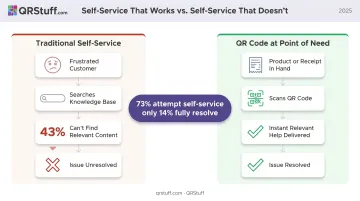
The mechanism that makes this valuable is findability. Gartner's 2024 survey of 5,728 customers found that only 14% of customer service issues are fully resolved in self-service, even though 73% of customers attempt it. The primary reason self-service fails? 43% of customers couldn't locate content relevant to their issue.
That's a placement problem, not a content problem. A QR code on the product, the receipt, or the signage eliminates the search entirely — the relevant help is one tap away at the exact moment the customer needs it.
The cost case is direct. APQC's 2026 benchmark puts the median cost per inbound customer service contact at $11.00. Every routine question resolved at the touchpoint — before it becomes a staffed interaction — has a measurable cost impact.
KPIs this advantage influences:
- Support ticket volume
- Average resolution time
- Customer Effort Score (CES)
- Cost per support interaction
- Agent-to-routine-inquiry ratio
When this matters most: Self-service QR codes have the highest impact during high-volume periods — product launches, peak retail seasons, hotel check-in rushes, and post-purchase onboarding windows — when support teams are most stretched and customer questions are most predictable.
For businesses managing support across multiple products or locations, QRStuff's platform supports over 40 QR code types relevant to service delivery:
- URL codes for FAQ pages and support portals
- Wi-Fi credential codes
- Feedback forms
- Phone number codes for instant call initiation
- Live chat links
Dynamic codes on the Full Suite and Enterprise tiers allow destination URLs to be updated instantly without reprinting.
Advantage 2: Effortless Feedback Collection at Higher Response Rates
QR code feedback surveys capture customer sentiment at the exact moment a service interaction is still fresh — at the register, on the receipt, on the delivery slip, at the table. The difference in response rates between in-moment and delayed feedback methods is substantial.
A 2025 emergency department study compared real-time patient surveys with mailed surveys during the same shifts. The real-time method achieved a 50.1% response rate. The mailed surveys? 3.14% — from the same patient population. The authors noted that delayed surveys are also susceptible to recall bias — making the data less representative and less accurate.
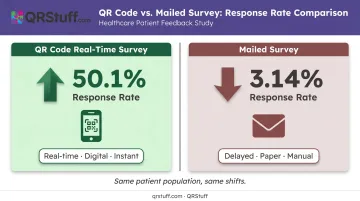
QR codes specifically reduce the access barrier at that point of experience. A customer doesn't need to remember a URL, search for a survey link in an email, or find a comment card. One scan from the receipt or table card opens the form. Adding a clear call-to-action — "Scan to rate your experience" — on placement materials increases participation further.
Where this translates to service improvement: Higher-quality feedback gathered more frequently gives operations teams the signal they need to fix recurring service failures rather than relying solely on complaint data. Zendesk reports that 56% of consumers rarely complain after a negative experience and quietly switch instead. Complaint-driven feedback systems miss most of the problem.
QRStuff's dedicated Feedback Form QR Codes and Survey QR Codes link directly to survey platforms and Google Forms. Hotels can place codes on room cards and reception desks; restaurants on receipts and table cards; retailers on packaging inserts and checkout counters. For organizations using Google Sheets, QRStuff's integration allows survey response data to flow directly into existing tracking workflows.
What this moves on the scorecard:
- Net Promoter Score (NPS)
- Customer Satisfaction Score (CSAT)
- Survey response rate
- Feedback volume per location or touchpoint
- Review conversion rate
When this matters most: In-moment QR feedback delivers the greatest value in high-footfall environments — restaurants, retail stores, events, hotels — where large volumes of customers cycle through quickly and capturing a representative sample fast is critical for service quality management.
Advantage 3: Scan Analytics That Reveal Where Service Is Breaking Down
Every QR code scan generates a data point: when it happened, where, on what device, and whether the same user has returned. That data produces a map of where customers seek help most — and where service is falling short.
In practice, the patterns are telling:
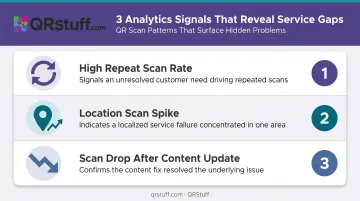
- A spike in scans on a product's instruction code signals that setup is confusing
- High scan volume on a support access code at one store location compared to others indicates a localized service gap
- A high ratio of total-to-unique scans on a support code (meaning the same users are returning) suggests the linked content isn't resolving the issue
Without scan analytics, service improvements are reactive. Businesses wait for complaints to surface and then diagnose the problem after the fact. Scan data provides earlier signals — volume trends visible days before complaint volumes climb.
Zendesk reports 70% of organizations are now investing in tools to automatically capture and analyse customer intent signals, because behavioral data surfaces problems faster than complaint data alone.
QRStuff's analytics dashboard tracks total and unique scans, time-based patterns (daily, weekly, and custom date ranges), geographic data at country and city levels, and device breakdowns by operating system.
For multi-location businesses, this means comparing scan activity across stores, hotels, or facilities in a single view — identifying which locations are generating disproportionate support demand without waiting for complaint escalations.
Scan logs can be exported as CSV files for integration with existing BI tools, and the platform's Slack integration pushes real-time scan notifications to team channels for immediate visibility.
Impact on service KPIs:
- Scan-to-resolution rate
- Support contact rate by location or product
- Repeat scan frequency (proxy for unresolved need)
- Content engagement rate
- Time-to-feedback
Where scale makes this essential: Analytics become critical for multi-location retailers, hotel chains, manufacturers distributing products across regions, or any business managing QR codes across dozens of touchpoints where manual monitoring of individual service quality is impractical.
What Happens Without QR Codes for Customer Service
Without QR codes, service gaps don't stay manageable. They compound — into higher support costs, slower resolution, and customers who quietly disengage rather than complain.
| Gap | Consequence |
|---|---|
| No self-service at point of need | Support teams absorb routine questions (setup, policy, product info), reducing capacity for complex issues that genuinely require human judgment |
| No in-moment feedback | Service decisions rely on complaint data from the loudest minority, missing the 56% of dissatisfied customers who never speak up |
| Static printed materials | Outdated URLs on manuals, receipts, and signage become dead ends — correcting them requires reprinting |
| No scan data | No visibility into which touchpoints are working, which are ignored, and where customers are silently disengaging |
Each of these gaps feeds into the same downstream risk: churn. PwC found that 55% of consumers would stop buying from a company after several bad experiences, and 32% would leave due to inconsistent service. Businesses tracking only complaints miss most of this damage entirely — because frustrated customers rarely file tickets. They just leave.
How to Get the Most Value from Customer Service QR Codes
Three conditions determine whether QR codes for customer service deliver lasting results or become neglected squares on printed materials.
1. Place codes at the moment of customer need. The scan rate — and the service impact — depends almost entirely on placement. Codes buried in packaging inserts or printed on the back page of a manual get ignored. Codes placed at the exact point where the question arises (on the product where setup begins, on the receipt where the experience just ended, at the desk where the queue forms) get scanned.
2. Keep destination content current. A QR code linking to a broken page or outdated instructions makes the service experience worse, not better. Dynamic QR codes solve this directly: the destination URL can be updated at any time through the QRStuff dashboard without reprinting a single physical material. A code printed on packaging six months ago can still point to current support content today — no technical expertise required, and changes take effect immediately across all paid plans (Lite, Full Suite, and Enterprise).
3. Review analytics and act on them. Scan data collected and ignored improves nothing. The businesses that consistently improve service quality review scan patterns regularly. Watch for:
- Unusual repeat scan rates on the same code (a signal of unresolved customer need)
- Location outliers where scans spike unexpectedly
- Support codes where scan volume drops after a content update (confirmation the fix worked)
For organizations managing codes across dozens of touchpoints, QRStuff's bulk generation (up to 500 codes on Full Suite; unlimited on Enterprise) and API access allow programmatic creation and updates at scale, without manual code-by-code administration.
Conclusion
QR codes improve customer service through three compounding operational advantages: they deliver instant help at the point of need, capture higher-quality feedback at the moment of service, and produce scan analytics that turn guesswork into actionable service intelligence.
The advantages compound with consistent application. Dynamic codes stay relevant without reprinting, analytics sharpen as scan data accumulates, and feedback volumes build a clearer picture of service quality across every touchpoint.
Done well, QR code deployment becomes a self-improving system — each scan cycle generates data that makes the next iteration faster, leaner, and more useful for customers. QRStuff's dynamic codes and built-in analytics make it straightforward to build that system, whether you're starting with a free account or scaling across an enterprise.
Frequently Asked Questions
What types of businesses benefit most from using QR codes for customer service?
Retail, hospitality, restaurants, healthcare, and manufacturing see the greatest impact — particularly businesses with high foot traffic or physical products where routine customer questions arise at predictable touchpoints. The higher the volume of customer interactions at physical locations, the more value QR codes add by handling self-serviceable enquiries at scale.
Can QR codes replace human customer service agents?
No, and they work best as a complement rather than a replacement. QR codes handle routine, self-serviceable interactions well: product information, FAQs, setup guides, feedback collection. Complex, sensitive, or account-specific issues still require human agents who can use judgment and empathy.
What is the difference between static and dynamic QR codes for customer service?
Static codes are locked to a fixed destination after printing, so any URL change requires reprinting. Dynamic codes let you update the linked content anytime through a management dashboard, making them the better choice for service content that evolves: support portals, updated FAQs, or seasonal information.
Where should QR codes be placed to have the most impact on customer service?
Place codes where customer questions are most likely to arise: product packaging, receipts, instruction manuals, in-store signage, hotel room cards, and service desks. Proximity to the point of confusion drives the highest scan rates because the code needs to be visible at the exact moment the customer needs help.
How do businesses measure whether their customer service QR codes are working?
Track scan volume by location and product, feedback response rates, and support ticket volume before and after deployment. QRStuff's real-time analytics dashboard surfaces geographic data, device breakdowns, and time-based scan patterns, giving teams clear visibility across every active code.
How do QR codes help businesses collect better customer feedback?
QR codes at service touchpoints like receipts, checkout counters, and room cards capture feedback while the experience is still fresh. This in-context timing produces higher response rates and more accurate sentiment data than email surveys sent days later, where recall bias and low engagement are common.