Introduction
QR codes have become standard infrastructure for businesses across industries — retail managers print them on shelf signage, restaurateurs embed them in table cards, healthcare administrators add them to appointment reminders, and event organizers put them on badges. The tool behind all of it is the QR code generator — and most businesses are using it wrong.
The typical approach: grab a free tool, generate a static code, print it, move on. According to a 2025 Bitly survey, 87% of marketers still struggle to understand the customer journey after a scan — a direct result of that reactive approach.
Static codes break when URLs change. Pages built for desktop frustrate mobile users mid-scan. Codes mounted at awkward angles or in low-light spots simply don't get scanned. Each failure quietly burns your print budget with nothing to show for it.
This guide covers QR code generation from the ground up — prerequisites, creation, deployment, and performance monitoring — so you can build codes that work and measure whether they do.
Key Takeaways
- Dynamic codes are the business default — they let you update destinations and track scans without reprinting
- Three things before you generate: confirm your content type, mobile-optimized destination, and placement plan first
- Creation follows a sequence: choose type → enter content → customize design → test on real devices → deploy
- Industry context matters — retail, hospitality, healthcare, and events each have different code type and security requirements
- Placement, sizing, and pre-deployment testing drive scan rates — design is secondary
When Should You Use a QR Code Generator for Business?
A QR code generator makes sense when you need to bridge a physical touchpoint (print, packaging, signage, product labels, business cards) with a digital destination, and when you need that bridge to be measurable or updatable over time.
Where QR Codes Don't Work
Before committing to a QR code, rule out these common misuse scenarios:
- TV spots and fast-scrolling social content: scanning requires dwell time, so a code that viewers can't hold their phone to is purely decorative
- Static codes backing campaigns that will need URL updates: once printed, a static code's destination is locked permanently
- Any placement without a call-to-action: users won't scan if they don't know what they'll get
When none of those apply, QR codes deliver measurable operational value — especially in these scenarios:
Where QR Codes Add Clear Operational Value
- Multi-location retail or hospitality chains managing hundreds of codes from a single dashboard
- High-frequency update scenarios like restaurant menus, event schedules, and promotional offers
- Any print marketing where ROI needs to be measurable — a dynamic code turns a printed poster into a trackable campaign asset
U.S. Census Bureau data citing Statista puts QR code scanning at 89 million U.S. smartphone users in 2022, up 26% from 2020, with an estimated 100 million projected by 2025. That scale means the barrier to adoption isn't audience size — it's whether each code placement gives users a clear reason to scan.
What You Need Before Creating a Business QR Code
Skipping pre-generation planning is where most reactive QR deployments go wrong. Confirm these three things before opening any generator:
1. Content Type and Destination
Decide what the QR code will actually do. The content type determines which QR format to generate — and they aren't interchangeable after the fact.
Common business content types include:
- URL: links to a webpage, product page, or landing page
- vCard: shares contact details directly to a phone's address book
- WiFi: lets users connect to a network without typing a password
- PDF: delivers a document, menu, or guide on demand
- Google Review / Feedback Form: prompts a specific customer action
- Payment: initiates a transaction via Venmo, UPI, or similar
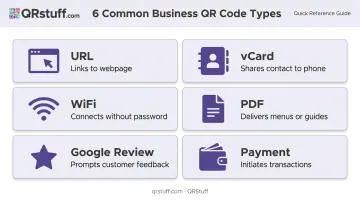
QRStuff supports 40+ data types, including Audio, Video, Eventbrite, Discord, Wedding RSVP, and GS1 Digital Link. GS1 Digital Link is worth noting for product packaging — it works at retail POS checkouts while simultaneously delivering consumer-facing product information from the same code.
2. A Mobile-Optimized Landing Destination
Every QR code gets scanned on a smartphone. If the page it points to isn't optimized for mobile — slow to load, requires horizontal scrolling, or renders a desktop layout — the scan creates a worse experience than no QR code at all.
Before generating anything, confirm the destination:
- Loads in under 3 seconds on a mobile connection
- Renders correctly on small screens without horizontal scrolling
- Presents the key action (button, form, menu) above the fold
3. Placement Plan and Minimum Print Size
Know where the code will appear before designing it. Size requirements, contrast ratios, and quiet zone margins differ by medium.
A practical minimum for close-range scanning is 2.5 cm × 2.5 cm (1 inch) at a viewing distance of 20–30 cm, per NN/g's QR usability guidelines. Codes on large-format signage viewed from further away need to scale up accordingly.
How to Create and Deploy a Business QR Code (Step-by-Step)
Effective QR code creation follows a deliberate sequence. Skipping steps — particularly testing — leads to costly reprints and broken campaigns.
Setting Up: Choose Your QR Code Type
The first decision in any QR code generator workflow is content type. Different types serve fundamentally different purposes, and choosing the wrong one means the code can't serve a new use case without being regenerated entirely. The second decision — static vs. dynamic — must be made at this same stage.
| Static Code | Dynamic Code | |
|---|---|---|
| Destination after printing | Permanent | Editable at any time |
| Scan analytics | Not tracked | Full tracking available |
| Best for | One-off, permanent info | Campaigns, menus, ongoing use |
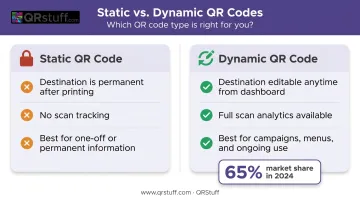
Dynamic codes held 65% market share in 2024 (Bitly): once a static code is printed in volume, its destination is locked. Dynamic codes let you update the destination URL from a dashboard without touching the physical code.
QRStuff's creation workflow follows four steps — Data Type → Destination → Style → Setup — which surfaces the static/dynamic choice before any design work begins.
Configuring Content and Design
Once you've selected your content type, QRStuff's design options let you build a branded, scan-ready code:
- Custom foreground and background colors (with gradient support)
- Module shape and eye shape variations
- Centred logo or image embedding
- Frame with call-to-action text
- Pre-built templates and AI styling
Branded codes build trust and communicate purpose before the scan happens — but design choices that compromise scannability erase any engagement lift.
Three design errors that kill scan reliability:
- Insufficient contrast — foreground must be noticeably darker than the background; aim for at least 40% contrast
- Oversized logo coverage — keep centred logos at or below 15% of the total code area; QRStuff's automated logo placement handles this sizing for paid subscribers
- Removing the quiet zone — the white border surrounding the code is required for scanners to locate and read it; never crop it
Testing Before Deployment
Every QR code must be tested on multiple devices before printing. This is not optional.
Testing checklist:
- Scan with at least two devices (iOS and Android)
- Test at the actual intended print size, not just on-screen
- Verify the destination loads quickly on mobile
- Confirm the intended user action (form fill, menu view, purchase) completes without friction
QRStuff includes a preview step in its creation workflow, but physical device testing before a print run is still essential — no on-screen preview fully replicates real-world scanning conditions.
Deploying and Monitoring Performance
QRStuff's analytics dashboard gives you full visibility into post-deployment performance:
- Total scans and unique scans
- Hourly scan velocity
- Geographic location (city-level and global distribution)
- Device type (iOS vs. other platforms)
- CSV export for custom reporting
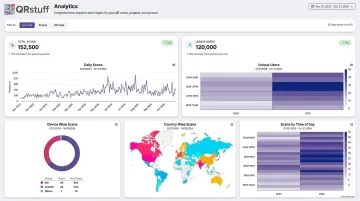
For deeper attribution, add UTM parameters to your destination URLs. QRStuff supports this natively — UTM tags identify QR traffic in Google Analytics, while the QRStuff dashboard handles scan-level behaviour (where, when, and on what device).
The critical operational advantage of dynamic codes: you can redirect traffic mid-campaign. A printed code pointing to a holiday promotion page can be updated to point to a January sale page from the dashboard — no reprinting required.
Where QR Codes Deliver Real Business Value
QR codes appear across virtually every industry, but the code type and feature requirements vary significantly by context.
Retail and E-commerce
QR codes on packaging and in-store signage connect customers to product detail pages, loyalty programs, how-to guides, and review prompts. SmartLabel — a QR-enabled packaging program — reports that participating products represent 54% dollar share and 76% unit share in the average grocery cart, with nearly 100,000 products enrolled.
For multi-location retail chains, bulk code generation, campaign tagging, and a centralized dashboard make it practical to manage hundreds of codes across locations while keeping performance visibility intact.
Restaurants, Hospitality, and Events
Dynamic QR codes are operationally essential in these environments because content changes constantly. Restaurant menus, hotel room collateral, and event schedules all need to update in real time.
Café Luna (Austin, TX) owner Sofia Benitez captures the practical case: "Switched our laminated menus out for QR years ago and never looked back. Cheaper than the menu-specific services, and I update the PDF myself whenever the specials change."
For events, QR codes on badges and confirmation emails support contactless check-in, session entry, and vCard-based contact exchange — reducing queues and providing real-time attendance data.
Healthcare, Professional Services, and Education
QR codes on appointment reminders, patient information materials, and institutional signage link to intake forms, instructional videos, and credential verification.
These industries operate under strict data compliance requirements, which makes platform-level security features critical. QRStuff's Full Suite and Enterprise plans address this directly:
- Access-controlled content via password-protected QR codes
- GDPR compliance for organizations handling patient or student records
- SOC2 compliance for regulated environments requiring auditable data workflows
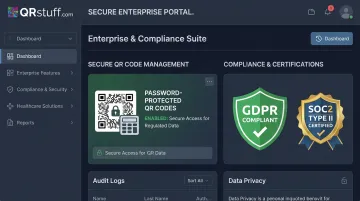
If a QR code workflow links to, collects, transmits, or exposes patient health information, HIPAA's technical safeguard requirements apply. Verify that the destination system, not just the QR code itself, meets the relevant compliance standards.
Best Practices for Using a QR Code Generator Effectively
Choose dynamic over static for any code printed in quantity. The cost difference between plans is insignificant compared to the cost of reprinting 500 posters because a URL changed.
Always include a call-to-action. "Scan to See the Menu" or "Scan to Book a Table" removes uncertainty and increases scan rates — without a CTA, most people won't bother.
Respect minimum print sizes and quiet zones: Print at minimum 2.5 cm × 2.5 cm for close-range scanning; scale up for signage viewed from a distance. Never crop the white border — it's structurally required for the scanner to locate the code.
Test before you print. Scan with at least two devices at the actual print size. Verify the full user journey: scan → load → intended action completes.
Monitor and act on scan analytics. Look for patterns by day, time, location, and device. A code with zero scans might just need better placement or a clearer CTA. Platforms like QRStuff include campaign tagging so multi-location businesses can compare performance across all active codes without digging through separate reports.
Frequently Asked Questions
Is there a 100% free QR code generator?
QRStuff's Free Suite includes 5 static codes and 10 dynamic codes, but dynamic codes expire after 30 days and the plan caps at 50 scans per month. Free tools work for one-off personal use; business campaigns that need tracking, destination updates, and design customization require a paid plan.
What is the difference between static and dynamic QR codes for business?
Static codes permanently encode the destination at creation — they can't be changed after printing and don't track scans. Dynamic codes store a short redirect URL that can be updated from a dashboard at any time, and they automatically log scan data. For any business use case involving campaigns, menus, or print materials used over time, dynamic codes are the right choice.
Can I change the content of a QR code after it's already been printed?
Only dynamic QR codes allow destination changes after printing — static codes cannot be edited. This is why choosing dynamic at the point of creation is critical. QRStuff's dynamic codes allow destination URL updates at any time from the dashboard, no matter how many copies are already in circulation.
How do I track how many times my QR code has been scanned?
Scan tracking requires a dynamic QR code on a platform with built-in analytics. QRStuff automatically captures total scans, unique scans, device type, location, and time-based data. For deeper attribution, add UTM parameters to your destination URL to route QR traffic through Google Analytics alongside QRStuff's scan data.
What size should a QR code be for printed materials?
Use at least 2.5 cm × 2.5 cm (1 inch) as a conservative business default for close-range scanning at 20–30 cm. Larger viewing distances require proportionally larger codes — a useful rule of thumb is a 10:1 ratio of scan distance to code size. Always preserve the quiet zone (the white border), and use SVG or EPS file formats for print to avoid resolution issues at scale.
How do I make a QR code that matches my brand?
Branded QR codes can incorporate company colors, custom module and eye shapes, and a centered logo — keep logo coverage at or below 15% of the total code area. QRStuff's automated logo placement handles this for paid subscribers. Always test on multiple devices and in realistic lighting before printing, since designs that look correct on screen can fail in print.