For event organizers, healthcare administrators, hospitality managers, and HR teams, the check-in moment is operationally critical. It's where first impressions form, queues either move or stall, and attendance data either gets captured accurately or doesn't get captured at all.
This guide covers how QR code check-in works end-to-end, what affects its performance, where it's used, and the mistakes that quietly undermine it.
Key Takeaways
- QR check-in scans a unique code per person, instantly validates identity, and logs attendance automatically
- It works across events, appointments, fitness classes, education, and visitor management — anywhere attendance needs tracking
- Dynamic QR codes beat static ones for check-in: you can update destination data without reprinting
- Effectiveness depends on code size, device availability, backend integration, and connectivity — not the QR code alone
- Redirecting to a generic form isn't check-in — real validation requires the scan to record attendance in a live database
What Is QR Code Check-In?
QR code check-in is a digital entry validation method where a unique, machine-readable code — linked to an attendee's registration, booking, or identity record — is scanned at arrival to confirm and log presence in real time.
The goal is to replace clipboard sign-ins, manual name lookups, and paper ticket stubs with an instant, contactless action that requires no staff data entry. When it works properly, the whole thing takes one to three seconds.
How It Differs From a Basic QR Scan
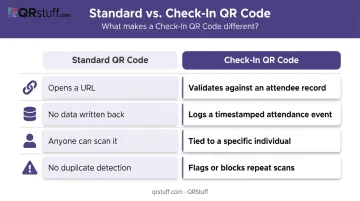
A standard QR code opens a URL. A check-in QR code does something different — and that difference is what makes it useful for events:
| Standard QR Code | Check-In QR Code |
|---|---|
| Opens a URL | Validates against an attendee record |
| No data written back | Logs a timestamped attendance event |
| Anyone can scan it | Tied to a specific individual |
| No duplicate detection | Flags or blocks repeat scans |
Platforms like Eventbrite make this concrete: when an organiser scans a ticket QR code, the app confirms the attendee as checked in — and displays an error if the code has already been scanned or isn't valid for the event. That error state is the feature that matters. Without it, you have a scanner — not a check-in system.
How QR Code Check-In Works: Step-by-Step
Here's the full process, from code generation to logged attendance: generate a unique QR code per attendee, distribute it before the event, scan it on arrival, validate it against your database, and log the result with a timestamp.
Step 1: Generate Unique QR Codes Per Attendee
Each code must be individually generated and tied to a specific registration or booking record. A shared code across multiple attendees removes your ability to track who showed up or prevent duplicate entries.
This is where the static vs. dynamic decision has real operational consequences:
- Static codes encode fixed data. Once printed, they can't be changed. If an appointment time shifts or an event reschedules, you need new codes.
- Dynamic codes point to a changeable destination. Update the backend data, and the same printed code works correctly. Platforms like QRStuff generate dynamic codes that can be edited post-distribution — critical for recurring appointments or events that change details after invitations go out.
For print, the minimum reliable size is 2cm × 2cm, with an additional 1cm per side for every 10cm of expected scanning distance, according to NN/g's QR code usability guidelines.
Step 2: Distribute QR Codes to Attendees
Main distribution channels:
- Email confirmation attachments
- Calendar invites with embedded codes
- Event registration confirmation pages
- Printed tickets, wristbands, or lanyards
- Mobile wallet passes
Match the format to how attendees will most likely arrive. An outdoor festival crowd will have phones ready. A medical waiting room may have patients arriving with a printed sheet from home. The distribution method you choose directly determines whether attendees can get scanned at the door.
Step 3: Set Up Scanning Infrastructure at Entry
Scanning infrastructure options:
- Staff-held smartphones running a check-in app — most flexible, works for most event scales
- Tablet kiosks in self-service mode — good for lower-staffing scenarios with tech-comfortable attendees
- Fixed USB or Bluetooth scanners connected to a desktop — fast and reliable for high-volume entries where speed matters
The right choice depends on event scale, staffing levels, and whether you want assisted or fully self-service check-in.
For high-volume events, scan station count must match peak arrival rate. If 500 attendees are expected in 15 minutes, one scanner handling two-second scans can process roughly 450 in that window, leaving almost no margin for delays, technical glitches, or attendees fumbling for their code.
Step 4: Scan, Validate, and Capture Data
At the moment of scan, the system:
- Reads the QR code
- Queries the attendee database
- Returns a match or mismatch result
- Displays confirmation to staff or attendee
- Logs the check-in with a timestamp
All of this happens in one to three seconds. The logged record — not the scan itself — is what makes this a proper check-in system. Without a write-back to an attendance database, the scan only redirects the user — it doesn't constitute a check-in.
Where QR Code Check-In Is Applied
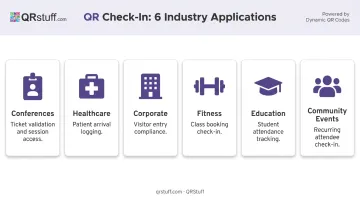
The check-in process works the same way across industries. The differences are in the backend system, compliance requirements, and whether codes are one-time or recurring.
| Setting | QR Check-In Use Case |
|---|---|
| Conferences and trade shows | Ticket validation, session attendance, badge access |
| Healthcare appointments | Patient arrival logging at clinic entry points |
| Corporate visitor management | Staff and visitor entry logs for compliance |
| Fitness studio classes | Member check-in tied to class booking records |
| Education events | Student attendance tracking, event entry |
| Community events and meetups | Recurring attendee check-in for smaller gatherings |
One of the largest healthcare deployments on record: the U.S. Department of Veterans Affairs rolled out smartphone check-in across most VA health facilities, where veterans scan a clinic QR code and can check in between 30 minutes before and 15 minutes after their appointment.
One-Time vs. Recurring Check-In
- One-time event codes expire after each occurrence — a code for a June conference shouldn't work in July.
- Recurring appointment codes use a persistent dynamic code that updates in the backend without changing the code itself — a gym member scans the same code every visit while the attendance record increments automatically.
Key Factors That Affect QR Code Check-In Performance
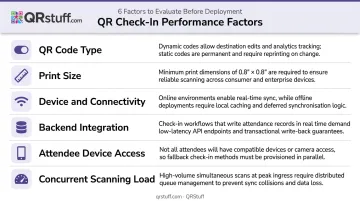
Six variables consistently determine whether a QR check-in system holds up under real event conditions or breaks down when it matters most.
- QR code type: Dynamic codes allow post-generation edits and enable scan analytics. Static codes are fixed, with no updates or tracking. For recurring events or those with evolving details, dynamic codes are the practical choice.
- Print size: Minimum 0.8" × 0.8" (about 2cm × 2cm) for reliable scanning. Smaller codes fail in lower-light or fast-movement scenarios common at busy entry points.
- Device and connectivity: Some platforms require a stable internet connection for scans to save. Others, like Blackthorn, store offline check-in requests in a queue and sync them after reconnection — critical for basements, remote venues, or anywhere with unreliable signal.
- Backend integration: Check-in data needs to flow into an attendance database, CRM, or appointment management platform in real time. A QR code linking to a static page with no write-back capability is a dead end, not a check-in system.
- Attendee device access: 91% of U.S. adults own a smartphone, but that still leaves a sizable gap. For elderly patients, school-age attendees, or community groups with lower smartphone adoption, always pair QR check-in with a backup — printed codes at the desk, or manual name lookup.
- Concurrent scanning load: Multiple scan stations must sync to a shared backend without duplicating records. At high-volume events, distributed scanning across several devices simultaneously is a hard technical requirement, not an afterthought.
Common Issues and When QR Check-In May Not Be the Right Fit
Misconceptions Worth Addressing
Three assumptions trip up most first-time deployments:
- Any QR generator works — A URL-pointing QR code with no backend cannot validate attendance, prevent duplicates, or log individual records. A code linking to a Google Form is not a check-in system.
- One code can cover all attendees — Shared codes break individual validation. The system either flags every scan after the first as a duplicate, or marks the wrong person as present.
- Small events don't need it — A 20-person appointment schedule with manual arrival logs creates the same reconciliation headaches as a 500-person conference, just at smaller scale.
When QR Check-In Adds Friction Instead of Removing It
- Very small, informal gatherings where verbal acknowledgement is faster
- Events where a significant share of attendees lack smartphone access
- High-security facilities requiring multi-factor identity verification — QR codes should be combined with ID checks, not used as standalone proof
- Last-minute walk-in-heavy events where pre-generated, individually assigned codes can't be prepared in time
The Security Risk Worth Knowing
QR codes in public-facing settings carry spoofing risks. The FTC and NCSC have both flagged that malicious codes can redirect users to phishing sites, and the NCSC warns about physical code replacement in public spaces.
For check-in deployments, a well-configured system addresses most of this exposure. Look for:
- Individually assigned codes (not shared or publicly posted)
- Duplicate scan detection to prevent reuse
- Encrypted data transmission and access-controlled backends
- GDPR and SOC2 compliance for any deployment handling personal attendee or patient data
Frequently Asked Questions
How do you use a QR code to check in?
Open your confirmation email or printed ticket to find your unique QR code, then hold it up to the scanner or kiosk camera at the entry point. The system reads it, validates your registration, and marks you as present — no manual steps needed from either side.
How do I scan a QR code directly with my phone?
On iPhones running iOS 11 or later, open the native Camera app, point it at the QR code for one to two seconds, and tap the notification banner that appears. Most Android devices with built-in camera QR scanning work the same way — no separate app required.
Can the same QR code be used by multiple attendees?
No. A properly implemented check-in QR code is unique to one registration. Sharing it will either trigger a duplicate error or mark the wrong person as present — undermining accurate attendance tracking entirely.
Do attendees need to download an app to check in?
Attendees only need a phone camera to scan their code. The app requirement sits on the organizer side: staff or self-service kiosks need a check-in application to read and validate codes against the attendance database.
What's the difference between a static and dynamic QR code for check-in?
Static codes encode fixed data that cannot be changed after generation. Dynamic codes point to a changeable destination, meaning event details or attendee data can be updated without reprinting. Dynamic codes also support scan analytics — static codes do not.
Are QR code check-in systems secure?
Security depends on implementation. Individually assigned, expiring codes with encrypted transmission and access-controlled backends are secure; generic shared codes without backend validation are not. For organizations handling personal data, confirm the platform is GDPR and SOC 2 compliant before deployment.