Introduction
Picture a Monday morning at a busy GP practice: three patients at the front desk, one staff member juggling phone calls and check-ins, a clipboard being passed back and forth, and a waiting room that's already running behind. It's a familiar scene — and it's almost entirely avoidable.
QR code patient check-in replaces that front desk queue with a simple scan. Patients arrive, point their phone at a code on the wall, confirm their appointment, and take a seat. Staff get an automatic arrival alert. No paper, no queue, no interruptions.
This approach is gaining traction across GP surgeries, specialist practices, physiotherapy clinics, and urgent care centres. How it actually works, what it connects to, and what to watch for during rollout, however, rarely gets explained in one place.
This guide covers all of it: what QR code check-in is, why clinics are adopting it, how to set it up step by step, and the compliance and practical considerations you need to address before going live.
Key Takeaways
- Patients scan a QR code on arrival to confirm their appointment and complete intake steps — no front desk queue needed
- Dynamic QR codes let clinics update the linked destination anytime — no reprinting required
- The QR code is just a link: HIPAA/GDPR compliance sits with the patient portal it connects to
- Setup takes minutes: generate a dynamic code, brand it, print it, place it at reception
- Keep a parallel front desk option available for patients without smartphones
What Is QR Code Patient Check-In?
QR code patient check-in is a contactless process where patients scan a code displayed at the clinic to confirm their arrival, verify their identity, and complete intake steps — all from their own mobile device, without approaching the front desk.
This shifts the administrative work of arrival processing from your staff to the patient's phone — faster throughput, fewer queues, and front desk staff free to focus on clinical support rather than manually logging each arrival.
A few common points of confusion are worth addressing directly:
- Not a booking tool — appointment scheduling happens before the visit, separately
- Not an EHR replacement — it's a front-end layer that sits on top of your existing practice management system
- The bridge between arrival and system update — connecting a patient walking through your door to their appointment status in your scheduling software
When a patient scans the code, they're directed to your existing patient portal or intake form URL. The QR code itself is simply the delivery mechanism — a scannable shortcut to wherever your check-in workflow already lives.
Why More Clinics Are Switching to QR Code Check-In
The Wait Time Problem
Front desk bottlenecks directly affect how patients feel about their care. Research across 44 ambulatory clinics found that a 10-minute combined wait was associated with a 77% probability of receiving the highest satisfaction score — dropping to 53% at 60 minutes. A separate review of orthopaedic outpatient visits found that patients waiting less than 15 minutes had 3.78 times greater odds of being satisfied than those who waited longer.
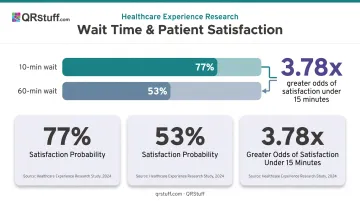
When check-in itself creates the delay, because one staff member is juggling arrivals, phone calls, and appointment queries at once, that satisfaction gap widens before patients even see a clinician.
Lower Cost Than Kiosks or Tablets
Shared check-in hardware carries real costs: procurement, installation, ongoing maintenance, and regular cleaning. One NHS trust's 2023 kiosk contract — covering a mobile check-in app and kiosk system for a single outpatient department — came in at £69,100 over three years.
QR codes use the patient's own device. Beyond a QR code generator subscription and a laminated sign, there's almost nothing to spend.
The Contactless Hygiene Case
Clipboards, shared pens, and check-in tablets all involve repeated contact in a clinical environment. A 2021 Harris Poll survey of 2,055 US adults found that 49% of patients wanted the ability to complete appointment paperwork digitally before or during their visit. Removing shared touchpoints from the check-in process is a straightforward win for any high-volume clinic.
Staff Workload Relief
When patients self-confirm arrival and complete demographics or consent forms on their own device, staff receive a dashboard notification rather than managing each arrival manually. For understaffed or single-receptionist practices, this makes a real difference. A 2024 systematic review of digital check-in tools found one implementation achieved a 14-minute reduction in time-to-identification per patient — a finding that translates directly to outpatient clinic throughput.
The practical benefits for front desk staff include:
- Fewer interruptions during peak arrival windows
- Automatic form collection without manual data re-entry
- Real-time arrival dashboard replacing verbal check-in confirmations
- More time for patient queries that actually need a human response
How QR Code Patient Check-In Works
Here's the end-to-end flow from the moment a patient arrives:
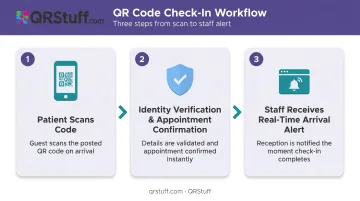
Step 1: Patient Scans the Code on Arrival
The patient walks in and points their smartphone camera at the QR code posted at reception, the waiting room entrance, or even the parking lot for pre-entry check-in. No app download required. Both iOS (since iOS 11) and Android natively detect QR codes through the built-in camera. The code opens a check-in URL directly in the patient's browser.
Step 2: Identity Verification and Appointment Confirmation
The patient is prompted to verify their identity — typically by entering their name, date of birth, or phone number, or by receiving a one-time SMS or email link. They then confirm their appointment time.
Patients who haven't completed pre-registration can also fill in demographics, update insurance details, or sign consent forms at this stage, from their own device.
Step 3: Staff Receives a Real-Time Arrival Alert
Once the patient confirms check-in, the practice management or scheduling system updates the appointment status to "Arrived" and notifies staff — no manual processing needed. Staff see a dashboard update rather than fielding a face-to-face arrival.
This workflow also stays resilient when clinic systems change. Because each sign uses a dynamic QR code pointing to a URL, the destination can be updated at any time without reprinting. If your intake portal URL changes, you update the redirect in your QR code dashboard — the physical code on the wall stays exactly as it is.
Setting Up QR Code Check-In at Your Clinic
What You Need Before You Start
Your clinic needs an online check-in or patient intake portal URL. Most practice management systems — Jane App, Juvonno, Athenahealth, and others — include a patient-facing arrival or intake URL within their settings. It typically looks like a web address you'd find under "Patient Portal," "Online Check-In," or "Appointment Confirmation" in your system's configuration.
Once you have that URL, the setup takes three steps.
Step 1: Generate Your QR Code
- Go to QRStuff and select URL QR Code as your code type
- Paste your clinic's check-in portal URL into the destination field
- Choose a dynamic QR code — this is essential, because it lets you update the destination URL later without reprinting your signage
Dynamic codes also provide scan analytics: you can monitor check-in volume by time of day and spot peak arrival periods.
For most small-to-medium clinics deploying one or a handful of check-in codes, QRStuff's Lite Suite (£4/month) covers 50 dynamic codes with analytics and no expiry. Larger practices or multi-location groups may prefer the Full Suite (£15/month), which includes expanded customisation, 250 dynamic codes, and GDPR compliance documentation — relevant for UK-based healthcare settings.
QRStuff holds GDPR compliance and its scan analytics track aggregate data only — device type, scan volume, geographic location at city level — with no patient-identifiable information captured at the QR layer.
Step 2: Customise and Brand the Code
A plain black-and-white QR code on a white sheet of paper gets ignored. A branded code with your clinic's logo and a clear call to action gets scanned.
QRStuff's customisation options include:
- Add your clinic's logo — it can cover up to 30% of the code surface without affecting scan reliability
- Apply custom foreground, background, and gradient colours to match your brand
- Wrap the code in a frame with call-to-action text like "Scan to Check In"
- Adjust corner and dot pattern styles to fit your visual identity
Keep the design clean. High contrast between the foreground and background is non-negotiable for reliable scanning across different phone cameras and lighting conditions.
Step 3: Print and Place Signage
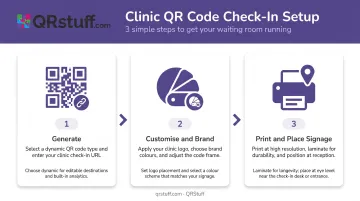
- Print at A4 or A5 size with brief instructions: "Scan with your phone camera to confirm your arrival"
- Laminate for durability — waiting room wear and tear adds up quickly
- Place at multiple touchpoints: reception desk, waiting room entrance, and optionally the building entrance or car park for patients who prefer to check in before they come through the door
- Test the scan in your actual lighting conditions before going live — avoid placing codes in low-light corners or at heights above comfortable phone-camera reach
Key Considerations When Rolling Out QR Check-In
Data Privacy and Compliance
The QR code itself stores no patient data. It is a link — nothing more. HIPAA compliance (for US clinics) and GDPR compliance (for UK and EU settings) sit with the patient intake portal the code connects to, not with the QR code itself.
What this means practically:
- Confirm your intake platform holds the right compliance certifications before deploying. For US clinics, your EHR or practice management system's BAA (Business Associate Agreement) status is what HIPAA auditors will scrutinize.
- Choose a GDPR-compliant QR code generator. QRStuff's analytics infrastructure captures aggregate scan data only, with no PII collected at the QR layer.
- Per HHS guidance on online tracking technologies, if the destination portal uses any third-party tracking scripts that collect PHI, that is where your compliance review needs to focus.
Patient Inclusivity
Compliance covers the system — inclusivity covers the people using it. QR check-in should be one channel, not the only channel. According to Pew Research, 78% of US adults aged 65+ own a smartphone, meaning roughly one in five older patients may not. Always maintain a parallel front desk check-in path, and frame QR check-in as a convenience option rather than a requirement.
Common Rollout Pitfalls
Once compliance and accessibility are covered, physical execution is where most rollouts stumble. Avoid these before you print anything:
- Place codes at eye level, away from glare and dim corners — poorly positioned codes simply don't scan
- Ensure the destination URL opens a mobile-optimised form; a desktop-style layout on a phone screen kills adoption immediately
- Use dynamic QR codes so any portal URL change doesn't force you to reprint all signage
- Send patients a brief note in appointment reminders before launch — clinics that do this consistently see stronger adoption in the first two weeks
Common Misconceptions About QR Code Patient Check-In
Three objections come up repeatedly when clinics consider QR check-in. Here's what the evidence actually shows:
| Misconception | Reality |
|---|---|
| "Patients need to download an app" | iOS (since iOS 11) and Android both scan QR codes natively through the built-in camera. No additional software required. |
| "QR check-in replaces our EHR" | The QR code is a front-end interface — a scannable shortcut to your existing portal. It doesn't store records, manage clinical data, or affect scheduling workflows beyond updating an arrival status. |
| "QR codes aren't secure enough for healthcare" | The QR code itself is just a URL. Security sits entirely with the portal it links to. Pair a HIPAA-compliant patient portal with a GDPR- and SOC2-certified QR code generator, and the end-to-end process meets clinical standards. Don't evaluate the QR code in isolation from the system it connects to. |
Frequently Asked Questions
Do patients need a special app to scan a QR code for check-in?
No app is needed. iOS and Android both scan QR codes natively through the built-in camera — the check-in form opens directly in the patient's mobile browser. Native scanning has been standard since iOS 11 (2017) and works across all current Android devices.
Is QR code patient check-in HIPAA compliant?
The QR code itself is just a link and stores no patient data. HIPAA compliance depends entirely on the patient intake portal the code connects to. Clinics should verify their portal provider's BAA status and compliance certifications independently.
What can patients actually do through a QR code check-in?
Depending on your intake portal, patients can complete a range of tasks from their own device: confirming arrival, verifying demographics, updating insurance details, signing consent forms, and in some systems, making co-payments before they're called in.
How is QR code check-in different from a kiosk check-in?
Kiosks require upfront hardware costs, regular cleaning, and ongoing maintenance. QR codes use the patient's own device, involve no shared surfaces, and cost almost nothing to deploy. That makes them faster to roll out and simpler to keep running long-term.
What happens if a patient doesn't have a smartphone?
Always keep a parallel front desk check-in option available. QR check-in works well as a convenience channel, but patients without smartphones or those who need assistance should never be left without an alternative.
Can the QR code be updated if the clinic changes its intake portal?
Yes — if you use a dynamic QR code (as recommended), you can update the destination URL at any time through your QR code dashboard without reprinting any physical signage.