Paper tickets and clipboard check-ins are essentially gone. But simply switching to QR codes doesn't guarantee a better experience — the software behind those codes determines whether attendees walk in within seconds or queue for 20 frustrating minutes. According to Eventbrite's 2024 event statistics report, QR codes are the most-used technology by event organizers at 41%, ahead of even Wi-Fi. That adoption rate reflects how central QR scanning has become to modern event operations.
The right QR code event ticketing software eliminates duplicate entries, blocks fraudulent tickets, and gives organizers real-time attendance visibility as the event unfolds. The wrong one creates data sync failures, unscannable codes, and long lines at exactly the moment first impressions are being formed.
This guide covers the best platforms for 2026 — what each does well, where each falls short, and how to match your event's specific requirements to the right solution.
Key Takeaways
- QR code ticketing software generates unique per-attendee codes, validates entries in real time, and logs attendance data automatically
- Top platforms for 2026: Eventbrite, Cvent OnArrival, Whova, RSVPify, and QRStuff — each suited to different event scales and use cases
- Key selection criteria: real-time validation, scan speed under peak load, offline capability, and CRM or registration integrations
- Pricing spans per-ticket commissions to flat subscriptions; the best model depends on your event frequency, size, and budget
- Organizers who want branded, trackable codes without marketplace lock-in should consider a standalone QR platform like QRStuff
What Is QR Code Event Ticketing Software?
QR code event ticketing software generates unique, scannable codes tied to individual registrations, validates them at entry in real time, and logs attendance data as the event runs. It replaces manual guest list checks with instant, automated verification.
Static vs. Dynamic QR Codes — Why It Matters
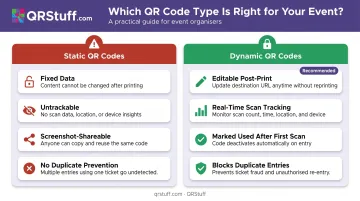
Not all QR codes offer the same level of security. The distinction between static and dynamic codes is the foundation of fraud prevention at events.
- Static QR codes encode fixed information directly into the pattern and cannot be changed or tracked after generation. Anyone who screenshots a static ticket can share it freely — every copy scans as valid.
- Dynamic QR codes use a short redirect URL or managed identifier. The destination can be changed after the code is printed, each scan is recorded in real time, and codes can be marked as "used" after the first valid scan — blocking any duplicate entry attempts automatically.
According to RSVPify's 2026 Event Check-In Trend Report, QR code scanning for event check-ins grew from under 5% of all check-ins in early 2026 to 20% by May 2026 — a rapid shift that reflects growing organizer confidence in QR-based entry systems.
That growth makes platform selection matter more than ever — the right tool determines how smoothly your entry process runs on event day.
Best QR Code Event Ticketing Software in 2026
These platforms were evaluated on QR scan reliability, real-time validation, scalability, pricing transparency, and how tightly ticketing and check-in are integrated.
Eventbrite
Eventbrite is one of the most widely recognized ticketing platforms globally, used for public concerts, festivals, community events, and corporate gatherings. Its Organizer app handles QR scanning directly integrated with its marketplace ticketing system — the same platform attendees use to find and buy tickets.
The built-in discovery marketplace drives organic ticket sales without additional marketing effort. QR validation is real-time and reliable at scale, and the familiar interface reduces confusion for both event staff and attendees. The trade-off: per-ticket fees can erode margins on high-volume paid events, and organizers have less flexibility to operate outside the Eventbrite ecosystem.
| Key Features | Real-time QR scanning, marketplace ticket distribution, customizable event pages, mobile check-in app, real-time analytics dashboard |
| Best For | Public-facing consumer events, festivals, community gatherings, and organizers who prioritize audience reach |
| Pricing | 3.7% + $1.79 service fee per ticket; 2.9% payment processing fee per order; free for free events |
Cvent OnArrival
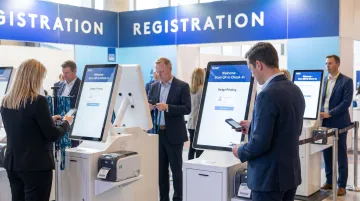
Cvent OnArrival is the enterprise standard for large corporate conferences, trade shows, and multi-gate events. It supports QR scanning, kiosk-based self-check-in, on-demand badge printing, and deep integration with Cvent's broader event management ecosystem.
The offline mode is a genuine differentiator: basic check-in, badge scanning, and badge printing all work without internet connectivity after event data is downloaded, protecting operations when venue Wi-Fi fails.
Multi-station support handles simultaneous high-volume arrivals across several iPads. Compliance controls covering SOC 2 Type II, ISO 27001, GDPR, and PCI DSS make it the default choice for regulated industries. One Capterra reviewer reported checking in nearly 200 attendees in under an hour across four iPads — a credible benchmark for mid-to-large conferences.
| Key Features | Multi-station QR scanning, offline capability, on-demand badge printing, kiosk check-in, real-time dashboards, Salesforce and Marketo integrations |
| Best For | Large enterprise conferences, trade shows, and government or healthcare events requiring compliance and high-volume processing |
| Pricing | Annual license fee + per-registrant fee; custom enterprise pricing (contact for quote) |
Whova
Whova is a conference-focused platform that combines QR code check-in with attendee engagement tools (agenda management, networking features, and community boards), making it a strong fit for academic, association, and mid-sized corporate events.
Its fast setup and intuitive interface reduce staff training time, and QR scanning integrates directly with its attendee app. The all-in-one engagement features extend value well beyond the entry gate. Whova has case studies spanning events from 1,000 to over 40,000 attendees, though it's generally less suited for very large expos with heavy badge-printing demands. It holds a 4.8/5 rating from 2,447 reviews on Capterra — one of the strongest satisfaction scores in this category.
| Key Features | QR code check-in, attendee engagement app, agenda management, networking tools, real-time check-in dashboard, on-demand badge printing |
| Best For | Conferences, academic events, association gatherings, and mid-sized corporate events prioritizing attendee engagement |
| Pricing | Custom pricing based on event duration, attendee count, and format (in-person, virtual, or hybrid) |
RSVPify
RSVPify is a flexible event management platform offering branded QR code check-in, guest list management, and real-time attendance tracking. It scales from intimate private events up to large corporate conferences, with customization options that cover the entire visual experience from check-in screen to badge design.
Individual-level RSVP management within groups handles complex guest list structures cleanly. Its 37+ integrations — including Salesforce, HubSpot, Marketo, and Google Sheets — make it a practical fit for corporate and nonprofit teams with existing CRM workflows. The free plan covers events up to 100 registrations, and paid ticketing carries a 1.95% + $0.90 per-ticket fee. Worth noting: some users on lower-tier plans have flagged scanner limits and manual steps post-scan, so confirm tier capabilities against your event's check-in volume before committing.
| Key Features | Branded QR check-in, guest list management, real-time tracking, seating chart maker, badge printing, email tools, Salesforce/HubSpot integrations |
| Best For | Corporate events, fundraisers, nonprofits, and private events needing full branding control and CRM connectivity |
| Pricing | Free up to 100 RSVPs/month; 1.95% + $0.90 per ticket for paid ticketing; tiered paid plans (Starter through Enterprise) |
QRStuff
QRStuff is a dedicated QR code platform trusted by 250,000+ businesses globally, including Fortune 500 companies like Coca-Cola, Walmart, Amazon, and Marriott. Rather than replacing your ticketing system, it functions as a flexible QR infrastructure layer — handling code generation, scan tracking, and access control alongside any existing registration setup.
What makes it particularly suited to events:
- Dynamic codes editable post-print — update the destination URL without reprinting tickets, which saves significant time when event details change after materials are distributed
- Real-time scan analytics — track total and unique scans, peak scan times, geographic entry data, and device types from a live dashboard
- Bulk generation at scale — the Enterprise tier supports unlimited batch processing; the Full Suite handles up to 500 codes per batch, with a separate high-volume service available for jobs exceeding 20,000 codes
- Custom branding — logos, brand colors, custom module shapes, and gradient options with high-resolution export in PNG, JPG, SVG, and PDF for print-ready ticket production
- Password-protected codes — adds an authentication layer for VIP areas or restricted sessions
- Security and compliance — GDPR and SOC2 compliant, AES-256 encryption at rest, TLS 1.2+ in transit, SSO via SAML 2.0 and OpenID Connect, and a documented 99.968% uptime track record since 2008
API access enables programmatic code generation directly from attendee registration data in third-party systems — useful for corporate seminars, brand activations, and multi-venue conferences that need QR control without committing to a single ticketing marketplace.
| Key Features | Dynamic QR codes (editable post-print), real-time scan tracking and analytics, custom design with logos and brand colors, password-protected codes, bulk QR generation, 40+ QR code types, 99.9% uptime SLA |
| Best For | Businesses needing custom-branded, trackable QR codes for event entry, access control, or marketing integrations — from corporate events to large-scale brand activations |
| Pricing | Subscription-based: Lite from $10/month, Full Suite $25/month, Enterprise $250/month; no QR code expiration on paid plans. See current tiers at qrstuff.com |
How We Chose the Best QR Code Event Ticketing Software
Platforms were assessed on real-world check-in performance under peak load, not just feature lists. A platform that works cleanly in a demo can still fail when 300 attendees arrive in the same 15-minute window.
Three common mistakes organizers make when selecting software:
- Choosing based on brand familiarity alone, without testing scan performance at realistic peak arrival volume
- Using static QR codes instead of dynamically validated ones — leaving the door open to screenshot fraud
- Running ticketing and check-in through disconnected systems, creating data sync failures at exactly the wrong moment
Core Evaluation Criteria
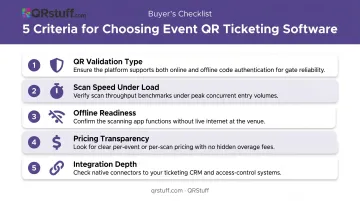
The five criteria that determined these selections:
- QR validation type — does the system validate each code in real time against a live database, or just scan and record without blocking duplicates?
- Scan speed and stability under concurrent load — Cvent notes that effective check-in apps should scan and update attendee status in under a second; long waits at check-in directly damage attendee satisfaction
- Offline readiness — venues with unreliable Wi-Fi can render cloud-only platforms unusable mid-event
- Pricing transparency — per-ticket fees, commissions, and platform costs that look minor individually can compound significantly on high-volume events
- Integration depth — connectivity with CRM, registration, and analytics tools determines whether check-in data flows into the rest of your event operations
Security and Compliance
Corporate, healthcare, and financial events face real vendor scrutiny around data handling. Platforms carrying GDPR compliance, data encryption, and SOC2 certification give procurement and legal teams documented proof of security controls — not just assurances. If your event involves sensitive attendee data, ask vendors for their compliance documentation before shortlisting, not after.
Conclusion
The best QR code event ticketing software isn't the one with the longest feature list. It's the one that gets QR validation, scan speed, and data reliability right when it matters — because the check-in experience is the first impression every attendee forms of your event.
Before finalizing a decision, assess three things:
- Whether the platform holds up during your peak arrival window without slowing down
- Whether the pricing stays manageable as your event scales
- Whether it integrates cleanly with the tools your team already uses
The cheapest option at signup can become the most expensive in lost time and attendee frustration on the day.
For event organizers who need reliable, custom-branded, trackable QR codes without platform lock-in, QRStuff offers dynamic QR code generation with real-time analytics, bulk creation, API access, and a 99.9% uptime guarantee. Visit qrstuff.com to find the plan that fits your event size and scanning volume.
Frequently Asked Questions
How do you track attendance at events?
Modern event check-in software tracks attendance by validating unique QR codes in real time, updating a live dashboard as each attendee scans in. Organizers can monitor total arrivals, peak check-in windows, and no-show rates from any device during the event.
What is the difference between static and dynamic QR codes for event ticketing?
Static QR codes encode fixed data and cannot be changed or tracked after printing. Dynamic QR codes redirect through a managed URL, allowing edits after printing, per-scan tracking with timestamp and location data, and individual attendee record linkage — making them far more secure and flexible for ticketing.
How do QR code event tickets prevent fraud and duplicate entries?
Platforms with real-time validation assign a unique QR code to each attendee, mark it as "used" on the first scan, and immediately block any subsequent scan of the same code. This prevents ticket screenshots from being shared and used multiple times at the entry gate.
Can QR code event check-in apps work without internet?
Several platforms, including Cvent OnArrival, offer offline mode that stores scan data locally and syncs when connectivity returns. Real-time duplicate prevention requires an active connection, so confirm offline capabilities before deploying at venues with unreliable Wi-Fi.
What hardware is needed to scan QR code event tickets?
Most QR code event ticketing apps run on standard iOS or Android smartphones or tablets — no specialized hardware is required for basic scanning. Dedicated scanners or kiosks are recommended for high-volume entry gates, and on-demand badge printing requires a compatible thermal printer.
Are QR code event ticketing platforms GDPR compliant?
Not every platform is GDPR compliant by default. Look for data encryption, consent management, and attendee data deletion capabilities. Platforms with SOC2 certification, including QRStuff, provide documented security controls and audit trails for stronger compliance assurance.