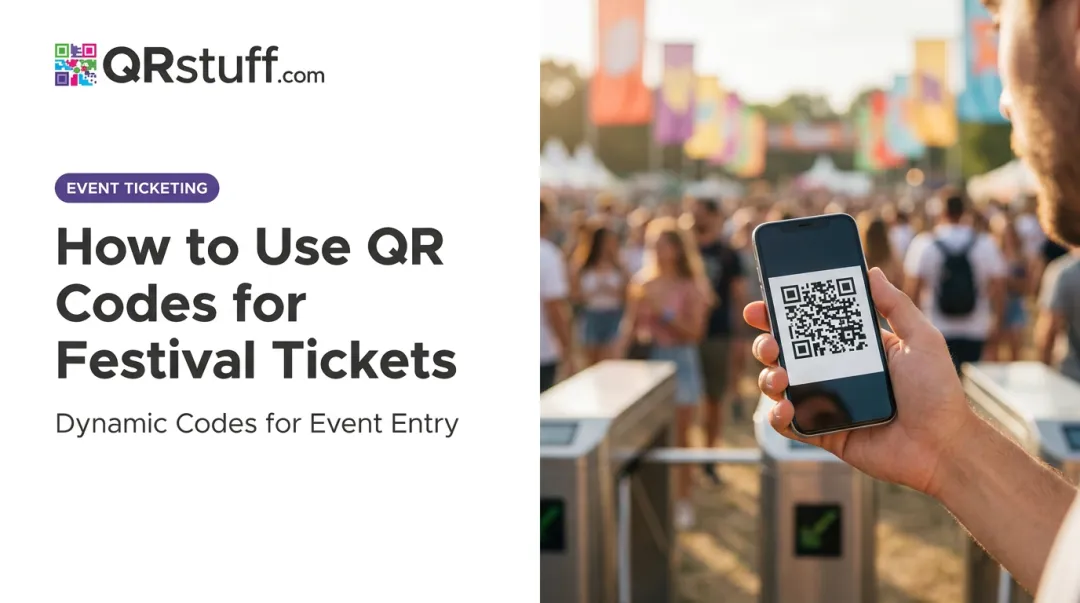
QR code ticketing has become the practical answer — and the numbers back up why it matters. In 2024, UK ticket fraud reports hit 9,826 cases with losses of £9.79 million, up 47% from the previous year. Meanwhile, the QR-based segment held 46% of the global digital ticketing market in 2024 — the leading technology segment in that space.
This guide covers everything event organizers need to know: what QR code ticketing is, how the validation process works step by step, the key benefits, how to generate codes at scale, and the best practices that separate smooth events from chaotic ones.
Key Takeaways
- QR code event tickets are unique, scannable digital tickets that validate attendee entry instantly — no paper required.
- Each code is single-use; once scanned, it's marked as used, making duplicates and screenshots invalid.
- Dynamic QR codes let organizers update venue, time, or session details without reissuing tickets.
- Real-time scan analytics give organizers live attendance counts and post-event insights.
What Are QR Codes for Event Ticketing?
A QR code event ticket is a digital or printed ticket embedded with a unique, machine-readable code that stores attendee and event data — things like ticket type, event ID, and a unique validation identifier. When staff scan the code at entry, the system validates it in under a second, replacing manual guest list checks.
How QR Differs From a Standard Barcode
The key difference is data capacity. Traditional 1D barcodes encode data in a single dimension. QR codes are 2D symbols — according to DENSO WAVE's technical specifications, a Version 40 QR code can hold up to 7,089 numeric characters or 4,296 alphanumeric characters, depending on error-correction level.
A single QR ticket can therefore contain:
- A unique ticket ID tied to a specific attendee record
- Event name, date, and location
- Ticket category (VIP, General Admission, etc.)
- A real-time validation URL that confirms authenticity on scan
Beyond storage capacity, QR codes can link to dynamic, server-side information. If event details change after tickets are distributed, the destination updates without printing a new ticket.
How QR Code Event Ticketing Works
Step 1 — Ticket Creation and Code Generation
When an organizer issues tickets, each one receives a unique encrypted QR code tied to a specific attendee record. No two codes are identical — this uniqueness is the foundation of fraud prevention. Platforms like Eventbrite, for example, automatically generate a unique QR code when an attendee completes registration.
For events with hundreds or thousands of attendees, bulk generation handles this at scale. QRStuff's batch processing supports up to 500 codes per online batch, with offline processing available for larger volumes (500,000+ codes for enterprise events).
Step 2 — Ticket Distribution
Tickets reach attendees digitally via:
- Email a PDF attachment or image directly to the attendee
- Send an SMS link to a mobile ticket page
- Save to Apple Wallet or Google Pay for one-tap access at the gate
Attendees simply show the code on their phone screen. No printing required, though printed tickets work equally well.
Step 3 — Scanning and Validation at the Gate
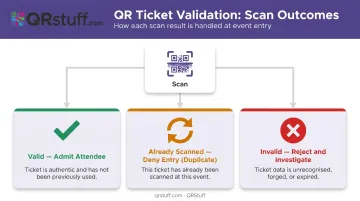
A staff member scans the QR code using a smartphone camera or dedicated scanner app. The system checks the ticket database and returns a status in under a second:
- ✅ Valid — admit the attendee
- 🔁 Already scanned — flag as duplicate, deny entry
- ❌ Invalid — reject and investigate
Once scanned, the ticket is marked "used." Screenshots and photocopies fail immediately — the system marks the code consumed on first scan, so any repeat attempt triggers the duplicate flag.
Step 4 — Real-Time Attendance Tracking
That scan data doesn't sit idle. Every check-in feeds a live dashboard, giving organizers a running view of:
- Total check-ins vs. ticket sales
- Entry pace (useful for managing gate congestion)
- Which entry points are busiest
- No-show rates in real time
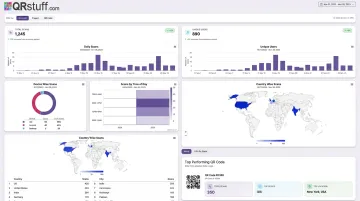
Eventbrite, TryBooking, and Ticketor all offer live attendance reporting tied to QR scan events. QRStuff's analytics dashboard updates immediately as dynamic codes are scanned, with data visualized in line and bar charts.
Step 5 — Post-Event Reporting
After the event closes, scan data becomes business intelligence. Useful outputs include:
- Track attendance rate and no-show percentage against total ticket sales
- Identify peak entry times to improve gate staffing at future events
- Break down ticket types (VIP vs. General Admission) to assess tier performance
- Map geographic origin of attendees for targeting future promotions
- Export CSV or Excel reports for deeper post-event analysis
Cvent's event ROI guide specifically lists check-in data, no-shows, and attendee counts as inputs for calculating event ROI — data that QR validation captures automatically.
Key Benefits of Using QR Codes for Event Tickets
Faster Check-Ins and Shorter Queues
QR scanning replaces the slowest part of manual check-in: finding the name on a list. Cvent states that a well-implemented check-in app can validate a ticket in under a second, and Eventbrite positions contactless QR scanning as the primary method for expediting entry.
At high-volume events — concerts, festivals, large conferences — that difference compounds. One gate processing 1,000 attendees over two hours finishes in roughly 17 minutes at one second per scan, versus nearly 6 hours at 20 seconds per manual lookup.
Fraud Prevention That Actually Works
The scale of ticket fraud makes this benefit concrete. In the UK alone, gig-goers lost £1.6 million to fake ticket scams in 2024 — more than double the previous year. The problem is just as acute in the US, where the FTC consistently ranks event ticket fraud among the top consumer complaint categories.
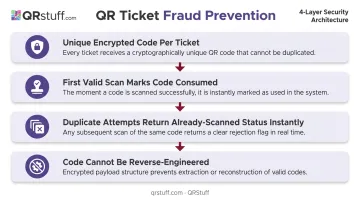
QR validation addresses fraud through a simple but effective mechanism:
- Each ticket carries a unique encrypted code — no two are the same
- The first valid scan marks the code as consumed
- Any duplicate attempt (screenshot, photocopy, forwarded image) returns an "already scanned" status instantly
- The code cannot be reverse-engineered into a valid ticket
This doesn't require attendees to do anything differently — the protection operates entirely at the gate.
No Printing Costs and Reduced Paper Waste
Digital QR ticketing eliminates the entire physical production chain: design, printing, fulfillment, and on-site reprints for lost tickets. TicketSource explicitly frames digital ticketing as a core component of zero-waste event planning.
Attractions.io reports that ZooTampa reduced paper waste by up to 95% after moving to digital tickets — a concrete illustration of what going fully digital can achieve at scale.
Dynamic Updates Without Reissuing Tickets
Venue changed at the last minute? Session link updated? With dynamic QR codes, the destination URL updates server-side — the printed or distributed ticket stays exactly the same.
QRStuff's dynamic codes redirect through a short URL that can be modified at any time via the dashboard. Attendees scanning an old ticket automatically reach the updated information — no mass reissue, no support queue of confused attendees.
Actionable Analytics for Smarter Events
Scan data turns ticket validation into an intelligence layer:
- Compare ticket tiers sold against actual attendance by tier
- Track arrival timing — early, on-time, or after the main session starts
- Identify which gates hit peak congestion and where extra staff are needed
- Map the geographic spread of your audience by country and city
QRStuff's analytics dashboard tracks total and unique scans, device type breakdowns, geographic data at country and city level, and time-based scan patterns. All of it is exportable as CSV for integration with other reporting tools.
How to Generate a QR Code for Event Tickets
Step 1 — Choose the Right Platform and Code Type
Select a platform that supports:
- Dynamic QR codes — so event details can be updated post-distribution
- Bulk/batch generation — for events with hundreds or thousands of attendees
- Custom design options — for branded tickets
- Analytics — for real-time and post-event tracking
QRStuff supports 40+ QR code data types, including a dedicated Event QR code type (capturing name, start/end date, timezone, and location) and an Eventbrite integration type for directing attendees to event pages.
For scale, the Full Suite plan includes batch generation up to 500 codes and comprehensive analytics. The Enterprise plan covers unlimited batch processing and API access for ticketing platform integrations.
Step 2 — Configure the Code Content
Link each QR code to a unique attendee record. Typical data encoded per ticket:
- Attendee name and ticket ID
- Ticket category (VIP, General, Workshop)
- Event name, date, and location
- A unique validation URL or identifier
For VIP or restricted-access tiers, QRStuff supports password-protected QR codes as an additional security layer. Attendees with special access codes can be separated from general admission without requiring a separate physical ticket format.
Step 3 — Customise the Design
Branded QR codes reinforce event identity and stand out on printed tickets. QRStuff allows organizers to:
- Apply brand colours to the code dots and finder patterns
- Embed a logo or event graphic in the centre
- Select custom dot and eye shapes
- Add a decorative frame with text
Critical: test scanning after any design change. QRStuff automatically applies error correction (the QR standard supports up to 30% restoration capacity at Level H), but heavy customisation should always be verified across multiple devices before distribution.
Export in PNG or SVG ; SVG is preferable for printed tickets since it scales without quality loss.
Step 4 — Test, Export, and Distribute
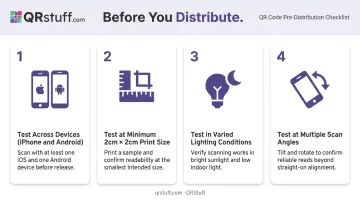
Before distribution:
- Test across devices — both iPhone and Android native cameras, plus common scanner apps
- Test at actual print size — minimum 2 cm × 2 cm per Nielsen Norman Group's QR code guidelines, larger if scanning from distance
- Test in varied lighting — dimly lit venue entrances are common
- Test at angles — attendees won't always hold their phones perfectly flat
For bulk distribution, QRStuff's batch processor generates unique codes from an Excel (.xlsx) file and delivers a ZIP archive of individual image files via email, usually within a few minutes for standard batch sizes.
Distribute tickets via email (PDF attachment), embedded in ticket image files, or as a link in SMS. Remind attendees the day before to screenshot or save the code offline; some venue apps require a connection to load tickets.
QR Code Event Ticketing Use Cases and Best Practices
Use Cases by Event Type
| Event Type | Primary QR Use Case |
|---|---|
| Concerts & Festivals | High-volume crowd management at multiple gates |
| Corporate Conferences | Session-level access tracking and branded badges |
| Sports Events | Gate-specific access control, zone separation |
| Charity & Fundraisers | Digital-only entry eliminates printing costs |
| Educational Events | Attendance confirmation for workshops and graduations |
The Paris 2024 Olympics shows what this looks like at scale: the IOC required mobile-only ticketing, with QR codes delivered exclusively through the official app. Over 9.5 million of 10 million tickets sold were validated this way — no paper, no alternatives.
That deployment illustrates why both operational and technical preparation matter. Here's what those look like in practice.
Best Practices for Event Day
Operational:
- Send tickets 3–7 days before the event (Ticketmaster's standard is 3–7 days for mobile ticket availability)
- Send a day-before reminder prompting attendees to screenshot or save offline
- Stage backup scanning devices at each gate — one device failure shouldn't stop an entry lane
- Brief gate staff on three scenarios: valid scan, duplicate scan, and offline fallback
Technical:
- Use HTTPS-linked dynamic codes for secure data transmission — this also protects against QR phishing risks flagged by the FTC and NCSC
- Minimum print size: 2 cm × 2 cm, larger for scanning from distance
- Pre-load ticket data to devices before the event starts in case of connectivity issues — TryBooking and Cvent both recommend offline-capable scanning as a backup
- Monitor the live analytics dashboard during entry to spot gate bottlenecks before queues build
Frequently Asked Questions
How do I generate a QR code for event tickets?
Use a QR code platform like QRStuff to create unique dynamic QR codes linked to each attendee's ticket data, then export them in bulk and distribute via email, SMS, or PDF. No coding skills are required — the platform handles batch generation from a spreadsheet and delivers individual code files ready to embed in tickets.
Is QR Pro free?
Most QR code platforms offer a free tier with basic static codes. Paid plans unlock the features event organizers actually need: dynamic codes (editable after distribution), scan analytics, bulk generation, and custom branding. QRStuff's Full Suite at £15/month covers all of these, with the Enterprise tier adding unlimited batch processing and API access.
Can QR code event tickets be duplicated or faked?
Each code is unique and tied to a specific attendee record. Once scanned, the system marks it as consumed — any duplicate attempt (screenshot, photocopy, forwarded image) returns an invalid status immediately. With proper validation software in place, counterfeiting is blocked at the gate.
What information is stored inside a QR code event ticket?
Typically: attendee name, ticket ID, ticket type (VIP/General), event name and date, and a validation URL or unique identifier. Dynamic QR codes go further — venue address, session links, or other details can be updated server-side without reissuing the ticket.
Do attendees need a special app to use QR code tickets?
No. Attendees just show the QR code on their phone screen — any smartphone camera can display it. It's the organizer's gate staff who need a scanner app or device to validate tickets at entry.
What is the difference between static and dynamic QR codes for event tickets?
Static QR codes encode fixed data that cannot be changed after creation. Dynamic QR codes point to a server-managed URL that can be updated at any time — useful for last-minute venue changes, updated session links, or correcting errors — without reissuing the ticket.