Introduction
Picture this: a potential customer searches for somewhere to eat tonight, finds your restaurant, and immediately looks for the menu. Nothing comes up — or worse, they find a PDF that won't load on their phone. They move on to the next option.
According to a US Foods survey of 1,003 Americans, 83% of diners review a restaurant's menu before visiting, and 50% decide what to order before they even arrive. A missing or outdated menu isn't just an inconvenience — it's lost revenue.
Publishing your menu online sounds simple. In practice, most restaurants get only part of it right. A PDF that won't render on mobile, a website that's updated while Google Business Profile stays stale, a QR code pointing to a URL that later breaks — each one sends diners elsewhere.
This guide walks through the complete process: setup, platform selection, QR codes, and the formatting details that determine whether diners stay engaged or bounce.
Key Takeaways
- 83% of diners check a menu before visiting — an inaccessible menu costs you customers before they arrive
- Publish on at least 2–3 channels: your website, Google Business Profile, and one third-party directory
- HTML/text-based menus outperform PDFs for both mobile readability and search engine indexing
- Dynamic QR codes let you update your menu destination without reprinting a single table card
- Publishing once and never updating it is the fastest way to lose customers who find stale prices or missing items
Why Every Restaurant Needs Its Menu Online
Most dining decisions are made before anyone leaves the house. 77% of diners visit a restaurant's website before dining in or ordering out, and nearly 70% say a poor website experience has actively discouraged them from visiting.
Three things happen when your menu is online and easy to find:
- Discoverability improves — customers searching "Thai restaurant near me" or "best pasta in [city]" can find you through dish names and cuisine types indexed by search engines
- Decision friction drops — diners who've already seen the menu arrive more confident, order faster, and spend more intentionally
- Printing costs fall — a well-maintained digital menu supplements or replaces reprinted physical menus, which saves money every time prices or items change
If your menu isn't findable online, you're invisible to the customers already searching for exactly what you serve.
How to Publish Your Restaurant Menu Online
Step 1: Prepare Your Menu Content
Before you publish anywhere, the menu content itself needs to be ready. "Menu-ready" means:
- Organised sections — appetisers, mains, desserts, drinks, clearly labelled
- Accurate prices — current, not last season's
- Item descriptions — 1–2 sentences per dish, focused on ingredients and appeal
- Photos — at minimum, your top 5–8 signature dishes
On format, you have three main options:
| Format | Pros | Cons |
|---|---|---|
| PDF upload | Fast to create | Not mobile-friendly; handled differently from HTML by search engines |
| Menu builder tool | Structured, designed for menus | Varies by platform; some charge fees |
| Direct platform entry | Best for SEO and mobile | Takes more time upfront |
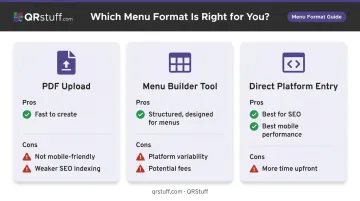
Text-based, platform-native entry pays off in SEO and mobile performance. PDFs can be indexed by Google, but they're parsed differently from HTML and render poorly on mobile — two strikes that matter when most diners are on their phones.
Step 2: Choose Where to Publish
Rather than trying to be on every platform at once, aim for 2–3 channels: your own website, Google Business Profile, and at least one third-party directory. The "Where to Publish" section below covers each in detail.
One rule applies across all of them: consistency is non-negotiable. If your burger is listed as "Classic Smash Burger" on your website and "Smash Burger Classic" on Yelp with a different price, customers notice — and so do search engines. Every platform must reflect the same item names, descriptions, and prices at all times.
Step 3: Upload, Format, and Optimise the Menu
The practical process varies by platform, but the core steps are similar:
- Create or access your account on the chosen platform
- Enter items by category — don't dump everything into one list
- Add descriptions and images for each item
- Set availability where relevant (lunch menu vs. dinner menu, seasonal items)
- Verify mobile display before publishing
That last step is easy to skip and costly to ignore. Google's restaurant research found 71% of smartphone users used their phones to locate casual or fine dining, and 76% of people who search for nearby businesses visit within a day. If your menu is hard to read on a 6-inch screen, you're losing them at the final moment.
Also worth adding during setup: allergen information, dietary labels (vegan, gluten-free, contains nuts), and calorie data where applicable. These details increasingly influence dining choices and improve how search engines classify your menu content.
Step 4: Make It Accessible In-Restaurant with a QR Code
Once your menu is published online, QR codes close the gap between digital discovery and the in-restaurant experience.
A QR code on each table, menu card, or receipt gives seated guests instant access to your digital menu. No app required — just a phone camera. The National Restaurant Association's 2024 Technology Landscape Report found 59% of full-service customers would access a menu via QR code, so the format is well past the novelty stage.
The critical decision here is dynamic vs. static.
Here's how they compare:
| Static QR Code | Dynamic QR Code | |
|---|---|---|
| URL editable after printing? | No | Yes, via dashboard |
| If menu URL changes | Code becomes a dead link | All printed codes redirect automatically |
| Reprint required for updates? | Yes | No |
| Best for | One-time use | Ongoing restaurant use |
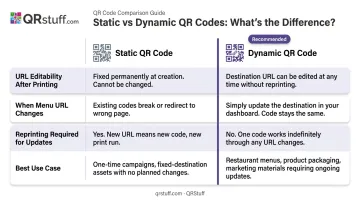
A static code embeds the destination URL directly into the pattern. Change that URL, and every table card, window sticker, and receipt becomes useless overnight. A dynamic code points to a short redirect URL managed through a dashboard, so updating the destination takes seconds.
QRStuff's dynamic QR codes use a Website URL data type for restaurant menus, making setup straightforward: select the data type, paste your menu link, and generate.
If your menu URL ever changes, log into the dashboard, update the destination, and all existing printed codes redirect to the new link instantly. For restaurants on paid plans (starting at the Lite tier), codes don't expire, so table cards printed today stay functional indefinitely.
Where to Publish Your Restaurant Menu Online
Different platforms serve different discovery moments. A customer searching Google uses a different path than one browsing Yelp or scrolling Instagram. Covering multiple channels means reaching diners at each of those moments.
Your Own Website
Your website is the highest-priority channel. It gives you complete control over design, content, and updates — and it builds the SEO foundation that makes you findable when someone searches "[your restaurant name] menu" or "[cuisine type] restaurant in [city]."
The key point: menus entered as text on your website are indexed by search engines. A PDF uploaded to your site is handled differently and won't deliver the same SEO benefit. If your current "menu" page is just a PDF embed, replacing it with structured HTML content is one of the highest-return changes you can make.
Google Business Profile
Google Business Profile puts your menu directly in front of searchers on Google Maps and in local results — often without them ever clicking through to your website. For many potential diners, this is the first place they look.
Setup process:
- Claim and verify your Google Business Profile at business.google.com
- Navigate to "Edit profile"
- Select the "Menu" section
- Add items individually with names, descriptions, photos, and prices
Google states that complete and accurate Business Profile information helps customers know what a business does, where it is, and when they can visit — and that local results are based on relevance, distance, and prominence. A complete menu makes your listing more relevant to specific dish and cuisine searches.
Third-Party Directories and Delivery Platforms
Platforms like Yelp, TripAdvisor, DoorDash, Grubhub, and Uber Eats have large, intent-driven audiences actively searching for places to eat. Yelp alone had 28 million average monthly unique devices in Q1 2026.
The trade-off is commission fees and reduced control. Commission structures vary by platform:
- DoorDash: 15%, 25%, or 30% depending on the plan
- Uber Eats: 20% to 30% marketplace fees
- Grubhub: Similar tiered commission model
These platforms work well for delivery revenue and discovery. The trade-off is less control over how your menu is presented or updated.
For pure menu visibility without delivery, a free Yelp business listing with menu upload is a solid complement to your website and GBP.
Social Media (Facebook, Instagram)
Facebook lets restaurant pages add a dedicated menu tab. Instagram supports a menu link via the bio or story highlights.
These channels work best for showcasing seasonal specials or new dishes to existing followers. They're not a primary discovery channel for someone who doesn't know you yet — treat them as a supplement to your website and GBP, not a substitute.
What Makes an Online Restaurant Menu Perform Well
Publishing is the starting point. Whether it actually converts browsers into diners depends on a few controllable factors.
Menu Design and Readability
Layout affects decisions faster than most operators realize. eCornell notes that customers typically spend only 1–2 minutes reviewing a menu — which means the structure has to do a lot of work quickly.
Menu engineering, a framework developed by Kasavana and Smith in 1982, categorises items by profitability and sales volume, then positions them to guide customer choices. Applied to online menus:
- Place high-margin or signature dishes at the top of their category
- Use clear category headings that match how customers think ("Small Plates" over "Starters")
- Keep item descriptions to 1–2 sentences — enough to sell the dish, not a paragraph
- Limit options per category where possible to reduce decision fatigue
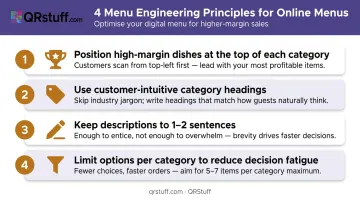
Photo Quality
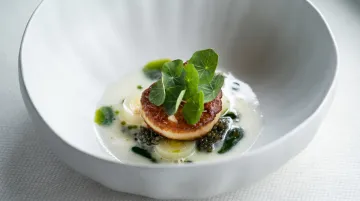
Food photography has an outsized effect on perceived quality and ordering behavior. According to Grubhub, including images on a menu can lead to 70% more orders and 65% higher sales compared to menus without photos.
That number only works in your favour with quality images. Low-resolution, poorly lit, or unappetising photos actively harm perception. If professional photography isn't in the budget, natural light and a clean background beat most improvisations.
Pricing Presentation
A Cornell field experiment published in 2009 found that menus displaying prices as plain numerals — without currency symbols or the word "dollars" — produced $5.55 more per check on average compared to formats using "$". Removing the "$" shifts attention from cost to the dish itself.
Other pricing tactics that reduce cost-focus:
- Use ".90" or ".95" endings rather than round numbers
- Avoid right-aligned price columns, which make price comparisons too easy and shift focus to cost rather than appeal
- Let the dish description do the work before the price appears
Regular Updates
An outdated menu erodes trust fast — and unhappy diners tend to say so in reviews.
Recommended update cadence:
- Quarterly: full menu audit for accuracy
- Immediately: price changes, removed items, added dishes
- Seasonally: rotate specials on a defined schedule, not whenever someone remembers
Common Mistakes When Publishing a Restaurant Menu Online
Most restaurants make the same handful of errors when putting their menu online. Here's what to watch for before you publish.
- PDF-only menus don't render well on mobile, behave differently from HTML in search results, and require a full file re-upload for every change. Many restaurants default to PDFs because it's fast — and then wonder why their menu doesn't appear in search.
- Inconsistent information across platforms erodes customer trust fast. When a dish appears on Yelp but not your website, or prices differ between Google and your menu board, people notice. Update all channels at the same time, not one at a time over a week.
- Static QR codes are hardcoded to a fixed URL. When a site gets redesigned or a menu platform changes, every printed code stops working. Dynamic QR codes solve this: the printed code never changes, only the destination does.
- Skipping the mobile check is one of the most common oversights. A menu that looks polished on desktop can be completely unusable on a phone — tiny text, broken layout, horizontal scrolling. Since most restaurant discovery happens on mobile, test the mobile view before you publish.
Frequently Asked Questions
How do I announce a new menu?
Update all online channels simultaneously — website, Google Business Profile, and third-party directories — then share new dish photos on social media. If you're using a dynamic QR code in-restaurant, simply update the destination link in your dashboard. Every printed table card automatically redirects to the new menu without reprinting anything.
How do I put my restaurant menu on Google?
Log into Google Business Profile, go to "Edit profile," and select the "Menu" section. Add items individually with names, descriptions, photos, and prices. Changes typically appear in Google Search and Maps within a few days.
Can I publish my restaurant menu online for free?
Yes. Google Business Profile and Yelp both offer free listings with menu upload, and you can create a PDF or image version using Canva at no cost. Dedicated menu platforms and ordering integrations typically involve fees, but core online visibility is available for free.
Do I need a website to publish my restaurant menu online?
No — Google Business Profile, Yelp, social media, and third-party platforms all allow menu publishing without a website. That said, having your own website significantly improves discoverability and gives you full control over presentation and SEO.
How often should I update my online menu?
At minimum, run a full audit quarterly and make price or item changes as they happen. Outdated menus — wrong prices, discontinued dishes, seasonal items still listed in winter — are a consistent source of negative reviews and walk-out complaints.
What format is best for posting a restaurant menu online?
HTML or text-based menus entered directly into a platform or website are best for SEO and mobile readability. Image-based menus work as a secondary option. Avoid PDFs as your primary format — they're difficult to read on mobile and search engines don't index them as effectively.