Digital channels exposed this gap sharply. Every email open, ad click, and landing page visit produces a timestamped data trail. Direct mail produced none of that — until QR codes changed the equation.
By giving every printed piece a digital handshake, QR codes turn a historically passive channel into an active, measurable one. This article covers what that data actually looks like, why dynamic codes are the only type worth using for direct mail, how to connect scan data to your CRM and analytics stack, and what to know about USPS postage incentives before your next campaign.
Key Takeaways
- Dynamic QR codes track total scans, unique scans, timestamps, location, and device — data static codes can't provide
- UTM parameters connect every scan to Google Analytics, keeping direct mail traffic out of the unattributed "(direct)/(none)" bucket
- Unique per-recipient codes unlock individual-level attribution and feed conversion data directly into your CRM
- USPS offers postage discounts when QR codes link to qualifying interactive digital experiences
- QRStuff's real-time analytics dashboard makes all of this accessible without a data team
Why Direct Mail Was Flying Blind — And How QR Codes Change That
For decades, direct mail measurement relied on proxies: unique phone numbers, coupon codes, custom landing page URLs. None of them were seamless. According to USPS research conducted with Forrester, direct mail data has "always been less accessible" compared to other marketing channels — and 40% of marketers cite audience targeting and data access limitations as their primary challenge.
The fragmentation shows in practice too. Statista data on 2026 direct mail measurement methods found that no single tactic — including unique URLs, QR codes, unique phone numbers, or coupon codes — exceeded 57% adoption. Most marketers are stitching together incomplete signals rather than relying on one reliable source of truth.
QR codes address this. Each scan creates a timestamped, device-specific, location-tagged event — connecting a physical mail piece to a measurable digital action you can act on immediately.
Consumer Behaviour Already Supports It
The friction concern is gone. Insider Intelligence forecast that U.S. smartphone users scanning QR codes would grow from 83.4 million in 2022 to 99.5 million in 2025. People scan codes at restaurants, retail checkouts, and event venues without hesitation. A QR code on a mailer is not an ask — it's a familiar action.
Static vs. Dynamic QR Codes: Choosing the Right One for Direct Mail
Static Codes: What They Are and Where They Fall Short
A static QR code encodes the destination URL directly into the code's visual pattern. Once printed, the destination, tracking, and content are all locked in. If your landing page URL changes or an offer needs correcting, the only fix is a reprint.
Static codes have a place: permanent signage, product packaging with evergreen destinations, or one-time informational pieces where tracking isn't needed. For direct mail campaigns with measurable goals, they're the wrong tool.
Dynamic Codes: The Only Choice for Measurable Direct Mail
Dynamic QR codes work differently. Instead of encoding the final URL, they encode a short redirect URL. That redirect layer is what makes everything else possible:
- Editable destinations — update the landing page any time after printing, no reprint required
- Scan tracking — every scan through the redirect is logged with time, location, device, and OS data
- Mid-campaign pivots — change an expired offer or fix a broken URL while the campaign is still live
- Lower code density — shorter encoded URLs produce cleaner visual patterns that scan faster and more reliably
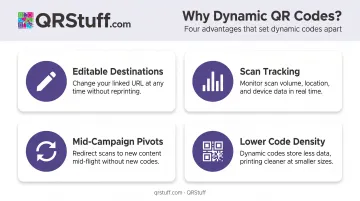
QRStuff's dynamic codes use a short redirect system built to keep code density low. That matters in direct mail, where print quality and scanning conditions vary and a dense, hard-to-read code is a wasted impression.
On paid plans, dynamic codes never expire as long as the subscription stays active. The Full Suite and Enterprise tiers include unlimited scans — useful for high-volume campaigns where per-scan limits would undercut the economics of direct mail at scale.
The Data Gold Mine: What QR Codes Actually Track
Every scan through a dynamic QR code produces a structured data record — and that record is what separates trackable direct mail from the traditional "send and hope" approach.
Core Data Points from Every Scan
| Data Point | What It Tells You |
|---|---|
| Total scans | Overall campaign engagement volume |
| Unique scans | Actual audience reach (individuals, not just repeat scans) |
| Scan timestamp | Which days and hours recipients engage most |
| Geographic location | Country and city-level breakdown of where scans originate |
| Device type and OS | iOS vs. Android, mobile vs. desktop |
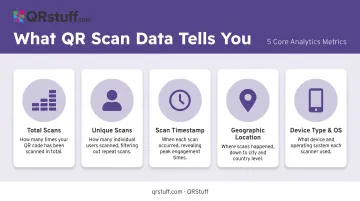
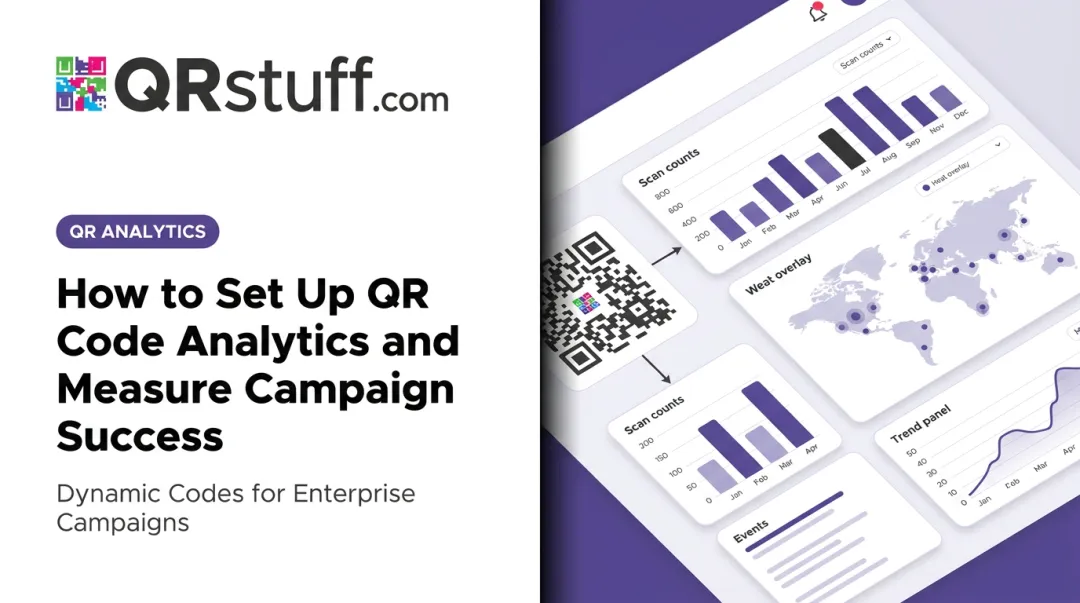
QRStuff's analytics dashboard captures all of these in real time. The moment a dynamic code is scanned, the data populates — analysis starts immediately, not at the end of the week. Marketers can filter by date range (daily, weekly, or custom), view trends in line and bar charts, and export scan logs as CSV or Excel files for deeper analysis.
Why Unique Scan Data Matters Most
Total scans measure volume. Unique scans measure reach. For direct mail, the distinction is significant:
- A recipient who scans three times is counted once as a unique scan — showing high intent
- Comparing unique scans to total mail volume gives you a true response rate, not an inflated one
- High unique-to-total ratios indicate the offer is compelling enough to revisit
Geographic and Device Insights
Geographic data answers a practical question: did the right people respond? If a regional promotion drew scans almost entirely from outside the target area, that's useful intelligence for audience refinement.
Device and OS data is equally actionable. If the majority of scans come from iOS users on mobile, your post-scan landing page needs to be optimized for that experience — not a desktop layout that happens to render on a phone.
From Scan to Strategy: Using Data to Optimise Campaigns
Raw scan data is only valuable when it feeds decisions. Here's how to close that loop.
UTM Parameters: Making Direct Mail Visible in Google Analytics
Without UTM parameters, QR code traffic lands in Google Analytics as "(direct)/(none)" — the same bucket as someone who typed your URL manually. Google's own documentation confirms that links without UTM or referral data lose source attribution entirely.
The fix: append UTM parameters to the destination URL before generating the QR code.
A properly tagged URL looks like this:
https://yoursite.com/offer?utm_source=direct_mail&utm_medium=postcard&utm_campaign=q3_promo&utm_content=version_a
QRStuff supports user-managed UTM tagging — you add the parameters to your destination URL, and every scan carries that attribution data into your analytics platform. Direct mail becomes a named, measurable line item in multi-channel reporting.
A/B Testing With Multiple Codes
Assign different QR codes to different creative versions, offer types, or audience segments within the same campaign. Scan rates across codes reveal which version outperformed, in real time, without waiting for the campaign to end. That data directly informs the next drop — a feedback loop that simply didn't exist with traditional mail.
CRM Connectivity and Retargeting
QRStuff doesn't offer native Salesforce or HubSpot connectors, but its REST API enables custom integration with any CRM platform. Once scan events are connected to contact records:
- Sales teams get a prioritised list of warm leads based on engagement signals
- Non-scanners can be identified for follow-up via a second mailer or digital ad
- Converters can be excluded from follow-up and moved into a nurture sequence
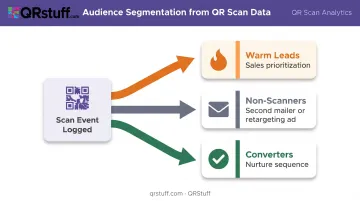
The result is audience segmentation built on actual behaviour — not assumptions about who might have read the piece.
Personalisation and Full-Funnel Attribution
One Code Per Recipient
The most powerful application of QR codes in direct mail is also the most underused: unique codes per recipient. Each person in the mailing list receives a distinct code. When they scan it, the scan event is linked to their specific identity — not just an aggregate campaign tally.
QRStuff's API supports this at scale. The batch processing workflow accepts CSV or spreadsheet uploads, generating one unique QR code per row. For mailings exceeding 20,000 codes, QRStuff offers a high-volume generation service at £2.50 per 1,000 codes (or £2.20 per 1,000 for jobs over 100,000 codes), with a 48–72 hour turnaround.
Personalised Landing Pages
A unique code delivers more value when it leads to a personalised post-scan experience: a landing page pre-filled with the recipient's name, relevant product recommendations, or account-specific details.
USPS describes these as personalised URLs (PURLs) — and the principle applies equally to QR-driven experiences. What separates a generic mailer from a one-to-one touchpoint is the post-scan experience — what the recipient sees the moment they engage.
Reporting in Revenue Terms
With scan data tied to named CRM records, full-funnel attribution becomes possible:
Scan → Form fill → Opportunity → Closed deal
Direct mail stops being reported in response rate terms and starts being reported in pipeline and revenue terms. That's the conversation that gets budget approved.
Compliance Considerations
Collecting individual-level scan data means handling personal data. The ICO is clear that location data, online identifiers, and scan events tied to named recipients all fall within GDPR's scope — so that attribution capability comes with obligations attached.
QRStuff is both GDPR and SOC2 compliant, with servers located in Europe and data retention policies aligned to GDPR requirements. Marketers deploying individual-level tracking should ensure:
- Destination URLs use HTTPS throughout
- Opt-out mechanisms are accessible from any post-scan landing page
- Consent is collected and documented before linking scans to named CRM records
The compliance infrastructure is in place. Implementing the consent mechanisms, however, remains the marketer's responsibility.
Design and Implementation Best Practices
Print-Ready QR Code Requirements
A QR code that doesn't scan is worse than no QR code — it creates frustration and wastes print spend. Follow these requirements:
- Minimum size: At least 1 inch square on printed mail pieces (per Lob's direct mail guidance)
- Contrast: Dark foreground on a light background — avoid reversing this
- Quiet zone: Clear margin around the code where nothing else is printed (required by DENSO Wave's QR standard)
- Placement: Prominent position with a clear CTA — tell recipients what they'll get by scanning
- Pre-print testing: Test with both iOS and Android native cameras at actual print size before committing to a run
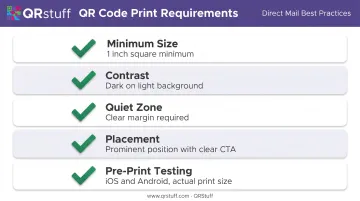
QRStuff includes a preview feature that shows the code exactly as it will appear, and the platform recommends testing across multiple devices at various distances and lighting conditions before any print run.
The USPS Integrated Technology Promotion
USPS offers postage discounts through its Integrated Technology Promotion when QR codes link mail pieces to qualifying interactive digital experiences. The promotion covers both First-Class Mail and USPS Marketing Mail, and Official PostalPro resources confirm it runs through both 2025 and 2026.
For verified discount percentages and current promotion dates, consult the official USPS PostalPro guidebook directly — specific figures should be confirmed from the source before citing in budget planning.
Adding a dynamic QR code to a direct mail campaign can simultaneously improve measurability, enable personalization, and reduce postage costs — three wins from a single minor production change.
Technical Checklist for Scale
- Use dynamic codes that can be updated post-print
- Generate unique codes via API for personalised campaigns
- Use QRStuff's proprietary short redirect URLs to keep code density low
- Maintain redirect infrastructure so codes never lead to broken destinations
- Export scan logs to CSV for BI tool integration
Frequently Asked Questions
How do you add a QR code to direct mail?
Generate a dynamic QR code linked to a relevant landing page and place it prominently on your mail piece with a clear CTA explaining what recipients get by scanning. Print it at minimum 1 inch square and test on multiple devices before finalizing your print run.
How do I get a USPS QR code?
USPS doesn't issue QR codes for general marketing. Marketers generate their own codes using QRStuff, then include them on mail pieces that qualify for USPS promotions — such as the Integrated Technology Promotion — by linking to an interactive digital experience.
What data can you track with QR codes in direct mail?
Dynamic QR codes capture total and unique scans, scan timestamps (day and hour), geographic location at city and country level, and device type and operating system — all available in real time through the QRStuff analytics dashboard.
What is the difference between static and dynamic QR codes for direct mail?
Static codes have a fixed, uneditable destination and no built-in tracking. Dynamic codes use a redirect layer that can be updated after printing and capture detailed scan analytics with every scan — scan counts, device types, timestamps, and geographic data included.
Do QR codes in direct mail qualify for USPS postage discounts?
Yes. USPS offers postage discounts through its Integrated Technology Promotion when QR codes connect mail pieces to qualifying interactive digital experiences. Review the current PostalPro guidebook for verified discount percentages and eligibility requirements.
How do you create a unique QR code for each recipient?
QRStuff's batch processing accepts CSV uploads and generates one unique code per row — with enterprise-scale service for mailings exceeding 20,000 codes. Each code can encode a recipient identifier that connects the scan event directly back to a specific CRM record. API access is available for automated, programmatic generation.