The problem is that many organizers generate QR codes without understanding the difference between static and dynamic codes, or how to connect them to a validation system that actually prevents duplication. A QR code that just encodes text isn't a ticket — it's a sticker anyone can copy.
This guide covers the full workflow: code generation, ticket distribution, gate scanning, live monitoring, and post-event data review. Whether you're running your first festival or optimizing an established one, getting the setup right before gates open is what separates smooth entry from a queue disaster.
Key Takeaways
- Use dynamic QR codes — they can be validated in real time and flagged as used after scanning
- Every ticket needs a unique code linked to an individual record in a backend system
- Test your full scanning workflow, including offline mode, before the event
- Print QR codes at minimum 2cm × 2cm with high contrast and Level H error correction
- Post-event scan timestamps reveal peak arrival windows and gate load — use them
When Should You Use QR Codes for Festival Tickets?
Scale isn't the deciding factor. Even a 300-person event benefits from QR check-in when managing multiple ticket tiers — General Admission, VIP, and multi-day passes all need different validation logic, and manual verification creates exactly the delays that kill first impressions.
QR codes earn their place in specific operational scenarios where manual checks break down fastest:
- Multiple gates running simultaneously — staff at each entrance need instant confirmation without radioing a central desk
- Re-entry management across multi-day events — multi-day pass holders need exit/re-entry rights that single-day ticket holders don't
- Low staff-to-attendee ratios — QR scanning compensates when you don't have enough people to check IDs and cross-reference lists manually
Common Misuse Scenarios
Knowing when to use QR codes is only half the picture. These three setup errors consistently undermine even well-planned deployments:
- Identical codes across a ticket tier — printing the same QR code on every GA ticket makes duplication undetectable at the gate
- No database connection — a code storing only text (a name, an order number) can be read by any scanner but can't be validated or flagged as already scanned
- Static codes that can't be revoked — if a ticket is cancelled or transferred, the static code stays valid and can't be invalidated remotely
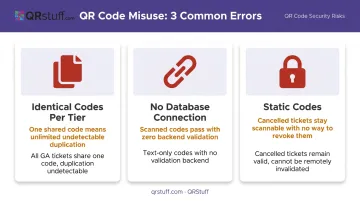
According to TicketSpice, dynamic QR codes are specifically used for high-volume entry points like festivals and stadiums because they support duplicate-ticket detection — something static codes fundamentally cannot do.
What You Need Before Setting Up QR Code Ticketing
Get these three things in place before generating a single code:
A Dynamic QR Code Generation Platform
Dynamic codes link each ticket to a live backend record. When scanned, they trigger a database lookup — not a static text read. That architecture enables:
- Real-time validation and denied-entry tracking
- Cancellation processing without issuing a new code
- Tier upgrades (GA to VIP) where the record changes but the printed code stays the same
QRStuff supports this with dynamic code generation where the destination URL or ticket record updates after the code is created. The bulk generation tool can also process hundreds or thousands of unique codes at once through an Excel-based upload — a practical necessity for any festival with significant ticket volume.
Scanning Hardware and a Dedicated Check-In App
Your check-in app must support offline scanning. Festival venues — fields, parks, warehouse districts — frequently have poor mobile data coverage. If your app can't operate on a locally cached attendee list, a connectivity drop at peak arrival time means your gates stop working.
Confirm before the event:
- Offline mode is enabled and the attendee list is downloaded to each device
- Backup devices are charged and on site
- The number of scanning lanes matches expected peak arrival volume
Configured Gate Roles and Staff Briefing
Entry staff need clear instructions for edge cases before gates open, not during the queue:
- Unreadable codes — low screen brightness, cracked screen, damaged print
- Denied entries — what to say and where to direct the attendee
- Escalation paths — who makes the final call on disputed tickets
How to Use QR Codes for Festival Tickets: Step-by-Step
Errors at any stage — generation, distribution, gate setup — create compounding problems on event day. Follow this sequence.
Setup and Ticket Generation
Generate a unique dynamic QR code for each individual ticket through your platform. The code should resolve to a specific ticket record in the backend, not encode attendee details directly in the code pattern itself.
When a scanner reads the code, the system runs a live database query — checking validity, usage status, and ticket tier. That lookup is what prevents fraud. If the code contains only a name and order number as plain text, any scan of a copy reads identical data with no way to detect duplication.
The most common setup error: generating all tickets of the same type with an identical QR code. At that point, anyone who photographs a friend's ticket can print their own.
Ticket Distribution
Deliver each QR code via email as a downloadable PDF. Where possible, also provide a mobile wallet link. Either way, advise attendees explicitly: download or screenshot the ticket before arrival. They will not always have data connectivity at the venue entrance.
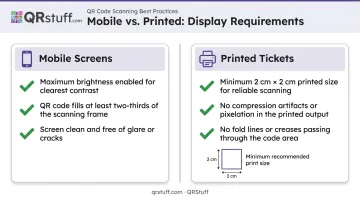
For reliable scanning at the gate, ensure tickets meet these display conditions:
- Mobile screens: maximum brightness, code filling at least two-thirds of the scanning frame
- Printed tickets: minimum 2cm × 2cm for the QR code itself (vendor guidance from Scanova, not an ISO requirement), no compression artifacts, no fold lines through the code
Gate Scanning and Entry Validation
At the gate, the sequence is: scan → live lookup → pass or fail → gate opens or staff intervenes. Configure your app to return a distinct visual and audio alert for duplicate scans — a green tick for valid, a red alert for already-used or invalid codes. Staff who can hear a different tone for duplicates catch shared tickets without looking up from the device.
Common scanning failures in outdoor festival environments and how to handle them:
| Problem | Immediate Fix |
|---|---|
| Low screen brightness | Ask attendee to increase to maximum |
| Direct sunlight glare on scanner camera | Shade the device with your hand or body |
| Crumpled or wet printed ticket | Flatten against a hard surface; retry |
| QR code too small on mobile screen | Ask attendee to zoom in before presenting |
Monitoring During the Festival
Use your platform's live dashboard to watch three numbers throughout the event:
- Check-in rate per gate — if one gate is moving significantly slower, pull staff from a quieter lane
- Scanned vs. total capacity ratio — tells you how far through arrival you are
- Denied entry rate — a spike at one gate often points to a scanner hardware issue, not fraud
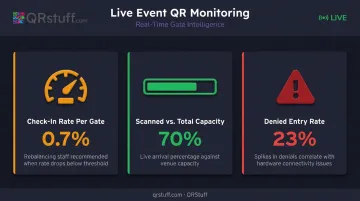
If scan confirmation times slow or a gate goes offline, your fallback is the locally cached guest list. Set up offline mode before doors open — once the queue builds, there's no time to configure it.
Best Practices for Using QR Codes Effectively at Festivals
Error Correction for Physical Tickets
Print QR codes at Level H error correction for any physical wristbands or paper tickets. According to DENSO WAVE, Level H allows the code to remain scannable with up to 30% of the surface damaged — accounting for moisture, smudging, and folding in outdoor conditions. When you add a logo to a QR code, Level H is what makes that safe: the logo covers part of the code, but Level H's built-in redundancy fills the gap.
QRStuff automatically raises the error correction level when logo customization is applied — the correct default for wristbands and branded tickets.
Dynamic Codes for Late Changes
Set ticket transfers, cancellations, and upgrades to update the backend record — not reissue the code. With dynamic QR codes, the physical or digital ticket in the attendee's hand doesn't change; only the record it resolves to does. This eliminates the need to coordinate reprints for tier upgrades or last-minute cancellations.
The use cases that benefit most from this approach:
- Ticket transfers — reassign ownership without touching the physical code
- Tier upgrades — update entitlements in the backend after late-sale purchases
- Cancellations — invalidate a code instantly without chasing the original ticket
Build a Connectivity Contingency
Before gates open, every scanning device should have:
- Offline mode enabled in the check-in app
- The full attendee list downloaded locally
- A defined manual verification process — ID check against the downloaded list — that staff can execute without significantly slowing the queue
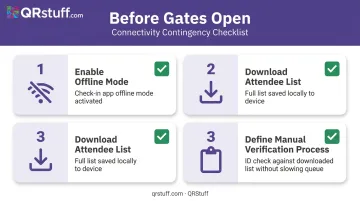
Humanitix notes that offline app use requires the attendee list to be downloaded while the device is still in data range. Don't wait until you're on site to do this.
Post-Event Analytics
After the festival, pull scan timestamps and gate-by-gate data. The questions worth answering:
- Which 30-minute window saw the highest arrival volume, and was gate staffing matched to it?
- Which gates generated the most denied entries, and why?
- Which ticket tiers arrived earliest vs. latest?
Eventbrite's platform, for example, gives real-time access to check-ins, attendance, and on-site sales data — the same type of scan-level data that, reviewed after the event, directly informs staffing and gate layout decisions for the next edition. Eventbrite's platform, for example, gives real-time access to check-ins, attendance, and on-site sales data — the same scan-level data that, reviewed post-event, directly shapes staffing and gate layout decisions for the next edition. The goal isn't just smoother entry on the day; it's a shorter feedback loop between each festival and the one that follows.
Conclusion
Reliable QR ticketing at festivals is a configuration problem before it's a technology problem. The code itself is only as effective as the system it connects to, the device scanning it, and the staff operating it. Align all three before gates open, and entry moves fast with far fewer interventions on the day.
Once the festival closes, treat scan data as an operational asset. Every timestamp and gate metric is information about what worked, what slowed down, and where to adjust next time. Organizers who review that data systematically consistently reduce entry friction — each event becomes a baseline the next one improves on.
Frequently Asked Questions
Can I use an RSVP QR code for events?
Yes, but a QR code can link to an RSVP form or registration page and serves a different function than a ticket validation code. RSVP codes drive registrations; ticket QR codes authenticate entry by triggering a live record lookup when scanned at the gate.
What is the difference between a static and dynamic QR code for festival tickets?
Static QR codes contain fixed data that cannot be changed after creation, so anyone with a copy can use it freely. Dynamic QR codes link to a live record that can be updated, redeemed, and invalidated in real time — that's what makes them suitable for ticket validation.
How do I prevent ticket fraud with QR codes at a festival?
Three controls cover most fraud scenarios:
- Use dynamic codes tied to individual ticket records
- Configure single-scan validation so re-scans of redeemed codes trigger an alert
- Give staff a clear visual or audio signal for duplicates so they can intercept at the gate
Do festival attendees need an internet connection to show their QR code ticket?
No — once the QR code is saved to their device, attendees don't need connectivity. The scanner needs backend access, not the attendee's phone. Advise everyone to download or screenshot their ticket before arriving at the venue.
Can the same QR code be used for re-entry across multiple days of a festival?
Re-entry permissions are configured in the ticketing platform, not the QR code itself. Multi-day passes can be set to allow multiple scans across designated days; single-day tickets are locked to one redemption.
What should I do if a QR code won't scan at the festival gate?
Check screen brightness first, shade the scanner from direct sunlight, and clean the lens. Ask the attendee to zoom in on the code before trying again. If it still fails, verify against the offline guest list and log a manual note for post-event reconciliation.