Yet many merchants still treat QR payments as an afterthought. They don't understand how the technology actually works, which code type suits their operation, or what security risks to watch for.
This guide covers all of it. You'll learn how QR payments work end-to-end, the practical difference between static and dynamic codes, the key benefits, and a five-step setup walkthrough you can follow today.
Key Takeaways
- QR code payments let customers pay by scanning a code with their smartphone — no card reader required.
- Static codes are reusable but trackless; dynamic codes are transaction-specific and support real-time analytics.
- Setup costs are minimal: choose a payment provider, generate your merchant code, place it, and test it.
- Security is strong when codes come from verified sources — tokenization, biometrics, and 2FA protect every transaction.
- The same QR infrastructure scales from a single pop-up booth to thousands of retail locations — no hardware investment needed.
What Are QR Code Payments?
A QR code payment is a contactless transaction method where a merchant displays a code — printed on card, shown on a screen, or embedded in a digital document — and the customer scans it with their smartphone to initiate payment. No card swipe, manual entry, or physical terminal required.
What Gets Encoded in a Payment QR Code
The code itself isn't just a link. Based on EMVCo's QR code payment specifications, a payment QR code encodes structured data fields including:
- Merchant account information (which payment network or gateway receives the funds)
- Transaction currency and amount (optional in static codes, fixed in dynamic)
- Merchant name and category code
- A CRC checksum to verify data integrity
This structured data tells the customer's banking app or wallet exactly where to route the money — and explains why codes from different providers can still be read by compatible apps.
Two Directions of Payment
EMVCo defines two scan models:
- Merchant-presented mode — the merchant displays a QR code and the customer scans it. This is the most common setup for retail, restaurants, and online checkout.
- Consumer-presented mode — the customer generates a QR code inside their banking app and the merchant scans it at the point of sale. Common in supermarkets and cafés with mobile POS systems.
Most businesses start with merchant-presented mode because it requires no scanning hardware on the merchant's end.
How QR Code Payments Work
The end-to-end payment flow is straightforward:
- Merchant displays QR code — at a counter, on a table card, on a checkout screen, or inside an invoice PDF
- Customer opens their app — banking app, mobile wallet (PayPal, Google Pay, Apple Pay, etc.), or phone camera
- Customer scans the code — payment details populate automatically
- Customer reviews and confirms — they see the merchant name and amount before approving
- Merchant receives confirmation — payment is processed and both parties see a completed status
The entire sequence takes seconds, and the customer never types a card number or account detail.
How that flow gets initiated depends on who generates the code. There are three main models:
Merchant-Initiated vs. Customer-Initiated Payments
| Model | How It Works | Best For |
|---|---|---|
| Merchant-initiated | Business generates one static or per-transaction code; any compatible app scans it | Retail counters, restaurant tables, ecommerce checkout, invoice PDFs |
| Customer-initiated | Customer's app generates a personal code; merchant scans it at POS | Large-format retail with mobile POS infrastructure |
| Payment link / QR invoice | Unique code generated per transaction, embedded in a digital invoice or email | Service businesses, B2B invoicing, ecommerce order confirmations |
Which Apps Are Compatible?
The major wallets and payment apps all decode the same underlying payment data:
- Apple Pay, Google Pay
- PayPal, Venmo, Cash App
- WeChat Pay, Alipay+
- Most bank mobile apps
Businesses don't need customers to download anything new. Pew Research reports that 91% of U.S. adults own a smartphone in 2025, and the vast majority already have at least one compatible payment app installed.
Static vs. Dynamic QR Codes for Payments
Static and dynamic QR codes serve different payment needs — choosing the wrong type creates operational headaches that are hard to fix without reprinting codes or rebuilding workflows.
Static QR Codes
A static QR code encodes fixed information at creation. The same code works for every transaction, and the customer manually enters the payment amount. Per EMVCo-based specifications, static codes use Point of Initiation Method value 11.
Best for: Market stalls, donation points, service counters where simplicity matters more than per-transaction tracking.
Limitations: No scan analytics, no order tracking, no way to update destination without reprinting.
Dynamic QR Codes
A dynamic QR code points to an editable destination. The transaction amount, order ID, and destination URL can all be updated without printing a new code. Dynamic codes use Point of Initiation Method value 12 and capture real-time scan data: who scanned, when, on what device, and from which location.
Best for: Ecommerce, invoicing, multi-location retail, any business that needs clean per-transaction accounting.
Choosing Between Them
| Static | Dynamic | |
|---|---|---|
| Cost | Free | Requires a QR platform subscription |
| Reusable | Yes | Yes (destination changes, code stays) |
| Amount encoded | No (customer enters manually) | Yes |
| Scan analytics | None | Real-time |
| Update without reprint | No | Yes |
| Best for | Simple, low-volume setups | Ecommerce, invoicing, multi-location |
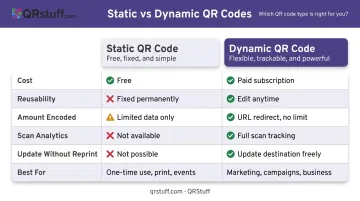
QRStuff supports both types, with dynamic payment QR codes available on paid plans. The analytics dashboard updates in real time — every scan logs device type, geolocation, and timestamp the moment a customer scans.
Key Benefits and Business Use Cases
Why Merchants Choose QR Payments
- No hardware cost — a printed code or screen display replaces a card terminal (the Stripe Reader S700 runs $299; a printed QR stand costs almost nothing)
- Faster checkout — customers confirm payment in their already-open banking app
- Built-in security — biometric authentication, tokenization, and 2FA happen on the customer's device
- Contactless by default — no shared surfaces, no cash handling
- Easy multi-channel deployment — the same code type works in-store, on invoices, and on checkout pages
Where QR Payments Work Best
- Retail checkout counters: scan-to-pay replaces or supplements card terminals
- Restaurants and cafés: table QR codes support pay-at-table and order-and-pay flows
- Ecommerce checkout pages: embedded codes let mobile users skip manual card entry
- Invoicing and B2B payments: QR-linked invoices speed up collections and cut manual bank transfers
- Events and pop-ups: no POS hardware needed — payments work anywhere with a mobile signal
Scalability Without Infrastructure
A micro-business can start with a single printed code. An enterprise can deploy dynamic codes across thousands of locations — with centralized scan tracking — using the same platform. Juniper Research forecasts global QR code payment value growing from $5.4 trillion in 2025 to over $8 trillion by 2029, putting it firmly in the same tier as card payments by volume.
That growth is already showing up at scale. CVS Pharmacy integrated PayPal and Venmo QR codes across 8,200+ stores; Walmart chose QR codes through Walmart Pay over NFC entirely. Both are using the same underlying technology a small retailer can deploy tomorrow.
How to Set Up QR Code Payments for Your Business
Step 1 — Choose a Payment Provider
Your payment provider processes the actual funds. The major options:
- Stripe — Payment Links with built-in QR generation; no expiry on the code
- PayPal / Venmo — merchant QR display for in-person and remote payments
- Square — QR ordering and scan-to-pay for restaurants and retail
- Revolut Business — create a Payment Request, select QR code, set currency and amount
- Adyen — wallet-specific QR codes for enterprise POS environments
Key selection criteria:
- Transaction fees and settlement timing
- Supported currencies and regions
- Integration with your existing POS or ecommerce platform
- Which mobile wallets your customers already use
Step 2 — Create Your Merchant QR Code
Two paths:
Through your payment provider's dashboard — Stripe, PayPal, and Square all generate QR codes linked directly to your merchant account. Fastest route for a basic setup.
Through a dedicated QR platform — For merchants who want custom branding, real-time analytics, or multi-location management, QRStuff generates dynamic payment QR codes with custom colors, logos, and brand patterns. Supported payment types include:
- PayPal, Venmo, UPI, Zelle, and Bitcoin
- A general URL option for any other payment page
Dynamic codes track scan data by location, device, and time — useful for identifying which counter or campaign drives the most payment activity.
Custom branding (logos, colors, shapes) is available on QRStuff's Full Suite plan; the Enterprise tier adds bulk generation, API access for per-transaction code creation, and SSO. See QRStuff's pricing page for current rates.
Step 3 — Place the QR Code Where Customers Will Scan It
Deployment options by context:
- Retail/restaurant: Printed countertop stand or table card
- POS environment: Displayed on checkout screen or register
- Ecommerce: Embedded on checkout page or in order confirmation emails
- Remote billing: Inside invoice PDFs, shared via email or messaging apps
QRStuff recommends a minimum print size of 2cm x 2cm for reliable scanning. Use SVG or EPS for professional printing — vector formats scale to any size without quality loss. Include a short instruction like "Scan to Pay" — most customers won't scan without a prompt.
Step 4 — Test the Payment Flow Before Going Live
Before your first real transaction:
- Scan the code on both iOS and Android devices
- Confirm the correct merchant name and amount display on the payment screen
- Verify funds route to the right account
- Set up a fallback option — card terminal or cash — for network disruptions
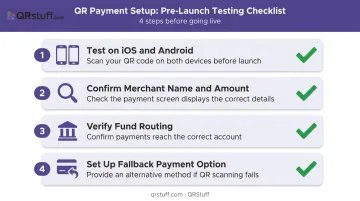
Stripe recommends testing every QR code before deployment to confirm it triggers the correct payment process and displays the correct merchant details.
Step 5 — Train Staff and Monitor Performance
With the technical setup confirmed, the last step is making sure your team is ready to handle payments — and problems. Staff need to know:
- How to confirm a completed payment on the merchant side
- How to handle a failed scan (manual fallback, network check)
- When to escalate to a supervisor or alternative payment method
For businesses using dynamic codes, review scan analytics weekly. Look for peak payment times, high-traffic locations, and any points in the flow where scan volume drops off unexpectedly.
Keeping Your QR Code Payments Secure
QR payments are secure when managed correctly. The risks come from misuse, not from the technology itself.
The Real Threats
- Fake codes over legitimate ones — stickers placed over real codes in physical locations, redirecting to fraudulent payment pages (documented in parking meter scams across multiple U.S. cities)
- Quishing — phishing links embedded in QR codes sent by SMS or email; the FBI IC3 warned in 2022 that cybercriminals tamper with physical QR codes to steal financial information
- Untrusted code generators — third-party tools that may expose merchant or customer data
Practical Security Measures for Merchants
- Generate codes only through verified payment systems or trusted QR platforms (SOC2-certified and GDPR-compliant where possible)
- Use HTTPS payment pages exclusively
- Inspect physical QR displays regularly — look for stickers placed over your code
- Enable real-time transaction alerts on your payment account
- Post a visible note: "Always confirm our business name on the payment screen before approving"
- Use dynamic QR codes — if a code is ever compromised, update the destination URL instantly without reprinting
QRStuff's dynamic codes support instant URL editing via the dashboard and offer password protection for access-controlled payment links. The platform is SOC2 and GDPR compliant, and supports 2FA for merchant account security.
Built-In Protections That Work in Your Favor
Beyond what merchants control, QR payments include strong built-in protections at the platform level:
- Payment tokenization replaces card numbers with single-use tokens throughout the transaction — card details are never exposed (EMVCo's tokenization standard governs this across the payment chain)
- Customers must authenticate via Face ID, fingerprint, or PIN before any payment completes
- Most major wallets add a second verification step through their banking app
These layers make a compromised QR code far less dangerous than a stolen physical card.
Frequently Asked Questions
How do I make a payment using a QR code?
Open your banking app, mobile wallet (PayPal, Apple Pay, Google Pay), or phone camera and point it at the merchant's code. Your payment details populate automatically — confirm the merchant name and amount, then confirm. The entire process takes seconds with no manual data entry.
Are QR code payments safe?
Yes, when codes come from verified sources. Tokenization, biometric authentication, and 2FA protect every transaction at the device level. Customers should always confirm the merchant name on-screen before approving, and merchants should regularly check physical codes for tampering.
What is the difference between static and dynamic QR codes for payments?
Static codes contain fixed information and work for every transaction ; the customer enters the amount manually. Dynamic codes are generated per transaction with the amount and order ID encoded, and they support real-time scan tracking. Dynamic codes suit ecommerce and multi-location operations where per-transaction tracking matters.
Do I need special hardware to accept QR code payments?
No. A printed code or a screen to display it is all you need on the merchant side. The customer's smartphone handles the scanning, making QR payments one of the lowest-cost payment acceptance methods available.
Can I use the same QR code for all transactions?
Yes — a static code is permanently reusable. Print it once, display it, and customers scan it for every purchase. If you need the amount pre-filled and want per-transaction records, generate a fresh dynamic code for each order instead.
What payment apps support QR code scanning?
Apple Pay, Google Pay, PayPal, Cash App, Venmo, WeChat Pay, Alipay+, and most banking apps all support QR payment scanning. The majority of smartphone users already have at least one compatible app, so there's no need to direct customers to download anything new.