For brands, that drop-off means incomplete customer data, reduced recall reach, and missed post-purchase touchpoints. The fix isn't complicated — it's a QR code that turns registration into a single scan.
This guide walks through exactly how to set it up: the prerequisites, the step-by-step process, where to place codes, and the practices that separate a working warranty registration programme from one customers ignore.
Key Takeaways
- Use dynamic QR codes on printed warranty materials so you can update destinations and track scans without reprinting.
- Build and test your mobile-optimised registration form before generating any QR code.
- Place codes on the warranty card insert, exterior packaging, and the product itself to cover every scanning moment.
- Limit your registration form to 4–5 fields maximum to reduce abandonment.
- Use QRStuff's analytics dashboard to monitor registration completion rates and pinpoint drop-off.
Why Traditional Warranty Card Registration Falls Short
Paper-based warranty registration stacks friction at every step. Customers have to locate the card, find a pen, write legibly, find a stamp, and actually mail it — or manually type a long URL into a browser while juggling new product packaging. Most don't.
The University of Michigan data tells the story: 29% of consumers seldom register products, and 16% never do. That same research found that 87% would be more likely to register if the process were simpler or if activation required it. The barrier isn't motivation — it's effort.
The downstream consequences for businesses are concrete:
- Recall contact gaps — unregistered customers can't be reached directly when a product is recalled or a safety notice is issued. The CPSC specifically cites registration as the mechanism manufacturers use for recall outreach.
- Lost support context — when an unregistered customer contacts support, agents lack purchase date, retailer, or serial number data, slowing resolution times.
- Fewer repeat purchase opportunities — registered customers are contactable for extended warranty offers, accessory promotions, and loyalty programs.
QR codes eliminate that friction at the source — turning a multi-step process customers ignore into a two-tap action they actually complete.
What You Need Before Setting Up Warranty Registration QR Codes
Before generating a single code, three things need to be in place:
1. A mobile-optimized registration form or landing page This is what the QR code points to. Without a form that loads fast and works on a phone screen, the scan leads nowhere useful. Google's research shows 53% of mobile site visits are abandoned if a page takes longer than 3 seconds to load — speed matters as much as design.
2. A dynamic QR code generator that supports URL editing and scan tracking Static codes encode the destination URL permanently. If your registration form URL ever changes after printing, every physical code in circulation breaks. Dynamic codes use a redirect layer, so the destination can be updated through the dashboard without touching the printed code. QRStuff's dynamic codes include scan tracking built in, which is useful for measuring registration rates by product line.
3. A defined data collection scope Decide upfront which fields the form will capture (name, email, purchase date, serial number, retailer) and confirm your privacy policy covers that data. Too many form fields is a leading reason registration rates drop.
For multi-SKU operations: If you're printing across multiple product lines, you'll also need bulk QR code generation capability before going to print — generating codes one by one at scale isn't viable.
How to Use QR Codes for Warranty Card Registration — Step-by-Step
Two errors kill warranty QR registration programmes before they start: skipping form testing before print, and using a static code. Every step below is load-bearing.
Step 1: Build and Test Your Registration Form
Build for mobile first. A well-structured form reduces drop-off and cuts manual entry for customers:
- Use minimal fields with large tap targets and autofill support
- Append URL parameters to pre-populate product model or SKU — customers type less, complete more
- Keep the form URL stable; changing it after printing breaks every physical code already in the field
That last point is the core argument for dynamic QR codes. If your form migrates platforms or your URL structure changes, a dynamic code can be redirected without a reprint.
Step 2: Generate a Dynamic QR Code for Each Product or SKU
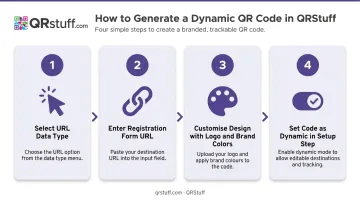
In QRStuff, the process follows four steps:
- Select "URL" as your data type from the DATA TYPE panel
- Enter your registration form URL in the DESTINATION step
- Customise the design — add logo, brand colors, and call-to-action text in the STYLE step
- In the SETUP step, set the code as dynamic — this is where you select static or dynamic before downloading
For brands managing multiple product lines, QRStuff's bulk QR code generator creates unique codes per SKU in a single batch operation rather than one by one. The Enterprise plan includes unlimited batch processing and API access, making it practical to integrate QR code generation directly into production or inventory management workflows.
Step 3: Customise the QR Code for Trust and Scannability
Branded QR codes consistently outperform plain black-and-white ones. Customers are more likely to scan a code that looks intentional and official — and less likely to ignore it as generic packaging noise.
QRStuff allows full customisation: logo placement in the centre of the code (safely covering up to 30% of the surface without affecting scan reliability), custom module colors, corner shapes, and frame text like "Scan to Register Your Warranty."
Technical requirements to follow:
- Minimum print size: 2cm × 2cm for simple URLs — smaller than this becomes unreliable in real-world conditions
- Contrast: Dark code on a light background; avoid inverted colors (light on dark) as older scanners struggle with them
- File format: SVG or EPS for print — vector formats scale without quality loss; high-res PNG at 300 DPI minimum for raster
Step 4: Test Across Devices Before Printing
Before committing to a print run, scan the code using multiple devices. Modern iOS (since iOS 11) and Android devices scan QR codes natively through the built-in camera — no separate app needed. Test on both platforms, in realistic conditions.
Pre-print testing checklist:
- Scans successfully on iOS (native Camera app)
- Scans successfully on Android (native camera or Google Lens)
- Form loads in under 3 seconds on mobile
- All form fields render and function correctly on a phone screen
- Form submission triggers a confirmation message or email
- Tested from arm's length (for warranty card insert) and further back (for box panel)
- Tested in varied lighting conditions
QRStuff's platform generates a live preview during creation and allows test scanning before download — use it before any file is sent to a printer.
Step 5: Embed the QR Code on Warranty Cards and Print Materials
The final step is placing the code in the right physical locations (covered in detail in the next section). For warranty card inserts specifically, include a brief instructional line beneath the QR code:
"Scan with your smartphone camera to register your warranty in under 60 seconds."
This single line eliminates uncertainty for customers who haven't scanned a QR code before, and it sets a time expectation that reduces hesitation.
Where to Place Your Warranty Registration QR Code
Placement determines when and whether customers actually scan. Each location serves a different moment in the post-purchase journey.
| Placement | Scanning Moment | Why It Works |
|---|---|---|
| Warranty card insert (inside box) | During unboxing | Highest intent — motivation to register peaks when the product is new and in hand |
| Product packaging exterior (box side/back) | Before or during unboxing | Reaches customers at retail and allows registration to begin before the box is opened |
| On the product itself (label or sticker) | Weeks or months post-purchase | Durable goods outlive their packaging; a code on the product remains accessible throughout the warranty period |
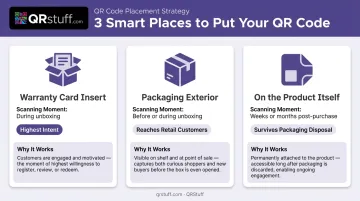
For products with 1–3 year warranty periods — standard for consumer electronics and appliances — product-level placement matters most. Longer-warranty products like DEWALT tools (3-year limited) or select Milwaukee tools (up to 5 years) make this even more critical.
Packaging rarely survives the first week. A label or sticker on the product itself stays scannable for the entire warranty period.
Best Practices for Warranty QR Codes That Drive Real Results
Use Dynamic Codes Without Exception
For any QR code going to print at scale, dynamic is the only sensible choice. QRStuff's dynamic codes let you update the destination URL through the dashboard at any time. The physical printed code stays unchanged but redirects to the new URL immediately. Given that warranty periods run 1–5 years, this protection against broken links is essential.
QRStuff guarantees 99.9% uptime (with actual historical uptime at 99.968% since 2008), and paid plan codes never expire provided the subscription remains active. Verify these terms with your QR provider before finalizing any print run.
Keep the Registration Form Short
Baymard Institute research found that 17% of users abandoned checkout flows because the process was too long or complicated, and that many forms can be reduced to 8 fields without losing necessary data. Nielsen Norman Group's UX research reinforces this: every extra field increases the chance users give up.
For warranty registration, the minimum viable field set is:
- Customer name
- Email address
- Product serial number or model
- Purchase date
Retailer can be added if operationally necessary. Everything else — phone number, address, demographic data — should be deferred to post-registration follow-up, not the initial form.
Monitor Scan Analytics to Measure Real Performance
Once the form is live, scan data tells you whether customers are actually engaging and where in the funnel they're dropping off. QRStuff's analytics dashboard tracks:
- Total scans and unique scans
- Device type (iOS vs Android)
- Geographic location (country and city level)
- Scan time and date

This data lets product and marketing teams identify whether low registration rates stem from poor QR code placement, slow form load times, or form abandonment — each requiring a different fix.
Set and Enforce Sizing and Contrast Standards
Brand teams regularly shrink QR codes to fit packaging aesthetics — and it's one of the most common causes of unscannable codes in the field. Before any packaging goes to final print approval, enforce these standards across every SKU:
- Minimum size: 2cm × 2cm
- Contrast ratio: At least 4:1 between the QR pattern and its background
- Testing: Scan every packaging variant under real-world lighting conditions before sign-off
Frequently Asked Questions
How do you scan a QR code for a warranty?
Open your smartphone's native camera app (no separate app needed on modern iOS or Android), point it at the QR code on the warranty card or packaging, and tap the notification that appears. This opens the registration form directly in your browser.
How do you get a QR code for a warranty card?
Use a QR code platform like QRStuff to generate a dynamic URL code pointing to your registration form. Download the code in a print-ready format — SVG or high-resolution PNG — and embed it in your warranty card design before sending to print.
What is a warranty QR code?
A warranty QR code is a scannable code printed on product packaging or warranty card inserts that directs customers to a digital registration page. It replaces paper forms and manual URL entry with a single scan.
Should I use a static or dynamic QR code for warranty registration?
Always use a dynamic QR code for printed warranty materials. Dynamic codes let you update the destination URL after printing and provide scan analytics. Static codes are fixed: if your form URL changes, the printed code breaks and can't be recovered without a reprint.
Can I update the destination URL of a warranty QR code after it's been printed?
Yes, if you used a dynamic code. Through the QRStuff dashboard, you can update the destination URL at any time. The physical printed code stays the same but redirects to the new URL immediately — no reprint required.
What information should a warranty registration form collect?
Capture the minimum viable set: customer name, email address, product serial number or model, and purchase date. Keep optional fields out — every extra field reduces completion rates with little operational upside.