The challenge most retail operators face isn't awareness — it's execution. Which use cases actually move customers? Where should codes live in-store? And how do you avoid the cost of reprinting every time a promotion changes?
This guide covers all of it: the right QR code types for retail, how to build and deploy them correctly, where to place them, and how to track what's working.
Key Takeaways
- Use dynamic QR codes for all printed in-store materials — they let you update destinations without reprinting signage
- Every code needs a visible reason to scan: "Scan to save 15%" outperforms an unexplained code every time
- Top placements that drive scans: entrance displays, shelf tags, checkout counters, fitting rooms, and product packaging
- Track scan data by location and time to identify which placements drive engagement, then cut the ones that don't
- Always test across multiple devices before committing to print
Top Ways to Use QR Codes in Your Retail Store
QR codes work best when each one serves a single, defined purpose. A generic code with no context rarely gets scanned. The most effective retail deployments connect a specific customer moment — pausing at a shelf, waiting to check out, trying on a jacket — to a relevant digital action.
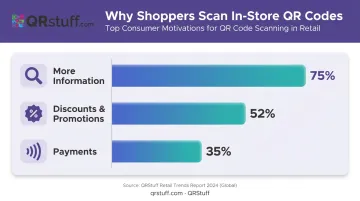
According to a 2026 Chain Store Age survey, the top reasons consumers scan QR codes are more information (75%), discounts (52%), and payments (35%). That ranking should guide your use case priorities.
Product Information and Extended Content
Shelf-tag QR codes are one of the highest-value placements in any retail environment. Packaging real estate is limited: skincare products can't list every ingredient, electronics can't include full spec sheets, food brands can't fit allergen cross-references on a label.
A QR code solves this without redesigning packaging. Link customers to:
- Ingredient lists and sourcing details
- How-to-use videos and care instructions
- Sizing guides and fit recommendations
- User-generated reviews and photo galleries
GS1 US research found 79% of consumers are more likely to buy when a scannable code provides the product information they want. For categories where purchase decisions are information-dependent, this is a direct conversion lever.
Promotions, Coupons, and Loyalty Programs
QR codes on checkout displays, signage, and receipts give customers direct access to time-limited offers without requiring staff intervention. A code that links to a loyalty enrollment page runs itself.
The key advantage here is dynamic codes: seasonal promotions, clearance events, and weekly offers can all be updated through the platform dashboard. The physical sign stays up; only the destination changes.
74% of consumers said they were likely to scan QR codes during Black Friday and Cyber Monday, with 56% motivated specifically by promotional offers. That means peak shopping events are your highest-leverage window to capture scans and drive conversions.
Payment, Reviews, and Social Growth
Beyond information and promotions, QR codes can handle checkout, reputation, and customer retention with minimal setup:
- Payment QR codes — Link to PayPal, Venmo, Zelle, or UPI for contactless checkout at pop-ups, secondary registers, or express lanes. QRStuff supports all of these without requiring third-party integrations.
- Review collection — A checkout counter code linking to your Google Review page increases post-visit review volume without staff prompting. Customers tap once; you get more reviews without asking.
- Social media and loyalty apps — Codes on bags, receipts, and fitting room mirrors can direct customers to Instagram, TikTok, or a loyalty app. QRStuff offers dedicated QR code types for both platforms, not just generic URL redirects.
What You Need Before Setting Up QR Codes in Your Store
Skipping setup prerequisites is how retailers end up with broken links on shelf tags or static codes they can't update when a product page changes. Three things to sort out before generating a single code:
A Clear Goal for Each Placement
Define the customer action before creating the code. "Scan for more info" is too vague to design around. "Scan to see the full ingredient list" or "Scan to join our loyalty program and get 10% off your first order" gives you everything you need: the destination URL, the CTA copy, and the success metric.
Without that specificity, you're placing a code with no measurable outcome — and no way to know if it's working.
A Dynamic QR Code Platform with Analytics
Static QR codes are a liability in retail. They lock the destination at creation — so every promotion change, expired product page, or broken link means reprinting physical signage. Retail QR users reported that broken links (26%) and expired offers (22%) are among the most common QR pain points, both of which dynamic codes eliminate.
QRStuff supports 40+ QR code types built for retail use cases:
- Coupons, URLs, and product pages
- Google Review links and feedback forms
- Wi-Fi credentials and payment portals
- Social media profiles and loyalty program sign-ups
Dynamic codes let you update the destination through the dashboard without reprinting a single tag. Analytics break down scans by location, device type (iOS vs. Android), and time of day — data that shapes smarter placement decisions over time.
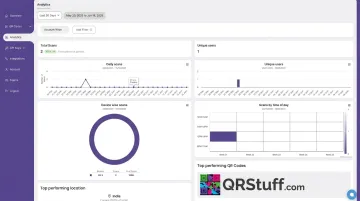
Analytics are available from the Lite Suite (£4/month) upward, with full analytics unlocked on the Full Suite (£15/month) and Enterprise (£185/month) plans.
Print-Ready Design Assets
QR codes going onto shelf tags, window decals, or wall signage need to be exported in SVG or EPS format — vector files that scale without pixelation regardless of print size. QRStuff exports both. PNG is acceptable for digital displays only.
Each code should include a CTA frame with clear copy before it goes to print. Codes without instructional copy — even something as simple as "Scan for today's offer" — see noticeably lower scan rates in-store.
How to Create and Deploy QR Codes in Your Retail Store
Setting Up and Creating Your QR Code
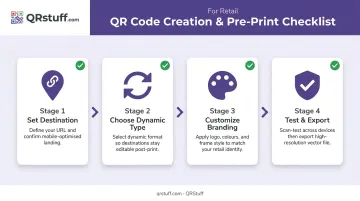
Start with the destination URL. Verify it's mobile-optimized and loads in under three seconds — slow landing pages are the leading reason customers abandon after scanning. Then:
- Select the QR code type that matches your goal (URL, coupon, Google Review, Wi-Fi, payment, social media)
- Create a dynamic version so the destination can be updated post-print if needed
- Customize for in-store visibility — add your store logo, apply brand colors, and choose high-contrast foreground/background settings
Branded QR codes build scan confidence. Shoppers are more likely to scan a code that visibly carries your store's identity than a generic black-and-white square they don't recognize. QRStuff supports logo uploads, custom color pickers, gradient fills, module and eye shape variations, and frame text for CTA labels — all previewable before download. Styling options are available on paid tiers.
Testing Before Print
Test every code before it reaches a printer. Scan across at least three device types — iOS, Android, and an older smartphone if available — and in lighting conditions that match the intended placement. Bright shelf lighting and dim fitting rooms behave differently for camera autofocus.
Confirm:
- The landing page loads correctly and matches the CTA copy on the code frame
- The destination is mobile-optimized (not a desktop page that doesn't render on a phone)
- The file is exported in SVG or EPS for print, not PNG
The most common pre-print mistake: generating a PNG at low resolution and discovering it's pixelated only after signage has been produced. Download vector files for anything going to print.
Deploying and Monitoring
Once deployed, run a quick in-store audit:
- Scan each code in its installed position
- Confirm placement height is roughly 4–5 feet for standing customers
- Check for adequate lighting and no visual obstructions (price tags, product overhang, shadows)
That audit catches placement problems before customers do. After launch, monitor scan analytics weekly for the first month. QRStuff's dashboard tracks total scans, unique scans, peak scan times, geographic distribution, and device type in real time. Use that data to:
- Retire placements that aren't generating scans
- Update seasonal destinations on dynamic codes as promotions change
- Match promotional offers to peak foot traffic windows
Where to Place QR Codes in Your Store for Maximum Impact
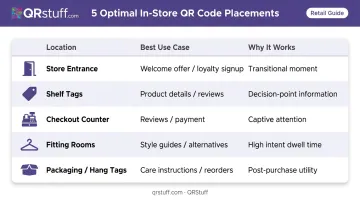
Placement is about intercepting natural attention. A shopper who's pausing, reading, or waiting is already primed to scan. Forcing a scan in the middle of active browsing, with no reason to stop, rarely works.
High-Converting Retail Placements
| Location | Best Use Case | Why It Works |
|---|---|---|
| Store entrance | Welcome offer or loyalty signup | Customers are transitioning and receptive |
| Product shelf tags | Product details, reviews, or how-to content | Decision moment — information has direct purchase impact |
| Checkout counter | Google Review link, loyalty signup, or payment | Captive attention while waiting |
| Fitting rooms | Style guides, size alternatives, complementary items | High intent, lower foot traffic = more time to engage |
| Product packaging / hang tags | Care instructions, reorder links, ingredient details | Post-purchase touchpoint with ongoing utility |
Placements to Avoid
- Below knee height — most customers won't crouch to scan
- Low-light areas without supplementary lighting or directional signage
- Glossy reflective surfaces — glare disrupts camera focus
- More than 3 feet from the customer without larger format signage guiding them to scan
Getting placement right also means getting size right. The practical minimum for close-range shelf scanning is ¾ × ¾ inch (2 × 2 cm). For wall signage or window displays scanned from 3 feet (1 meter) or further, apply the 10:1 rule: a 3-foot scanning distance needs roughly a 4-inch (10 cm) wide code. A 1.5 × 1.5 inch (4 × 4 cm) code is a safe default for most in-store applications.
- Below knee height — most customers won't crouch to scan
- Low-light areas without supplementary lighting or directional signage
- Glossy reflective surfaces — glare disrupts camera focus
Best Practices for Using QR Codes in Retail Effectively
Use Dynamic Codes on All Printed Materials
Static codes lock the destination permanently. Every promotion change, product page update, or broken URL requires a physical reprint. Dynamic codes on QRStuff let you update the destination through the dashboard — the printed code stays unchanged. No reprinting, no downtime.
Always Label the Code with a Reason to Scan
The code should never appear alone. One line above or below is all it takes: "Scan for 10% off," "Scan to see full ingredient list," "Scan to join rewards." A labeled code gives customers a reason; an unlabeled code gives them uncertainty.
Prioritize Scannability Over Design
Branded QR codes perform better than plain black-and-white versions, but over-customizing creates problems. Watch for:
- Insufficient contrast between the QR pattern and background (dark pattern on a light background is the reliable default)
- Logo placement that overlaps the data pattern rather than the center quiet zone
- Too many competing colors reducing readability on lower-end cameras
Always test customized codes on older devices — they're the most likely to struggle with heavily styled codes.
Review Analytics Monthly — Then Act on Them
QRStuff's dashboard tracks the metrics that matter most for retail placements:
- Scan volume and unique vs. repeat scanners
- Peak scan times and geographic distribution
- Device breakdown (iOS vs. Android, mobile vs. tablet)
This data shows which placements earn their space and which should be relocated or retired. Seasonal campaigns — holiday sales, clearance events, new arrivals — can be activated and deactivated by updating a dynamic code's destination. The sign stays up; only the URL changes.
Frequently Asked Questions
Do customers need a special app to scan QR codes in my store?
Most modern smartphones scan QR codes natively through the built-in camera app. iOS 11 and later includes native recognition, and Android 13+ has a built-in scanner. Customers with older devices may need a free scanner app, but that covers a small share of current smartphone users.
What size should QR codes be on retail shelf tags and signage?
For shelf tags scanned at close range (10–30 cm), 2 × 2 cm is the practical minimum, though 4 × 4 cm is a safer default. For wall signage or window displays, apply the 10:1 rule — a code scanned from 1 meter needs roughly 10 cm width. Always maintain a quiet zone of at least 4 modules around the code border.
What's the difference between static and dynamic QR codes for a retail store?
Static codes permanently embed the destination URL and cannot be changed after printing. Dynamic codes use a redirect that can be updated anytime through your platform dashboard. For retail, where promotions, landing pages, and products change regularly, dynamic codes are the only practical choice for printed materials.
Can I use one QR code across multiple store locations?
A single dynamic code can point all locations to the same destination. However, separate codes per location are recommended when you want to track scan performance by store or serve location-specific content. QRStuff allows multiple codes within a single account, with analytics filterable by individual code.
How do I know if my in-store QR codes are actually being scanned?
Dynamic QR code platforms like QRStuff provide analytics dashboards showing total scans, unique scans, peak scan times, device type, and geographic distribution. Without a dynamic code, there is no way to measure performance — static codes generate no data whatsoever.
What should I do if a QR code on printed signage links to the wrong page?
With a dynamic QR code, update the destination in the QRStuff dashboard and the fix takes effect immediately, with no reprinting required. The redirect updates in real time, so the next scan will reach the correct page.