Introduction
Picture this: you've printed 50,000 product boxes with a QR code linking to your launch campaign — then the campaign ends, the URL changes, and every single one of those codes now leads nowhere. Reprinting isn't just expensive (short-run packaging reprints can run thousands of dollars); it's often impossible once materials are in the field.
Dynamic QR codes exist precisely to prevent this scenario. Instead of locking a destination into the printed pattern, they point to a redirect server that you control — meaning you can update where the code sends people at any time, without touching the physical code itself.
This guide covers everything you need to know: how dynamic QR codes work technically, how they differ from static codes, their key benefits, common use cases across industries, and how to create one.
Whether you're a marketer running print campaigns, a brand manager overseeing product packaging, or a business owner managing menus and signage, you'll leave with a clear picture of what dynamic QR codes can do for you.
Key Takeaways
- A dynamic QR code encodes a short redirect URL — not the final destination — so you can change where it points without reprinting.
- Unlike static codes, dynamic codes support real-time analytics, URL editing, and broken-link recovery — all managed from a single dashboard.
- Common applications include marketing campaigns, retail packaging, restaurant menus, healthcare, and hospitality.
- Free plans include scan caps, code expiration limits, and basic analytics; paid plans remove all three restrictions.
- QRStuff lets you generate, manage, and track dynamic QR codes at any scale, backed by a 99.9% uptime guarantee.
How Does a Dynamic QR Code Work?
The Two-URL Mechanism
Every dynamic QR code physically encodes a short, fixed URL — something like qrs.ly/abc123 — that points to a redirect server. When someone scans the code, their device hits that server, which immediately forwards them to the actual destination you've configured. The printed pattern never changes; only the server's forwarding instruction does.
This means you can update a code's destination as many times as you need, even after it's been printed, distributed, and scanned thousands of times.
How Analytics Get Captured
Because every scan passes through the redirect layer before reaching the destination, the platform logs detailed data at that moment. QRStuff captures:
- Distinguishes total scans from unique visitors to separate new engagers from repeat ones
- Timestamps each scan to identify peak engagement windows
- Records device type and OS (iOS vs. Android, mobile vs. desktop)
- Pinpoints geographic location at country and city level from IP data
- Tracks referring website or app for codes shared digitally
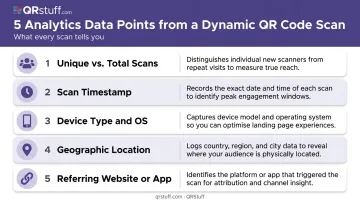
This data populates in real time on the dashboard and can be exported as CSV or PDF for deeper analysis.
Scan Reliability at Small Sizes
That same short encoded URL that enables the redirect also produces a simpler, less dense pixel pattern. GS1 testing data confirms that QR codes with fewer encoded characters perform more reliably at small print sizes — relevant for product packaging, labels, and event materials where space is tight.
The Uptime Dependency
Dynamic codes rely on the redirect server being online. If it goes down, scans fail — which is more than a user experience issue if the code carries regulatory information (such as EU wine labelling or electronic patient leaflets required to remain continuously accessible).
This is why provider uptime matters. QRStuff's infrastructure has maintained 99.968% actual uptime since January 2008 against a documented 99.9% service guarantee, translating to under three hours of total downtime per year on average. For context:
- Static QR codes have no server dependency — they work as long as the destination URL exists
- Dynamic QR codes require redirect server availability, making provider reliability a direct factor in scan success
Dynamic QR Code vs. Static QR Code: Key Differences
Static QR codes encode the final destination data (a URL, contact card, Wi-Fi credentials) directly into the QR pattern at creation. Once printed, that data is permanent. If the URL breaks or content needs updating, you must regenerate and reprint the code from scratch.
Dynamic codes, by contrast, encode only a redirect URL. The destination is stored server-side and can be changed at any time.
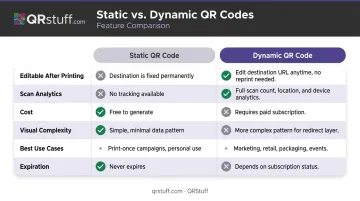
Side-by-Side Comparison
| Feature | Static QR Code | Dynamic QR Code |
|---|---|---|
| Editable after printing | No | Yes |
| Scan analytics | None | Full (scans, device, location, time) |
| Cost | Free | Subscription required |
| Visual complexity | Higher (more data encoded) | Lower (short URL only) |
| Best for | Wi-Fi credentials, contact cards, fixed URLs | Campaigns, packaging, menus, anything updatable |
| Expiration | Never | Platform-dependent; paid plans typically don't expire |
When to Use Each
Use static codes when:
- The destination will never change
- You don't need tracking data
- Budget is the primary concern
Use dynamic codes when:
- Content may be updated (promotions, menus, product pages)
- You need to measure campaign performance
- Materials are expensive to reprint at scale
That said, neither type looks different to the person scanning. Static and dynamic QR codes are visually indistinguishable — the difference is entirely in how the backend processes the scan.
Key Features and Benefits of Dynamic QR Codes
Editable Destination URL
The most obvious benefit: update the linked content without reprinting. A retail brand, for example, might launch a product with a QR code pointing to the campaign landing page — then redirect that same code to a review aggregation page once the promotion ends. The code on the packaging stays the same; only the destination changes.
QRStuff doesn't restrict how many times you can update a code's destination on paid plans.
Real-Time Scan Analytics
According to eMarketer, 98% of marketers reported a positive impact from QR codes — yet only 12% measured revenue contribution. Dynamic QR analytics close that gap.
With scan-level data on location, device, time, and unique vs. repeat users, marketers can:
- Measure actual ROI from print placements
- Compare performance across physical locations
- Identify which poster, shelf, or flyer drives the most engagement
- Time campaigns around peak scan windows
Error Correction and Link Recovery
URLs break. Pages get moved, domains lapse, redirects misconfigure. With a static code, a broken link means a broken code — permanently. With a dynamic code, you fix it in the dashboard in under a minute and every existing print instantly works again.
Custom Branding
Dynamic codes can carry brand colors, embedded logos, custom shapes, and styled frames — all without affecting scannability.
QRStuff supports colors, gradients, logo embedding, background images, and AI-assisted styling, starting from the Lite Suite tier. The platform applies high error correction to keep codes scannable even with a logo covering the center.
Security and Compliance
For regulated industries, QRStuff offers:
- Password-protected QR codes for restricted content
- Role-based access controls and multi-user team management
- SSO (SAML 2.0 and OpenID Connect) for enterprise environments
- GDPR and SOC2 compliant
- Full audit logging for accountability
Common Use Cases Across Industries
Marketing and Advertising
Dynamic codes on print ads, billboards, and direct mail let campaign teams swap destinations mid-flight — pointing to a different landing page, updated offer, or localized content — without touching a single piece of printed material.
Scan analytics show which placements drive action, enabling budget reallocation based on actual performance rather than assumptions. Key capabilities include:
- A/B testing: Run two codes side-by-side and compare scan-to-conversion rates across destinations
- Mid-campaign redirects: Update offer URLs or landing pages without reprinting any materials
- Performance tracking: Identify which physical placements generate the most scans and conversions
Retail and Product Packaging
Brands are already moving in this direction. The GS1 Sunrise 2027 initiative is driving the US retail industry to enable 2D barcode capabilities (including QR codes) at point-of-sale checkouts by 2027. A single GS1 Digital Link QR code handles checkout scanning while also linking consumers to nutrition data, sustainability credentials, warranty registration, or regulatory disclosures.
QRStuff supports GS1 Digital Link as a dedicated QR code type, including bulk generation for SKU- and batch-level coding. For brands planning packaging compliance before the 2027 deadline, this matters.
Restaurants, Hospitality, and Healthcare
- Restaurants: 62% of adults said they'd use a QR code to access a menu if offered. Dynamic menus mean pricing and availability stay accurate without reprinting laminated cards.
- Hotels: In-room guides, local recommendations, and booking links can be updated centrally across hundreds of rooms.
- Healthcare: A study at Tshwane District Hospital found 85% of patients were willing to scan QR codes for electronic patient information leaflets. Dynamic codes allow clinical teams to keep medication information and appointment links current — and redirect codes if pages are restructured.
How to Create a Dynamic QR Code
The Basic Steps
Creating a dynamic QR code on QRStuff takes four steps:
- Select your QR code type — URL, vCard, PDF, social media, GS1 Digital Link, or 40+ other options. URL codes are the most versatile starting point for most campaigns.
- Enter your destination content — paste the URL or upload your file. Ensure the URL includes
https://or the generator won't accept it. - Customise the design — add brand colours, gradients, logo, custom shapes, and frames (available from Lite Suite and above).
- Choose static or dynamic, then download — select the dynamic option to enable editing and analytics, name the code, assign it to a project folder, and export in PNG, SVG, or PDF format. SVG is recommended for large-format print.
What to Look for in a Platform
The platform you choose directly affects scan reliability, data quality, and how much flexibility you retain after printing. Key criteria:
- Uptime reliability — the redirect server is the single point of failure for every code you print. Look for a documented guarantee (QRStuff: 99.9%, with 99.968% actual since 2008).
- Analytics depth — scan location, device type, time-based trends, and unique vs. total scans.
- Edit flexibility — no limit on destination updates post-creation.
- Compliance certifications — GDPR and SOC2 matter if you're in healthcare, finance, or operating in the EU.
- Scale options — bulk generation (QRStuff's Full Suite handles up to 500 codes per batch; Enterprise offers unlimited batching) and API access for programmatic creation.
Brands like Walmart, Coca-Cola, Marriott International, and PepsiCo use QRStuff for enterprise QR management — a useful signal if you're evaluating platform reliability at scale.
Test Before You Print
Always scan across at least two devices and in varied lighting before printing at scale. Confirm the redirect resolves to the correct destination and that analytics are recording. Catching a broken redirect before print runs saves reprinting costs — and protects whatever campaign or product launch is riding on those codes.
Frequently Asked Questions
What is a dynamic QR code?
A dynamic QR code encodes a short redirect URL rather than a final destination. When scanned, it forwards the user to a target page configured by the code owner — which can be updated at any time from a management dashboard without changing the printed code.
Is a dynamic QR code free?
Most platforms, including QRStuff, offer a free tier with significant restrictions — QRStuff's free plan includes 10 dynamic codes with a 30-day expiration and a 50-scan monthly cap. Paid plans remove expiration dates, lift scan limits, and unlock full analytics and custom branding.
Can I change the URL of a dynamic QR code after it's been printed?
Yes. That's the defining feature: the printed pattern stays fixed while you update the destination URL from your dashboard. QRStuff paid plans impose no limit on how many times you can change it.
Can a dynamic QR code expire?
On free plans, yes. QRStuff free-tier codes expire after 30 days (or 7 days without an account). On paid plans, codes stay active as long as the subscription does — and if it lapses, monthly plan codes remain live for 30 days, annual plan codes for one year.
Do dynamic QR codes require an internet connection to scan?
Yes. The scan routes through a redirect server before reaching the destination, so both the scanning device and the server need an active connection. No mobile data or a server outage means the scan won't resolve — provider uptime matters in practice, not just on spec sheets.