Review QR Codes
Generate QR codes that send customers directly to your Google Business review submission screen, reducing friction and making review requests easy after purchases, appointments, visits, or completed services.


Make it effortless for customers to leave a Google review with a scannable QR code that opens your review submission screen instantly. QRStuff helps businesses create branded, trackable review QR codes for receipts, counters, table tents, packaging, service stickers, and displays—so every in-person interaction can become a simple path to stronger online reputation.
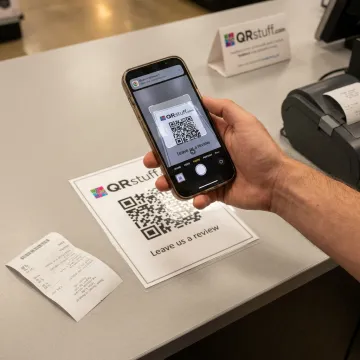
Create, brand, display, and track Google review QR codes across customer-facing touchpoints.
Generate QR codes that send customers directly to your Google Business review submission screen, reducing friction and making review requests easy after purchases, appointments, visits, or completed services.
Use dynamic QR codes to update destinations, test review-ask messaging, or rotate links across locations without reprinting the same receipt insert, counter card, or service sticker.
Customize your review QR code with logos, brand colors, frames, shapes, and contrast controls so printed review prompts look polished, trustworthy, and easy to scan.
Track review QR code performance with scan data, including time, location, device type, and campaign activity, helping teams understand which placements generate engagement.
Create QR codes for signs, windows, table tents, counter cards, receipts, tip jars, packaging, and displays with sizing and contrast guidance for reliable scanning.
Give restaurants, cafes, bars, and hospitality teams simple Google review QR codes for tables, menus, receipts, Wi-Fi cards, loyalty prompts, and post-visit feedback.
QRStuff turns your Google review link into a clean, scannable customer prompt built for real-world use. Add it to receipts, service cards, packaging, table tents, or storefront displays, then use dynamic destinations and analytics to improve placement performance. With custom branding, secure platform features, and flexible plans, collecting reviews becomes simpler for teams of any size.
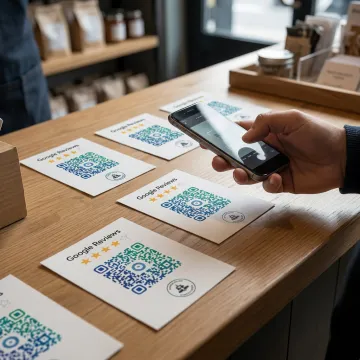
See how review QR codes support reputation growth across retail, hospitality, healthcare, and service teams.
"Print proofs on cards for clients with a QR to the full gallery. Faster than writing out a URL, and my clients think it is fancy. Fine with me."
"Très content du tool pour mon utilisation"

"Go-to for client projects. Been using it for years."
"I use these for handouts. Kids scan and get the worksheet. Free tier has been plenty for me. Only wish is that the icon choices for the centre logo could be a bit bigger."
"Print proofs on cards for clients with a QR to the full gallery. Faster than writing out a URL, and my clients think it is fancy. Fine with me."
"Très content du tool pour mon utilisation"
"Go-to for client projects. Been using it for years."
"I use these for handouts. Kids scan and get the worksheet. Free tier has been plenty for me. Only wish is that the icon choices for the centre logo could be a bit bigger."
"Print proofs on cards for clients with a QR to the full gallery. Faster than writing out a URL, and my clients think it is fancy. Fine with me."
"Très content du tool pour mon utilisation"
"Go-to for client projects. Been using it for years."
"I use these for handouts. Kids scan and get the worksheet. Free tier has been plenty for me. Only wish is that the icon choices for the centre logo could be a bit bigger."
QRStuff combines easy QR creation with business-grade control, analytics, and security.
Longstanding QR platform trusted by businesses and creators for reliable code generation.
Used by leading global brands, including Fortune 500 companies across major industries.
Update review links, test destinations, and keep printed materials useful longer.
GDPR and SOC2 compliant features support privacy-conscious business QR code programs.
A global QR platform built for business growth.
QRStuff has provided trusted QR code generation since 2008, growing into a comprehensive platform for businesses, creators, agencies, and enterprise teams worldwide. The company supports practical QR use cases across reviews, forms, menus, payments, retail, hospitality, healthcare, education, marketing, packaging, and more. Its platform is designed to make QR codes easy to create while giving teams the controls they need to manage branding, analytics, dynamic destinations, bulk generation, and integrations at scale. Today, QRStuff serves hundreds of thousands of users and businesses globally, with a continued focus on secure, scalable, and measurable QR code experiences that connect offline customer moments to digital action.
First, create a QR code that links directly to your Google Business review submission page. Then download the code in a print-ready format and place it on a counter card, table tent, acrylic stand insert, receipt sign, or display. For best results, use clear review-request copy, strong contrast, enough quiet-zone space, and a size customers can scan comfortably from the expected distance.
Explore QRStuff tools or create your review QR code today.

Supports privacy-conscious QR code management.
Business-grade controls for secure platform operations.
Used by major global enterprise brands.
Use QRStuff to generate a branded review QR code, choose static or dynamic options, and prepare it for print or digital sharing.