QR codes remove that friction entirely. A single scan takes a reader from the physical book directly to the exact review submission page, at the precise moment they're most motivated to respond.
This guide covers everything: choosing the right QR code type, creating and customising your code, where to place it for maximum conversions, and how to track results over time.
Key Takeaways
- QR codes in books link readers directly to review platforms, eliminating the gap between finishing a book and leaving a review
- Dynamic QR codes are the better choice — destinations can be updated after printing and scan data is tracked
- The highest-converting placement is the book's final pages, where readers are emotionally primed
- Always test on both iOS and Android before sending anything to print
- A short CTA next to the code — something like "Loved this book? Scan to review" — significantly improves scan rates
Why Use QR Codes for Book Reviews?
The gap between finishing a book and leaving a review is mostly structural. Readers who genuinely enjoyed a book still rarely convert to reviewers because the process requires independent action: locating the correct listing on the right platform, finding the review input, and writing without any prompting.
A QR code collapses that process to a single tap. Placed at the right moment, it meets the reader where they are.
Two Distinct Use Cases
The deployment approach differs between two core use cases:
- Collecting reviews: linking readers directly to Amazon, Goodreads, or Google to write their own review
- Displaying reviews: linking prospective readers to a curated page of editorial quotes, testimonials, or a video review reel
Both are valid. Review collection helps authors and publishers build social proof. Review display helps convert browsers at bookstores, library shelves, or book fairs.
Who Benefits Most
- Indie authors needing review volume to build trust signals and improve platform visibility
- School librarians running structured student book review projects
- Publishers channeling advance readers toward specific feedback forms
- Educators building reading programs that connect physical books with digital responses
The placement and design may vary by context, but the goal is the same: capture reader intent before it fades.
What You Need Before Creating a Book Review QR Code
Getting this setup right before you open any QR generator saves significant rework.
Your Review Destination URL
Identify the exact URL readers will land on after scanning. Options include:
- The Amazon "Write a Review" page for that specific book
- A Goodreads book listing
- A Google review prompt
- A custom feedback or survey form
- A landing page aggregating multiple review platform links
The URL must be live and mobile-accessible before you generate the code. One important note: Amazon requires reviewers to have spent at least $50 on Amazon.com with a valid card in the past 12 months. Goodreads requires a Goodreads account. Factor in these platform requirements when choosing where to send readers.
Static vs. Dynamic QR Codes
| Feature | Static | Dynamic |
|---|---|---|
| Destination URL editable after printing | ✗ | ✓ |
| Scan tracking and analytics | ✗ | ✓ |
| Works offline | ✓ | ✓ |
| Expires | Never | Depends on plan |
| Cost | Free | Free (limited) or paid |
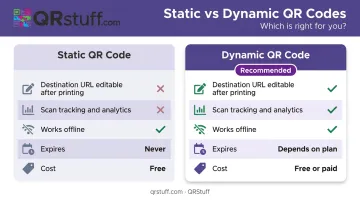
For any printed material with a long shelf life, dynamic codes are the better choice. Pew Research found that 25% of webpages from 2013–2023 were no longer accessible — a static code printed in a book today could point to a dead URL within a few years.
That's where a platform like QRStuff helps. Free accounts include dynamic QR codes to get started, while the Lite plan (£4/month) removes expiration limits and adds scan tracking for longer-running print campaigns.
Physical Placement Context
Know where the code will appear before you design it. Different placements have different requirements:
- Bookmarks: Small format — prioritize high contrast and a compact code size
- Inside back cover: Moderate space — add a brief call-to-action line above the code
- Posters or shelf displays: Larger format — allows more design detail and a logo overlay
Confirming placement before you generate the code prevents a full redesign later.
How to Create and Deploy a QR Code for Book Reviews
Decide What the QR Code Links To
For review collection, link directly to the specific review submission page, not the book's homepage or the author's website. Every extra navigation step loses readers.
For review display, link to a curated page: editorial testimonials, a video review compilation, or a landing page with star ratings. This works well on back covers and retail displays where the audience is a prospective buyer, not a reader who just finished.
Generate and Customize Your QR Code
QRStuff supports URL QR codes as the core data type for this use case, and also offers a Social Link format that creates a native multi-link landing page — useful if you want one code that routes readers to Amazon, Goodreads, and Google simultaneously.
When generating:
- Choose dynamic if the code is going into print
- Customize the design using your book cover's color palette, author logo, or publisher branding — QRStuff lets you adjust colors, shapes, and add a logo overlay up to 30% of the code surface before scan reliability is affected
- Download in SVG or EPS for professional print, or PNG at 300 DPI minimum for digital and small-format print
- Add a frame with instructional text directly in the platform — options like "Scan to leave a review" can be embedded into the code design itself
Write the Call-to-Action
Place a single instruction line directly above or below the QR code. Keep it specific:
- "Loved this book? Scan to leave a quick review"
- "Share your thoughts — scan here"
- "Scan to read what other readers thought" (for display use cases)
One sentence. Directly adjacent. Not on the opposite page.
Test Before You Print
A broken QR code in a printed book cannot be fixed without stickers or a full reprint — test everything before it goes to press.
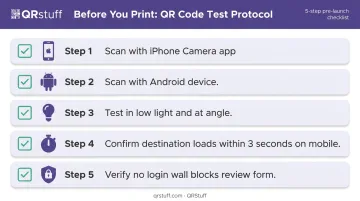
Test protocol:
- Scan with an iPhone (native Camera app)
- Scan with an Android device
- Test in low light and at an angle
- Confirm the destination loads within 3 seconds on mobile
- Verify no account login wall blocks access before the review form
iOS 11 and later supports native QR scanning via Camera. Most modern Android devices can scan natively through the camera app as well — no additional app required.
Track and Update After Deployment
Dynamic QR codes on QRStuff provide:
- Total and unique scan counts
- Device type breakdown (iOS vs. Android)
- Geographic data at country and city level
- Time-based scan patterns (peak hours, days)
- Real-time dashboard updates
If a review platform changes its URL structure, or a book moves to a new listing, update the destination directly in the dashboard. The printed QR code image stays the same — only the backend redirect changes.
Where to Place Book Review QR Codes
Placement determines who sees the code, when they see it, and how motivated they are to act. Timing relative to reading completion is the most important variable.
Inside the Book (Back Matter)
The last page, the "About the Author" section, or a dedicated "Enjoyed this book?" page is the highest-converting placement available. Readers who reach this point have finished the content — they're emotionally engaged and more likely to take action than at any other point in their interaction with the book.
This requires planning before the book goes to print. If you're producing a revised edition or a new title, build this page into the layout.
Physical Book Covers and Retail Displays
The back cover or inside flap targets prospective buyers rather than existing readers. Here, linking to a curated review display page — editorial quotes, reader ratings, a short video testimonial — helps convert browsers at bookstores, library displays, and book fairs.
This is a distinct goal from review collection. The audience hasn't read the book yet; the QR code supports a purchase or borrowing decision.
Bookmarks, Swag, and Event Materials
Bookmarks inserted at signings, library checkouts, or book fair giveaways travel home with the reader and stay with the book until it's finished. That's a strong placement.
Key sizing rule: QR codes on small-format print must be at least 2 cm × 2 cm (approximately 0.8 in × 0.8 in) to scan reliably at close range, per Bitly's print guidelines. Business cards and postcards can carry review-request codes for authors doing in-person appearances, as long as the quiet zone (the white border around the code) is preserved.
Library and Classroom Displays
For educators and librarians, QR codes work well on shelf labels, book display cards, and bulletin boards. They can link to:
- Student-created video reviews
- Reading response forms
- Curated review collections
- Interactive reading guides
The same mechanic that connects classroom books to supplemental audio applies directly to review collection and reading response programs. QRStuff's scan analytics let educators track which shelf displays drive the most engagement — useful for identifying which titles or programs resonate most with students.
Best Practices for Getting More Scans and Reviews
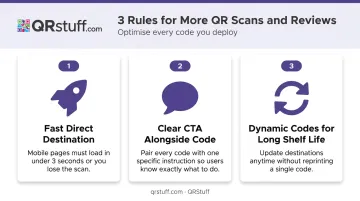
Follow these three rules and most drop-off problems disappear before they start:
- Send readers somewhere fast and direct. Google research shows 53% of mobile visits are abandoned if a page takes more than 3 seconds to load. Point the code to a fast, mobile-optimized page where the review input is within one scroll — not a homepage requiring extra navigation.
- Always pair the code with a clear CTA. A QR code without context has a lower scan rate. One specific sentence, placed immediately next to the code, is enough to drive action.
- Use dynamic codes for materials with a long shelf life. Books in multi-year print runs, library collections, and classroom programs all fall into this category — a static code linked to a deleted or changed page permanently breaks the review pipeline.
Additional considerations:
- For educational programs that need access control, QRStuff supports password-protected QR codes — useful for limiting review submissions to verified readers
- Test regularly, not just before printing — platform URLs can change after launch
- Monitor scan analytics to identify which placements are driving activity and which are being ignored
Frequently Asked Questions
Can I use one QR code to link to multiple review platforms at once?
A single QR code links to one URL, but that URL can be a landing page containing links to Amazon, Goodreads, Google, and other platforms. QRStuff's native Social Link feature does this without a third-party tool — one scan, one page, multiple review destinations.
Should I use a static or dynamic QR code for collecting book reviews?
Dynamic codes are the better choice — they let you update the destination URL if the listing changes and track scans so you can see which placements are working. Static codes lock in a permanent URL at creation and offer no analytics.
Where is the best place to put a review QR code in a printed book?
The end of the book — the last page, the "About the Author" section, or a dedicated "Enjoyed this book?" page — is the most effective placement. Readers who reach that point are most likely to leave a review.
Do readers need a special app to scan a book review QR code?
No — iPhones running iOS 11 and later, and most modern Android devices, scan QR codes natively through the camera app without any additional software.
How do I know if my book review QR code is actually working?
Dynamic QR codes include built-in analytics covering total scans, device types, scan timing, and geographic data — so you can tell exactly which placements are driving readers to your review page.
Can QR codes be used to display reviews, not just collect them?
Yes. A QR code can link to a curated review page, editorial testimonials, or a video review reel. This works well on back covers, retail shelf displays, and library cards — anywhere a reader needs a quick reason to pick up the book.