Introduction
Picture this: a customer unpacks a new dishwasher, needs to check the installation clearances, and can't find the manual anywhere in the box. They call support. That call costs your team time and money — and it was entirely preventable.
Paper manuals have a reliability problem. They get separated from products during shipping, buried in packaging material, or simply tossed. Meanwhile, appliance manufacturers absorb printing, translation, and logistics costs that multiply with every unit shipped — and every manual revision means reprinting.
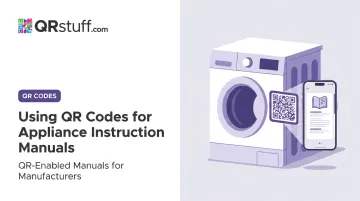
A QR code on the rating plate or inside the door panel puts the full manual on a customer's phone in seconds — no searching, no support call. GE already does this at scale, embedding QR codes on rating plates, product cartons, and registration cards that route owners to model-specific documentation, videos, and support resources.
This guide walks appliance manufacturers, product teams, and packaging designers through how to implement QR codes for instruction manuals. It covers content preparation, code generation, placement decisions, and keeping codes functional across a product's entire service life.
Key Takeaways
- Use dynamic QR codes so manual content can be updated without reprinting labels or packaging
- Host your manual as a mobile-optimized PDF or responsive web page before generating any code
- Place QR codes where customers need help — near controls, inside door panels
- One appliance can carry multiple codes: quick start, full manual, warranty registration, and support
- Track scan data by model to see which products drive the most support calls
Why Appliance Brands Are Replacing Paper Manuals With QR Codes
Paper manuals create real operational problems at manufacturing scale — and they often go unread.
The Problem With Print-Only Documentation
Research on manual reading behavior tells an important story. A 670-participant study found that manual reading correlates strongly with perceived hazard (r = .70) and drops with product familiarity (r = -.61). Together, these two variables explained 66% of variance in reading behavior.
Practically speaking: customers familiar with a product category are least likely to read the manual — even when installation or maintenance details matter. A printed manual stuffed in the box may never get opened, and once the box is discarded, it's gone.
GE's approach reflects this reality. Many GE appliances now ship with a Quick Start Guide only — full owner's manuals and installation instructions are available online. QR codes on rating plates, product cartons, and registration cards route owners directly to a mobile landing page with product literature, instructional videos, and support resources.
Where QR Codes Make the Most Sense
QR codes work best for:
- Complex multi-step installations — refrigerators, dishwashers, range hoods, HVAC units
- Appliances with recurring maintenance requirements — filter replacements, descaling cycles, annual servicing
- Products sold internationally — where multi-language manuals inflate print costs and packaging weight significantly
They're often misused when deployed as the only instruction method, with no printed fallback for customers without smartphones. The CPSC's instruction design guidance recommends manufacturers consider diverse audiences — a QR code should supplement printed safety-critical quick-start content, not replace it entirely.
The Operational Case
At manufacturing scale, the compounding benefits matter. Two of the most tangible gains:
- Faster revisions — updating a manual previously meant reprinting inserts across every affected SKU; with QR codes linking to hosted content, it's a file update
- Simpler multilingual compliance — EU General Product Safety Regulation (GPSR) requires safety information in languages consumers can understand, and digital documentation governance makes that more manageable across markets
What You Need Before Setting Up QR Codes for Appliance Manuals
Before generating a single code, three things must be in place:
Prerequisites
| Requirement | Why It Matters |
|---|---|
| Mobile-optimized manual (hosted PDF or responsive web page) | Slow or hard-to-navigate content drives users away immediately |
| Dynamic QR code generator | Lets you update the destination URL after product revisions or safety recalls — no reprinting required |
| Placement decision per appliance model | Affects scan rate, durability requirements, and post-installation accessibility |
According to Google, 53% of mobile site visits are abandoned when pages take more than 3 seconds to load — so mobile optimization isn't optional.
No special app is required for end users. Apple introduced native QR scanning in iOS 11, so the Camera app identifies and scans codes automatically. Modern Android devices handle scanning through the built-in camera, Quick Settings, or Google Lens. The friction barrier that made early QR adoption difficult is effectively gone.
A Note on Manual Format
Adobe recommends mobile-friendly PDFs that display clearly on phone screens, are easy to navigate, and keep file size compact. For complex appliances with multiple sections, troubleshooting guides, or embedded video content, a dedicated responsive web page outperforms a flat PDF. Either works: what matters is fast load time and no login requirement on scan.
How to Create and Link QR Codes to Appliance Instruction Manuals
Follow this sequence carefully — skipping testing or mobile optimization is the most common reason QR programs fail at the customer level.
Prepare Your Manual Content
Host the manual at a stable, permanent URL before generating the code. Options include:
- A branded domain page (e.g.,
brand.com/manuals/model-xyz) - A CDN-hosted PDF with a clean direct URL
- A dedicated landing page with the PDF embedded plus links to related resources
Avoid temporary file-sharing links. Pew Research Center's 2024 link-rot study found that 38% of webpages that existed in 2013 were no longer accessible in 2023. A QR code printed on a durable appliance label must still work in a decade — a campaign URL or shared Drive link will not.
Before generating the code, confirm:
- Page loads in under 3 seconds on a mobile connection
- No login credentials required to access the content
- Content renders correctly on a small screen without zooming
Create the QR Code
Using a platform like QRStuff, the process is straightforward:
- Enter the destination URL for the hosted manual page or PDF
- Select the dynamic code type so you can update the destination URL later without reprinting
- Customize the visual design with brand colors and a logo — this signals legitimacy to the end user
- Download in a print-ready format: SVG or EPS for label production (vector formats scale without pixelation), or high-resolution PNG at minimum 300 DPI for digital use
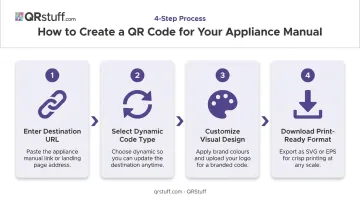
QRStuff supports both URL and PDF QR code types, and allows manufacturers to upload PDFs directly to the platform for hosting — simplifying the process if you don't have a dedicated content hosting setup.
Test Across Devices Before Printing
Test on both iOS and Android devices, across older and newer models, and in the actual lighting conditions where the appliance will be installed. Poor lighting in laundry rooms or under kitchen cabinets is a documented scan failure point.
On size: a commonly applied smartphone-print guideline is 0.8" × 0.8" (approximately 2 cm × 2 cm) as a practical minimum for reliable scanning. ISO/IEC 18004 and DENSO specifications define the underlying symbology requirements, but real-world scan performance is what matters.
Codes on curved or textured surfaces may need to be larger. Validate on production samples after lamination, embossing, or powder coating is applied.
Deploy to Packaging, Labels, and Product
Each placement serves a different moment:
- Product carton — visible at unboxing, but discarded with the packaging
- Rating plate or near-control-panel sticker — persists with the appliance for its full service life
- Inside door panel (dishwasher, oven, refrigerator) — task-proximate and protected from wear
- Quick-start insert and warranty card — catches the customer during initial setup
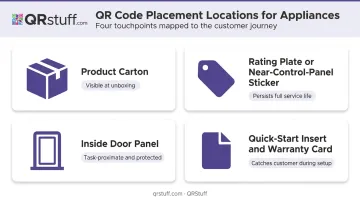
Include a clear call-to-action near every code. "Scan for full manual and setup guide" performs better than a standalone QR code with no context — the CTA tells customers exactly what they'll get before they scan.
Where to Place QR Codes on Your Appliances
QR code placement comes down to one question: will the customer see it exactly when they need it — during setup, a maintenance task, or troubleshooting? That's the standard every placement decision should meet.
Placement by Appliance Type
| Appliance Type | Recommended Placement |
|---|---|
| Refrigerators, dishwashers | Rating plate, inside door panel |
| Washers, dryers | Near the control panel or door frame |
| Ovens, ranges | Inside oven door or near control panel |
| Small appliances (coffee makers, air fryers) | Product carton and quick-start insert |
| Outdoor appliances (grills, HVAC) | Sheltered area on product body or service panel |
The inside door panel deserves particular attention for large appliances. It keeps the QR code accessible long after the box is gone, in the exact location where a customer is likely to be standing when they need help.
Durability in Challenging Environments
Wherever the QR code lives on the appliance, the label has to survive that environment for the product's lifespan. Plan for:
- Heat near stovetops or dryers requires label stock rated for the surface temperature
- Moisture on dishwashers and refrigerators calls for laminated or resin-coated labels
- UV exposure on outdoor grills and HVAC units needs UV-resistant materials tested to ASTM D4329 procedures
- Abrasion and cleaning chemicals are best handled with polyester labels with high tensile strength (3M's durable label range covers these specifications)
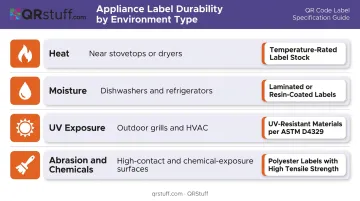
UL's Marking and Labeling Systems Program tests labels to ANSI/UL 969 standards — relevant for any appliance label subject to environmental stress.
Static vs. Dynamic QR Codes: What Appliance Manufacturers Need to Know
This is the most consequential technical decision in the entire implementation.
The Core Difference
A static QR code permanently encodes a URL. If that URL ever changes — manual revision, domain migration, safety recall update — the code becomes a dead link. Every unit already in the field loses access. No fix is possible without reprinting.
A dynamic QR code stores a short redirect URL. The final destination can be updated at any time from the platform dashboard. The printed code never changes.
Why Dynamic Is Non-Negotiable for Appliances
EEA data shows microwave ovens remain in use for an average of nearly 10 years. Pad/capsule coffee machines last around 5.5 years. A QR code printed on a durable label must stay functional for that entire service life.
Dynamic codes handle several scenarios that static codes simply cannot:
- Manual revisions: Push updated PDFs or pages without reprinting a single label
- Safety recalls: CPSC remedy information can change daily — Samsung has faced washing machine recalls; LG, electric range recalls — and a live redirect reaches every unit in the field instantly
- Domain migrations: Change hosting or URL structure without orphaning codes already in production
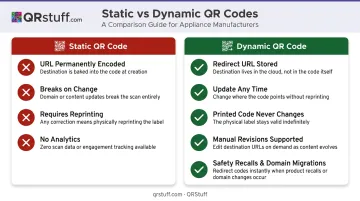
QRStuff's dynamic codes allow destination URLs to be updated in real time across the entire product catalog. For manufacturers managing codes across dozens of models, this removes a manual update process across hundreds of SKUs.
The Analytics Dimension
Dynamic QR codes also provide scan tracking — by device type, geographic location, and time. QRStuff's analytics dashboard captures this data up to the minute, with campaign tagging that lets manufacturers track scans by model or product line.
High scan rates on a specific model's manual code often correlate with installation complexity or support call volume. Product teams can use this signal to prioritize documentation improvements or proactive support outreach before call volume spikes.
Best Practices for QR Codes on Appliance Manuals That Actually Get Used
A few operational principles determine whether a QR code program delivers lasting value or gets abandoned after the first product cycle:
Lock down the URL. Host manual content on a branded domain with a stable URL structure. Never encode a temporary link, shared drive URL, or agency campaign URL into any code that will go to print. Use a dynamic QR code as a redirect layer. If the hosted URL ever needs to change, the printed code stays valid without a reprint.
Design the landing page for the scan moment. When a customer scans the code on a dishwasher that won't drain, they don't want a homepage. The landing page should load with:
- The appliance model name and image
- A direct link or embedded PDF for the full manual
- Links to troubleshooting, warranty registration, and support contact
Use analytics to catch problems early. A spike in manual scans for one specific model is a signal — potentially an installation issue, a confusing setup step, or a missing piece of documentation. QRStuff's scan tracking identifies these patterns by model, giving product teams time to respond before the issue generates significant support volume.
Keep a printed fallback. The Quick Start Guide should cover immediate safety warnings and first-use steps without requiring a scan. QR codes extend documentation access — they don't replace the minimum printed content that safety standards require.
Frequently Asked Questions
How do I find the QR code on my appliance?
Most appliances with QR codes have them on the rating plate, inside a door panel, on the product carton, or on the quick-start guide included in the box. If no QR code is present, the manufacturer's website typically offers manual lookup by model number.
How do I get a physical QR code printed for my product?
Generate the code using a platform like QRStuff, download it as a high-resolution SVG or EPS file, and send it to your label or packaging printer. Use a dynamic QR code so the destination can be updated after labels are already in print.
Should I use a static or dynamic QR code for my appliance manual?
Use dynamic codes. Manuals are revised over a product's service life, and dynamic codes allow the destination URL to be updated without reprinting any labels or packaging — critical for safety recalls and content updates.
What happens if my appliance manual is updated after units are already in the field?
With a dynamic QR code, update the destination URL in your QRStuff dashboard. All existing printed codes automatically redirect to the new content — no reprinting, no field service required.
Can customers scan an appliance QR code without downloading an app?
Yes. iOS 11 and later scan QR codes natively through the Camera app. Modern Android devices support scanning via the built-in camera or Google Lens. No separate QR reader app is needed.
What file format should an appliance manual be in for QR code delivery?
A mobile-optimized PDF hosted at a permanent URL is the most practical option for most manufacturers. For complex manuals with multiple sections, search functionality, or embedded video tutorials, a dedicated responsive web page is preferable.