Introduction
Most retailers understand what QR codes do. The problem starts when they try to move beyond a pilot. A handful of codes in one store is manageable. Hundreds of codes across dozens of locations — covering payments, shelf labels, loyalty enrollment, and product traceability — require a fundamentally different operational approach.
According to Square's 2025 Future of Commerce report, 67% of retailers find QR codes a convenient payment method. Consumer appetite is there too: a 2025 GS1 US survey found that 66% of U.S. adults would scan a QR code on food packaging to access freshness and shelf-life information.
Consumer demand exists. What most retail networks lack is the operational infrastructure to meet it at scale.
This guide is for retail professionals ready to move from scattered QR deployments to a managed, scalable program:
- Retail operations managers overseeing multi-location rollouts
- Digital transformation leads building store technology infrastructure
- Store network owners standardizing QR programs across sites
Key Takeaways
- Scaling QR codes in retail requires governance across payments, loyalty, discovery, and traceability — not just more codes
- Use dynamic QR codes in live retail environments: you can update destinations without reprinting your entire estate
- Success depends on GS1 standards alignment, technology readiness, and clear cross-functional ownership
- Treat scan analytics as your control layer — without them, ROI is invisible and underperforming touchpoints go unfixed
- Single-location stores with older customer demographics should assess alternatives before committing to a full rollout
What Is QR Code Acceptance in Retail?
QR code acceptance in retail covers every touchpoint where a code triggers a customer or operational action: shelf labels, loyalty sign-ups, product pages, payments, and expiry tracking. It's not a single feature — it's an infrastructure that spans your entire store and supply chain.
Static vs. Dynamic: Why the Distinction Matters
| Code Type | How It Works | Best For |
|---|---|---|
| Static | Data embedded permanently at creation | Wi-Fi login, fixed URLs, permanent product pages |
| Dynamic | Contains a short redirect URL; destination editable anytime | Pricing, promotions, campaigns, seasonal content |
For most retail use cases, dynamic codes are the right default. Prices change. Campaigns end. Product pages get updated. A static code printed on 10,000 shelf labels becomes a dead end the moment the destination changes.
Scaling Is Not Just Generation
Generating a handful of codes is not scaling. True scale involves:
- Bulk code generation tied to SKUs, locations, or campaigns
- POS and backend system integration
- Centralized management and governance across locations
- Scan analytics to measure performance
- Dynamic destination management without reprinting
The operational complexity jumps sharply once you move beyond a single store or department.
Why Retailers Are Scaling QR Code Acceptance
Consumer behavior, operational efficiency, and regulatory compliance are all pushing retailers toward QR codes at the same time — and the business case has never been clearer.
Consumer and Market Demand
EMARKETER forecast that 102.5 million U.S. consumers would use smartphone QR scanners in 2025 — a number that reflects mainstream adoption, not early-adopter behavior. The GS1 US consumer research adds commercial weight: 79% of consumers are more likely to purchase products with a scannable QR code that provides product information, and 62% are willing to spend more for detailed product data.
Operational Pressures
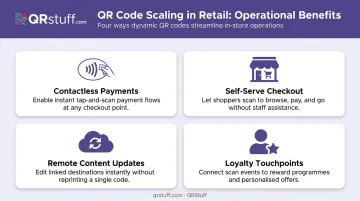
The business case for scaling QR codes across a retail network includes:
- Contactless payment options — reducing friction at checkout without hardware investment
- Self-serve and scan-and-go models — reducing staffed checkout dependency
- Remote content updates — change a promotional landing page across 500 shelf labels without sending anyone to the floor
- Loyalty touchpoint coverage — every product or shelf edge becomes an enrollment opportunity
The Regulatory Dimension
For grocery and food retail specifically, the compliance trajectory is significant. ECR Retail Loss published research in May 2025 identifying ten conditions for scaling QR codes with embedded date codes across fresh and perishable categories by 2030 — including regulatory alignment on food safety transparency and end-to-end GS1 standardization.
The U.S. FDA's FSMA Food Traceability Rule (with compliance now targeted for July 2028) doesn't mandate QR codes directly, but 2D barcodes with embedded data are the practical enabling technology for the traceability records the rule requires.
The GS1 Sunrise 2027 initiative sets a hard industry deadline: retail POS systems worldwide should be able to read 2D barcodes and QR codes by end of 2027, replacing 1D UPC codes. GS1's 2024 global endorsement statement reported active pilots in 48 countries covering 88% of world GDP.
Retailers that delay QR infrastructure buildout face concrete consequences:
- No ability to block expired product sales at POS using embedded date data
- No visibility into scan performance across locations
- Missed regulatory alignment windows as deadlines approach
How Scaling QR Code Acceptance Works in Retail
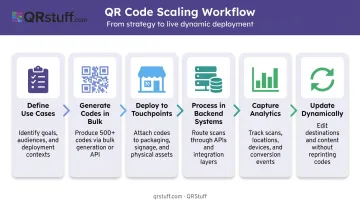
The end-to-end flow runs: define use cases → generate codes in bulk → deploy to touchpoints → process interactions in backend systems → capture analytics → update dynamically as needed.
Step 1: Define Use Cases and Establish Standards
Before generating a single code, align on which use cases you're solving and which standards apply. Mixing approaches creates fragmentation that's expensive to unwind.
Priority use cases by retail category:
- Grocery/food: Expiry date tracking, traceability, nutritional data (GS1 Digital Link)
- Apparel/electronics: Product information, reviews, loyalty enrollment (dynamic URL)
- All formats: Contactless payment, self-serve checkout, promotional campaigns
Standards decision: GS1 Digital Link is the standard for product-level QR codes that need to work at POS while connecting shoppers to product data online. PepsiCo used GS1 Digital Link on Starry packaging to deliver nutrition facts, allergens, sustainability data, and loyalty rewards from a single on-pack code. For marketing and campaign codes, standard dynamic URL codes are simpler and sufficient.
QRStuff's platform supports GS1 Digital Link QR code generation natively, producing GS1-standard codes that encode a product's GTIN in structured URI format. Codes are Sunrise 2027 compliant and can link to EU Digital Product Passport data simultaneously.
Step 2: Generate and Manage QR Codes at Scale
Static generation tools break down quickly at enterprise scale — volume, multi-location complexity, and campaign turnover demand a managed platform. Core requirements for a multi-location retailer include:
- Batch processing tied to product SKUs, store locations, or campaign parameters
- Dynamic code management so destinations can be updated without reprinting
- API integration for programmatic generation directly from ERP or POS systems
- Centralized dashboard with project and tag-based organization by store, region, or campaign
QRStuff's Enterprise plan supports unlimited batch processing, delivering codes in ZIP archives across multiple image formats (PNG, SVG, EPS, PDF). The API enables direct integration with retail ERP and POS systems for automated SKU-level code generation. For very high volumes — above 20,000 codes — bulk processing is handled at $2.50 per 1,000 codes (reducing to $2.20 per 1,000 above 100,000 codes).
Step 3: Deploy and Integrate with POS and Backend Systems
Infrastructure requirements that are frequently underestimated:
- POS scanners must support 2D/QR reading — many legacy 1D barcode scanners cannot. This is a hardware audit item, not an assumption
- ERP and inventory systems must be configured to ingest QR-linked data (especially if encoding expiry dates or batch numbers via GS1 Application Identifiers)
- Fallback procedures must exist for damaged labels, poor lighting, or incompatible devices — a manual staff lookup process must be in place
Print specifications are equally critical. QRStuff recommends a minimum print size of 2cm × 2cm for simple URL codes at 300 DPI minimum for raster formats.
For in-store signage and large-format displays, use vector formats (SVG, EPS) to ensure the code scales without degradation. Place codes on flat, non-reflective surfaces at eye level with the quiet zone border intact.
Step 4: Track, Analyze, and Optimize
Scan analytics tell you what's working, where engagement is breaking down, and which touchpoints justify continued investment.
What to track at minimum:
- Total and unique scans per code and per location
- Geographic breakdown (country and city level)
- Device type (iOS vs. Android) — affects landing page optimization decisions
- Time-of-day and day-of-week patterns — reveals peak engagement windows
- Conversion from scan to desired action
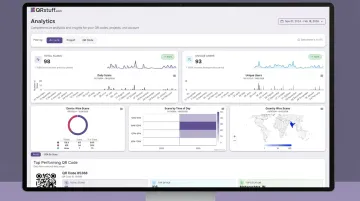
QRStuff's real-time analytics dashboard provides all of these dimensions, with CSV export for deeper analysis and daily, weekly, or custom date-range views. For multi-location chains, city-level geographic data helps identify which stores are driving engagement and which touchpoints are underperforming.
Set baseline benchmarks per touchpoint type — a shelf-edge loyalty enrollment code will have different expected scan rates than a checkout payment code — and review performance at a regular cadence.
Key Factors That Affect QR Code Scaling in Retail
Technical and Physical Constraints
Code density and print size: Dynamic QR codes encode only a short redirect URL, keeping the code compact and scannable at smaller print sizes. High-data static codes are physically larger and harder to scan reliably in retail environments.
Error correction: GS1 specifies four error correction levels — L (7%), M (15%), Q (25%), H (30%). Higher levels increase code size but improve reliability on curved packaging, glossy surfaces, or codes with logo overlays. Choose based on your worst-case deployment environment, not average conditions.
Scanning conditions vary by placement: A shelf label scanned at arm's reach is a different environment from a window display scanned from pavement. Test scan performance in actual store conditions before finalizing print specifications.
These technical decisions don't exist in isolation — they only hold up if the suppliers printing those codes are working from the same standards you are.
Supplier and Stakeholder Alignment
This is where grocery retail QR scaling most commonly stalls. If suppliers aren't printing GS1-compliant QR codes on packaging, your POS system can't use the embedded data — regardless of how well your own infrastructure is configured.
ECR Retail Loss's 2025 guidance is explicit: standardization across the value chain — from manufacturer to POS — is a prerequisite, not an option. Supplier readiness — equipment, quality control, cost tolerance — must be assessed as part of any scaling plan.
Organizational Ownership
Cross-functional buy-in is essential. QR code scaling touches multiple departments simultaneously:
- Buying and merchandising
- IT and infrastructure
- Store operations
- Marketing
- Loss prevention
Programs without a single accountable owner typically fragment into department-by-department implementations that don't share standards, data, or governance. Designate one owner with cross-departmental authority before the rollout begins.
Common Challenges and Misconceptions
"More codes equals scaling." This is the most common mistake. Unmanaged proliferation of static codes across a retail estate creates a maintenance liability. When URLs change or campaigns end, static codes become dead ends. Volume without governance makes the problem larger, not smaller.
Assuming customers will scan without friction. Scan rates are affected by:
- Code placement height and angle
- Presence of a clear call to action near the code
- Whether shoppers understand what they'll receive by scanning
- Mobile-optimised landing pages (a non-mobile page kills conversion)
QR Payment Interoperability Isn't Automatic
A QR code for one payment wallet won't work with a competitor's system unless both adopt compatible standards. The IMF noted in 2025 that proprietary closed-loop QR payment schemes fragment acceptance.
Retailers must define which payment standards they support and communicate this clearly — particularly in franchise or multi-tenant environments. That means:
- Confirming which wallet standards your POS hardware accepts
- Aligning with tenants or franchisees on a shared standard
- Publishing accepted payment QR types at checkout
When QR Scaling Isn't the Right Move
Not every retailer benefits from a scaled QR program. Evaluate alternatives if:
- Your customer base skews significantly older ((YouGov: only 38% of U.S. adults 55+ scanned a QR code in the past three months, vs. 75% of 18–34 year olds)
- Your store count is low and operations are stable
- The product experience is inherently hands-on and QR adds friction, not value
The infrastructure cost, supplier alignment effort, and staff training burden must have a proportionate return.
Frequently Asked Questions
How small can a QR code be and still be usable?
The practical minimum for printed retail QR codes is 2cm × 2cm (excluding the quiet zone border), with a minimum resolution of 300 DPI for raster formats. Smaller codes may scan if the reading distance is very short, but this is not reliable for standard shelf or packaging placements where customers scan at arm's length.
What is the difference between static and dynamic QR codes in retail?
Static codes embed fixed data permanently — once printed, the destination cannot change. Dynamic codes contain a short redirect URL that can be updated at any time without reprinting. For retail environments where prices, promotions, and content change regularly, dynamic codes are the practical default.
How do you measure QR code performance across multiple retail locations?
Use a scan analytics platform that tracks total scans, unique scans, geographic data, device type, and time-based patterns by code and location. Set benchmarks per touchpoint type (shelf label vs. checkout vs. window display) and review performance regularly to optimize placement and content.
Do shoppers need a special app to scan QR codes in retail stores?
No — native cameras have supported QR scanning since iOS 11 (2017) and it's built into current Android camera apps as well. The exception is payment-specific codes tied to a wallet app (such as Alipay or a retailer's loyalty app), which require that app to complete the transaction.
What types of retail use cases benefit most from QR code scaling?
The highest-ROI use cases are contactless payment, self-serve and scan-and-go checkout, dynamic product information and reviews, loyalty program enrollment, and expiry date or traceability tracking in fresh and perishable grocery categories.
How do you keep QR codes manageable across hundreds of store locations?
Use a platform with project-based and tag-based organization to segment codes by store, region, campaign, or SKU, with role-based permissions limiting access to relevant codes. Centralized dynamic destination management lets you update content across all deployed codes without reprinting.