Introduction
Picture this: a guest arrives at your hotel after a long flight, pulls out their phone, and starts hunting for the WiFi password. The card in the welcome folder says "H0tel_Gu3st_2024!" — but is that a zero or the letter O? They try three times, fail, and call the front desk. The room isn't even unpacked yet, and the experience is already soured.
This scenario plays out hundreds of times daily across hotels and restaurants worldwide. According to a hospitality WiFi survey, 90% of hotel guests consider WiFi access very important — and more than 81% had experienced a poor WiFi connection in the prior year. About a third request the password the moment they arrive.
QR code WiFi access eliminates the friction entirely — one scan, instant connection. This guide covers exactly how it works, why it matters operationally, and how to deploy it effectively across a property.
Key Takeaways
- Guests connect instantly by scanning — no passwords to misread or mistype
- Dynamic QR codes let properties rotate credentials without reprinting any signage
- Staff stop fielding repetitive WiFi queries and focus on taking orders, upselling, and resolving guest issues
- Branded WiFi codes signal professionalism at first contact with every guest
- Setup takes minutes, and the time savings stack up across every shift
What Is QR Code WiFi Access?
A WiFi QR code encodes a network's name (SSID), security protocol, and password directly into a scannable image. When a guest points their phone camera at it, the device connects automatically — no manual entry required.
Most modern smartphones handle this natively — iOS since version 11, Android since version 10 — with no additional app required.
Where it applies across a property:
- Table cards and menus in restaurants
- Room welcome packets and compendiums
- Lobby check-in areas and concierge desks
- Elevator panels and landing signage
- Pool, spa, and outdoor areas
- Conference and event rooms
Placing codes at each of these touchpoints means guests connect the moment they need to, without hunting for passwords or flagging down staff.
Key Advantages of QR Code WiFi Access
The advantages below aren't theoretical. They affect measurable outcomes: guest satisfaction scores, staff time, security posture, and printing costs. Each one compounds over time.
Advantage 1: Frictionless Guest Connectivity from the First Moment
Manual password entry is a multi-step failure point. A guest has to locate the credential, read it accurately (case-sensitive, often alphanumeric), type it correctly, and troubleshoot if it fails. With a QR code, the entire process takes under five seconds with zero staff involvement.
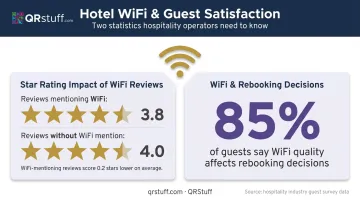
That first impression shapes the entire stay. A hotel review analytics study of 53 million English-language reviews found that reviews mentioning WiFi averaged lower scores (3.8 vs. 4.0) than those that didn't — a measurable drag on ratings from a single friction point. The same WiFi survey found 85% of guests said WiFi quality would affect their decision to rebook.
The accessibility angle is real too. International guests navigating an unfamiliar keyboard layout, older guests less comfortable with complex alphanumeric strings, guests distracted by children or luggage — all of these scenarios produce failed connection attempts that QR scanning eliminates entirely.
KPIs this affects:
- Guest satisfaction scores (CSAT/NPS)
- Front desk query volume related to WiFi
- Average time-to-connect on arrival
- Staff minutes spent on WiFi requests per shift
When it matters most: High-turnover dining environments where every minute of a guest's seating time counts; large hotel properties with multiple connectivity zones where guests expect consistent access without repeating the credential lookup process at every location.
Advantage 2: Stronger Security Without Adding Guest Burden
Displaying a WiFi password on a chalkboard, table card, or welcome folder is functionally public. Anyone in the space — a departing guest, a delivery person, someone passing through the lobby — can photograph it and retain access indefinitely.
That credential stays exposed until someone changes it. In practice, that rarely happens on a regular schedule when reprinting is involved.
QR codes address this in two ways. First, they remove the readable credential from plain sight — a guest scans and connects, but the actual password isn't visible to anyone nearby. Second, and more operationally significant: dynamic QR codes allow credential rotation without changing or reprinting the physical code.
That second point is what makes WiFi QR codes a genuine security tool, not just a convenience. A property using a platform like QRStuff can update the underlying network credentials from a management dashboard — the printed code on the table card stays in place, but it always reflects the current password.
The business risk from neglecting this is real. Unauthorised users on a shared guest network can potentially reach POS systems, internal communications, and stored guest data. Routine credential rotation is a simple mitigation. QR codes make it operationally painless enough that it actually gets done.
KPIs this affects:
- Frequency of password rotation
- Cost and time per credential update cycle
- Number of unauthorised connection attempts
When it matters most: High-traffic restaurants where the same credential is exposed to hundreds of different visitors each week; conference centres where external event attendees should not retain access after an event ends; properties handling payment data on shared network infrastructure.
Advantage 3: Operational Efficiency and Reduced Staff Load
WiFi credential questions are among the most repetitive interactions front desk and floor staff handle. They're also entirely avoidable. When WiFi access is self-serve and reliable, this category of query disappears — and staff attention shifts to interactions that actually require human judgment.
That reallocation has direct operational value. In a leaner staffing environment, every minute recovered from rote tasks adds up. A server who isn't spelling out a password can take another order. A front desk agent who isn't troubleshooting a connection issue can complete a check-in without interruption.
Credential changes also carry a recurring cost most operators underestimate:
- Printed table tent cards, room compendium inserts, and welcome folder sheets need replacing every time credentials change
- Each reprint cycle involves design, printing, delivery, and staff time to swap materials across every room and zone
- Properties often delay rotation precisely because this cycle is burdensome — which compounds the security exposure from Advantage 2
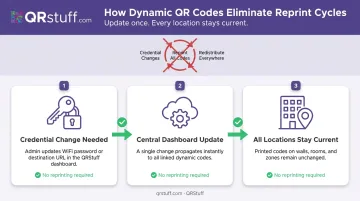
Dynamic QR codes eliminate this cycle. The physical material stays in place and the credential updates centrally. A hotel group with 200 rooms — or a restaurant group spanning multiple locations — can manage everything from a single dashboard. No on-site intervention required at each location.
KPIs this affects:
- Staff time saved per shift on WiFi-related queries
- Printing cost per credential rotation cycle
- Front desk call volume
- Time-to-resolve guest connectivity issues
When it matters most: Multi-location groups where centralised credential management is essential; properties with frequent event business that cycles guest WiFi between events; any operation where staff headcount is lean and every minute has measurable cost.
What Happens When QR Code WiFi Access Is Missing
Traditional credential sharing carries hidden costs that rarely get traced back to the WiFi setup, but they add up across every shift.
- Guests who can't connect quickly don't just wait — they carry that frustration into every subsequent interaction during their stay or meal
- Visible credentials on signage create persistent security exposure that compounds the longer the password stays unchanged
- Staff field the most connection questions during peak service, exactly when they're least available to help
- Reprint cycles get deprioritized because they're disruptive and costly, leaving outdated credentials in circulation for months
- As contactless and self-serve expectations keep rising, properties still handing out password cards look dated next to competitors who've moved on
A Hotel Internet Services WiFi survey found that nearly three quarters of hotel guests say WiFi quality influences their booking decision. What looks like a minor friction point is, for a meaningful share of guests, actually a deciding factor.
How to Get the Most Value from QR Code WiFi Access
Deploying one code in a hotel room is useful. Deploying codes at every guest touchpoint is the system that delivers full value.
Coverage across all zones:
- Lobby and check-in areas
- All room welcome packets
- Restaurant and bar areas
- Pool, spa, and outdoor spaces
- Conference and meeting rooms
- Elevator landings
Static codes lock the property into a credential permanently — changing the password means generating a new code and reprinting everything. Dynamic codes solve this directly. QRStuff's Full Suite plan and above let you update WiFi credentials from a management dashboard without touching a single printed material, which is what makes regular password rotation actually workable.
Getting the placement right is just as important as having the codes in the first place:
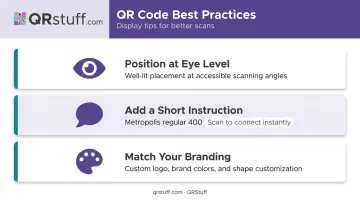
- Position at eye level in well-lit locations — codes in dark corners or at awkward angles go unscanned
- Include a short instruction next to every code: "Scan to connect instantly" removes any ambiguity for guests unfamiliar with WiFi QR codes
- Match branding — QRStuff supports custom logo embedding, brand colors via hex codes, and shape customization, so codes can carry the property's visual identity rather than looking like an afterthought
For print materials — table cards, framed room signage — download in SVG or PDF format. Both are vector formats that scale to any size without losing scan quality — relevant when the same code needs to work on a small table card and a large lobby poster.
Conclusion
QR code WiFi access removes a specific, recurring category of friction that affects every guest, every arrival, every shift. It reduces a real security exposure that most properties underestimate — especially when the same credential sits unchanged on a table card for months. And it frees up staff time that, accumulated across hundreds of shifts, represents meaningful operational value.
Those individual gains stack: credentials rotate on schedule without reprint costs, codes stay current across all locations, and guests across every demographic get the same instant, effortless connection.
Properties that implement this well rarely think about it again. Those that don't keep absorbing the same guest experience friction and operational overhead — shift after shift, property after property.
Frequently Asked Questions
What are the benefits of QR code WiFi access for hotel and restaurant guests?
Guests connect instantly by scanning — no password to type, misread, or ask staff to repeat. The same seamless experience works across every zone of the property, from the lobby to the pool.
What security risks should hotels and restaurants consider when using QR codes for guest WiFi?
The primary risk is physical tampering (a bad actor swapping a legitimate code for one pointing to a rogue network). Using a platform with verified destination control, inspecting codes regularly, and rotating credentials via dynamic codes if compromise is suspected keeps that risk manageable.
Do guests need a special app to connect to WiFi using a QR code?
No. Most modern smartphones (iOS 11 and later, Android 10 and later) scan WiFi QR codes natively through the built-in camera app. No additional software required.
Can I update the WiFi password on a QR code without reprinting it?
Yes, with dynamic QR codes. The underlying credentials can be updated from a management dashboard, leaving the printed or displayed code unchanged. This is available on QRStuff's Full Suite plan and above.
Where should restaurants and hotels place WiFi QR codes for maximum use?
The highest-impact locations are table cards, room welcome packets, lobby check-in areas, elevator landings, pool and spa zones, and conference rooms — anywhere a guest is likely to first want connectivity.
How do I create a WiFi QR code on QRStuff?
Select the WiFi QR code type from QRStuff's 40+ code types, enter your network SSID, password, and security protocol (WPA, WPA2, WEP, or open), then customize the design and download in your preferred format. Visit qrstuff.com/type/wifi to get started directly.