Badge scanners capture a contact. They rarely capture intent, context, or qualification data. The result: hundreds of leads sitting in a spreadsheet while competitors who collected better data reach the same prospects first.
QR code lead capture flips that dynamic. Instead of a rep swiping a badge, the attendee scans, fills a short form, and lands directly in your CRM — with their information, timestamp, and the specific booth touchpoint that drove the interaction. The mechanics are simple. The results vary enormously depending on how you deploy them.
This article walks through exactly how QR lead capture works, a six-step setup process, where to place codes across your booth, and the variables that determine whether your leads convert or collect dust.
Key Takeaways
- QR lead capture is attendee-initiated — they scan, fill a short form, and their data routes to your CRM in real time
- Use dynamic QR codes so you can update destinations without reprinting — critical if anything changes before or during the show
- Give each booth zone its own code to track per-touchpoint performance and serve tailored offers
- Keep forms to 3–5 fields — HubSpot's analysis of 40,000+ landing pages found 3-field forms convert above 25%
- Pre-build your follow-up sequence before the show — leads captured on day one need outreach within 24 hours, not after the event wraps
How QR Code Lead Capture Works at Trade Shows
Badge scanning is exhibitor-controlled: a rep swipes, the system logs a name and email, and the data sits in an event platform until the organizer exports it days later. The exhibitor has no input on what gets captured, and the attendee contributes nothing beyond showing up.
QR lead capture puts the attendee in the driver's seat. They scan, a branded form or landing page opens on their phone, they fill in their details, and submit. The data routes immediately to wherever you've pointed it — a CRM, a Google Sheet, a QRStuff analytics dashboard — timestamped and tagged to the specific code that triggered the scan.
The Dynamic QR Code Advantage
Static QR codes encode a destination permanently — if that landing page changes after printing, every piece of signage pointing to it breaks.
Dynamic QR codes solve this: the code itself never changes, but the destination URL can be updated at any time from the dashboard. For trade shows — where landing pages get revised, demo links change, and offers shift mid-show — that flexibility matters. With QRStuff, update the destination once and every printed code immediately resolves to the new page. No reprinting, no wasted signage.
Why This Outperforms Paper and Fishbowls
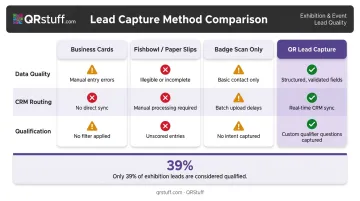
| Method | Data Quality | CRM Routing | Qualification |
|---|---|---|---|
| Business cards | Variable, manual entry | Delayed, error-prone | None |
| Fishbowl / paper slips | Inconsistent | Manual, slow | None |
| Badge scan only | Minimal fields | Delayed export | Rarely used |
| QR lead capture | Structured, clean | Real-time | Built into the form |
Less than 10% of exhibitors use custom qualifiers when capturing leads, yet only 39% of exhibition leads are considered qualified when assessed against exhibitor criteria. QR forms close that gap by making qualification part of the capture process, not an afterthought.
How to Set Up QR Code Lead Capture: A Six-Step Process
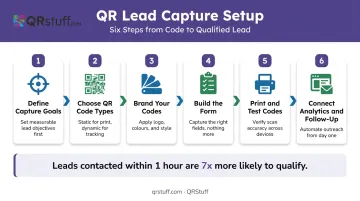
Step 1: Define What You Want to Capture and Why
Before creating a single code, decide what a qualified lead looks like for this show. That decision drives every form design choice downstream.
Identify which fields are non-negotiable (name, work email, company, role, primary interest) and which are nice-to-have. If a field won't change how you follow up, cut it. The goal is a form that attendees complete in under 60 seconds while standing at your booth.
Also confirm your data destination before the show. QRStuff integrates with Zapier, Make, and Workato — which connect to HubSpot, Salesforce, and most major CRMs — and supports Google Sheets as a lightweight alternative for smaller teams.
Step 2: Choose the Right QR Code Type for Each Use Case
Most exhibitors need two to three QR types deployed across different booth zones:
- URL codes → lead capture forms and landing pages
- vCard codes → rep-to-prospect contact exchange during conversations
- PDF codes → replace printed brochures with scannable digital versions
- Social media codes → grow followers from engaged show attendees
- Form/feedback codes → collect post-demo ratings or session feedback
One generic code for the entire booth tells you nothing about which touchpoint drove engagement. Separate codes per zone enable per-touchpoint analytics.
Step 3: Create and Brand Your QR Codes
QRStuff supports custom brand colors, logo embedding, and dot pattern modifications — so each code is visually distinct and on-brand rather than a generic black-and-white square.
For multi-zone deployments, the bulk generator lets you create all booth codes in a single workflow from an Excel upload. Each code can be downloaded in SVG or EPS format for banner-scale printing without pixelation, or high-res PNG for smaller print materials.
Branded codes are more recognizable on a busy show floor. They signal professionalism at the point of scan — which matters when you're asking someone to hand over their contact details.
Step 4: Build the Lead Capture Form or Landing Page
Keep forms to five fields maximum for show-floor completion. Every additional required field reduces completion rates. Based on HubSpot's landing page data, the conversion gap between a 3-field and 5-field form is already noticeable. Add five more fields and you've likely lost the majority of potential submissions.
QRStuff supports native form and landing page creation directly within the platform (no external form builder required), with the Full Suite offering 10 customisable forms and Enterprise offering unlimited.
Two requirements the landing page must meet:
- Mobile-optimized layout that loads in under three seconds
- A confirmation message after submission that tells the attendee what happens next
Step 5: Print Codes at the Correct Size
DENSO WAVE specifies a four-module quiet zone on all sides of a QR code — skip this border and scanners will struggle to read it reliably.
For sizing, use a practical 10:1 distance-to-size ratio: a code scanned from 1 metre away should be at least 10 cm square. Applied to trade show formats:
- Banner or display (1–2 m viewing distance): minimum 15–20 cm square
- Table placard or handout (arm's length): minimum 3–4 cm square
Before the show floor opens, test every code on both iOS and Android at the actual expected scanning distance. Verify the form loads, fields work, and submissions route correctly. Have a shortened URL as a staff backup if a code fails under show conditions.
Step 6: Connect Analytics and Pre-Build Your Follow-Up Sequence
Set up QRStuff's analytics dashboard before the show. The platform tracks scans in real time by code, time of day, device type (iOS/Android), and geographic location — so during the event, you can see which booth zones are generating the most engagement and reposition or reinforce accordingly.
Pre-build your post-show email sequence before you leave for the show. Research from Harvard Business Review found that companies contacting leads within one hour were nearly 7x more likely to qualify them than those waiting another hour, and more than 60x more likely than those waiting 24 hours or longer.
Leads captured on day one of a multi-day show should receive follow-up within 24 hours — not after the entire event wraps.
Where to Deploy QR Codes for Maximum Lead Capture
A single QR code at the booth entrance is a missed opportunity. Every distinct interaction type should have its own code — both to maximize capture moments and to generate analytics that reveal which touchpoints actually perform.
Busy Booth Coverage
When staff are occupied with other visitors, a QR code on a table placard, TV screen, or booth pillar functions as a self-service rep. Attendees scan, fill in their details, and move on without waiting. During peak floor hours, when booth traffic regularly exceeds staff capacity, this prevents interested prospects from leaving empty-handed.
Sponsorship and Branded Assets
Any asset you sponsor at the show (conference bags, lanyards, charging stations, directional signage) is a lead capture opportunity. Add a QR code linking to a short form, and you capture attendees who encounter your brand across the entire show floor, not just those who visit your booth.
Giveaways and Raffle Entries
Replace fishbowls and paper slips with a QR-linked entry form. Every participant enters the giveaway and the CRM simultaneously. The entry form can also include a qualifying question — purchase timeline, product interest, team size — that paper slips can never capture. You end the show with raffle entrants who are also segmented leads.
Session and Demo Areas
Display a QR code on the first and last slide of any presentation or live demo. Attendees who sit through a session are already high-intent prospects.
Capturing their details at the session level enables segmented follow-up tied to the specific content they engaged with, rather than a generic post-show sequence.
Each placement type serves a different audience moment. Together, they ensure no interaction — staffed or unstaffed, booth-based or floor-wide — goes uncaptured.
Key Factors That Affect Lead Capture Results
Two exhibitors with identical QR setups can get very different outcomes. Three variables account for most of the gap.
Form Length and Field Selection
Each additional required field reduces completion rates. HubSpot's analysis of 40,000+ landing pages found 3-field forms converted above 25% and 5-field forms above 21%. Add phone number or multiple dropdowns and rates drop further — HubSpot's data identifies these field types as specifically associated with lower conversions.
For trade show forms: name, work email, company, job title, and one qualifying question. Five fields is the ceiling for show-floor completion.
Call-to-Action Clarity
A QR code without explicit framing will be ignored. "Scan here" tells attendees nothing. Effective CTA frames communicate the benefit in under three seconds, for example:
- "Scan to Book a Live Demo"
- "Scan to Enter the Giveaway"
- "Scan to Download the Spec Sheet"
QRStuff's per-code analytics let you test different CTA frames across your booth zones and see in real time which phrasing drives the most scans. That data is available while the show is still running, so you can adjust on the fly.
Post-Show Follow-Up Speed
QR-captured leads with CRM routing via automation platforms like Zapier can trigger follow-up sequences immediately. Badge scan exports often take 48–72 hours to arrive from event organizers. By the time that export lands in your inbox, the prospects who showed up on day one have already heard from faster-moving competitors.
Common Mistakes That Undermine QR Lead Capture
Most QR lead capture failures trace back to three setup errors that are easy to avoid — once you know to look for them.
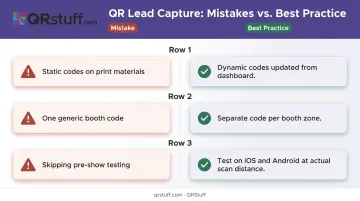
Static codes on printed materials. If any destination URL changes, every printed piece with that code breaks. Always use dynamic codes for trade show applications. QRStuff's dynamic codes let you update the destination from your dashboard at any time, no reprinting required.
One generic code across the entire booth. A single code tells you someone scanned somewhere. It tells you nothing about which touchpoint performed, makes post-show segmentation impossible, and removes the ability to tailor form content or offers to each interaction type.
Skipping pre-show testing. A slow-loading page, a form that breaks on Android, or a landing page that isn't mobile-optimized will lose leads without a trace. Test every code on both iOS and Android at the actual scanning distance before doors open. Keep a shortened URL on hand as a staff fallback.
Frequently Asked Questions
How do I get a QR code for trade show lead capture?
Use QRStuff to create a dynamic QR code, link it to a lead capture form or landing page, and display it at your booth. Attendees scan with their phone camera (no app required), and submitted details feed directly into your CRM or dashboard.
What is a QR code attendance system?
A QR code attendance system uses unique scannable codes to log when attendees enter a session, booth area, or event space. At trade shows, this is typically combined with lead capture so attendance data and contact details are collected in a single scan.
What information should a trade show lead capture QR code collect?
Name, work email, company, job title, and one qualifying question — such as product interest or purchase timeline. Five fields or fewer maximizes form completion on the show floor.
Should I use static or dynamic QR codes at a trade show?
Always dynamic. Destinations change before and during shows — a dynamic code lets you update the linked page without reprinting any booth materials.
Where should I place QR codes in my trade show booth?
At minimum: table placard or entry point for walk-in traffic, giveaway or raffle station, presentation or demo slides, and any sponsored assets or printed handouts. Each zone should have its own code.
How do I follow up with QR-captured leads after the show?
Connect your QR platform to your CRM via Zapier or a similar tool so leads sync in real time. Pre-build a segmented email sequence before the show so day-one leads receive outreach within 24 hours of the scan.