According to Bitly's 2025 survey of 250 marketers, 93% increased QR code usage in the prior 12 months, yet 87% struggled to understand the customer journey after a scan. The technology isn't the problem. The strategy is.
Done right, QR codes bridge physical touchpoints — packaging, signage, print ads, receipts — to specific digital actions that move customers closer to a purchase. Done wrong, they link to a homepage no one needed to visit.
This guide covers the full picture: when to use QR codes, what to set up before you launch, how to execute step by step, and which use cases generate the strongest returns.
Key Takeaways
- Link QR codes to a specific destination (coupon, product page, or review form), not a generic homepage
- Dynamic QR codes let you update the destination without reprinting — essential for any active campaign
- Placement, design, and call-to-action carry as much weight as the destination itself
- Scan analytics tell you what's working; without them, you're guessing
- Different goals require different QR code types — what works for a retail promotion won't suit a healthcare intake form
When to Use QR Codes to Drive Sales
QR codes perform best at moments of high purchase intent — when a customer is already engaged with your product, space, or ad and just needs one more prompt to act.
The three most common scan contexts, according to MobileIron's consumer research, are restaurants and cafés (38%), retail stores (37%), and consumer products (32%). All three share the same condition: customers have a specific need and a phone already in hand.
Where QR Codes Belong
Strong use cases share a common trait: clear context and a clear destination.
- Restaurant table tents linking to the current menu or daily specials
- Product packaging linking to ingredient details, usage instructions, or reviews
- Retail shelf tags linking to a product detail page with upsell options
- Storefront windows linking to an online store for after-hours purchases
- Real estate signage linking to a virtual tour or appointment booking form
Where QR codes fail is when the destination doesn't match the context. A code on a product tag that opens the store homepage tells the customer nothing useful — and that mismatch is why many campaigns see one scan and no return visits.
Relevance matters more than scale. A single-location café and a national retail chain are both valid QR environments. What determines success isn't the size of the operation — it's whether each code serves a clear purpose at its given location.
What You Need Before Launching a QR Code Campaign
Skipping setup is the fastest way to waste a campaign. Three things must be in place before a single code gets printed.
1. A Defined Goal for Each Code
Every QR code should answer one question before it's created: what specific action do I want the customer to take? Options include:
- Drive a direct purchase or add-to-cart
- Deliver a coupon or limited-time offer
- Capture an email or loyalty sign-up
- Request a review
- Share product information
The goal also determines which QR code type to use — a coupon code needs a different destination than a review request.
2. A Mobile-Optimized Landing Page
Every scan happens on a smartphone. Google's research found that 53% of users abandon a mobile site that takes more than 3 seconds to load, and a 0.1-second speed improvement increases retail conversion rates by 8.4%. A slow or desktop-only page kills the conversion before it starts.
3. A QR Code Platform with Dynamic Capabilities
You need a platform that supports:
- Dynamic codes that let you update destination URLs without reprinting physical materials
- Custom design options for logos, brand colors, and call-to-action labels
- Scan analytics covering volume, device type, location, and timing
QRStuff supports 40+ QR code types, including dedicated types for coupons, Google reviews, digital menus, payment initiation, and product packaging. Dynamic codes on paid plans can be updated at any time through the dashboard — the printed code stays exactly the same.
How to Use QR Codes to Drive Sales: Step by Step
Step 1: Choose Your QR Code Type and Set a Clear Destination
Different goals require different setups. Matching the code type to the intended action is the first decision — and one of the most consequential.
| Goal | QR Code Type | Destination |
|---|---|---|
| Menu access | URL / Digital Menu | Current menu page or ordering system |
| Product detail | URL | Specific product page with reviews |
| Upsell | URL | Bundled product or "frequently bought with" page |
| Virtual property tour | URL / Video | 3D walkthrough or listing page |
| Loyalty sign-up | URL | Enrollment form or rewards landing page |
| Review request | Google Review | Direct review submission page |
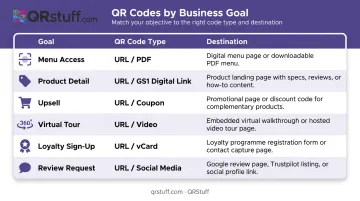
A restaurant might use a URL code linking to that day's specials, with the destination updated weekly via the dynamic dashboard. A retailer might place a separate code on each shelf section, each linking to that category's top-reviewed products.
A real estate agent can embed a video QR code on a yard sign linking directly to a hosted walkthrough — no app required for the buyer.
Step 2: Create and Customize Your QR Code Design
Plain black-and-white QR codes blend into the background. Branded codes — with a logo, brand colors, and a visible call-to-action — signal relevance and trust before a customer even raises their phone.
QRStuff allows customization of module shapes, eye patterns, foreground and background colors, logo embedding, and gradient effects. All changes preview in real time before you export.
Non-negotiable scannability rules:
- High contrast — dark code on a light background; never invert this
- Quiet zone — never crop the white border surrounding the code; scanners need it to locate the code's boundaries
- Minimum size — test at the actual print dimensions before sending to print; a code that looks fine on screen may not scan reliably on a glossy surface or at distance
Step 3: Place the Code Where Customers Will Actually Scan
Placement determines whether customers ever interact with the code. It needs to appear at the exact moment of intent — not buried on a back panel or displayed too small to notice.
Highest-performing placement locations:
- Product packaging and shelf edge labels
- Table tents and counter displays (restaurants)
- Printed receipts and packing inserts
- Business cards and brochures
- Window displays and door signage
- Direct mail pieces
Context must match destination. A code on a specific product should link to that product's page. A code on a seasonal promotion should link to that promotion. Mismatched destinations are the primary reason customers don't return after a first scan.
Step 4: Write a Call-to-Action That Tells Customers What to Expect
A QR code on its own communicates nothing. The label next to it does the work.
Every code needs a short, benefit-led prompt:
- "Scan to save 15%"
- "Scan to see it in action"
- "Scan to join our rewards program"
- "Scan for today's specials"
The landing page must deliver exactly what the label promises. A customer who scans "Save 15%" and lands on a homepage will leave. The landing experience has to fulfill the promise within the first two seconds.
Step 5: Track, Analyze, and Optimize
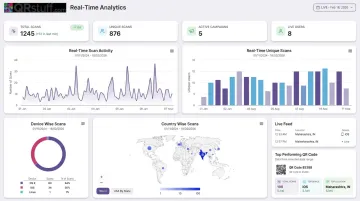
Without scan data, you're running a QR campaign on assumption. QRStuff's analytics dashboard provides real-time data on:
- Total scans and unique scans (separately tracked)
- Scan volume by day, week, or custom date range
- Geographic distribution and top scan locations
- Device type breakdown
- Scan velocity (hourly tracking for campaign launches)
Bitly's 2025 marketer data shows 69% of marketers updated their QR code destinations at least monthly — reflecting how often campaign performance data prompts a destination change, copy update, or placement adjustment.
With dynamic codes, none of those changes require reprinting. You update the destination in the dashboard, and every existing printed code redirects to the new page immediately.
High-Impact Ways to Use QR Codes for Sales and Engagement
The same underlying technology can serve very different goals depending on deployment. These are the use cases with the strongest documented returns.
Product Packaging and Shelf Displays
Research cited by the U.S. Chamber of Commerce found 66% of consumers would scan a QR code on food packaging to access ingredient or shelf-life information — and 98% of surveyed companies said QR codes had a positive marketing impact.
Linking packaging codes to product demos, usage instructions, or customer reviews reduces purchase hesitation without requiring staff involvement. It also creates natural upsell pathways: a customer researching one product can be directed to related items or bundle offers on the same landing page.
In-Store Promotions and Limited-Time Offers
QR codes on receipts, till displays, or promotional signage are a low-friction way to deliver mobile coupons, instant rebates, or loyalty enrolment. Customers don't need to remember a promo code or return to a website later. The scan happens in the moment, at the point of maximum motivation.
For restaurants specifically, Square's data found businesses using QR-code self-serve ordering saw 42% higher average ticket sizes — a direct revenue impact from a single implementation.
Printed Marketing Materials
Print ads, direct mail, and business cards have a specific problem: they can't be clicked. A QR code solves this by giving every printed touchpoint a direct digital destination.
A car dealership newspaper ad with a QR code linking to a specific vehicle detail page — with pricing, photos, and an appointment booking form — converts a passive reader into an active prospect. The destination has to match the creative; a generic homepage loses the lead entirely.
Out-of-Hours Sales Capture
A storefront window QR code can capture purchases from foot traffic that arrives when the location is closed. This is particularly effective for retail, restaurants handling catering enquiries, and real estate agents receiving walk-by interest outside business hours.
The Tesco Homeplus virtual store in South Korea is one of the most cited examples of this at scale: shoppers scanned product QR codes on subway-station displays, and online sales increased 130% while new registered members rose 76%.
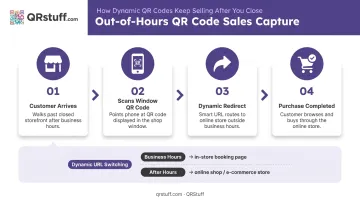
Dynamic codes make this even more flexible. Business hours might link to an in-store offer; after close, the same code routes directly to the online store — no reprint required.
Post-Purchase Engagement
The transaction opens the door to the next customer touchpoint. QR codes on packaging inserts, receipts, or product labels can direct customers to:
- Leave a Google review (Google's own platform supports review-request QR codes)
- Complete warranty or product registration
- Join an email list or loyalty programme
- Access usage guides or how-to content
These are low-cost placements with outsized lifetime value impact. Each of these micro-actions — a review, a registration, a loyalty sign-up — compounds into a measurably stronger customer relationship than a one-time transaction ever could.
Best Practices for Effective QR Code Campaigns
Three rules separate campaigns that convert from ones that quietly fail:
Use dynamic codes for any campaign that will evolve. Static codes are permanent — change the destination and the code becomes a dead end. Dynamic codes decouple your printed material from the URL, giving you full flexibility without reprinting costs. QRStuff supports dynamic codes across paid plans, with Enterprise tiers adding bulk generation and API access for large-scale deployments.
Test at real-world scale before committing to print. Screen previews lie. Print the code at its exact intended size, then scan it under the actual lighting conditions and on the actual surface where it will appear. Glossy finishes, low-light environments, and small print sizes each create scan failures that only show up in the field.
Give each code its own space and label. Stacking QR codes for reviews, warranty registration, and social follows on the same product page doesn't increase engagement — it kills it. Customers faced with multiple unlabeled codes scan none of them. Place each code at a distinct touchpoint with a clear, single purpose.
Frequently Asked Questions
How do QR code car sales work?
Car dealerships place QR codes on vehicle window stickers, lot signage, and print ads that link directly to vehicle detail pages, pricing sheets, virtual tours, or appointment booking forms. This lets customers self-serve information during lot visits — including outside business hours when staff aren't available.
What does QR mean in sales?
QR stands for Quick Response. In a sales context, it refers to using scannable codes to connect a physical touchpoint (packaging, signage, a printed ad) to a specific digital action like a product page, discount, or lead capture form. The result is a shorter path from awareness to purchase.
What are the benefits of using QR codes for sales?
Key benefits include:
- Bridges offline and online channels at the point of intent
- Gives customers instant access to product information or offers
- Captures first-party behavioral data for retargeting
- Reduces friction in the buying journey without requiring staff involvement
How do I track how many people are scanning my QR codes?
Dynamic QR code platforms include built-in analytics that log every scan with data on time, location, device type, and whether the scan came from a unique or returning user. QRStuff's dashboard presents this in real time, with CSV export for deeper analysis or integration into existing reporting tools.
What is a dynamic QR code and why does it matter for marketing?
A dynamic QR code stores a short redirect URL rather than encoding the final destination directly. This means the linked content can be updated at any time without altering or reprinting the physical code, making it essential for campaigns where offers or landing pages change over time.
Can QR codes be used for customer engagement beyond just driving sales?
Yes. Common non-sales applications include review requests, loyalty program enrollment, warranty registration, event check-ins, product education content, and social media follows. If there's a physical touchpoint in your customer journey, there's likely a QR engagement use case for it.