Here's the paradox: social media is consumed almost entirely on smartphones — over 63% of global web page requests come from mobile devices, and in the US, 91% of adults own a smartphone. That's a massive, mobile-first audience. Yet embedding QR codes directly in social media post images asks those same people to scan a code on the device they're already holding.
That's not a minor inconvenience — it's a fundamental usability problem that most "best practices" guides skip entirely.
This guide covers the honest truth about QR codes in social posts, where they genuinely drive follower growth, and the design and tracking practices that make offline-to-social campaigns worth the investment.
Key Takeaways
- QR codes embedded in social media post images are largely ineffective — mobile viewers can't scan a code on the phone they're already using
- QR codes work best alongside social media — placed on physical materials that drive people to your profiles
- Always use dynamic QR codes for social campaigns — update destinations and track scans without reprinting
- Include a clear, specific call-to-action next to every code so people know where it takes them
- Pair QR scan data with your social analytics to measure follower acquisition by placement
The Real Story: Can You Actually Scan a QR Code in a Social Media Post?
Short answer: usually no — and understanding why matters more than any design tip.
The Core Problem With Mobile-First Feeds
When someone scrolls Instagram, TikTok, or LinkedIn on their phone, they are already using the only device they have available to scan a QR code. Pointing a camera app at an image that's displayed on that same screen isn't how QR scanning works.
There are two narrow exceptions worth knowing:
- Desktop viewers — someone browsing Facebook or LinkedIn on a laptop can technically pull out their phone and scan the screen. Facebook's device data shows roughly 14.3% of users access it via both desktop and mobile, with only 1.2% desktop-only, so this audience exists — it's just small and shrinking.
- Screenshot-to-scan — iOS and Android camera apps can scan a QR code saved to the camera roll. This works technically, but it requires deliberate extra effort from the viewer.
The screenshot route has its place, but viewers will only tolerate that friction for a high-value offer — an exclusive discount, an event pass, a downloadable resource — not a generic "follow us" prompt.
Why Print Is Different
QR codes thrive in physical contexts because the phone is free — someone holding a product, reading a flyer, or standing in front of event signage has their hands available and their camera ready.
Use QR codes alongside social media — on physical materials that drive people to your profiles — not inside social media post images as your primary CTA.
Where QR Codes and Social Media Work Brilliantly Together
Where QR Codes and Social Media Work Best Together
The offline-to-social strategy is where QR codes genuinely earn their place in a marketing mix.
Converting Physical Audiences Into Followers
When someone scans a QR code on your product packaging, event booth, or receipt, they've already demonstrated intent. That's a warmer audience than a cold ad impression. The code removes every friction point between the moment of interest and actually following your brand — no searching for handles, no typing URLs.
U.S. smartphone QR scanner numbers were projected to reach 99.5 million by 2025 — that's a mainstream behavior, not a niche one.
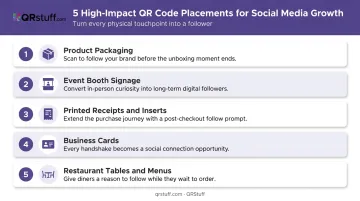
High-impact physical placements for follower acquisition:
- Product packaging and clothing tags — post-purchase moment with high brand affinity
- Event booth signage and name badges — engaged, opted-in audience
- Printed receipts and shipment inserts — caught at a natural pause point
- Business cards — professional context with genuine follow-up intent
- Restaurant tables and menus — extended dwell time, phone already in hand
The Social Media Hub QR Code
Rather than creating separate codes for each platform, a single social media hub QR code routes to one branded landing page displaying all your profiles. The scanner chooses which platform to follow — and you capture the conversion regardless.
QRStuff's Social Link Pages feature does exactly this. You bundle Instagram, TikTok, LinkedIn, Facebook, YouTube, and more into one dynamic code with a customizable landing page — your logo, brand colors, and CTA copy all included. For physical materials where space is limited, one code covering every platform is far more practical than a row of individual codes.
Campaign Mechanics That Work
The reverse use case — posting a QR code on your social channels — can also work when the destination has clear, immediate value. A printable coupon, downloadable guide, or event registration gives desktop viewers and intentional screenshot-scanners a real reason to follow through.
Beyond simple follow mechanics, QR codes can power:
- Contest entry forms — "Scan to enter our giveaway" consistently drives action when the prize is specific
- Scan-to-unlock discounts — QRStuff supports password-protected QR codes and coupon QR codes, making discount-reveal mechanics straightforward to execute
- Influencer and ambassador programs — brands can generate personalized QR codes for individual ambassadors, each linking to a unique campaign page (QRStuff's batch generation handles up to 500 codes per run, with API support for larger programs)
Consumer motivation data supports focusing on tangible value: a recent Chain Store Age survey found 75% of consumers scan QR codes to get more information and 52% scan to find discounts. Benefit-driven CTAs — specific outcomes over generic prompts — are consistently more effective.
Best Practices for Designing and Deploying Social Media QR Codes
Always Use Dynamic QR Codes
Static QR codes permanently encode a URL into their pattern. If you rebrand, change a campaign landing page, or need to update a destination after printing, the code breaks — and every piece of printed material becomes a dead end.
Dynamic QR codes solve this by routing scans through a short redirect URL. You can update the destination at any time without touching the physical code. QRStuff supports dynamic codes across all plan tiers, with paid plans removing scan limits and expiration dates — so your codes stay live as long as your campaign does.
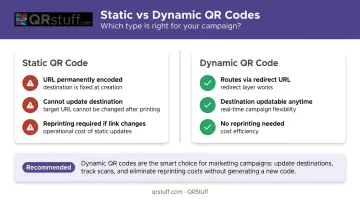
For seasonal promotions, rotating offers, or event registrations, dynamic codes are the only practical choice.
Design for Scannability First
Prioritize scan reliability over aesthetics. Research on QR code deterioration shows recognition rates drop from 95% for mildly degraded codes to under 32% for severely degraded ones — contrast and print quality drive that difference.
Design checklist:
- Dark modules on a light background (the safest default)
- Avoid placing codes over busy patterns, very dark, or very light backgrounds
- Minimum 2 cm × 2 cm for close-range scanning; use the 10:1 rule for distance (3 metres away = 30 cm wide code)
- Keep encoded data lean — use a short URL rather than embedding long text directly
- Brand colors and logos are fine; QRStuff automatically adjusts error correction so logos covering up to 30% of the code surface remain scannable
Include a Clear Call-to-Action
A code without context gets ignored. A short, specific CTA tells the viewer what they'll get and why it's worth the scan.
| Generic (Avoid) | Specific (Use Instead) |
|---|---|
| "Scan me" | "Scan to follow us on Instagram" |
| "Learn more" | "Scan to unlock 15% off your next order" |
| "Visit our website" | "Scan to enter our giveaway" |
Place the CTA visually adjacent to the code — above or below, never separated by other design elements.
Test Before You Print
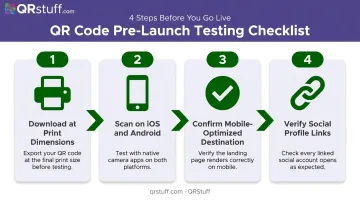
A broken code discovered after a print run is an expensive problem. Before any materials go to production:
- Download the code at final print dimensions
- Scan on both iOS and Android using native camera apps
- Confirm the destination page loads quickly and is mobile-optimized
- Verify all linked social profiles resolve correctly
QRStuff's built-in preview feature shows the code exactly as it will appear in final output, which reduces the chance of design issues surviving into print.
Common Mistakes to Avoid
Three errors account for most failed QR campaigns on social. Avoiding them takes minutes; recovering from them doesn't.
Embedding QR codes in social post images as the primary CTA. Mobile-first audiences — the overwhelming majority on every major platform — can't scan a code on the same device they're viewing it on. Put the link in the caption. Reserve QR codes for physical materials where a second device makes scanning practical.
Using static codes for campaigns with changing destinations. If your campaign URL is seasonal or tied to a specific offer, a static code will eventually point somewhere wrong or nowhere at all. Beyond reprinting costs, every person who scans a dead-end code erodes trust in your future QR campaigns. Dynamic codes solve this — the destination updates without touching the printed code.
Skipping the pre-launch scan test. Many brands only discover broken codes after materials are already in the wild. Before any print run or campaign launch, test on multiple devices at the intended viewing distance and confirm the destination loads quickly.
Frequently Asked Questions
Should you put QR codes on social media posts?
Embedding a QR code in a post image is generally ineffective for mobile viewers, who cannot scan a code on the same device they're using to view it. Sharing a QR code on social media with clear context — a downloadable coupon, event pass, or exclusive resource — can work when the audience has a specific reason to screenshot and scan intentionally.
Can people screenshot a QR code from social media and scan it?
Yes, most smartphone camera apps can scan a QR code saved to the camera roll. It works technically, but requires deliberate extra effort from the viewer. This approach performs best when the offer behind the code is specific and high-value enough to justify the additional steps.
What type of QR code is best for social media marketing?
A dynamic QR code routing to a branded landing page that displays all your social profiles. QRStuff's Social Link Pages bundles multiple platforms into one scannable code, with dynamic functionality letting you update the destination and track scans without reprinting.
How do I use QR codes to grow my social media following?
Place QR codes on physical materials — packaging, event signage, receipts, business cards — where the audience's phone is free to scan. Direct them to a social profile hub or a follow-to-enter campaign page. Physical touchpoints consistently outperform in-feed placements for follower acquisition.
Do QR codes in social media stories work better than in feed posts?
Stories viewed on mobile face the same scanning limitation as feed posts — the viewer's phone is already in use. Stories also support link stickers and native CTA buttons, which achieve the same outcome as a QR code without requiring the viewer to scan anything at all.
How do I track how many scans my social media QR code campaign gets?
Dynamic QR codes provide scan analytics including total and unique scans, geographic data at country and city level, device type (iOS vs Android), and time-based trends. QRStuff's dashboard visualizes this data in real-time, making it straightforward to measure campaign performance across physical placements.