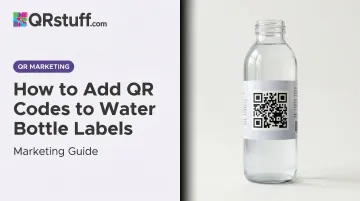
A QR code changes that equation. One scan turns a passive label into an active touchpoint — but only if the code is set up correctly. According to GS1 US, 66% of consumers say they would scan a QR code on food packaging to access product information — that's a significant audience already willing to engage.
The catch: results vary widely depending on what the code links to, how it's designed for label conditions, and whether it's static or dynamic. This guide covers each of those decisions in order.
Key Takeaways
- A QR code on a water bottle label turns a disposable item into a direct marketing channel
- Dynamic QR codes are the right choice for most campaigns — they let you change the destination URL after labels are printed
- Scannability on curved, wet, or reflective surfaces depends on size, contrast, and error correction level — all three must be right for the code to work in real conditions
- The destination page matters as much as the code — link to a mobile-optimized, goal-specific page, not a generic homepage
- Always test on a physical printed label before approving the full print run
How to Add a QR Code to Your Water Bottle Label
Step 1: Define the Goal and Destination
Before generating anything, decide what the QR code should accomplish. The goal determines everything else — the destination page, the call-to-action text, and whether you need scan analytics.
Common goals for water bottle labels:
- Driving a promotion or contest entry
- Collecting consumer feedback
- Growing a social media following
- Sharing nutritional or ingredient information
- Enrolling customers in a loyalty program
Once the goal is clear, confirm the destination page is mobile-optimized and loads quickly. A slow or desktop-only page will cause drop-off even after a successful scan.
Step 2: Choose Between Static and Dynamic QR Codes
The choice between static and dynamic codes has permanent consequences once labels go to print — so it's worth getting right before you commit.
Static QR codes permanently encode the destination URL in the pattern. Once printed, the destination is fixed. If the URL breaks or the campaign ends, the code leads nowhere.
Dynamic QR codes use a short redirect URL that can be updated at any time through a dashboard. The printed code stays the same; only the destination changes. They also capture scan analytics — location, device type, time of scan, and unique vs. repeat scans.
For water bottle labels specifically, dynamic codes make sense in almost every scenario:
- Time-limited promotions where the offer will change
- Campaigns where the destination URL might be updated
- Any situation where scan data would inform future decisions
QRStuff's paid plans (Lite Suite and above) include dynamic QR codes with no expiration and full scan analytics: location, device, time, and GPS coordinates all tracked in real time through the dashboard.
Step 3: Generate and Customise the QR Code
Use a generator that supports dynamic codes, custom branding, and high-resolution vector exports. Raster files like PNG will pixelate when scaled for print unless exported at 300 DPI minimum.
QRStuff supports:
- SVG and EPS vector formats — recommended for label printing since they scale without quality loss
- PNG at 300 DPI minimum for raster use cases
- Custom module shapes, eye shapes, and corner patterns
- Full colour customisation including hex codes, gradients, and per-element colour control
- Logo embedding — the platform automatically raises error correction when a logo is added, keeping the code scannable with up to 30% of the surface covered
For water bottle labels, set error correction to Level H (30%) before exporting.
Error correction at Level H This is the highest level defined in ISO/IEC 18004:2024 and allows the code to remain readable even if condensation, minor print distortion, or a logo overlay obscures part of it.
Step 4: Integrate the QR Code Into the Label Design
Export at 300 DPI minimum for raster formats, or use SVG/EPS for vector-based label files. Then apply these rules during layout:
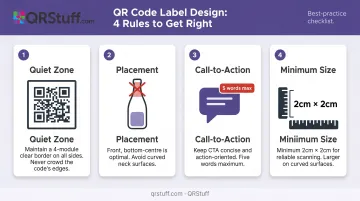
- Quiet zone: Maintain a blank border of at least four modules wide on all sides — per DENSO Wave's official QR code specifications. Removing or cropping the quiet zone is the most common reason QR codes fail on printed labels.
- Placement: Position the code on the flattest, most visible part of the label — typically the front bottom-centre or back panel. Avoid the neck of the bottle entirely (a GS1 placement restriction for good reason — the curvature makes scanning unreliable).
- Call-to-action: Pair the code with a short CTA of five words or fewer. "Scan to claim your offer" is enough. No CTA means lower scan rates.
- Minimum size: Keep the code at least 2 cm × 2 cm. For codes encoding longer URLs or more complex data, go larger.
Step 5: Test on a Physical Print Before the Full Run
Most teams skip this step. It causes the most expensive problems.
Print a test label on the actual material (matte, gloss, or waterproof vinyl) and apply it to a bottle. Then test:
- In low indoor light
- In bright outdoor light
- With at least two different phone models (iOS and Android)
- At arm's length, as a real user would hold the bottle
If the scan fails, check in this order:
- Contrast — the most common culprit
- Quiet zone — was it cropped during layout?
- Error correction level — is it set to H?
- Size — is the code large enough on the actual label?
Fix the issue and retest on a new physical print before approving the final file.
What Should Your Water Bottle QR Code Link To?
The destination determines whether the scan adds value or gets ignored. Here are the most effective use cases:
Promotions and Discount Campaigns
Link to a campaign-specific landing page with a time-limited offer, coupon code, or contest entry. Capri Sun ran front-of-pack QR codes for a sweepstakes that generated more than 579,000 landing-page views, proving that consumers will scan when the incentive is clear.
Dynamic codes are essential here: when the campaign ends, update the destination to a new offer rather than leaving the code pointing at an expired page.
Product Information and Transparency
For food and beverage brands, link to a mobile page with detailed nutritional information, ingredient sourcing, or allergen details. This is particularly useful when label space is constrained by regulatory requirements.
QRStuff's food packaging tools cover exactly this use case, supporting traceability, farming origins, and full ingredient breakdowns through a single scan.
Loyalty Program Sign-Up or Social Media Growth
Direct scanners to a loyalty enrollment page or social media profile. Include a visible incentive:
- "Scan to earn 50 points" outperforms generic codes with no stated benefit
- Loyalty sign-up pages should load fast and require minimal fields
- Social follow links work best when paired with exclusive content offers
Event-Specific Engagement
For branded bottles distributed at conferences, trade shows, or corporate events, link to event schedules, speaker profiles, or exclusive content. QRStuff supports dedicated event QR code types, including Eventbrite integration and attendance tracking — both practical for bottles handed out at large-scale events.
Sustainability and Recycling Information
Eco-conscious brands can link to a recycling guide, bottle return program, or sustainability report. It keeps the physical label clean while giving environmentally minded consumers the detail they're looking for.
Key Design Parameters That Affect Scannability
Four variables determine whether a QR code scans reliably on a water bottle label — and a failure in any one of them can undermine an otherwise well-executed design.
Minimum Size
A QR code printed too small becomes unreadable on a curved surface where the label flexes. The minimum recommended size is 2 cm × 2 cm for simple URLs — larger for data-dense codes. More modules in the code means more physical space is needed to maintain the pixel density scanners require.
Color Contrast
Scanners distinguish dark modules from a light background. The safest approach is dark modules on a white or light quiet zone, even if the surrounding label uses a darker color palette.
DENSO Wave notes that scanners commonly use red light, making certain combinations unreadable regardless of apparent visual contrast. Common problem pairings include:
- Dark blue on black or light grey on white (low luminance contrast)
- Red on white or blue on green (red-light interference)
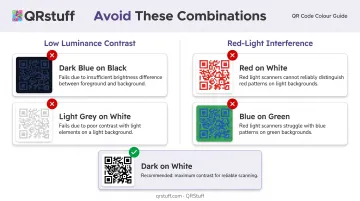
Always test color choices on a physical print before finalizing.
Label Finish
High-gloss finishes create specular glare that disrupts phone cameras under bright or angled light. Matte or satin finishes perform more reliably for QR codes. If gloss is required for brand aesthetics, consider a spot-matte finish over the QR code area only — this preserves the label's visual finish while protecting scannability.
Call-to-Action Placement
A QR code with no explanation gets lower engagement than one paired with a benefit-driven CTA. Position the code where a person naturally holds or views the bottle, and keep the CTA to five words or fewer. Placement on the back panel or front bottom-centre works well; placement on the neck or a curved seam does not.
Common Mistakes When Adding QR Codes to Water Bottle Labels
These are the errors that show up most often — and each one is avoidable.
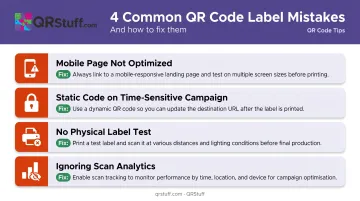
Linking to a page that isn't mobile-optimized. Virtually all QR scans originate from mobile devices, so a desktop-formatted or slow-loading homepage will cause immediate drop-off. The destination should be a single-purpose mobile page built for the campaign.
Using a static code for a time-sensitive campaign. Once printed, static codes cannot be redirected — if the URL changes or the campaign ends, the code either breaks or leads somewhere irrelevant. Dynamic codes eliminate this risk entirely.
Skipping physical label testing. A code that looks correct in design software can fail on actual label material due to ink bleed, surface texture, or scaling errors. Always test on the real substrate — not a screen preview — before approving the print run.
Ignoring scan analytics after launch. Brands using dynamic QR codes but never checking the data miss the ability to optimize. Scan volume, geographic distribution, and device type all inform future label design and campaign targeting decisions.
QRStuff's analytics dashboard surfaces this data in real time — including city-level location breakdowns and OS splits — so you can act on it before the next print run.
When QR Codes on Water Bottle Labels Are Worth the Investment
Not every water bottle distribution scenario justifies a QR code. The investment pays off when there's a real campaign behind it.
High-value use cases:
- Branded corporate events and trade show giveaways with a linked promotion
- Product launches requiring measurable consumer engagement
- Health and wellness brands offering ongoing digital content (recipes, workout guides, nutrition data)
- Loyalty-driven repeat-purchase scenarios where scan tracking provides ROI data
- Food and beverage brands with regulatory transparency requirements
Lower-value situations:
- Single-use generic giveaways with no linked campaign
- Short production runs where tracking costs exceed expected scan volume
- Audiences with low smartphone adoption — though Pew Research reports 91% of U.S. adults owned a smartphone as of 2025, making this a genuinely rare scenario
Frequently Asked Questions
How do I scan a QR code on a water bottle?
Most modern smartphones scan QR codes through the native camera app — point it at the code and tap the notification that appears. No third-party app is needed on iOS or Android. If the scan doesn't trigger, a dedicated QR scanner app from the app store will work as a backup.
How can I identify a fake water bottle using the QR code?
Brands use unique, serialized QR codes that link to official authentication pages. If scanning a code returns an error, redirects to an unrelated page, or shows no verification result, that can indicate a counterfeit product. Tamper-evident labels around the QR code area provide an additional physical signal to check.
Can I update the QR code content after labels are already printed?
Only dynamic QR codes allow this. The printed code stays the same, but the destination URL can be changed at any time through the QRStuff dashboard, with no reprinting required. Static QR codes permanently encode the destination and cannot be redirected after printing.
What size should a QR code be on a water bottle label?
A minimum of 2 cm × 2 cm works for standard, simple-URL codes. Larger is better for data-dense codes. The quiet zone border around the code must be preserved — cropping it is responsible for more scan failures than code size alone.
What should a QR code on a water bottle label link to?
The destination should match the campaign goal — promotions, loyalty sign-ups, product information pages, event schedules, or social media profiles all work well. One firm rule: the landing page must be mobile-optimized and load quickly.
Do I need a paid QR code generator?
Free generators can produce basic static QR codes, but paid plans are needed for dynamic QR codes, custom branding, logo embedding, and high-resolution vector exports (SVG/EPS) required for professional label printing. QRStuff's Free Suite includes 10 dynamic codes with a 30-day expiry, which works for testing but not live label campaigns.