Introduction
When your business needs QR codes at scale — dozens per day, thousands per batch, or triggered by live system events — manual generation breaks down fast. A QR code generator API solves this: your system creates codes programmatically, tied directly to your data, without human intervention. The use cases span payment flows, product packaging, employee onboarding, logistics tracking, and customer engagement campaigns.
Integration quality depends on five things: API selection, authentication setup, request parameters, error handling, and deployment testing. Miss any one of them and you're debugging unscannable codes in production.
This guide walks through the full process:
- Pre-integration requirements to validate before writing a line of code
- The four-step integration process from authentication to output
- Parameters that most affect scan reliability and output quality
- Mistakes teams consistently make — and how to avoid them
- Troubleshooting issues that surface after go-live
Key Takeaways
- A QR code API automates code generation at scale — essential for high-volume workflows and dynamic use cases
- Choose a provider that supports 40+ QR types, dynamic codes, and compliance certifications (GDPR, SOC2)
- Core integration: authenticate → structure request → parse response → test and deploy
- Static vs. dynamic code type, error correction level, and output format directly affect real-world performance
- Most failures trace back to missing error handling, skipped device testing, or the wrong code type
Before You Begin: What You Need to Integrate a QR Code API
Preparation determines integration success. Teams that skip this stage typically discover avoidable problems mid-build—wrong QR type support, missing compliance certifications, or authentication formats they didn't anticipate.
Work through each area below before writing a single line of code.
System and Technical Requirements
The minimum setup required:
- A development environment capable of making HTTP requests (Python, JavaScript, PHP, or any language works)
- An API key or Bearer token from your chosen QR code provider
- Basic familiarity with REST APIs and JSON responses
- An active paid subscription on a plan that includes API access (most providers gate API access behind paid tiers)
API Selection Criteria
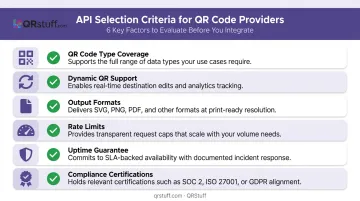
Not all QR code APIs are built for business systems. When evaluating providers, check for:
- QR code type coverage — aim for providers offering 40+ types (URL, vCard, WiFi, payment, social media, calendar, location, file upload)
- Dynamic QR code support — dynamic codes held 64.92% revenue share in 2025, meaning most production use cases require editable destinations
- Output formats — PNG, SVG, PDF, and EPS at minimum; SVG is non-negotiable for large-format print
- Rate limits — confirm requests-per-second and monthly caps for your expected volume
- Uptime guarantees — enterprise use requires at minimum 99.9% uptime commitments
- Compliance certifications — GDPR and SOC2 are baseline requirements for enterprise deployment
QRStuff's API, for example, supports 40+ data types across payments, social media, WiFi, vCard, and events. It carries GDPR compliance and a 99.9% uptime guarantee—with actual historical uptime of 99.968% since 2008.
Compliance and Security Readiness
Businesses in regulated industries face additional requirements:
- Healthcare teams should confirm whether their QR provider qualifies as a HIPAA business associate before encoding any patient-facing data that touches ePHI
- Payment flows that initiate or reference cardholder data require PCI DSS compliance review at the provider level—not just the application layer
- For all industries, verify whether QR content is stored server-side, how long it's retained, and where data physically resides
How to Integrate a QR Code Generator API Into Your Business System
Step 1: Obtain API Credentials and Configure Authentication
Sign up for an API-enabled plan, then locate your credentials in the provider's dashboard under the API or developer settings section.
QRStuff uses Bearer token authentication. Every request requires the token in the Authorization header:
curl -X POST 'https://api.qrstuff.com/api/qr-codes' \
  -H "Authorization: Bearer [your_api_key]" \
  -H "Content-Type: application/json" \
  -d '{"type": "website", "data": "https://example.com"}'
Critical security rule: Never hardcode API keys in source code or configuration files. OWASP classifies API keys as secrets and recommends storing them in a centralized secrets manager (AWS Secrets Manager, HashiCorp Vault, or environment variables) with least-privilege access and rotation policies.
Before building further, make one authenticated test request and confirm a 200 response. Don't move to Step 2 until you get a clean 200 response.
Step 2: Structure Your API Request
A standard QR code generation request includes these parameters:
| Parameter | Description | Example |
|---|---|---|
type |
QR code type | "website", "vcard", "wifi" |
data |
The encoded content | "https://example.com" |
format |
Output format | "png", "svg", "pdf" |
size |
Image dimensions in pixels | 256 (min: 128, max: 1024) |
error_correction_level |
Error correction | "H", "Q", "M", "L" |
dpi |
Resolution | 72, 150, 300, 600 |
One decision matters more than any parameter: static vs. dynamic. Static codes encode the destination directly into the QR pattern, making them permanent and unchangeable. Dynamic codes point to a provider-managed redirect URL, so the QR pattern stays constant while the destination updates freely. For any use case where content might change — promotions, landing pages, product info — request dynamic.
For batch operations, loop through your data array and send individual requests per item. Track rate limits carefully — sending 500 requests without throttling will trigger 429 errors and halt the job.
Step 3: Handle the API Response and Render the QR Code
A successful QRStuff API response (HTTP 200) returns a JSON object structured like this:
{
  "id": "qr_8f3k2m1n",
  "status": "active",
  "short_url": "https://qrs.tf/a1b2",
  "image_url": "https://cdn...",
  "created_at": "2026-02-12"
}
The image_url points to a CDN-hosted image — embed it directly into your UI, email template, label print file, or database record. No base64 decoding needed.
Build error handling around every API call. A failed generation call without error handling inserts a broken image or null record into your system silently — you won't find out until a customer reports it. Wrap every call in try/catch logic:
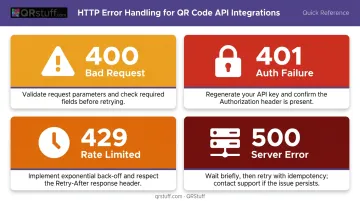
- 400: Bad request — check parameter formatting
- 401: Authentication failure — verify API key
- 429: Rate limit exceeded — implement exponential backoff (progressively longer retry delays;
- 500: Server error — retry with delay, then alert
Step 4: Test, Deploy, and Monitor
Before any production deployment:
- Test on multiple real devices — scan on both iOS and Android using at least two scanning apps
- Test across conditions — varying lighting, print sizes, and scanning distances
- Validate a sample set before batch runs — for bulk generation jobs, test 5–10 codes from the batch before committing the full run to print or deployment
Once deployed, monitoring keeps dynamic codes performing reliably over time:
- Use the provider's scan analytics dashboard to confirm codes are functioning and being used
- QRStuff's analytics endpoints provide scan counts, device breakdown (iOS/Android/OS), geographic data at country/city level, and hourly scan patterns
- Set up alerts or logging for API failures so a generation error doesn't silently break a downstream business process
- Maintain a fallback path (a direct URL, for instance) so QR generation failures don't take the entire workflow offline
Key Parameters That Affect Your QR Code API Integration
Four variables determine whether your QR codes perform reliably once deployed.
Static vs. Dynamic Code Type
Static codes permanently encode the destination. Dynamic codes use a provider-managed redirect that can be updated without reprinting.
For business systems where content changes—promotions, product pages, event links—static codes are the wrong default. Every destination change means regenerating and replacing every deployed code. Dynamic codes eliminate that cost and add scan analytics.
Use static codes only for permanently fixed data: WiFi credentials, plain text, or other content that will never change.
Error Correction Level
According to DENSO Wave, the four correction levels restore the following percentages of damaged codewords:
- L: ~7% — clean digital displays only
- M: ~15% — standard indoor use
- Q: ~25% — product packaging, indoor signage with moderate wear
- H: ~30% — outdoor signage, industrial labels, high-damage environments
Higher correction levels produce denser QR patterns. A larger, denser code requires a larger minimum print size to remain scannable. Test size and scannability together before committing a correction level to production.
Output Format and Image Size
- PNG: Good for web and email; degrades when scaled up for print
- SVG/PDF/EPS: Vector formats that remain crisp at any print size—use these for packaging and signage
- Minimum print size: At least 1 cm × 1 cm for small labels; use a 10:1 scan-distance ratio (a code scanned from 100 cm away needs to be at least 10 cm wide)
- Quiet zone: Maintain four modules of clear space around the QR boundary—removing this breaks scanner detection
For high-volume systems, oversized image generation inflates storage and bandwidth costs. Document the minimum dimensions for each use case and generate to spec.
Rate Limits and Batch Processing
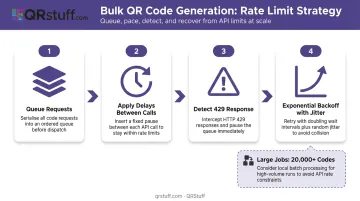
Rate limits vary by provider and plan tier. Exceeding them causes 429 errors that halt batch jobs. For bulk generation:
- Implement request queuing with delays between calls
- Use exponential backoff with jitter on 429 responses
- Apply retries only to idempotent operations to prevent duplicates
- For very large jobs (20,000+ codes), check whether your provider offers local batch processing. QRStuff, for example, offers a local processing service for jobs at that scale.
Common Mistakes When Integrating a QR Code API
Three mistakes account for most QR API integration failures in production:
Defaulting to static codes when dynamic ones are needed. Static codes are simpler to implement, so teams often reach for them first. Any use case involving changing destinations or scan tracking will eventually require complete regeneration and reprinting across all deployed materials — a cost that dynamic codes eliminate from the start.
Skipping error handling and assuming API calls always succeed. Production integrations without try/catch logic fail silently. A broken generation call inserts a null image or empty database record that only surfaces as a customer-facing problem days later. Every API call needs error handling, logging, and retry logic.
Not testing generated codes before deploying at scale. Batch-generating thousands of product label codes and shipping them without device testing is high-risk. A misconfigured size, wrong format, or excessive data density can make an entire batch unscannable. Test a representative sample across multiple real devices before committing to a full production run.
Troubleshooting QR Code API Integration Issues
Most API integration problems fall into three categories: scan failures, authentication errors, and rate limiting. Here's how to diagnose and fix each one.
QR Code Is Generated but Won't Scan
Likely causes:
- Image resolution too low for the intended print size
- Error correction level too low for the physical environment
- Special characters in the data payload not URL-encoded before passing to the API
What to check: Increase output image size, raise error correction to Q or H, URL-encode the full data payload before including it as a parameter, and re-test on multiple devices. Most QR code API providers require the text parameter to be URL-encoded — unencoded special characters are one of the most common causes of silent scan failures.
API Returns Authentication Errors (401)
Likely causes:
- API key expired or incorrectly formatted in the request header
- Account has exceeded plan limits triggering an access block
What to check: Re-verify the API key value from the provider dashboard, confirm the correct header format (Authorization: Bearer [key]), and check account usage and billing status.
Rate Limit Exceeded (429) During Bulk Operations
Likely causes:
- Requests firing too rapidly without throttling between calls
- Multiple concurrent threads submitting requests simultaneously
What to check: Add delays between requests in your loop, implement exponential backoff on 429 responses, and review whether your current plan tier supports the generation volume you need. QRStuff's Enterprise plan supports bulk generation at scale — if you're hitting limits regularly, it's worth evaluating whether your current tier matches your actual throughput needs.
Frequently Asked Questions
How do I generate QR codes for my business?
Businesses can generate QR codes manually through a platform's web interface or programmatically using a QR code generator API. For automated, high-volume, or system-integrated generation—such as product labeling or customer onboarding workflows—an API is the right approach.
What is the best QR code generator for business?
Look for a platform offering dynamic QR codes, 40+ code types, real-time scan analytics, enterprise compliance (GDPR and SOC2), batch generation support, and API access. The best fit depends on your volume, industry, and integration requirements.
Can I use a QR code API without coding experience?
A QR code API requires basic development knowledge—HTTP requests and JSON handling. Most providers supply comprehensive documentation, cURL examples, and code samples that make integration accessible to developers at any experience level. QRStuff's full API documentation is available at api.qrstuff.com/docs.
What is the difference between static and dynamic QR codes in an API?
Static codes encode data permanently into the QR pattern; once generated, the destination cannot be changed or tracked. Dynamic codes point to a provider-managed redirect that can be updated anytime without reprinting. Both types can be generated via API, but dynamic codes require a provider that supports redirect-based QR management.
How do I handle API rate limits when generating QR codes at scale?
Use these strategies to manage high-volume generation without hitting rate limits:
- Queue requests with delays between calls
- Apply exponential backoff on 429 errors, with jitter to avoid retry collisions
- Confirm your provider's plan tier supports your required throughput for batch jobs
Are QR codes generated via API secure for enterprise use?
Security depends entirely on the provider. Choose APIs from providers with SOC2 and GDPR compliance, support for password-protected QR codes, and clear data handling and retention policies. For healthcare or financial use cases, verify HIPAA and PCI DSS positioning before encoding sensitive data.