A QR code is simply a scannable square that sends students to a digital destination the moment they point a camera at it. No typing URLs, no lost links, no separate app required. According to NCES 2025 data, 88% of public schools now run 1-to-1 computing programs — meaning most elementary classrooms already have the devices to make this work immediately.
This guide covers 12 practical, K-5-ready ideas grouped by purpose: engagement, assessment and differentiation, and classroom routines. It also walks through exactly how to set codes up, even if you've never created one before.
Key Takeaways
- QR codes give students instant, one-tap access to videos, forms, audio, and resources — no typing needed
- Works across every subject and every learning level, even in mixed-ability classrooms
- These 12 ideas help teachers boost engagement, run quick assessments, and simplify daily routines
- Dynamic codes (editable after printing) eliminate reprinting when links change — a practical time-saver all year
Why QR Codes Work in Elementary Classrooms
Young learners respond to novelty and physical action. Scanning a code turns a passive moment (sitting and waiting for instructions) into a tactile, purposeful task. Edutopia's elementary guide notes that QR codes help children avoid technological mishaps, support student choice, and ease the transition from whole-group lessons to independent work.
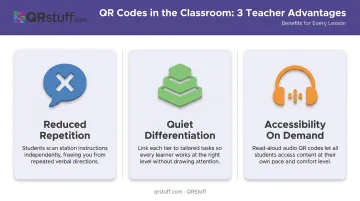
That student benefit translates directly into time savings for teachers. Three practical wins stand out:
- Reduced repetition — a QR code at a station answers the "what do I do next?" question without you leaving your reading group
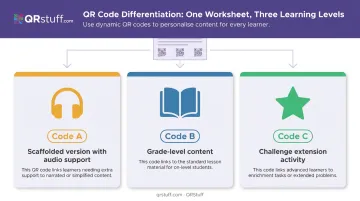
- Quiet differentiation — three codes on one worksheet can link to three different ability levels, no highlighting or pulling students aside required
- Accessibility on demand — Reading Rockets confirms that audio support benefits second-language learners, struggling readers, and students with learning differences; a QR-linked read-aloud delivers that support whenever a student needs it
Teachers average 53 hours of work per week, 15 beyond contract time. Each of these wins chips away at that number by reducing interruptions, side conversations, and repeated instructions.
Ideas 1–4: QR Codes for Engagement and Exploration
Classroom Scavenger Hunts
Hide QR codes around the room or hallway, each linking to a clue, short video clip, or unit question. Students move, scan, and record their findings — turning review into an active, physical experience.
Concrete example: In a science unit on life cycles, post five codes around the classroom. Each links to a 90-second video or image showing one stage (egg → larva → pupa → adult). Students document findings on a simple recording sheet as they move through the stations.
This works from grades 3–5 independently; younger students pair up with a partner or do it as a class walk.
Classroom Library Enhancements
Attach a laminated QR code to the spine or front cover of physical books, linking to:
- The author's official read-aloud video
- A student-recorded book review
- A 30-second book trailer to spark curiosity before a student commits to reading it
Research from the International Literacy Association supports using videos like book trailers as a "catch" for building situational reading interest — particularly for reluctant readers.
The "mystery book" version extends this idea: place a code on the shelf that plays a teaser before the student ever sees the title or cover.
Interactive Learning Stations
Place a QR code at each center that links to a short how-to video, task card directions, or a virtual manipulative. Students who forget the instructions simply rescan, keeping your small group time uninterrupted.
Elementary scenario: A math station on regrouping. Students scan before starting their practice sheet and watch a 2-minute video demonstrating the process. Reading Rockets notes that well-designed literacy centers create meaningful independent work that protects teacher-led small-group time. QR codes make that independence more sustainable in any subject.
Digital Student Portfolios and Art Explanations
While the first three ideas focus on classroom instruction, this one brings QR codes into the family connection. Have students (with teacher help in K-2) record a 60-second voice memo or video explaining their artwork, writing piece, or science project. Generate a QR code that links to that recording, then attach it to the physical work.
At Open House, parents scan the code on the hallway display and hear their child explain the project in their own words. It gives families a richer view than a static bulletin board, and builds metacognition even at age six.
Ideas 5–8: QR Codes for Assessment and Differentiation
Exit Ticket Check-Ins
Post one QR code on the board at lesson's end. It links to a 2–3 question Google Form: one concept question, one "how confident do you feel?" prompt.
- For grades 2+: standard multiple choice or short answer
- For K-1: use a smiley-face emoji scale or picture-based responses to keep it age-appropriate
Edutopia's exit ticket research frames these as tools for identifying strengths, guiding differentiation, and shaping the next day's lesson — not as grades. QRStuff supports a dedicated Google Form QR code type, so teachers can paste the Form link directly without an extra step.
Self-Check Answer Keys
Print a QR code at the bottom of practice worksheets or task cards. After students finish, they scan to reveal the answer key and self-correct.
This works best when clear right/wrong answers exist:
- Math fact practice
- Spelling checks
- Reading comprehension questions with defined answers
Research supports building this habit early. A 2021 study of 308 second- and fourth-grade students found that child-centered instruction positively predicted self-monitoring accuracy — with fourth graders outperforming second graders, a useful benchmark for adjusting expectations by grade level.
Differentiated Reading and Extension Activities
Place two or three QR codes on the same assignment sheet:
| Code | Links to |
|---|---|
| Code A | Scaffolded version with audio support |
| Code B | Grade-level content |
| Code C | Challenge extension activity |
Students self-select, or you quietly direct specific students toward the right code — no one is singled out. Early finishers have a clear next step, and students who need support can access it without having to ask.
Audio Support for ELL and Struggling Readers
Record a 60-second audio clip of assignment instructions, vocabulary pronunciations, or a passage read aloud. Upload it to Google Drive or directly to a QR code platform, then print the code alongside written instructions.
Record once, use all year. QRStuff supports audio file QR codes in MP3 and M4A formats, as well as URL-based links to externally hosted audio on Google Drive or Dropbox.
Ideas 9–12: QR Codes for Classroom Routines and Communication
Morning Meeting and Daily Routine Anchors
Post a QR code near the door or morning meeting area. Students scan when they arrive and it opens the day's calendar activity, morning greeting video, or weather app.
Two specific benefits:
- Students have a clear, independent task from the moment they walk in — reducing transition chaos
- Substitute teachers can scan the same codes to understand daily routines without reading through a full written sub plan
The IES K-5 behavior guide recommends using consistent pre-corrections and structured expectations before transitions — a posted QR routine supports exactly this.
Parent Communication and Newsletters
Add a QR code to weekly paper newsletters or Friday folders linking to:
- A short teacher-recorded video recap of the week
- A digital permission slip
- An online sign-up form for conferences
Peer-reviewed research identifies frequent two-way communication as a foundation of strong parent-teacher partnerships. A QR code on a paper newsletter bridges the physical and digital without requiring families to navigate a separate website.
That same logic carries into the classroom itself — QR codes can replace paper just as effectively at each student's desk.
Paperless Instructions and "Go Green" Assignments
Replace printed instruction sheets with a single laminated QR code card at each desk cluster or station. Students scan for directions.
The real value: dynamic QR codes let you update the linked content without reprinting the card. The laminated card from September still works in March — it just points to new instructions now. Over a full school year, that's real time saved on reprinting and redistributing.
Digital Praise and Reward Badges
Create QR codes linking to a short celebratory animation, a digital badge graphic, or a personalized teacher voice message. When a student finishes their first chapter book or masters multiplication facts, they receive a small printed card with that code.
They can scan it themselves, share it at home, or show a friend. ISTE supports digital badging as a way to recognize learning wherever it happens — and a physical card with a scannable code gives students something to hold onto and share, turning a classroom win into a moment families can be part of too.
How to Set Up QR Codes for Your Elementary Classroom
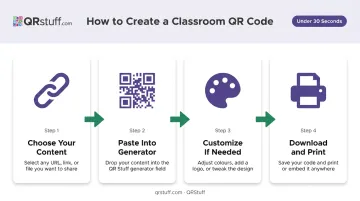
The process is four steps and takes under 30 seconds for a basic code:
- Choose your content — a URL, Google Form link, audio file, or video link
- Paste it into a QR code generator — no account required for basic static codes
- Customize if needed — add color or a simple logo to help students identify codes by subject or level
- Download and print — PNG works for standard classroom printing; SVG is better for small-size clarity on worksheets
Static vs. Dynamic: Which Does Your Classroom Need?
Static codes embed the destination directly. Free, permanent, no tracking. Fine for one-time handouts or content that never changes.
Dynamic codes use a redirect link, so the destination can be changed after printing. They also provide scan tracking — total scans, device types, scan times. A laminated station card with a dynamic code can be updated throughout the year without touching the printer.
QRStuff supports dynamic codes across 40+ content types — Google Forms, PDFs, audio, and video — and lets you edit the destination URL after printing. Teachers reusing laminated materials across units will get the most out of this. QRStuff also offers education discounts that double your subscription period on request, which is worth asking about if you're buying for a classroom or school.
Three Practical Printing Tips
- Print codes at least 2 cm × 2 cm (roughly 0.8 inches) for reliable tablet-height scanning
- Label every code with a short plain-text description so students know what to expect before scanning
- Test on the actual device students will use before the lesson — a code that scans perfectly on your phone may behave differently on a school-issued Chromebook
Frequently Asked Questions
Frequently Asked Questions
Do elementary students know how to scan QR codes?
Most students in grades 2 and up can scan independently after a brief demonstration. K-1 students typically scan with teacher or partner support. A short whole-class "scan practice" session before the first QR activity builds confidence quickly.
What devices do students need?
Any modern tablet or smartphone camera scans QR codes natively — no separate app required. iPads use the Camera app, Chromebooks use the built-in Camera with a Scan option, and Android tablets use the built-in camera. Shared devices rotate between pairs or stations.
Are QR codes safe for elementary students?
Safety depends entirely on where the code links. Always preview URLs before posting, use your school's filtered network, and label codes so students know the destination. Avoid codes pointing to open search results or unmoderated platforms.
Can I create QR codes for free?
Yes — free generators work well for static codes. QRStuff's free tier allows up to 5 static codes, though free codes expire after 30 days and include a 50-scan monthly limit. Paid plans remove those limits and unlock dynamic editing and scan analytics.
How do dynamic QR codes help teachers specifically?
Dynamic codes let you update the linked content without reprinting: swap a video, change a Google Form, or refresh a resource link instantly. This makes them ideal for laminated station cards, library labels, and newsletter inserts reused across multiple units.
Which subjects work best with QR codes?
All subjects work, but literacy (read-aloud links, author videos), science (experiment demos), and math (how-to videos, self-check answer keys) are the most natural fit. Art and social studies also benefit from QR-linked student reflections and multimedia examples.