Introduction
Walk into most academic libraries and you'll find a familiar tension: the collections have gone largely digital, yet the physical space still communicates through printed signs, static shelf labels, and paper handouts. Students carrying smartphones — have no easy way to move from a book spine to its digital record, from a shelf to a subject guide, or from a poster to an event registration form.
According to EDUCAUSE research, smartphone ownership among college students reached 99.7%, with 81% using their phones for learning at least once a week. The device is always in hand. The missing piece is a reliable bridge between the physical library and its digital resources.
QR codes fill that gap directly. A 2025 DESIDOC study surveying 104 Indian Institutions of National Importance found that 86.49% of academic libraries already use QR codes, with quick access to digital resources (78.38%) and enhanced user engagement (62.16%) cited as the top motivations.
This article covers where QR codes deliver the most value, how to deploy them effectively, and how to measure whether they're actually working.
Key Takeaways
- QR codes bridge physical library spaces and digital resources — most students already have a scanner in their pocket
- High-impact use cases include catalog access, wayfinding, research support, and event promotion
- Dynamic QR codes let you update destinations without reprinting signage, making them the practical choice over static codes
- Scan analytics help libraries measure usage and refine placement decisions over time
- Common failure points: non-mobile-optimized destinations, unclear CTAs, and inconsistent maintenance
Why QR Codes Fit Naturally in Academic Libraries
The mobile shift on campus has settled into baseline behavior. When nearly every student is carrying a capable scanning device at all times, a QR code is less a technology choice and more an obvious interface.
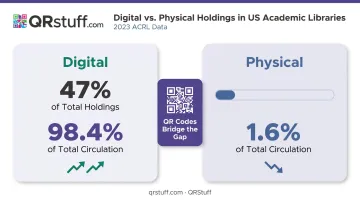
Device ownership is only part of the picture. The 2023 ACRL Annual Survey puts it in sharper relief: digital materials now account for 47% of reported holdings and 98.4% of total reported circulation in US academic libraries, while physical circulation represents just 1.6% of the total. Collections are overwhelmingly digital. Physical stacks, however, remain. QR codes are one of the only mechanisms that can connect a patron standing in front of a physical shelf to a digital record, e-journal, or research guide — in a single scan, with no staff intervention required.
Three practical reasons libraries adopt them quickly:
- No proprietary app needed — modern iOS and Android devices scan QR codes natively through the built-in camera
- Minimal infrastructure investment — no hardware, no wiring, no vendor contracts; libraries can print and deploy codes within days
- Accessible at limited IT budgets — even libraries with constrained technology resources can deploy codes at scale using free or low-cost tools, many of which require no technical setup
That combination — zero friction for students, low overhead for staff — is why adoption tends to accelerate once a single pilot deployment proves out.
High-Impact QR Code Use Cases for Academic Libraries
Catalog Access and Collection Discovery
Placing a QR code on a shelf end-cap, bookmark, or item label that links directly to the catalog record for that section gives patrons instant access to availability, hold options, and digital editions — without walking to a terminal. IIT Gandhinagar's library documented this approach extensively, using codes to connect patrons to catalog services, e-resource lists, new-arrival displays, and subject bibliographies across both print and digital collections.
New arrivals displays benefit particularly well. A code linking to a curated reading list or a call-number browse page delivers a richer discovery experience than any printed shelf label can.
Navigation and Wayfinding
Multi-floor libraries present real orientation challenges, especially during the first weeks of a semester. QR codes placed at entrances, elevator banks, and floor landings that open mobile-friendly interactive maps reduce directional questions to staff significantly.
During orientation week — when volume is highest and staff bandwidth is thinnest — codes linked to short video tours, floor guides, or room-reservation forms handle the most common first-visit questions without requiring one-on-one assistance.
Research Support and Information Literacy
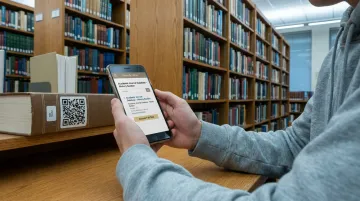
Among all the use cases in this guide, research support delivers the most immediate instructional value. A patron in the chemistry stacks who scans a code and lands on the chemistry LibGuide — with database links and how-to videos ready — gets the help they need at the exact moment they need it. That's a fundamentally different experience from walking to a reference desk or searching later from a dorm room.
The DESIDOC study found that 54.04% of surveyed academic libraries already use QR codes specifically for e-resource access. Common extensions of this model include:
- Periodical displays linking to e-journal access portals
- Audiovisual collections linking to related streaming or digital content
- Subject-specific stacks linking to curated LibGuides with vetted databases
Events, Feedback, and Community Building
John Jay College's Lloyd Sealy Library used QR codes on posters and postcards to reconnect students with the library website — including study spaces, citation guides, and help services — after pandemic lockdowns. The campaign demonstrated a practical outreach model that required no additional infrastructure.
Feedback codes placed at checkout counters and study room doors serve a different but equally useful purpose: short mobile-optimised surveys capture patron responses that paper feedback boxes rarely do, and the data arrives already digitised and actionable.
From Static to Dynamic: Choosing the Right QR Code Approach
Not all QR codes behave the same way after printing, and that distinction matters enormously in a library environment.
Static QR codes encode the destination URL directly into the code pattern. Once printed, the destination cannot be changed. If the linked page moves, the code breaks permanently.
Dynamic QR codes use a short redirect URL. The destination can be updated at any time through a management dashboard — without touching the printed code.
For academic libraries, dynamic codes are almost always the right choice. Resource URLs shift, database access links change with vendor contracts, and event pages expire.
Any of those changes breaks a static code permanently — requiring reprinted signage. With dynamic codes, the fix takes seconds in a dashboard.
QRStuff's platform handles this directly: administrators can update a linked LibGuide, fix a broken URL, or redirect a seasonal event code to a new destination without generating a new QR code or replacing printed materials.
For libraries deploying codes across multiple floors or departments, QRStuff's dashboard also supports:
- Grouping codes by floor, department, or use case (periodicals, study rooms, subject stacks)
- Filtering and comparing scan performance across sections with campaign tagging
- Assigning team members role-based permissions without sharing full administrative access
- Batch generation via spreadsheet upload — produce hundreds of codes at once in PNG, SVG, EPS, PDF, and other formats
For a library labeling an entire periodicals section or a full floor of stacks, batch generation eliminates the need to create codes individually and keeps formatting consistent across deployments.
How to Roll Out QR Codes in Your Academic Library
A phased approach beats library-wide deployment from day one. Start small, prove the concept, and expand from there — cleaner data and faster fixes come from a focused first rollout.
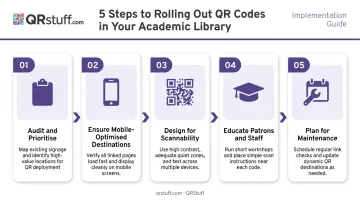
Here's a practical five-step sequence:
Audit and prioritise — Start with two or three high-traffic, high-friction points: the main entrance, the periodicals section, and one popular subject stacks area. Proving the concept in a limited zone is faster and produces cleaner data than a sprawling first deployment.
Ensure mobile-optimised destinations — A QR code is only as useful as the page it opens. Every linked destination — catalog pages, LibGuides, survey forms, event registrations — must be tested on both iOS and Android for load speed and usability before any code goes to print.
Design for scannability — Place codes at eye-to-waist height and size them for the intended scanning distance. Always add a short CTA ("Scan to access the e-journal") and maintain a quiet zone of at least four modules on all sides — per DENSO WAVE's QR Code specification, skipping this is the most common cause of scan failures.
Educate patrons and staff — The DESIDOC study found low user awareness affecting 16% of surveyed libraries. An explainer line under each code, a how-to-scan poster near the entrance, and a quick staff briefing handles most of this. The ALA also recommends including an alternative URL alongside each code so patrons with older devices or visual impairments aren't excluded.
Plan for maintenance — QR codes are not a set-and-forget deployment. Linked destinations need periodic checks for broken URLs, expired pages, or outdated content. Dynamic codes make this easier: one dashboard review catches issues across the entire set without requiring physical inspections of every sign.
Tracking Scan Performance and Proving Impact
Analytics are what separate a QR code programme from guesswork. Library administrators need scan data to justify the programme to stakeholders, identify which codes are working, and make informed decisions about where to expand or retire placements.
The DESIDOC study found that 81% of participating academic libraries already track QR code usage statistics — confirming this is an expected part of managing a programme, not an optional add-on.
Key Metrics Worth Tracking
| Metric | What It Tells You |
|---|---|
| Total scans | Overall usage volume per code |
| Unique scans | How many distinct users engaged |
| Device type (iOS vs. Android) | Informs mobile page design decisions |
| Time-of-day patterns | Identifies peak engagement windows |
| Geographic/location clusters | Shows which physical zones drive most scans |
Platforms like QRStuff's analytics dashboard capture all of these in real time, with daily, weekly, and custom date-range views. Scan logs are exportable as CSV files for custom reporting, and UTM parameter support allows integration with Google Analytics for libraries that want to connect scan data to broader web traffic reporting.
Using Data to Improve Placement
If a code on a periodicals shelf is generating near-zero scans, several causes are possible:
- The CTA is unclear or generic
- The destination doesn't load well on mobile
- Signage is positioned too high or too low
- Patron traffic in that zone is simply low
Analytics help distinguish between these. A code with high scans but low dwell time on the destination page points to a content problem, not a placement problem.
A monthly review cadence keeps the programme improving over time:
- Pull scan data and identify underperforming codes
- Diagnose the likely cause (placement, CTA, or destination content)
- Test one change — a new CTA, repositioned sign, or updated destination
- Track results over the following month before making further adjustments
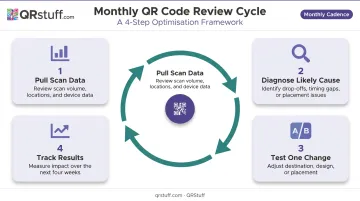
Each cycle produces measurable, documented improvements — exactly the kind of evidence that justifies continued investment to library stakeholders.
Common Mistakes to Avoid
Linking to non-mobile-optimised pages — A code that opens a desktop-formatted database portal or a PDF that won't render on a phone defeats the entire exercise. Every destination must be verified on an actual device before printing.
Deploying codes without a clear patron benefit — Every code should answer a specific question or solve a real friction point. Codes placed simply to fill space rarely get scanned — and repeated non-engagement erodes patron trust in future deployments.
Neglecting security hygiene — The ACRL warns that QR codes can redirect users to phishing sites, and "quishing" — fraudulent codes placed over legitimate ones — is an active threat. Use a reputable, GDPR-compliant platform and periodically verify that all deployed codes still point to institution-controlled destinations.
Skipping the quiet zone — Codes printed without adequate white space around the border frequently fail to scan, leading to patron frustration and staff overhead. DENSO WAVE's specification requires four modules of clear space on all sides.
Frequently Asked Questions
Do students need a special app to scan QR codes in the library?
Most modern smartphones — iOS and Android — scan QR codes natively through the built-in camera app with no download required. Students using older devices may need a free QR reader app, which is worth noting in any patron-facing signage.
What types of content can academic library QR codes link to?
Common destinations include:
- Digital catalogs, e-journal portals, and research databases
- LibGuides, tutorial videos, and feedback surveys
- Interactive floor maps and event registration forms
- Study room reservation systems
Should academic libraries use static or dynamic QR codes?
Dynamic QR codes are strongly preferred. They allow destination URLs to be updated without reprinting — critical in any environment where database links, event pages, and resource guides change regularly.
How can I create QR codes efficiently for a large collection?
Batch generation tools allow librarians to upload a spreadsheet of URLs and generate codes in bulk. QRStuff's Full Suite supports up to 500 codes per batch. The Enterprise tier offers unlimited batch generation with output in SVG and EPS formats for print-ready deployment.
How do I know if our library's QR codes are actually being used?
Dynamic QR codes include built-in scan analytics tracking total scans, unique users, device types, time-based patterns, and geographic data. QRStuff's dashboard presents this in real time and supports CSV export for administrator reporting.
What are the most common challenges with QR codes in academic libraries?
Low patron awareness, non-mobile-optimised destinations, and inconsistent maintenance of linked content are the three most frequently cited issues. Clear signage with brief explainer text, destination testing before printing, and dynamic codes that can be updated without reprinting address all three effectively.