But static catalogs have a real problem: prices change, products get discontinued, and promotions expire — often before the print run is even exhausted. Reprinting is expensive and slow. QR codes solve this by connecting a fixed printed page to content you can update at any time.
This guide covers everything you need to do it correctly: choosing the right QR code type, generating and designing codes for print, placement and sizing rules, and using scan analytics to improve each successive catalog edition.
Key Takeaways
- Use dynamic QR codes so you can update linked content without reprinting when prices or products change
- Match QR code type to intent — URL for product pages, PDF for spec sheets, video for demos, coupon for promotions
- Always include a short CTA next to each code, such as "Scan to see it in action"
- Export at 300 DPI minimum (or vector SVG/EPS) and size each code at least 2×2 cm for reliable scanning
- Use scan analytics to identify top-performing pages and sharpen the next edition
When to Use QR Codes in a Catalog
QR codes earn their place when print space is limited but the product demands more context — technical specifications, video demonstrations, extended image galleries, or pricing that changes faster than your print cycle.
Where They Fit Well
- Product spreads in print catalogs where one page can't capture the full story
- Promotional inserts linking to time-sensitive offers or discount codes
- Order pages connecting to a mobile-optimized checkout or request form
- B2B product binders sent to procurement teams who need detailed spec sheets before approving a purchase
Where They Don't Add Value
In fully digital eCatalogs with embedded clickable links, a QR code is usually redundant. The exception: if the eCatalog is distributed as a non-interactive PDF via email, where links may not be clickable depending on the viewer.
Catalog frequency shapes which code type you need. Seasonal fashion brands rotating inventory every few months have different needs than a B2B manufacturer sending the same product binder for two years.
High-frequency catalogs with changing promotions almost always benefit from dynamic codes. Low-frequency catalogs with stable content can work with static codes — but dynamic codes are the better choice by default.
What You Need Before Adding QR Codes to Your Catalog
Skipping preparation is where most catalog QR programs fail. Before generating a single code, confirm you have:
- A dynamic QR code platform that lets you update destination URLs after printing — no reprinting required (QRStuff supports 40+ code types with this functionality)
- Finalized, mobile-optimized destination content — every URL, PDF, or landing page must be live before you generate the code; a code pointing to a broken page is worse than no code at all
- Print-ready export files in SVG, EPS, or PNG at 300 DPI minimum — low-resolution exports produce blurry, unscannable codes in print
Static vs. Dynamic: Make This Decision First
| Static QR Code | Dynamic QR Code | |
|---|---|---|
| Destination editable after print? | No | Yes |
| Scan analytics available? | No | Yes |
| Best for catalogs? | Only if content never changes | Recommended for almost all catalog use |
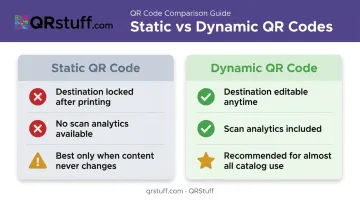
Static QR codes encode the destination directly into the pattern, so once printed, that destination is permanent. Dynamic codes work differently: they store a short redirect URL, meaning the printed pattern stays the same while you update the destination through your platform dashboard whenever needed. For catalogs where pricing, products, and promotions shift regularly, dynamic is the practical choice.
How to Add QR Codes to Your Catalog
Adding QR codes to a catalog follows a specific sequence. The two mistakes that most often derail the process: generating codes before destination content is live, and placing codes without testing them first. Both result in broken experiences and wasted print runs.
Step 1: Choose Your QR Code Type and Content Destination
Map each catalog page or product listing to a specific goal before generating anything:
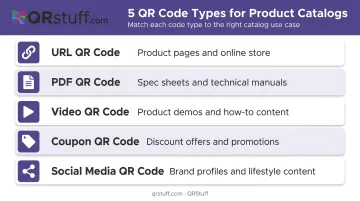
- Product page → URL QR Code
- Technical spec sheet → PDF QR Code
- Product demo → Video or YouTube QR Code
- Promotional offer → Coupon QR Code
- Community or social proof → Social Media QR Code
Avoid assigning the same generic URL code to every page. Different sections serve different buyer intents, and matching the code type to that intent improves the scan-to-action rate.
Step 2: Generate and Customize Your QR Code
Use a platform like QRStuff to generate codes with design customization that matches your catalog's visual identity — brand colors, embedded logo, frame style, and CTA text. A branded code reinforces recognition and gives readers a clear reason to scan rather than skip past it.
Download in SVG or EPS for print production. If your printer requires PNG, confirm the file is at least 300 DPI before placing it in your layout software.
For catalog publishers generating codes across hundreds of product listings, QRStuff's bulk generation tool accepts an Excel upload and processes up to 500 codes per batch — delivering a zip archive of ready-to-place files.
Step 3: Place and Size Your QR Code Correctly
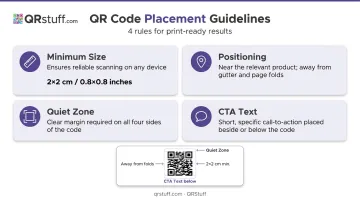
- Minimum size: 2×2 cm (approximately 0.8×0.8 inches) for reliable scanning
- Position: Near the relevant product, not in the gutter, near page folds, or against low-contrast backgrounds
- Quiet zone: Maintain clear white space around the code on all sides — this is required for scanners to read the code boundary correctly
- CTA text: Place a short, specific call-to-action directly beside or below the code — "Scan to download spec sheet," "Scan for today's price," or "Scan to see it in action"
Limit yourself to 1–2 QR codes per spread. Placing a code on every single product creates visual clutter and trains readers to ignore them.
Step 4: Test Before Printing and Track After Distribution
Before approving the final print file, scan every code on at least two devices — one iOS, one Android. Confirm the destination loads correctly, is mobile-optimized, and matches what the CTA text promises.
After distribution, use your platform's analytics dashboard to monitor performance by code. QRStuff tracks:
- Total scans and unique users
- Device type breakdowns (iOS vs. Android)
- Geographic data at the country and city level
- Scan timing and peak engagement windows
This data shows exactly which catalog pages are driving action — so you can double down on what works and rethink what isn't converting.
Types of QR Codes That Work Best in Catalogs
URL / Website QR Code
The most versatile option for catalog use. Links directly to a product page, landing page, or online store — best placed on product listings where the goal is moving a reader toward a purchase. US smartphone users scanning QR codes are projected to reach 99.5 million in 2025, which means your buyers are already comfortable scanning. Meeting them there is a low-friction win.
PDF QR Code
Best suited for content that can't fit in the catalog itself — spec sheets, technical manuals, extended lookbooks, or multi-tier pricing guides. This format is especially useful in B2B and industrial catalogs where procurement teams need detailed data before signing off on a purchase.
For sensitive materials, QRStuff's password-protected QR codes restrict access to authorized viewers only, which matters when proprietary specs or confidential pricing are involved.
Video QR Code
Links to a product demo, how-to, or brand story. Effective in fashion, home goods, and consumer electronics catalogs where motion resolves purchase hesitation that still images cannot address. QRStuff supports both uploaded video files and direct YouTube QR codes, making it easy to connect catalog pages to existing video assets.
Coupon / Discount QR Code
Drives direct conversions by linking to a discount code tied to a specific product. This works well in retail grocery, seasonal, and promotional catalogs where urgency is part of the message. A scan-triggered offer also creates a clean, measurable conversion event — useful for tracking which catalog pages are actually driving sales.
Social Media QR Code
Links readers to an Instagram profile, YouTube channel, or a consolidated social page. This works well in lifestyle and fashion catalogs where styling inspiration, influencer content, or user-generated posts add context that a printed page can't fully deliver. Common destinations include:
- Brand Instagram profiles showcasing products in use
- YouTube channels with how-to or unboxing content
- Link-in-bio style pages consolidating multiple social platforms
Best Practices for Catalog QR Codes
Always use dynamic codes. When a product is discontinued, a price changes, or a promotional page expires, you update the destination in your dashboard — the printed code stays the same. No reprints required.
Design for trust and scannability. Apply brand colors, embed your logo, and use a frame with CTA text. A code that looks like it belongs on the page gets scanned more than a generic black-and-white square dropped into white space.
Optimise every destination for mobile. Google's research shows 53% of mobile site visits are abandoned if a page takes more than 3 seconds to load. A QR code that leads to a slow, desktop-formatted page undoes the catalog investment entirely. Fast load times, readable text, and mobile-friendly layouts are non-negotiable.
Treat scan data as a feedback loop. After each catalog run, review which codes received the most scans, at what times, and from which locations. This tells you which products generated genuine interest, which CTAs resonated, and which placements were ignored. Use that data to make smarter placement and content decisions in the next edition.
Scale your deployment systematically. Large catalog runs — think hundreds of unique codes distributed across regions or print runs spanning months — require infrastructure that static tools can't support. QRStuff's Enterprise plan covers this with unlimited batch processing, API access for programmatic code generation, and a 99.9% uptime guarantee to keep every code active throughout the catalog's lifespan.
Conclusion
Using QR codes in catalogs effectively comes down to preparation and discipline. Define what each code should accomplish, prepare destinations before print, keep code density in check, and test before distribution. That discipline is what separates catalog QR programs that generate real results from ones that get ignored.
Every catalog QR code is a measurable marketing asset. Scan analytics deliver the kind of engagement data that print alone has never been able to provide. Apply those insights to each new edition, and your placement decisions get sharper with every print run.
Frequently Asked Questions
Can I get a free QR code for my catalog?
Most platforms, including QRStuff, offer free static QR code generation. For catalog use, where URLs, pricing, and promotions regularly change, a paid dynamic QR code plan is more practical — reprinting because a static code's destination expired costs far more than a monthly subscription.
What type of QR code works best for a product catalog?
It depends on the goal. URL QR codes work for product pages, PDF codes for spec sheets, video codes for demos, and coupon codes for promotional offers. Most catalog use cases benefit from dynamic versions of these types so destinations can be updated after printing.
Should I use static or dynamic QR codes in a print catalog?
For print catalogs, dynamic QR codes are the practical choice. They let you update the destination URL after distribution — useful when a promotion expires or a product is discontinued mid-run.
How big does a QR code need to be in a printed catalog?
Print QR codes at a minimum of 2×2 cm (0.8×0.8 inches) to remain reliably scannable. Always export at a minimum of 300 DPI for raster formats, or use SVG/EPS vector files for print production to avoid pixelation at any size.
Can I change where my catalog's QR code links after it's been printed?
Yes, with a dynamic QR code. The printed code image stays exactly the same while the destination is updated through your platform dashboard. QRStuff allows unlimited destination changes at any time.
How do I track how many people scan my catalog's QR codes?
Dynamic QR codes include built-in scan tracking. QRStuff's analytics dashboard shows total scans, unique users, device type (iOS vs. Android), geographic location, and time-of-day data — all updated in real time.