The scan is just the handoff. A consumer picks up your product, points their phone at the code, and arrives somewhere on the internet in under two seconds. If that destination is a generic homepage, a slow-loading page, or a promotion that expired three months ago, you've wasted the scan and probably the customer.
This guide covers both sides of the equation: generating a properly configured QR code and building a landing page worth scanning to. According to a 2025 GS1 US survey, 66% of U.S. consumers say they would scan a QR code on food packaging to access product information — the intent is there. The question is whether your setup captures it.
Key Takeaways
- Build a dedicated landing page for each campaign goal — not a homepage
- Use dynamic QR codes on any printed material where the destination might change
- Mobile speed matters: pages that load in over 3 seconds lose a measurable share of scanners before they convert
- Test QR codes on printed proofs, not just screen previews
- Scan analytics — including device, location, and time data — require dynamic codes, not static ones
How to Create a QR Code for a Product Landing Page
Two things have to work together: a landing page built for conversion, and a QR code configured for reliable scanning. Neither substitutes for the other.
Step 1: Define the Goal First
Each QR code on a product should serve one purpose. Pick one:
- Product setup or instructions — guides a buyer through first use
- Limited-time promotion — discount, bundle offer, or seasonal campaign
- Reorder or subscription link — drives repeat purchase
- Review request — sends buyers to your review platform of choice
- Loyalty sign-up — captures customer data post-purchase
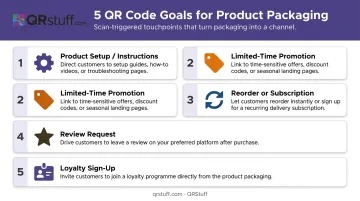
The goal determines everything downstream: page structure, CTA wording, and whether you need a static or dynamic code. A seasonal promotion requires a dynamic code — the URL has to change when the offer ends. A permanent instruction manual can use static.
Step 2: Build the Landing Page Before Generating the Code
The landing page must exist before you generate the QR code. You need the final, live URL to encode accurately.
Mobile requirements aren't optional here — practically all product QR scans happen on smartphones:
- Page load time under 3 seconds
- Large, tappable CTA buttons (no tiny links)
- Minimal form fields if capturing data
- No horizontal scrolling
- Uncompressed images and minimal scripts
Your headline should confirm what the scanner is getting within two seconds of arriving. "Your [Product Name] Setup Guide" or "Claim Your Exclusive Discount" eliminates confusion and reduces bounce from people who weren't sure what they'd find.
Step 3: Choose Static or Dynamic
| Static | Dynamic | |
|---|---|---|
| URL changeable after print? | No | Yes |
| Scan analytics available? | No | Yes |
| Visual complexity | Higher (encodes full URL) | Lower (encodes short redirect) |
| Best for | Permanent pages only | Packaging, inserts, POS materials |
If there's any chance the destination URL will change — promotions, seasonal campaigns, product updates — use dynamic. Static is only appropriate for permanent, non-changing destinations like a fixed support page or a manual that will never move.
Step 4: Generate and Customize Your QR Code
In QRStuff, the workflow runs in four steps:
- Select "URL" from QRStuff's 40+ data types
- Enter your destination URL with UTM parameters (e.g.,
?utm_source=product&utm_medium=qr&utm_campaign=product-name) so scan traffic shows as a distinct source in analytics, not buried in "direct" - Customize the design: apply brand colors via hex codes, embed your logo (JPG, PNG, or GIF up to 6MB), choose module shapes, and add frame text like "Scan for Setup Guide"
- Download in SVG or EPS for professional print production; high-resolution PNG for digital proofs
SVG scales without quality loss at any print size, making it the right choice for packaging and POS materials.
Step 5: Test on the Actual Print Surface
Screen testing is not enough. A code that looks perfect on a monitor can fail on a laminated panel, a glossy surface, or a curved container.
Testing checklist before going to print:
- Print a proof at actual intended size
- Test across at least two phone models (one iPhone, one Android)
- Scan in low light and bright light conditions
- Scan at the distance a consumer would realistically hold the product
- Verify the correct destination URL loads — not just that the code scans
On minimum size: GS1 UK states that a GS1 Digital Link QR code at the minimum permitted POS X-dimension requires a total footprint of at least 14.6mm × 14.6mm including the required quiet zone. For shelf or display signage scanned at greater distances, size up proportionally. DENSO WAVE specifies a four-module-wide clear margin on all sides — violate this and scan reliability drops sharply.
Avoid placing QR codes on:
- Highly curved surfaces (bottles, rounded corners)
- Shiny or metallic finishes without a matte panel
- Creased or folded areas of the packaging
Key Variables That Affect Scan Performance
The technical quality of the code and its physical context determine whether a scan even happens. A good landing page can't compensate for a code that fails at the camera.
Size and Quiet Zone
Size must be proportional to scanning distance. For close-range on-pack scanning, the GS1-verified minimum is 14.6mm × 14.6mm including the quiet zone — but this is a floor, not a target. Larger codes scan more reliably on consumer-grade smartphones, particularly older or lower-spec devices.
The quiet zone — the blank border around the code — requires a four-module-wide margin on all sides. Crowding the code against other design elements on the packaging is one of the most common causes of scan failure in the field.
Colour Contrast and Logo Embedding
Dark modules on a light background is the reliable baseline. Low-contrast combinations — light grey on white, brand colour on a similarly toned background — reduce scan success rates even on current-generation phones.
Adding a logo to the centre of a QR code is fine, provided:
- Error correction is set to Level H (approximately 30% codeword restoration capacity per DENSO WAVE's specification)
- The logo occupies a moderate, not dominant, portion of the code area
- The combination is tested on a physical print proof — ink spread on packaging materials behaves differently than a screen preview
Dynamic vs. Static: The Irreversible Decision
Choosing static when you should have used dynamic is a production mistake with real costs. When a promotional URL expires or a page changes, a static code on already-printed packaging has no fix: the entire print run needs to be redone.
Dynamic codes carry two additional scan advantages over static:
- Cleaner visual pattern — they encode a short redirect URL, not the full destination, resulting in fewer modules
- Faster, more reliable scans — lower module density means most smartphone cameras resolve the code on the first attempt
Scan Analytics
Analytics are only available with dynamic QR codes. QRStuff's real-time dashboard surfaces:
- Total and unique scans — overall reach vs. distinct individual engagement
- Device type — mobile vs. desktop, iOS vs. Android breakdowns
- Geographic data — country and city-level location
- Time and date — identifies peak engagement windows
- Per-code segmentation — campaign tags let you compare scan rates across different SKUs or packaging placements
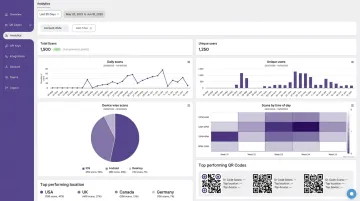
This data answers a question UTM parameters alone can't: whether low conversion is a placement problem, a landing page problem, or an offer problem. Running scan data alongside web analytics gives you the full picture — from first camera contact through to conversion.
What Makes a Product Landing Page Convert After the Scan
The QR code delivers attention. The landing page has to do the actual work.
One CTA, Clearly Stated
Pick one primary action and build the entire page around it: "Watch the Setup Video," "Claim Your Discount," "Reorder Now," or "Leave a Review." Multiple competing options reduce conversions — visitors who face too many choices often make none.
Speed Comes First
Google's mobile page speed research found that 53% of mobile site visits are abandoned when pages take longer than 3 seconds to load. Bounce probability increases 32% when load time moves from 1 second to 3 seconds — and 90% at 5 seconds.
For product QR landing pages, strip out:
- Heavy scripts and third-party trackers
- Auto-playing video on page load
- Large uncompressed images
Brand Consistency Between Code and Page
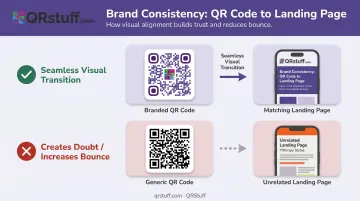
The visual transition from a branded QR code to the landing page should feel seamless. If the code carries your product's color palette and logo, the landing page should match the packaging aesthetic. Visual discontinuity — clicking through to something that looks unrelated — creates doubt and prompts bounces.
Trust Signals Above the Fold
A product rating, a short testimonial, or a recognizable "as seen in" badge near the top of the page helps retain scanners who have no prior relationship with your brand. This is especially important for new product launches, where a store shelf may be a scanner's first contact with your brand.
Common Mistakes to Avoid
Linking to a homepage instead of a dedicated page. Scanners expect something specific — setup instructions, a discount, a reorder option. A generic homepage forces them to hunt for it, and most don't bother. Nielsen Norman Group's QR usability guidelines are direct on this: QR codes must lead users to relevant, contextually appropriate pages.
Using a static code on changeable print materials. Seasonal promotions, limited-stock pages, and campaign-specific offers all require URL updates. A static code makes that impossible without reprinting — dynamic codes exist precisely for this reason.
Skipping physical print testing. Codes that scan perfectly on screen can fail on laminated finishes, curved surfaces, or small packaging panels. Test on the actual substrate at the actual production size before committing to a print run.
Ignoring analytics after launch. Without reviewing scan data by device, location, and time, there's no way to distinguish a placement problem from a landing page problem from an offer problem. Scan data is how you optimize — and it's only available if you set up dynamic codes with analytics from the start.
Conclusion
Creating an effective product QR code is a two-part job. You need a well-configured dynamic code — properly sized, contrast-tested, and verified on a physical proof — and a mobile-optimised landing page with a single, clear CTA that matches what the scanner expected to find.
The most preventable failures share a common thread:
- Using static codes on campaigns where the destination may change
- Sending scanners to a generic homepage instead of a purpose-built landing page
- Skipping physical test scans before committing to a print run
Dynamic QR codes with scan analytics connect your physical product to measurable digital performance. You can see which placements drive scans, which landing pages convert, and where drop-off happens — then fix it without reprinting a single label. Platforms like QRStuff make it straightforward to build, track, and update those codes from one place.
Frequently Asked Questions
What is a landing page for a QR code?
A QR code landing page is the web page a user arrives at after scanning the code. For product QR codes, this is a focused, mobile-optimized page built around one goal — setup instructions, a promotion, a review request — rather than a general website or homepage.
Should I use a dynamic or static QR code for my product landing page?
Dynamic QR codes are strongly recommended for product packaging and marketing materials. They allow the destination URL to be updated after printing without reprinting the code. Static codes are only appropriate when the destination URL will never change.
What should be included on a product landing page linked to a QR code?
Every product landing page linked to a QR code should include:
- A headline that immediately confirms what the scanner will get
- A single CTA aligned with the campaign goal
- Mobile-optimized design with a load time under 3 seconds
- A trust signal — such as a product rating or brief testimonial — near the top
How do I track how many people scanned my product QR code?
Scan tracking requires a dynamic QR code from a platform with built-in analytics. QRStuff's dashboard provides total and unique scans, device type, and geographic data at the country and city level — so you can see exactly which campaigns are driving engagement and where.
Can I update my QR code landing page URL after it's already been printed?
Only with a dynamic QR code. The short redirect can be pointed to a new URL at any time through the platform dashboard. Static QR codes have the URL encoded permanently — updating the destination requires reprinting.
How big should a QR code be on product packaging?
GS1 General Specifications require a minimum of 14.6mm × 14.6mm including the required quiet zone for close-range POS scanning. For display or shelf signage scanned from further away, size up proportionally. Always test at actual print size on the real packaging substrate before production.