QR codes close that gap. One scan takes a supporter from a table tent, direct mail piece, or charity shop window directly to a donation form — no typing, no searching, no delay.
The numbers back this up: mobile devices now account for 30.5% of all online donations, up from just 9% in 2014 according to the Blackbaud Institute. Donors are already giving on their phones. QR codes simply make it easier to get them there from wherever they encounter your cause.
This guide covers how to create fundraising QR codes, where to place them, and how to track which placements are actually driving donations.
Key Takeaways
- QR codes connect offline supporters directly to your donation page with one scan, eliminating the drop-off that long URLs cause
- Dynamic QR codes let you update the destination after printing, making them the safer default for any material with a shelf life
- Placement and a clear call-to-action determine whether a code gets scanned or ignored
- Per-channel scan analytics show which materials drive donations, so you can act on data instead of guessing
Why QR Codes Work for Fundraising
The Impulse Giving Window
Donor intent is highest at the moment of emotional connection — during a gala speech, while reading an appeal letter, or passing a charity display. Ask them to act later and most won't. There's no authoritative study that puts an exact time on this fade, but every fundraiser who has heard "I meant to donate but forgot" understands it intuitively.
A QR code captures that moment. A URL they have to remember does not.
Bridging Physical and Digital
Print materials, event signage, and in-person interactions are powerful for emotional engagement. Historically, though, they couldn't complete a transaction: a donor moved by your table display still had to go home, find the website, and navigate to a giving form.
QR codes make every physical touchpoint a potential giving moment. The Salvation Army's Kettle Pay program is a real-world example: QR codes on red kettle signs let donors give on the spot with their phone, replacing the need for cash entirely.
Cost and Trust Advantages
Compared to other giving methods, QR codes are low-friction for both organizations and donors:
- Cost to generate: Free — no keyword setup fees, carrier charges, or postage costs for the donor
- Text-to-give: No keyword licensing or carrier processing fees
- Reply envelopes: No printing, postage, or check processing
Trust is no longer a barrier either. Ivanti's research found that 83% of consumers had used a QR code to process a payment or financial transaction within the prior year, and 87% felt secure completing a financial transaction through one. Post-pandemic normalization in restaurants, retail, and healthcare has made QR scanning second nature for most smartphone users.
Multi-Channel Attribution
That same trust makes multi-channel deployment straightforward. Run one campaign across print, events, social media, and email — each channel gets its own unique code pointing to the same donation page. You capture impulse givers everywhere while knowing exactly which touchpoints are driving results.
How to Create a Fundraising QR Code Step-by-Step
Static vs. Dynamic — Choosing the Right Type
| Static QR Code | Dynamic QR Code | |
|---|---|---|
| Destination URL | Permanent — set at creation | Editable any time, no reprint needed |
| Analytics | None | Scan volume, device type, location, time |
| Best for | Single-use print (one-night event programme) | Anything with a shelf life |
| Risk | Code breaks if URL changes | Minimal — update destination in dashboard |
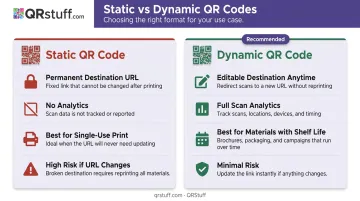
For most fundraising materials, dynamic codes are the right default. That includes:
- Direct mail campaigns
- Event banners and signage
- Merchandise and wearables
- Annual reports
- Any material that might outlast a single campaign
Creating Your Fundraising QR Code with QRStuff
Follow these steps to build a print-ready fundraising QR code:
- Prepare your donation page URL — confirm it's mobile-optimised and loads quickly on a smartphone
- Choose a generator that supports dynamic codes and custom branding — QRStuff supports 40+ QR code types, including dedicated URL/Website codes, with full dynamic code functionality on paid plans
- Select the URL/Website QR code type and enter your donation page URL
- Customise the design — embed your organisation's logo, apply brand colours using the colour picker or gradient tool, and select module and eye shapes that reflect your visual identity
- Download in the right format — SVG or 300 DPI PNG for print; 72–150 DPI PNG for digital use. QRStuff supports SVG and high-resolution PNG specifically for professional print applications
- Test before printing — scan the code on both iOS and Android using native camera apps, at the intended distance, in realistic lighting conditions
A branded QR code (with your logo and colours) tells donors immediately who they're giving to — before they even tap through. An unbranded black-and-white code gives no such reassurance, and many donors will simply pass it by.
Where to Place Fundraising QR Codes for Maximum Reach
In-Person and Event Placements
Events are the highest-intent environment for QR code giving, since attendees are already emotionally engaged with your cause. High-converting placements include:
- Table tents and seat-back cards — minimum 2"×2" for close-range scanning
- Retractable banners — 4"×4" or larger for viewing distances of 3–6 feet
- Event programmes and name badges
- Merchandise — charity run t-shirts, gala cocktail napkins, coffee mugs — these extend your campaign's visibility after the event ends
Always pair every code with a specific CTA. "Scan to donate tonight" outperforms a bare code with no instruction. The CTA should appear directly beside the code, not separated by layout elements.
The same principle applies beyond the event floor. Community placements capture spontaneous givers who wouldn't otherwise find your organization:
- Collection buckets and charity shop windows
- Waiting rooms relevant to your cause
- Library, gym, and grocery store bulletin boards
- Strategic partner locations (a coffee shop register, a community centre desk)
Print and Direct Mail
Direct mail is one of the strongest channels for fundraising QR codes. Recipients have already opened the envelope — intent is higher than a cold digital impression.
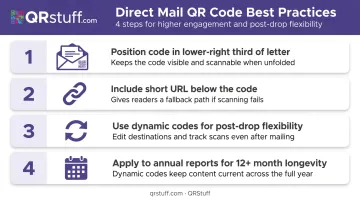
Best practices for direct mail placement:
- Position the code in the lower-right third of the letter or on a tear-off reply card
- Always include a short URL beneath the code for donors who can't or won't scan
- Use dynamic codes so you can redirect if the campaign page changes after mail drops
- Annual reports have long shelf lives — dynamic codes keep the link functional and updatable for 12+ months
Note: the USPS 2025 Integrated Technology Promotion offers a 3% postage discount for qualifying mail pieces that connect to digital landing pages, which can offset printing costs for QR-integrated mailings.
Digital Channels
QR codes in digital contexts work best when they bridge a screen gap:
- Instagram and Facebook — bridges the scroll to a donation action where clickable links are restricted. Prompt viewers: "Screenshot and scan to donate."
- Email newsletters — most useful for desktop readers who want to give on their phone. Include both a clickable donation button and the QR code; never replace one with the other.
- Slide decks and virtual presentations — a code on the final slide captures donors while emotional impact is highest, replacing "check our website later" with an immediate action.
Best Practices to Get More Scans and More Donations
These four principles separate QR fundraising campaigns that convert from ones that get ignored:
1. Include a specific call-to-action. A code alone communicates nothing. "Scan to donate to [cause]" or "Give now — scan here" removes ambiguity and drives more scans.
2. Get sizing and contrast right. A code that's too small, too close to other design elements, or printed on a glare-prone glossy surface will fail to scan. Follow these minimums:
- 1"×1" for close-range scanning (table cards, name badges)
- 2"×2" for table tents and standard flyers
- 4"×4" or larger for banners viewed from several feet away
QR codes also need a clear quiet zone — a blank margin around the symbol. Don't crowd it with competing visual elements.
3. Make the landing page mobile-ready. M+R Benchmarks reports that mobile users convert at 8% on donation pages versus 11% for desktop users. That gap widens when a page loads slowly or forces donors to pinch-zoom. Since nearly every QR scan happens on a smartphone, a mobile-optimized page with pre-populated donation amounts is non-negotiable.
4. Test on multiple devices before printing. Use at least one iPhone and one Android device in the lighting conditions where the code will actually be displayed. Catching problems before a print run saves time, money, and missed donation opportunities.
Track and Optimise Your Fundraising QR Code Performance
Track and Optimize Your Fundraising QR Code Performance
Without tracking, you're running campaigns blind. You won't know whether the gala banner or the direct mail piece drove more donations, or whether any particular city or event was worth the spend.
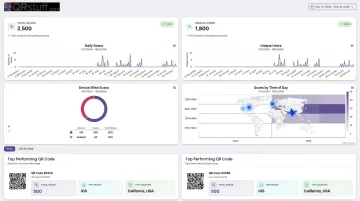
Dynamic QR codes solve this. QRStuff's analytics dashboard tracks:
- Total and unique scan counts — differentiates reach from repeat engagement
- Device type — iOS vs. Android and mobile vs. desktop breakdowns
- Geographic data — country and city-level scan location
- Time and date patterns — peak engagement windows across your campaign
Per-Channel Attribution
Create separate QR codes for each channel or placement — one for the gala table tents, another for the direct mail piece, a third for social media. Each code points to the same donation page but generates independent scan data.
Combine this with UTM parameters in the destination URL. QRStuff supports UTM pass-through, so completed donations in Google Analytics or your CRM trace back to a specific code and channel. You'll know not just how many people scanned, but how many donated and from which placement. Campaign tagging in the dashboard lets you filter and compare active codes at a glance.
Acting on the Data
Review scan analytics after every campaign and apply what you learn:
- If direct mail drove 3× more scans than the event table code, shift budget accordingly
- If a particular city's placement underperformed, cut it from the next round
- Mid-campaign URL changes? Update the dynamic code destination in the dashboard — no reprinting, no downtime
QRStuff's 99.9% uptime guarantee (with a historical average of 99.968% since 2008) means your codes keep resolving during time-sensitive events and campaigns.
Frequently Asked Questions
How do you get a QR code for a fundraiser?
Choose a QR code generator that supports dynamic codes, enter your donation page URL, customize the design with your organization's logo and colors, and download a high-resolution file. The whole process takes a few minutes. Use dynamic codes so you can update the destination without reprinting if your campaign page changes.
Can you accept donations via QR code?
Yes. A QR code links directly to a mobile-optimised donation page or giving form. When a supporter scans the code, they're taken immediately to the page to complete their gift using their phone's browser — no app required.
What's the difference between a static and dynamic QR code for fundraising?
Static codes have a fixed destination that cannot be changed after creation. Dynamic codes let you update the destination URL at any time and include scan analytics. For fundraising materials used beyond a single event, dynamic codes are the better option.
How big should a QR code be on fundraising materials?
Minimum 1"×1" for close-range materials like table cards and name badges. Use 2"×2" for table tents and standard flyers. For banners viewed from several feet away, go 4"×4" or larger. A practical guideline: add roughly 0.4 inches of code size for every additional foot of intended scanning distance.
Should I include a QR code in a fundraising email?
QR codes in email work best for desktop readers who want to give on their phone. Always pair the QR code with a clickable donation button, since mobile email readers cannot scan a code on the same screen they're reading.
Do donors need a special app to scan a fundraising QR code?
No app needed. All modern iOS and Android smartphones can scan QR codes using the built-in camera app. The donor opens their camera, points it at the code, and taps the notification that appears.