Introduction
Pick up a bottle of wine. The label tells you the vintage, the region, maybe a poetic description of oak and blackberry. What it can't tell you is the winemaker's story, what to pair it with, or whether the bottle is genuine.
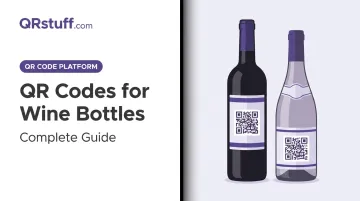
A small scannable square on the label bridges that gap — linking shoppers directly to tasting notes, pairing guides, authenticity verification, and more. Adoption has accelerated sharply since the EU's Regulation 2021/2117 made digital labeling mandatory for wines sold in Europe, and North American producers have followed suit.
This guide covers everything wineries need to know: what wine bottle QR codes link to, why dynamic codes are the only sensible choice for label applications, how to create and design one, and the placement rules that determine whether consumers actually scan it.
Key Takeaways
- 66% of US adults say they'd scan a QR code on food packaging to access product information—consumer appetite is real.
- EU Regulation 2021/2117 (in force December 2023) requires nutritional info and ingredient lists on wine labels; QR codes are the accepted delivery mechanism.
- Dynamic QR codes let you update destination URLs without reprinting, which is essential on long-run wine labels.
- Size minimum is 2 cm × 2 cm, dark code on white background, with a clear call-to-action.
- QRStuff's Full Suite (£15/month) includes 250 dynamic codes with unlimited scans, covering most multi-SKU winery operations.
Why Wine Brands Are Adding QR Codes to Their Labels
Consumer Expectations Have Shifted
Today's wine buyer does their homework. IWSR data from 2024 shows that across 18 key markets, 63% of online alcohol buyers conduct extensive research before purchasing—consulting brand websites and product reviews before committing. More than four in five US beverage-alcohol ecommerce shoppers spend at least some time researching online before buying.
A static label simply can't satisfy that curiosity. A QR code bridges the gap between the physical bottle and the depth of information buyers want.
The EU Regulation Driving Adoption
Regulation is now the single biggest driver of wine QR code adoption—outpacing consumer preference.
EU Regulation 2021/2117 entered application on 8 December 2023, making nutrition declarations and ingredient lists compulsory for wine sold in the European Union. The European Commission has confirmed that QR codes are an accepted method for delivering this information electronically.
Two important caveats from the regulation:
- Energy value and allergen information must still appear on the physical label
- The digital content linked from a regulatory QR code cannot include sales or marketing material, and user data cannot be collected for this purpose
While this directly affects EU producers, export-focused wineries in the US, Australia, and beyond are already adopting digital labels proactively to stay ahead of similar requirements in their own markets.
Anti-Counterfeit Value for Premium Wines
Wine fraud is a serious commercial problem. The EUIPO estimated counterfeit wine causes EUR 530 million in annual lost sales in the EU alone—roughly 2.3% of the EU wine market's total value.
A verified QR code linked to an authenticated winery page gives buyers confidence the bottle is genuine. DuCard Vineyards in Virginia demonstrated this in practice, launching the Real Provenance programme with a label QR code carrying a unique URL and serial number linked to cloud-based authentication software. For premium and collectible wines, that kind of verifiable provenance matters.
What Can a Wine Bottle QR Code Link To?
The physical label has space for maybe 200 words. A QR code has no such limit. Here's where smart wineries are pointing consumers:
Product-Specific Landing Pages
Linking to a generic homepage is a missed opportunity. The right approach is a mobile-optimised page dedicated to that specific wine, covering vintage details, awards, regional context, and a purchase link. A consumer scanning at a restaurant table wants immediate, relevant information — not a homepage navigation menu.
Tasting Notes, Pairings, and Serving Suggestions
A curated content page with flavour profiles, recommended dishes, and ideal serving temperature turns a passive label into something close to a personal sommelier. At the shelf, it helps customers choose. At the table, it helps diners understand what they've ordered.
Winemaker Story and Video Content
Short video content creates genuine emotional connection. A vineyard tour, harvest footage, or a two-minute explanation from the winemaker gives consumers something no label copy can.
Some producers recognised this early. Chateau Pichon Longueville Baron was among the first grand cru classé estates to adopt QR codes, placing one on back labels of their 2009 vintage. Portuguese producer Cortes de Cima had been doing it since 2008.
Nutritional Information and Ingredient Lists
For EU-market producers, this is now a compliance requirement. Delivering this data via QR code keeps the physical label clean while satisfying regulatory obligations across multiple markets simultaneously.
Promotions, Loyalty Programmes, and Social Links
Every bottle becomes a direct marketing channel at zero additional media spend:
- Discount codes and limited-time offers
- Competition entries and newsletter sign-ups
- Links to social media pages
- Loyalty programme enrolment
The key constraint for EU compliance: the regulatory QR code (for nutritional data) must be kept separate from any marketing content. Use a second QR code, or structure your landing page to keep the required legal information distinct.
Static vs. Dynamic QR Codes for Wine Labels
This is the most consequential decision in the entire process. Get it wrong and you may be reprinting thousands of labels.
How They Differ
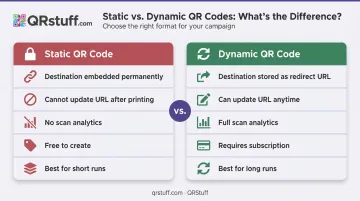
| Static QR Code | Dynamic QR Code | |
|---|---|---|
| Destination | Embedded in code permanently | Stored as a short redirect URL |
| Can update URL after printing | No | Yes |
| Scan analytics | None | Full data (scans, devices, locations) |
| Cost | Free | Requires platform subscription |
| Best for | Short runs, permanent destinations | Long runs, evolving content |
Why Dynamic Codes Are the Right Choice for Most Wine Labels
Wine labels have long print runs and multi-year lifespans. A static code embedded with today's URL becomes a dead end the moment a website is restructured, a campaign ends, or a domain changes. With a dynamic code, you update the destination from a dashboard. The printed code never changes.
The analytics case is just as compelling. QRStuff's dynamic codes track:
- Scan frequency and volume over time
- Device type (iOS vs. Android)
- Geographic location at city and country level
- Time-based trends across campaigns
For a winery distributing across multiple markets, knowing whether your label is driving engagement in Chicago, Sydney, or London has real strategic value.
When Static Codes Make Sense
Static codes aren't always wrong. For very small print runs, short-lived pop-up events, or a permanently fixed destination (like a stable PDF document that will never change), a static code is simpler and costs nothing. The trade-off is clear: no flexibility, no data — ever.
For commercial wine label applications, dynamic is the sensible default.
How to Create a QR Code for Your Wine Bottle Using QRStuff
Step 1: Choose Your QR Code Type
For most wine label applications, a URL QR code is the right starting point. QRStuff supports 40+ code types, so match the type to your content:
- URL – for landing pages, tasting notes, or winery websites
- Video – for direct links to winemaker footage or vineyard tours
- vCard – if the winemaker wants to embed contact details for trade customers
- GS1 Digital Link – for EU compliance and retail POS compatibility (Sunrise 2027 ready)
- File – for downloadable PDFs such as technical sheets or ingredient lists
Step 2: Enter Your URL and Select Dynamic
Input your destination URL and select the dynamic option before generating. Skipping this step locks your destination permanently — if your URL changes after printing, those labels become dead ends. Dynamic codes on QRStuff's paid plans allow unlimited destination updates without reprinting.
For wineries managing multiple SKUs, two plans cover most needs:
| Plan | Price | Dynamic Codes | Monthly Scans |
|---|---|---|---|
| Lite Suite | $4/month | 50 | 200 cap |
| Full Suite | $15/month | 250 | Unlimited |
Step 3: Customise to Match Your Label
QRStuff allows full design customisation:
- Colours and gradients – match your label's colour palette exactly
- Module and eye shapes – choose from multiple geometric options for a distinctive look
- Logo embedding – upload your winery crest or brand mark; QRStuff automatically centres it and raises error correction so the code remains scannable (logos can safely cover up to 30% of the code surface)
Maintain strong contrast regardless of styling choices. A dark code on a light background is non-negotiable for reliable scanning.
Step 4: Download in Print-Ready Format and Test
Download as SVG or EPS for professional label printing—these vector formats scale to any size without quality loss. If using PNG, maintain a minimum of 300 DPI.
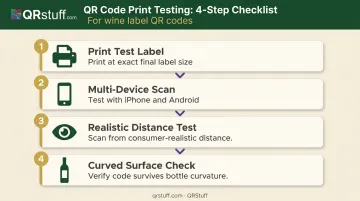
Always run a physical print test before committing to a full run:
- Print a physical test label at the exact final size
- Scan it with multiple devices (iPhone and Android)
- Test at the scanning distance a consumer would realistically use
- Check that the curved bottle surface doesn't distort the code
A code that scans perfectly on screen can fail on a curved glass bottle if the module density is too high or the quiet zone has been cropped.
Step 5: Monitor Scans via the Analytics Dashboard
Once live, QRStuff's dashboard gives you ongoing visibility into scan frequency, device breakdown, and geographic data—updated in real time. Export scan data as CSV files for integration with your wider marketing analytics. If a particular market shows low engagement, you can update the destination URL to a localised page without touching a single label.
Best Practices for Wine Bottle QR Code Design and Placement
Size and Contrast Requirements
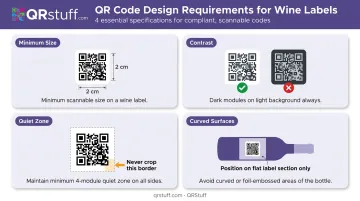
- Minimum size: 2 cm × 2 cm (QRStuff's guidance for simple URLs). GS1 UK specifies a minimum of 14.6 mm × 14.6 mm for retail-facing QR codes, so 2 cm gives you a reliable margin above both thresholds.
- Contrast: dark code on white or very light background. Avoid placing the code over foil elements, textured paper, or patterned backgrounds. Inverted codes (light on dark) cause problems for older scanners.
- Quiet zone: Never crop the white border surrounding the QR code. Removing it makes the code unreadable for most scanners.
- Curved surfaces: Keep the code on the flattest section of the label. Higher error correction settings (which QRStuff applies automatically when you embed a logo) provide some tolerance for surface distortion.
Front Label vs. Back Label
Back-label placement is standard—it preserves the front label's visual hierarchy and brand presentation. That said, a small, well-integrated QR code on the front label is more likely to catch a consumer's eye at point of sale.
The right answer depends on your label design and brand positioning. Whichever position you choose, lock in placement during the design phase—codes added late in production tend to look squeezed in, and consumers notice. Once you've settled on placement, the next step is making sure people actually scan it.
Add a Call-to-Action
A QR code without context gets ignored. A short line of text alongside the code gives consumers a reason to act:
- "Scan to meet the winemaker"
- "Scan for tasting notes and food pairings"
- "Scan to verify authenticity"
Without a call-to-action, most consumers will assume the code is a logistics barcode and keep walking. Four to six words is all it takes.
Frequently Asked Questions
What is the QR code on wine bottles?
A QR code on a wine bottle is a scannable square that links consumers to digital content—tasting notes, ingredient lists, winemaker stories, or the winery's website. It delivers information that would never fit on a physical label and can be updated by the producer at any time.
How do you scan a wine QR code?
Open the built-in camera app on any modern iPhone (iOS 11 or later) or Android phone (Android 9 or later), point it at the code for one to two seconds, and tap the link notification that appears. No separate app required.
What is the best app to scan wine bottles?
For QR codes, the built-in camera app works reliably on both iOS and Android. For wine label recognition, Vivino (70M+ users) is the most widely used option — it identifies a wine by photographing its label rather than scanning a QR code.
Can I update my wine bottle QR code without reprinting the label?
Yes. With a dynamic QR code, the destination URL is stored on the platform's server, not in the printed code itself. You can change where the code points from your QRStuff dashboard at any time, with no reprint needed.
What size should a QR code be on a wine label?
A minimum of 2 cm × 2 cm is recommended for reliable scanning. Smaller codes risk failing on curved bottle surfaces, particularly if scanned at an angle or in lower light conditions.
Do QR codes on wine bottles expire?
Static QR codes don't expire, but stop working if the linked URL goes offline. Dynamic QR codes on QRStuff's paid plans stay active for the life of the subscription. If a subscription lapses, dynamic codes drop to 10 scans per month and expire 30 days (monthly) or one year (annual) after the account goes inactive.