Introduction
WhatsApp Business crossed 200 million monthly active users in 2023 — a four-fold increase in just three years. For businesses, that growth represents a massive opportunity to reach customers where they already spend time.
The problem isn't convincing customers to use WhatsApp. It's getting them to start a conversation with your business in the first place. Asking someone to save a number, open the app, find the contact, and type a message introduces enough friction to kill the interaction entirely.
QR codes solve this. One scan opens a chat window directly — no number-saving, no searching, no typing required. This guide covers exactly what WhatsApp Business QR codes are, how to create one correctly (including native and custom options), where to place them for maximum effect, and how to make every scan count.
Key Takeaways
- A WhatsApp Business QR code encodes a
wa.melink that opens a direct chat with your business in one scan - The native WhatsApp Business app generates a free static code — no branding control, no scan data
- Third-party generators like QRStuff add custom design, dynamic editing, and scan analytics
- Dynamic codes let you update the destination after printing — no reprinting required
- High-performing placements include product packaging, in-store displays, print ads, and email footers
What Is a WhatsApp Business QR Code?
A WhatsApp Business QR code is a scannable image that encodes a wa.me link pointing to your business phone number. When someone scans it, WhatsApp opens directly to a chat with your business — ready to send. No manual number entry, no searching.
The link structure looks like this:
https://wa.me/[country_code][number]?text=[urlencoded_message]
Per the WhatsApp Help Center, the number must be in full international format — no leading zeros, no brackets, no dashes. Spaces in pre-filled messages should be URL-encoded as %20.
Native vs. Custom WhatsApp QR Codes
There are two distinct ways to get a WhatsApp QR code, and they behave very differently:
| Feature | Native (WhatsApp Business App) | Custom (Third-Party Generator) |
|---|---|---|
| Cost | Free | Free or paid |
| Branding | None | Colors, logo, shapes |
| Scan analytics | None | Full dashboard |
| Editable after printing | No | Yes (dynamic codes) |
| Pre-filled message | Yes | Yes |
| Expiration | Non-expiring unless reset | Depends on plan |
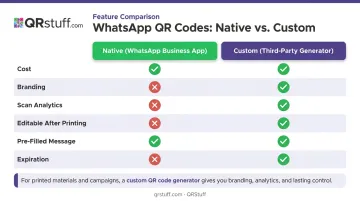
The native code does the job for simple, one-off use cases. For anything involving printed materials, campaigns, or multiple placements, a custom QR code from a generator gives you the control and data you actually need.
The right choice depends on your use case — and the next section breaks down exactly how to set up each option.
How to Create a WhatsApp QR Code (Step-by-Step)
Two paths. Pick the one that matches your needs.
Using the Native WhatsApp Business App
- Open WhatsApp Business on your phone
- Tap your business name at the top to access your profile
- Select Business tools → Short link → QR code
- Tap Download or Share to save or distribute the code
The code is static — meaning it cannot be restyled, tracked, or edited. If your phone number changes, every printed material carrying this code needs to be reprinted.
Using a QR Code Generator (Recommended for Most Businesses)
QRStuff's dedicated WhatsApp QR code type gives you branded, trackable, and editable codes. The creation process:
- Select the WhatsApp data type — QRStuff uses a dedicated WhatsApp QR code type, not a generic URL field
- Enter your phone number — select your country from the dropdown (for example, United States +1), then enter the number without the leading zero
- Add a pre-filled message (optional) — this auto-populates in the customer's chat box on scan
- Customize the design — adjust colors, add your logo, and select dot and frame styles to match your brand
- Download in the right format — PNG for digital use; SVG or EPS for print (available on paid plans)
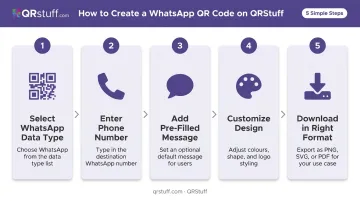
The resulting QR code encodes the same wa.me URL structure, but wrapped in a short redirect URL. That redirect is what makes dynamic codes possible.
Why Dynamic WhatsApp QR Codes Matter
Static codes embed the destination directly in the pattern. Change the destination, and you need a new code printed.
Dynamic codes work differently. The physical code points to a short redirect URL on QRStuff's servers, and you control where that redirect sends the scanner. Update the phone number, swap the pre-filled message, or redirect to a new campaign. The printed code stays the same.
For businesses with product packaging, in-store signage, or long-running print campaigns, this is a practical necessity. QRStuff's dynamic WhatsApp QR codes are available from the Lite Suite (50 dynamic codes) through Enterprise (1,000+ dynamic codes), with the Free Suite offering 10 dynamic codes that expire after 30 days.
Testing Before You Print
Before committing to a print run:
- Scan on both iOS and Android devices
- Test in different lighting conditions (dim indoor light, direct sunlight)
- Print a test copy at the intended size and scan from your normal distance
- QRStuff recommends a minimum size of 2 cm × 2 cm for close-range scanning, with the 10:1 rule for larger formats (scanning from 3 meters away? The code needs to be at least 30 cm wide)
- Verify the quiet zone — DENSO Wave's QR code guidance specifies a clear margin of at least four modules wide around the code; nothing should be printed in this zone
Where Businesses Use WhatsApp QR Codes in Practice
Placement is everything. The best WhatsApp QR code is the one that shows up exactly where a customer already has a reason to reach out.
Product Packaging and Inserts
A QR code on packaging converts a one-time purchase into an ongoing relationship. Common CTAs:
- "Scan to register your warranty"
- "Scan for product support"
- "Scan to reorder"
The customer has the product in hand — they're already engaged. A WhatsApp QR code at that moment catches them at peak intent.
In-Store and Point-of-Sale Displays
Restaurants, retail stores, and service businesses use table cards, counter displays, and printed receipts to let customers reach the business directly. According to the National Restaurant Association's 2024 Technology Landscape Report, 59% of full-service restaurant customers said they would likely use a QR code to access a menu, and 48% to place an order. Routing those interactions through WhatsApp consolidates inquiries that would otherwise scatter across staff, phone calls, and walk-in questions.
Print Advertising and Marketing Collateral
Flyers, event banners, direct mail, and billboards can't contain clickable links. A WhatsApp QR code bridges the gap — someone sees your ad, scans, and is immediately in conversation with your business. For lead generation in particular, skipping the landing page and opening a direct chat removes a step that most people won't take.
Email Footers and Digital Communications
A WhatsApp QR code image in order confirmations or newsletters gives mobile readers a direct path to chat — no hunting for a phone number, no composing a reply email. It works especially well for post-purchase support, where customers already have a question in mind.
Social Media and Digital Campaigns
Posting the QR code image on Instagram, Facebook, or LinkedIn works well for time-sensitive offers — exclusive discount drops, early-access events, flash sales. The QR code itself signals something worth scanning, which adds a layer of urgency that a plain link doesn't.
Best Practices for WhatsApp Business QR Codes
Write a CTA That Does the Work
"Scan here" is not a call to action. Tell the customer exactly what they get:
- ✅ "Scan to get instant support on WhatsApp"
- ✅ "Scan to claim your 15% discount via WhatsApp"
- ❌ "Scan to chat with us"
Specific benefits outperform vague invitations every time.
Use Dynamic Codes for Anything Printed
Any QR code going on printed material should be dynamic. Your business number might change, your campaign might evolve, and your pre-filled message may need updating.
With a dynamic code from QRStuff, none of that requires a reprint. Update the destination in the dashboard and every existing physical code routes correctly.
Keep One Number Across All Codes
WhatsApp ties each business account to a single registered phone number. Running multiple numbers across different QR codes splits conversations across disconnected accounts, creating data gaps and support confusion. Route all QR codes to one managed WhatsApp Business number.
Monitor Scan Analytics and Reallocate
The native WhatsApp QR code provides zero analytics. Third-party dynamic codes do. QRStuff's analytics dashboard tracks:
- Total and unique scans
- Device type (iOS vs. Android)
- Geographic location (country and city)
- Time-based scan activity
- Peak engagement periods
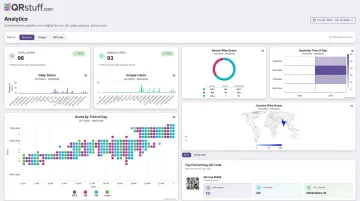
Use this data to identify which placements drive conversations and which don't. Move budget and attention to what's working.
Once you know which placements perform, make sure every printed code is physically optimized to scan reliably.
Print Quality Checklist
Before any printed QR code goes live:
- Minimum 2 cm × 2 cm for close-range use; scale up with viewing distance
- High-contrast colors (dark code on light background)
- Preserve the quiet zone — no text, graphics, or design elements in the border area
- GS1's placement guidelines advise against placing QR codes on perforations, seams, ridges, or tight curves that could distort the symbol
- Use SVG or EPS format for large-format printing (available on QRStuff paid plans); PNG requires minimum 300 DPI
Frequently Asked Questions
What is a WhatsApp Business QR code and how does it work?
It's a scannable code that encodes a wa.me link with your business phone number and an optional pre-filled message. When scanned, WhatsApp opens directly to a chat with your business. The customer just taps send.
Can I create a WhatsApp QR code for free?
Yes. The WhatsApp Business app generates a free native QR code, and QRStuff's Free Suite includes 10 dynamic WhatsApp QR codes (with 30-day expiration). Dynamic codes with full analytics and no expiration require a paid plan starting at the Lite Suite tier.
What's the difference between a static and dynamic WhatsApp QR code?
A static code has the destination baked into its pattern, so any change requires a new code. A dynamic code points to a redirect URL, letting you update the linked phone number or pre-filled message through a dashboard without touching the physical code.
Does the customer need WhatsApp installed to use the QR code?
Yes. The QR code opens the WhatsApp app, so WhatsApp must be installed on the scanning device. The link also works on WhatsApp Web if scanned from a desktop. Customers without WhatsApp will be directed to download it.
Can I add a pre-filled message to my WhatsApp QR code?
Yes. By encoding a wa.me URL with a ?text= parameter, the QR code auto-populates a message in the chat box when scanned. QRStuff's WhatsApp data type includes an optional message field in the creation flow, making it easy to set campaign-specific or support-focused openers.
How do I track how many people scan my WhatsApp QR code?
Native WhatsApp QR codes have no analytics. For scan tracking, you need a dynamic QR code through a third-party platform. QRStuff's dashboard shows total and unique scans, device type, geographic location, and time-based activity. The Full Suite and Enterprise tiers include unlimited monthly scans.