QR codes solve that gap directly. Scan, tap, done — the entire signup process moves to their phone in seconds.
This guide covers exactly how to create a QR code that links to a membership signup form (not a QR code printed on a membership card — an important distinction that changes how you build and deploy it). You'll find a step-by-step creation process, what to prepare beforehand, where to place the code, what affects performance, and the mistakes that kill conversions before they start.
Key Takeaways
- Select the URL QR Code type in your generator and link it directly to your membership signup page
- Dynamic QR codes are essential for any printed materials — they let you update the destination URL without reprinting
- Your signup page must be mobile-optimized — QR codes are always scanned on phones
- Placement at high-intent moments — gym desks, event check-ins, retail counters — drives more signups than passive locations
- Scan analytics tell you which placements work — without them, you're optimizing blind
How to Create a QR Code for Membership Signup
The process is straightforward. Each step has variables, though, and those variables determine whether the code converts prospects into members or gets ignored entirely.
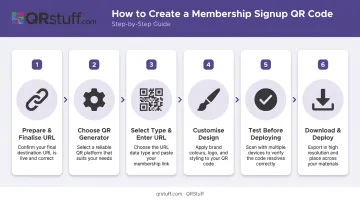
Step 1: Prepare and Finalize Your Membership Signup Page URL
Before touching a QR code generator, your destination needs to be solid.
- Confirm the page is live and mobile-functional — test it on an actual phone, not just a browser window resized to look small
- Choose the right destination: a general signup page works, but a targeted landing page built specifically for QR traffic typically converts better
- Plan for URL changes: if your signup page URL might change (platform migrations, seasonal campaigns, form updates), you'll need a dynamic QR code — more on that in Step 3
Don't generate the QR code until this URL is final and tested. Fixing it afterward means reprinting everything if you used a static code.
Step 2: Choose the Right QR Code Generator
Not all generators are equal. For a membership signup deployment, you need a platform that offers:
- Dynamic QR codes with editable destination URLs
- Custom design options — brand colours, logo placement, frame styles
- High-resolution export formats (SVG/EPS for print, PNG for digital)
- Built-in scan analytics to measure which placements drive signups
- Compliance certifications relevant to personal data collection via linked forms
QRStuff covers all of these requirements: 40+ QR code types, GDPR and SOC2 compliance (relevant when your QR code leads to a form collecting member data), and dynamic codes you can update from the dashboard without generating a new file. The Full Suite plan includes QR code styling, analytics, and unlimited data types, making it well-suited for an ongoing membership campaign.
Step 3: Select the QR Code Type and Enter Your URL
Inside QRStuff, select URL QR Code as your data type. This is the correct choice for any web-based signup form — not vCard, not Wi-Fi, not PDF, unless your signup flow specifically requires those formats.
If you're creating a dynamic QR code, the generator creates a short redirect URL and encodes that into the pattern — not your original long URL. This is what makes the destination editable later.
Paste your finalized signup page URL, then preview the link in the generator to confirm it resolves correctly before moving to design.
Step 4: Customise the QR Code Design
A branded QR code earns more trust than a plain black-and-white one. According to Uniqode's State of QR Codes 2026 report, 31% of users are more likely to scan a QR code when visible branding or a logo is present.
QRStuff's design tools let you:
- Upload your logo to the centre of the code
- Apply brand hex colours (including gradient options)
- Select module and eye shapes
- Add a frame with call-to-action text
That frame text matters more than most people realise. A single line — "Scan to Join," "Become a Member," or "Sign Up Here" — tells the viewer exactly what happens when they scan. Without it, most people won't bother.
One non-negotiable: keep the QR pattern high-contrast. Prioritise scannability over aesthetics, and test the final design on multiple devices before approving it.
Step 5: Test Before You Deploy
Skipping this step is how broken links and slow load times end up on printed materials you can't easily replace.
- Scan with at least two devices (iOS and Android) using both the native camera and a third-party scanner
- Confirm the page loads in under 2.5 seconds on mobile — Google defines this as the benchmark for a good Largest Contentful Paint score, and a Deloitte study found that a 0.1-second improvement in mobile load speed produced a 21.6% uplift in lead form submissions
- Check that form fields are tappable on a small screen
- If you're using a dynamic QR code, test the URL-update function: change the destination, rescan, and confirm the redirect works without a new QR file
Step 6: Download and Deploy
Format selection determines print quality:
| Use Case | Recommended Format |
|---|---|
| Large-format print (banners, posters, signage) | SVG or EPS (vector, scales without pixelation) |
| Standard print (flyers, cards, kits) | High-res PNG (minimum 300 DPI) |
| Digital (email, website, social media) | Standard PNG |
For any printed material, maintain a minimum size of 2 × 2 cm (0.8 × 0.8 in) and keep the quiet zone (white border) intact on all four sides — removing it breaks scannability. QRStuff supports SVG, EPS, PNG, PDF, DXF, TIFF, and GIF downloads across paid plans.
What You Need Before Creating Your Membership Signup QR Code
Get these three things in order before you generate anything — skipping ahead means a broken experience for potential members or wasted print materials.
Three non-negotiables:
A live, mobile-optimized signup page — accessible on cellular connections, with a working form submission flow and a confirmation message or redirect on completion.
Brand assets — your logo in high resolution, your hex color codes, and a clear decision on print versus digital placement (this determines the file format you'll export).
A dynamic QR code generator — free static-only tools won't let you update the destination URL or track which placements are actually driving signups.
QRStuff's Free Suite includes 10 dynamic QR codes, but they expire after 30 days and cap out at 50 scans per month. That's workable for a short test, not an ongoing membership campaign. For a permanent deployment, the Lite Suite removes expiration and raises the scan limit, while the Full Suite adds complete analytics and design customization.
When and Where to Display Membership Signup QR Codes
Generating the QR code is only half the work. Placement determines whether your audience encounters it at the right moment of motivation.
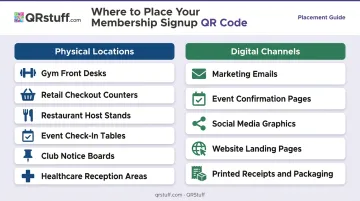
High-Intent Physical Locations
The highest-converting placements share one thing: the person has already decided to engage with your brand. That's the moment a signup prompt works.
Strong locations include:
- Gym front desks and reception areas
- Retail checkout counters
- Restaurant host stands
- Event check-in tables
- Club notice boards and member bulletin boards
- Reception areas at healthcare practices and clinics
For locations with short dwell time — a hallway poster, a window display — pair the QR code with a one-liner that creates urgency: "Skip the queue — join online in 60 seconds." A bare code with no context gets ignored.
Digital and Cross-Channel Use
Uniqode reports that consumers scan QR codes most frequently in restaurants and cafes (58%), on websites (42%), and from product packaging (40%) — so your digital placements are reaching people who are already comfortable scanning.
Effective digital placements include:
- Marketing emails and newsletters
- Event confirmation pages
- Social media graphics promoting membership benefits
- Your website's membership landing page
- Printed receipts, packaging, or brochures (materials you're already sending out become signup prompts at no extra cost)
Key Factors That Affect Membership Signup QR Code Performance
Getting people to scan is only half the equation — the code's underlying setup, the page it leads to, and how you measure results determine whether scans actually turn into members. Here's what to get right.
Static vs. Dynamic QR Codes
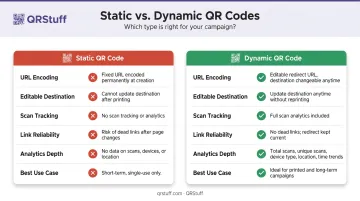
Static QR codes permanently encode the URL. If your signup page ever changes — due to a platform migration, a seasonal promotion, or an updated form — the static code becomes a dead link that still gets printed, distributed, and scanned.
Dynamic QR codes store a short redirect you control from the dashboard. You update the destination URL at any time; the physical QR code stays exactly the same. For any code that will be printed at scale or used beyond a few weeks, dynamic is the correct default.
Mobile Landing Page Quality
The QR code drives the scan, but the signup page is what converts the prospect.
Zuko's 2024 form analytics benchmarks show that mobile form completion rates (42.95%) lag behind desktop (47.01%), and onboarding forms specifically drop to 35.33% completion on mobile versus 50.8% on desktop. That gap exists before you factor in a poorly designed form.
To close that gap:
- Collect only the fields necessary to create the account
- Consider a two-step form: basic details first, optional information after submission
- Make every field large enough to tap comfortably on a phone screen
- Keep page load time under 2.5 seconds
QR Code Visibility and Design
A QR code placed too small, on a busy background, in poor lighting, or without a CTA label will not get scanned — regardless of how well it was built. Minimum requirements for physical placements:
- 2 × 2 cm minimum print size
- High contrast between the code and its background
- A visible quiet zone (white border) on all sides
- A call-to-action line in the frame text
Scan Analytics and Iterative Optimization
Without tracking, you cannot tell which placements drive signups, when scans peak, or whether your campaign is working. Analytics are the mechanism for improvement.
QRStuff's analytics dashboard for dynamic QR codes tracks:
- Total scans and unique scans
- Device type (iOS vs. Android)
- Geographic location (country and city level)
- Time and date of scans (daily, weekly, custom views)
- Exportable CSV scan logs for deeper analysis
Use this data to test different placements against each other, adjust CTA text, or compare landing page versions. Creating separate dynamic QR codes for each membership tier or campaign location gives you independent tracking, all managed from a single QRStuff account.
Common Mistakes When Creating QR Codes for Membership Signup
Linking to a page that isn't mobile-optimized — QR codes are scanned on phones. A desktop-first form with tiny fields causes immediate abandonment, so test the full experience on a real device before deployment.
Using a static QR code on permanent printed materials — banners, cards, and signage with a static code are locked to that URL forever. When the destination changes, every scan leads to a broken experience.
Skipping tests before a print run — many organizations discover too late that their code links to an error page or won't scan at the printed size. Test on multiple devices at final print dimensions before committing to a run.
Placing a QR code with no CTA context — a bare code with no label and no benefit statement gives viewers no reason to scan. Always pair it with a short line explaining what they'll get and what action to take.
Frequently Asked Questions
What type of QR code should I use for a membership signup page?
Select URL QR Code as your data type — this is the correct category for linking to any web-based signup form. Use a dynamic version so you can update the destination URL without reprinting materials if the page ever changes.
Can I update my membership signup QR code if the form URL changes?
Yes, but only if you created a dynamic QR code. Dynamic codes store a short redirect you control from your dashboard — update the destination anytime, no new QR file needed. Static codes permanently encode the original URL and cannot be changed after creation.
How do I track how many people scanned my membership signup QR code?
Dynamic QR codes from platforms like QRStuff include scan analytics covering total scans, unique scans, device type, location, and time trends. Use this data to identify which placements drive the most signups and refine your membership campaigns accordingly.
Where is the best place to put a QR code for membership signups?
The highest-converting placements are at peak-interest moments — gym desks, retail counters, event check-in tables — where someone has already decided to engage with your brand. Combine these with digital channels like emails and social media graphics for broader reach.
Does my membership signup page need to be mobile-optimised for QR codes to work?
Yes. QR codes are scanned on smartphones, so if the linked form is slow to load or difficult to complete on a small screen, conversion rates will be low regardless of the QR code's quality. Aim for a load time under 2.5 seconds and tap-friendly form fields.
Can I use one QR code for multiple membership tiers?
The simplest approach is linking to a single page where the user selects their tier. For more targeted campaigns, create separate dynamic QR codes per tier, each with its own landing page and independent analytics to track which tier drives the most signups.