The concept is straightforward, but the details matter. The wrong code type, a poorly formatted PDF, or a venue with no cell signal will leave guests squinting at a blank screen during your processional. This guide walks through every step and every decision point — from generating the code to placing it on the day.
Key Takeaways
- A QR code wedding program is a scannable sign or card that gives guests instant access to your digital ceremony program
- Always use a dynamic QR code — it lets you update the linked content without reprinting
- Host your program in a mobile-friendly format (responsive webpage or portrait-mode PDF)
- Minimum code size: 1.5"×1.5" for tabletop cards, 3"×3" for entrance signs
- Print 10–15 paper backups for guests without smartphones
How to Create a QR Code Wedding Program
Creating a QR code wedding program comes down to five steps. Each one has a decision that affects whether the whole thing works on the day.
Step 1: Create Your Digital Wedding Program
Your program needs to exist somewhere guests can open on a phone — without logging in, without a download prompt, without pinching to read tiny text.
Three format options:
| Format | Best For | Downside |
|---|---|---|
| Dedicated wedding website page | Mobile-responsive by default | Requires a website |
| Google Doc or Slides | Easy to update, shareable link | Formatting can shift on mobile |
| Hosted PDF | Familiar, print-like layout | Needs proper mobile formatting |
If you go the PDF route, format it in portrait orientation with font sizes no smaller than 12pt and a single-column layout — Adobe recommends 30pt headlines and 26pt body text for mobile-optimized PDFs. Whatever format you choose, test the link on both an iPhone and an Android before moving on.
Step 2: Choose a QR Code Generator and Select the Right Code Type
This is the most consequential decision in the process: static vs. dynamic.
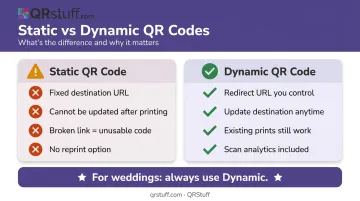
- Static codes permanently encode the destination URL. If the link breaks or the program file changes, the code is useless — and you'd need to reprint your signs.
- Dynamic codes use a redirect URL that you control. Update the destination any time through your dashboard, and every existing scan of the printed code follows the new link automatically.
For weddings, dynamic codes are the clear choice. Last-minute program changes — a late addition to the wedding party, a revised reading — are common. A dynamic code means you can update the file the night before without touching the sign.
QRStuff supports dynamic QR codes across its paid plans, starting from the Lite Suite at £4/month. The platform also supports 40+ code types including URL linking, direct file hosting, and custom landing pages — which gives you several viable ways to deliver your program to guests. Free accounts include 10 dynamic codes with a 30-day expiration, which works if your wedding is within that window, but a paid plan removes the expiration entirely.
Step 3: Input Your Link and Customize the Code
Paste your destination URL into the generator, then double-check it loads correctly on mobile before touching any design options. Once the link is confirmed live, customization takes minutes. QRStuff's paid plans let you adjust:
- Module and corner shapes
- Code and background colors (via custom color picker or presets)
- Gradient effects on the foreground
- A center logo or monogram
- Background and foreground image overlays
One firm rule: dots must be at least 70% darker than the background to scan reliably. Deep navy on cream or black on white are safe combinations. Pale grey on white will fail in dim ceremony lighting. QRStuff automatically raises the error correction level when you insert a center logo, which helps maintain scannability — but always test after customizing.
Step 4: Test the QR Code Thoroughly
Run through each of these checks before finalizing your code:
- Scan from multiple devices — at minimum, one iPhone and one Android
- Test from the distances guests will actually scan — arm's length for tabletop cards, several feet for entrance signs
- Visit the venue before the wedding day and test phone connectivity at the exact ceremony spot
- Share the link with a friend outside your network to confirm it's publicly accessible
If the venue has limited cell service, consider hosting the program on a platform that loads quickly on slow mobile data, or enable offline access via Google Drive. Some couples keep the program as a Google Doc with offline sync enabled — guests who open it before the ceremony can read it even without a signal.
Step 5: Display the QR Code at Your Wedding
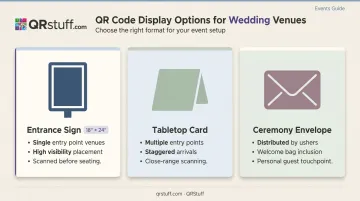
Three display options and when each works best:
- Entrance sign (18"×24") — Works for ceremonies where guests flow past a single entry point. High visibility, scanned before guests are seated.
- Tabletop card at each seat or table — Better for venues with multiple entry points or staggered arrival times. More intimate, easier to scan at close range.
- Card inserted into a ceremony envelope — Works well when ushers are distributing items individually, or as part of a welcome bag.
Whatever format you choose, include a short instruction line near the code: "Scan for today's ceremony program." Optionally print the direct URL in small text underneath — some guests prefer to type rather than scan, and it serves as a backup for phones with older cameras.
Export your final code as SVG or EPS for print. These vector formats scale to any size without pixelation, making them ideal for large entrance signs. PNG at 300 DPI works for smaller tabletop cards.
Is a QR Code Wedding Program Right for You?
A QR code program is not the right fit for every wedding. Whether it makes sense depends on your guests, your venue, and what you want the ceremony to feel like.
It works well when:
- You want to cut printing costs (printed programs run roughly $1.29–$1.69 each, plus assembly time for 80+ copies)
- Sustainability matters — a typical wedding generates around 400 pounds of waste, and paper programs add to that
- You expect last-minute changes to the order of events or bridal party details
- Your guest list skews younger — Pew Research reports 96% smartphone ownership among adults 18–29 and 95% among those 30–49
It may cause friction when:
- A significant portion of your guests are 65+ (smartphone ownership drops to 61% in that age group)
- The ceremony venue has no cellular signal and no Wi-Fi
- Paper programs are a meaningful keepsake — some couples want guests to take something home
If those friction points apply to your wedding, a hybrid approach covers both bases: display a QR code sign for most guests and keep 10–15 printed copies on hand. Wording the sign as "printed copies available on request" lets anyone grab one without feeling called out.
What to Include in Your Digital Wedding Program
Whatever guests land on after scanning needs to be readable on a 6-inch phone screen. Design for mobile first — not a document that looks great on a laptop and frustrating everywhere else.
Standard elements every program should include:
- Names of both partners
- Ceremony date and venue
- Order of events (processional, readings, vows, ring exchange, recessional)
- Names and roles of the wedding party
- Officiant's name
- Song titles and reading titles
Digital-only additions worth considering:
- Embedded Spotify playlist of ceremony music
- Short photo gallery of the couple
- A note explaining cultural or religious traditions for guests unfamiliar with them
- Reception menu with allergen information
- A link to a shared photo album where guests can upload their own pictures from the day
A shared guest photo album isn't something any printed program can offer. A digital format gives you room to add things that actually improve the day — use that space intentionally.
Key Parameters That Affect Your QR Code Wedding Program
A QR code can look polished and still fail to scan. Several variables determine whether the experience actually works.
QR Code Type: Static vs. Dynamic
Static codes permanently lock in the destination URL. If you change the program file location or the link breaks after printing, the code is dead and the sign is useless. Dynamic codes redirect through a URL you control: change the destination in your dashboard, and every scan of the existing code follows the update instantly.
Dynamic codes on QRStuff also enable scan analytics. Post-wedding, you can see how many guests opened the program, which devices they used, and the exact times scans spiked — useful if you want to know whether guests were checking the program before the ceremony or during.
Print Size and Contrast
Size and contrast are the two most common scan failure causes.
- Minimum size: 1.5"×1.5" for tabletop cards; 3"×3" for entrance signs
- Distance rule of thumb: a 2-inch QR code is typically scannable from about 2 feet away — scale up proportionally for larger signs
- Contrast: Dark code on light background, always. QRStuff recommends dots at least 70% darker than the background
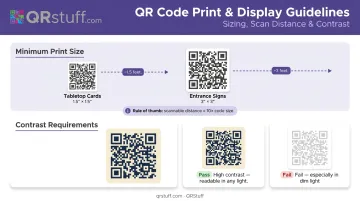
Ceremony venues are often dimly lit. When in doubt, go darker on the code and larger on the print size.
Mobile-Friendly Content Format
A letter-sized PDF with 10pt font becomes illegible when a guest opens it on their phone. The ideal formats are:
- A dedicated wedding website page (responsive by default)
- A portrait-orientation PDF with 12pt+ body text and single-column layout
If you're using a PDF, keep it under 2MB. Large files load slowly on mobile data, and guests waiting in line at your ceremony entrance won't wait long.
Venue Connectivity
Most couples don't think to check this. FCC mapping data shows outdoor cellular coverage, but it doesn't reflect indoor signal strength — and many ceremony venues (stone churches, barns, historic buildings) block mobile signals significantly.
Visit the venue during your rehearsal and test phone connectivity at the exact spot where guests will scan. If signal is weak:
- Host the program on a platform that caches content quickly on first load
- Share a Google Drive link in advance so guests can enable offline access
- Add a short note near the QR code: "Works best on WiFi — ask staff for the network name"
Common Mistakes and How to Fix Them
Mistake 1: Not Testing on Mobile Before the Wedding Day
The link works on your laptop but guests get a login prompt or a blank page on their phones. Test with multiple devices, share the link with someone outside your household to confirm public access, and do a final check at the venue itself.
Mistake 2: Printing the Code Too Small
Guests can't scan at normal viewing distance, which creates a bottleneck at the entrance. Use the 10:1 rule — a 3" code on an entrance sign works from about 3 feet away. When in doubt, go larger.
Mistake 3: Using a Static Code and Then Updating the Program File
Any change to the destination URL after printing breaks the code entirely. Use a dynamic code from the start so you can update the destination without reprinting — or lock the URL before generating and treat it as permanent.
Mistake 4: Forgetting Guests Without Smartphones
Older family members can feel excluded or confused when there's no alternative. Print 10–15 paper backups and add a line to the QR sign letting guests know printed copies are available on request. It takes 30 seconds and removes the awkwardness entirely.
Conclusion
A QR code wedding program is a practical upgrade that saves printing costs, reduces paper waste, and gives you the flexibility to update content right up to the ceremony. The difference between one that works without a hitch and one that frustrates guests comes down to three things: using a dynamic code, hosting the program in a mobile-friendly format, and testing at the actual venue before the day.
The best setup pairs a well-placed entrance sign with a clearly labeled code — exported at vector resolution for crisp print quality. Keep a small stack of printed backups on hand, and you've covered every guest in the room. With a dynamic QR code through a platform like QRStuff, you can still correct a typo or update the officiant's name the morning of the wedding without reprinting a thing.
Frequently Asked Questions
Can guests scan a QR code wedding program without Wi-Fi or cell service?
Yes, guests need internet access to load a cloud-hosted program. Test phone connectivity at your ceremony venue in advance — if signal is weak, enable Google Drive offline access and ask guests to open the link before they arrive.
What should a QR code wedding program include?
Core essentials include both partners' names, ceremony date and venue, order of events, wedding party names and roles, officiant, and song or reading titles. Digital programs can go further with a photo gallery, music playlist, tradition explanations, and a guest photo-sharing link.
How do I make my QR code match my wedding theme?
Most generators, including QRStuff's paid plans, let you change the code's colors, corner shapes, and add a center logo or monogram. Any color changes must maintain strong contrast — dots should be at least 70% darker than the background, or the code may fail to scan in low light.
What size should a QR code be on a wedding program sign?
Use a minimum of 1.5"×1.5" for tabletop cards scanned at close range, and at least 3"×3" for entrance signs viewed from several feet away. Scanning distance is roughly 10 times the code's size — a 3" code is reliably scannable from about 3 feet.
Should I still print paper programs if I use a QR code?
Yes — a hybrid approach is the safest option. Display the QR code on a sign for most guests and keep 10–15 printed copies available on request. Note this on the sign itself so no guest feels excluded.
When should I create and test my QR code wedding program?
Finalize the program content and generate the QR code at least two weeks before the wedding. Test it at the ceremony venue during your rehearsal visit — check scannability, loading speed, and phone signal at the exact spot where guests will be scanning.