Introduction
Printing a QR code on a round bottle sounds straightforward: generate a code, hand it to a designer, print it on the label. In practice, cylindrical packaging introduces geometry problems that flat-surface QR code guidance simply doesn't cover.
The challenge is physical: a QR code is a flat, square data grid. Wrap it around a bottle, and the edges distort. The tighter the curve, the worse the distortion — and a distorted code either scans poorly or not at all.
Research published in the Journal of Imaging found that standard decoders like Google ZXing successfully read only 30 of 180 distorted QR samples from a manufacturing environment. That's a failure rate worth taking seriously before committing to a production run.
Getting it right requires decisions made well before the label goes to print. This guide covers the full process: generating your code with the right settings, selecting a printing method, and avoiding the most common mistakes that cause scan failures on curved surfaces.
Key Takeaways
- QR codes work on round bottles, but curved surfaces require specific size, placement, and contrast rules
- Use Level H error correction to recover up to 30% of distorted data
- Keep the code in the center third of the label, never near edges or tapers
- Dynamic QR codes are strongly preferred — destinations can be updated without reprinting
- Always scan-test a physical sample on multiple devices before production
What Makes QR Code Printing on Round Bottles Unique
A QR code is a square grid of black-and-white modules, designed to be read flat. When applied to a cylindrical surface, the edges of the code bend away from the camera lens, shifting the three corner finder patterns — the square markers a scanner uses to locate and orient the code — out of their expected geometric positions.
The severity of this distortion depends on one variable: bottle diameter. A 750ml wine bottle has a wider circumference and a gentler curve, making it more forgiving. A 30ml cosmetic dropper bottle curves aggressively, and even a small QR code can wrap past the point where a standard smartphone camera can reconstruct the grid accurately.
GS1's curved-surface placement guidance gives a practical geometric rule: the angle between the tangent at the centre of the code and the tangent at its outer edge should stay below 30 degrees. In plain terms: keep the code narrow enough on the circumference that both sides remain visible to the scanner simultaneously.
Where Round Bottle QR Codes Are Already Common
This isn't a niche application. A 2025 study of 1,815 alcohol containers across 13 European countries found QR codes on 31% of containers — including 23% of beers, 37% of wines, and 30% of spirits. Of those, 84% appeared on the back of the container.
Beyond alcohol, QR codes on round packaging are increasingly common in:
- Personal care and cosmetics (ingredient lists, tutorials)
- Health supplements (dosage guidance, certifications)
- Condiments and sauces (recipes, allergen information)
- Water and beverage bottles (loyalty programmes, brand content)
What a Successful Result Looks Like
A correctly configured QR code on a round bottle scans instantly from a normal scanning distance, from multiple approach angles, on a standard smartphone camera (no special app required), and links to an active, mobile-optimised destination.
In practice, that means:
- Scans reliably from 15–30cm without repositioning the bottle
- Works across iOS and Android native camera apps
- Loads the destination page in under 3 seconds on a mobile connection
How to Print a QR Code on a Round Bottle: Step-by-Step
The decisions that determine whether a bottle QR code scans reliably happen before the printer is ever involved. Here's the full process.
Step 1: Define the QR Code Destination
The destination URL must be live and mobile-optimised before you generate the code. For bottle applications, common destinations include:
- Product pages or brand stories
- Cocktail recipes or pairing suggestions
- Ingredient lists or allergen information
- Loyalty programmes or contest forms
- Sustainability statements or traceability data
Test the destination page on both iOS and Android before generating anything.
Step 2: Generate the QR Code with the Right Settings
Two settings matter most at generation:
Error correction level: Use Level H, which allows up to 30% of the code's data to be recovered if obscured or distorted. On a curved surface, condensation, label imperfections, and geometric distortion all degrade the code partially. Level H gives you the most headroom — no other correction level is appropriate for round bottle applications.
Dynamic vs static: Use a dynamic QR code. Dynamic codes encode a short redirect URL rather than the final destination directly. This means the destination can be changed after printing without reprinting a single label. If a promotion ends or a URL changes post-production, you update the destination in your dashboard — no packaging changes required.
QRStuff's dynamic codes include real-time scan analytics (geographic location, device type, unique vs repeat scans) and support packaging-relevant formats including URL, GS1 Digital Link, and video codes. Dynamic codes are available from the Lite Suite tier upward.
Step 3: Set the Correct Size and Quiet Zone
- Minimum size: 20mm × 20mm for curved or round surfaces
- Quiet zone: A minimum of four modules wide on all sides — this is the blank white border surrounding the code
The quiet zone is non-negotiable. GS1 specifications require a 4X quiet zone on all four sides for QR codes. On a curved surface, scanner software needs that clean boundary to locate the code's edges. Eliminate it, and the code may look intact but fail to scan consistently.
Going below 20mm on a curved surface significantly increases scan failure risk. When in doubt, go larger within your label constraints.
Step 4: Integrate the QR Code into Label Artwork
- Place the code on the flattest, widest portion of the label — typically the centre panel
- Never position it across a seam, near a label edge, or on a tapered section
- Maintain high contrast: dark modules on a light background
- Avoid placing the code over gradients, textures, or images
- Export the code as a vector file (SVG or EPS) to prevent pixelation at print scale
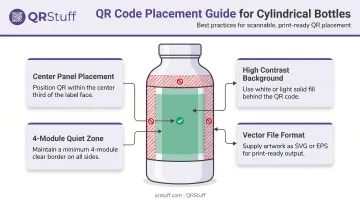
QRStuff supports SVG and EPS export directly from the code generator, so the file is print-ready without additional conversion steps.
Step 5: Request a Physical Sample Before Full Production
No digital proof is sufficient. A physical bottle with the actual printed or labelled QR code must be tested with at least two or three different smartphones — both iOS and Android — scanning from multiple angles and distances. Variables like ink absorption, label wrap tension, and surface finish only reveal themselves on a physical curved surface.
Key Technical Factors That Determine Scannability
Bottle Diameter and Curvature
| Bottle Type | Diameter Range | Curvature Risk |
|---|---|---|
| 750ml wine/spirits bottle | ~75–80mm | Lower |
| 500ml water bottle | ~65mm | Moderate |
| 250ml cosmetic bottle | ~50mm | Higher |
| 30ml dropper bottle | ~20–25mm | Very high |
For narrow bottles, keep the QR code as compact as possible within the 20mm minimum and position it dead-centre on the widest panel. If the label wraps more than roughly 180 degrees on a narrow bottle, the QR code must stay well within the centre third of that wrap.
Error Correction Level
| Level | Data Recovery | Use Case |
|---|---|---|
| L | 7% | Clean, flat surfaces only |
| M | 15% | General use |
| Q | 25% | Environments with moderate damage risk |
| H | 30% | Curved surfaces, exposed packaging |
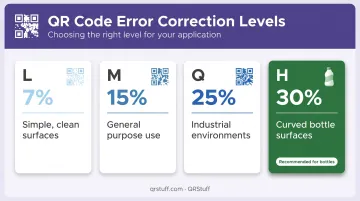
Level H is the right choice for any bottle application. Curved surfaces, condensation, scratches, and label imperfections are all real-world threats to code integrity.
Surface Material and Finish
- Matte label finishes scan more reliably than glossy or metallic finishes because they reduce glare
- Transparent glass or plastic without a label creates background bleed-through that interferes with contrast and typically kills scannability
- Ensure the contrast ratio between code modules and background is high — a dark code on a white or light-coloured label background is the most reliable combination
Dynamic QR Codes for Bottle Packaging
Static codes lock the destination permanently at generation. If the linked URL changes — a product page moves, a promotion expires, a domain changes — every bottle already in circulation carries a dead code with no fix short of reprinting.
Dynamic codes eliminate this risk. As covered in trade reporting from FoodNavigator-USA, CPG brands are increasingly moving away from static codes on printed packaging for exactly this reason.
QRStuff's dynamic codes also deliver scan analytics that help brands understand post-purchase behaviour:
- Geographic data — see which markets are scanning most actively
- Device breakdowns — understand whether customers scan on iOS or Android
- Time-based insights — track engagement spikes tied to promotions or seasonal campaigns
Printing Methods for Round Bottle QR Codes
Label-Based Printing
The most practical option for small and mid-scale production. The QR code is printed on a label using a standard label printer and applied to the bottle.
Key considerations:
- Keep the QR code in the centre third of the label width — this is the flattest part of the wrap
- Codes positioned near label edges curve away from the scan plane as the label wraps around the bottle
- Works well for most spirits, beverage, and personal care bottle formats
Continuous Inkjet (CIJ) Printing
CIJ systems print directly onto bottles moving on a production line at high speed. The Videojet 1880 HR, for example, supports QR code printing at line speeds up to 394 m/min with character heights from 1.2mm to 6mm.
When to use it:
- High-speed beverage and food manufacturing environments
- Traceability codes and batch identifiers
- Best suited for small, functional codes rather than large consumer-facing designs
CIJ codes are typically smaller — around 15mm — which pushes against the minimum size threshold for curved surfaces. They're the right choice for traceability, but label-based printing is generally better for consumer-facing QR codes.
UV Inkjet and Laser Printing
For operations that need permanent, high-quality direct-to-bottle marks — and have the budget to match — UV inkjet and laser printing are the two main options:
- UV inkjet (direct-to-bottle): High-resolution results on glass, plastic, and metal; compatible with cylindrical surfaces; used by manufacturers like Inkcups for bottle decoration
- Laser coding: Permanent marks on glass and plastics including PET and PP; used by Domino and Markem-Imaje for glass bottle marking
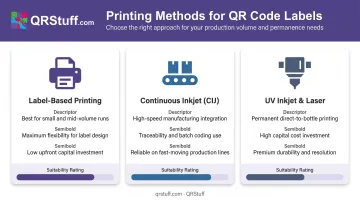
Both require significant capital investment. They make sense for high-volume operations where per-unit permanence justifies the equipment cost — not for small or mid-scale runs.
Common Mistakes When Printing QR Codes on Round Bottles
Scaling the Code Too Small or Removing the Quiet Zone
Producers frequently shrink the QR code to save label space — dropping below 20mm or cropping the quiet zone to fit more artwork. The code looks intact, but fails to scan. On a curved surface, this problem compounds: the scanner already struggles with geometry distortion, and a missing quiet zone removes its ability to find the code boundaries at all.
Using a Static Code Without Testing the Destination First
Static codes are permanently locked — any URL change after printing means every bottle in circulation has a dead link. Beyond that, many producers generate and print a code without confirming the destination actually works:
- Verify the URL is live before the code is generated
- Test on both iOS and Android devices
- Confirm the page is mobile-optimized and loads without errors
Test the destination on multiple devices before printing a single label.
Placing the Code on an Incompatible Section of the Bottle
Common placement errors include:
- Positioning the code on the shoulder or base taper where curvature is most extreme
- Placing it across a label seam
- Printing it over a coloured or textured background without adequate contrast
- Applying it to a transparent surface without a backing
A digital proof won't reveal any of these issues. Always test a physical sample under real scanning conditions before approving a full print run.
Frequently Asked Questions
Is it possible to make a round QR code?
The QR code itself must remain square. The module grid, finder patterns, and timing patterns all require a square structure to be scannable. A circular graphic frame can surround the code, but the data matrix cannot be made circular without destroying readability.
Do QR codes work on curved surfaces?
Yes, when correctly sized, positioned, and configured. Keep the code within the flattest section of the surface, maintain the 20mm minimum size with a four-module quiet zone, and use Level H error correction to offset any distortion from the curve.
What is the minimum QR code size for printing on a round bottle?
20mm × 20mm is the widely recommended minimum for curved surfaces, with a mandatory quiet zone of at least four modules on all sides. Going smaller than this on a curved surface significantly increases scan failure risk, particularly on narrower diameter bottles.
Should I use a dynamic or static QR code on a bottle label?
Use a dynamic code. Dynamic codes let you update the destination URL after printing, provide scan analytics, and protect against errors discovered post-production. Static codes are fixed at generation and cannot be changed once printed.
What printing method works best for QR codes on round bottles?
Label-based printing is most practical for small and medium runs. Continuous inkjet (CIJ) is the standard choice for high-speed production lines. UV inkjet is well-suited for direct-to-bottle printing on glass or plastic at industrial scale.
How do I test if my QR code will scan before going to full production?
Print or label one physical bottle and test it with at least two smartphones — both iOS and Android — scanning from multiple angles and distances. Digital proofs and on-screen tests are not substitutes for a physical curved-surface test.