Introduction
Pick the wrong QR menu app and you'll either pay for features you don't need or hit a wall the moment you try to update a price mid-service. According to PYMNTS, 29% of US restaurants were offering QR code menus in 2024, with adoption still climbing as operators look to cut reprinting costs and simplify menu updates.
The decision isn't whether to use a QR menu — that ship has sailed. It's knowing which category of tool fits your operation. Generic QR generators, dedicated menu platforms, and POS-integrated ordering systems each solve a different problem. Picking the wrong one wastes money and frustrates guests.
This guide compares the five best QR menu apps for restaurants in 2026: QRStuff, iMenuPro, MENU TIGER, UpMenu, and TableQR. Each review covers key features, pricing, and which type of restaurant it actually suits.
Key Takeaways
- QR menu apps fall into three categories — simple generators, dedicated menu platforms, and ordering systems — and the right choice depends on your service model.
- Dynamic QR codes (updatable without reprinting) are non-negotiable for any restaurant that changes prices or items regularly.
- Key features to look for: real-time menu updates, custom branding, scan analytics, and security compliance (GDPR/SOC2).
- The top five apps in 2026 are QRStuff, iMenuPro, MENU TIGER, UpMenu, and TableQR — each built for a different restaurant type.
- QRStuff stands out for GDPR/SOC2 compliance, detailed scan analytics, and 15+ years serving hospitality clients including Marriott — worth evaluating first for multi-location or compliance-conscious operations.
QR Menu Apps for Restaurants: What They Are and Why They Matter
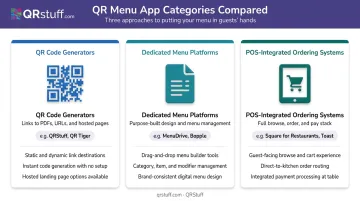
A QR menu app is software that generates a scannable code linking diners directly to a digital menu — no app download, no printing required. They fall into three categories:
- QR code generators with menu support — create dynamic codes linking to PDFs, URLs, or hosted menu pages (e.g., QRStuff)
- Dedicated digital menu platforms — purpose-built for menu design, display, and management (e.g., iMenuPro, TableQR)
- POS-integrated QR ordering systems — full stack tools where guests browse, order, and pay via QR (e.g., UpMenu, MENU TIGER)
Why Adoption Keeps Growing
QR menus have outlasted the pandemic for practical reasons:
- Reprinting costs add up fast. QSR Magazine reports paper menus cost $0.50–$3.00 per copy, with laminated versions reaching $10.00 each.
- Menu prices keep changing. The National Restaurant Association found average menu prices rose 31% between February 2020 and April 2025 — frequent reprints aren't optional anymore.
- Ordering efficiency gains are measurable. Hospitality Technology found QR ordering systems can increase average check value by approximately $2–$4 per transaction.
The five platforms below are evaluated on exactly these factors — cost, flexibility, and ordering capability.
Best QR Menu Apps for Restaurants in 2026
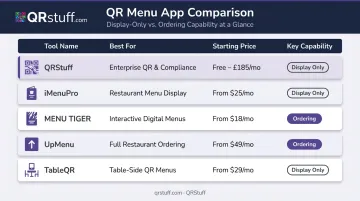
These five tools were shortlisted based on ease of setup, dynamic QR code capability, branding flexibility, analytics depth, security compliance, and overall value.
| Tool | Best For | Starting Price |
|---|---|---|
| QRStuff | Multi-location operators, enterprise compliance | Free / $10/mo |
| iMenuPro | Independent restaurants, print + digital management | $16/mo |
| MENU TIGER | Mid-size restaurants, optional QR ordering | Free / $17/mo |
| UpMenu | Chains and franchises, integrated online ordering | $49/mo per location |
| TableQR | Brand-conscious restaurants, done-for-you setup | $225/year |
QRStuff
QRStuff has been a trusted QR code platform since 2008, now serving over 495,000 businesses and creators worldwide — including hospitality clients such as Marriott International. For restaurants, it supports dynamic QR codes linking to hosted menu files, PDFs, or web pages, with a built-in landing page builder for category-based menu organization.
Where it stands out is infrastructure depth. GDPR and SOC2 compliant, with a 99.9% uptime guarantee (actual historical uptime: 99.968%), it's the only tool here built for enterprise compliance requirements.
Restaurants get real-time scan analytics: device type, geographic location, time-of-day breakdowns, and unique vs. repeat scan identification. Paid plans include no QR expiration, white-label customer-facing pages, and no ads.
| Attribute | Details |
|---|---|
| Best For | Multi-location operators and hospitality brands needing a reliable, scalable QR platform with advanced analytics and enterprise security compliance |
| Key Features | Dynamic QR codes with editable destinations; custom design (colors, logos, shapes); real-time scan analytics; password-protected codes; bulk generation (500 codes/batch); GDPR & SOC2 compliant; 99.9% uptime; white-label pages on paid plans |
| Pricing | Free: $0/month (10 dynamic codes, 30-day expiry, 50 scans/month) · Lite: $10/month (50 dynamic codes, 200 scans) · Full Suite: $25/month (250 dynamic codes, unlimited scans) · Enterprise: $250/month |
iMenuPro
iMenuPro is a menu design tool first, QR generator second. It targets independent restaurants that want both their print menu and digital QR menu managed from a single platform — with typography control and layout consistency that generic QR tools don't offer.
Its drag-and-drop formatting auto-adjusts layout as content changes, and it exports print-ready PDFs with CMYK support. ADA compliance is a genuine differentiator: digital menus consistently score 90+ on accessibility tests. One clear limitation — no native ordering or payment layer. This is a display-only tool.
| Attribute | Details |
|---|---|
| Best For | Independent restaurants that care about design aesthetics and want both print and digital menus managed from one place |
| Key Features | Drag-and-drop menu builder with auto-formatting; ADA accessibility compliance; QR code generation; print-ready PDF exports (CMYK); privacy-safe QR codes (zero cookies or trackers) |
| Pricing | $16/month or $135/year · Free tryout available (no credit card required) |
MENU TIGER
MENU TIGER sits in the middle of the market — more capable than a pure QR generator but not a full POS replacement. Restaurants can create digital menus, manage categories and modifier groups, and optionally enable QR-based ordering, all without switching their existing systems.
The multilingual reach is notable: 31 languages on the customer-facing menu, with 19 languages in the admin dashboard. The free tier is genuinely useful for small operations, with paid tiers scaling based on store count and table volume. Template-based design does limit branding flexibility for operators with strict visual identity requirements.
| Attribute | Details |
|---|---|
| Best For | Restaurants wanting a middle-ground QR menu platform with optional ordering capability, without committing to a full POS replacement |
| Key Features | QR menu creation; 31-language multilingual support; optional QR ordering and payments; category and modifier management; sales and revenue reporting |
| Pricing | Freemium: $0 (1 store, 10 tables, 7 categories, 200 orders/month) · Regular: $17/month · Advanced: $46/month · Premium: $119/month · 14-day free trial on paid plans |
UpMenu
UpMenu is primarily an online ordering system that happens to include a strong QR menu component. It's best positioned for restaurant chains and franchise groups; its flat-fee pricing structure scales well when you're managing multiple locations.
The centralized dashboard lets operators update menus across all locations simultaneously while maintaining location-specific customization. Built-in loyalty tools and automated upselling functions make it an active revenue tool, not just a menu display. That scope means it's overkill for single-location independents who just need a clean digital menu.
| Attribute | Details |
|---|---|
| Best For | Restaurant chains and franchise groups needing centralized QR menu management with integrated online ordering across multiple locations |
| Key Features | Multi-location management; commission-free integrated online ordering; centralized menu updates; customer loyalty tools; branded ordering page |
| Pricing | Basic: $49/month per location (up to 75 orders) · Standard: $89/month per location (up to 210 orders) · Premium: $169/month per location (unlimited orders) · 7-day free trial |
TableQR
TableQR is built specifically for brand-conscious restaurants that want a polished, professionally managed digital menu without touching their POS or adding ordering complexity. Its fully managed plan is the clearest differentiator: TableQR builds the menu from your existing paper menu, PDF, or photo, handling categories, descriptions, images, and modifiers.
It supports multilingual menus, multi-currency display, right-to-left layouts, and allergen/nutrition tagging, making it practical for international or specialty dining concepts. Updates on the Fully Managed plan are handled by TableQR's team, which suits restaurants without in-house tech resources.
| Attribute | Details |
|---|---|
| Best For | Brand-conscious restaurants (fine dining, boutique concepts) wanting a polished QR menu without switching POS or adding ordering complexity |
| Key Features | Done-for-you menu setup; custom branded design; real-time updates; multilingual and multi-currency support; allergen, calorie, and nutrition display; right-to-left layout support |
| Pricing | Starter: $225/year (self-managed after setup) · Fully Managed: $425/year (unlimited updates handled by TableQR) · Volume pricing available for multi-location groups |
Key Features to Evaluate When Choosing a QR Menu App
Dynamic vs. Static QR Codes
This is the single most important feature to check before committing to any tool.
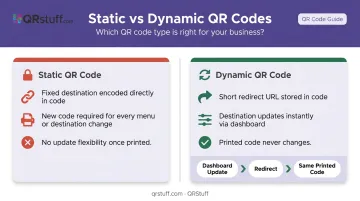
A static QR code encodes a fixed destination directly into the code. Change your menu — even one price — and you need a brand new code, plus reprinting.
A dynamic QR code stores only a short redirect URL. The destination content updates instantly through the platform dashboard, and the printed code never changes.
For any restaurant updating prices seasonally, running daily specials, or removing items due to supply issues, static codes create a constant cycle of reprinting costs. Dynamic codes eliminate that entirely.
Custom Branding and Analytics
A QR code sitting on your table represents your restaurant's brand. Generic black-and-white codes with third-party logos on the destination page undermine the dining experience. Look specifically for:
- Custom colors and logo embedding on the QR code itself
- Branded landing pages with no third-party ads
- White-label options so guests only see your brand
On analytics: scan data — device type, scan time, location, unique vs. repeat scans — helps restaurants identify peak browsing periods and measure which table positions drive the most engagement. Not every platform offers this depth. Those that do let you make operational decisions based on actual guest behavior, not guesswork.
Security Compliance and Ordering Integration
Two features restaurants often overlook — but shouldn't:
- Data security: If your QR codes collect guest data via feedback forms, lead capture, or payment links, the platform needs GDPR compliance and SOC2 certification. This matters for US restaurants serving international guests or operating in privacy-conscious states like California.
- Ordering integration: Not every venue needs scan-to-order. For upscale or service-led dining, a browse-only digital menu often outperforms it on guest satisfaction. Match the tool's capability to your service model — paying for ordering infrastructure you won't use adds cost without adding value.
How We Chose the Best QR Menu Apps for This List
These five tools were selected based on real-world restaurant use cases: dynamic menu capability, branding control, analytics depth, pricing transparency, security compliance, and deployment simplicity.
What was excluded — and why:
- Tools that generate only static QR codes were excluded (no practical menu management capability)
- Apps requiring diners to download a separate app were excluded (creates friction that reduces scan rates)
- POS-integrated QR ordering systems like Toast, Square, and Lightspeed were excluded — they represent a separate category requiring full platform commitment beyond just a menu solution
Two mistakes consistently trip up restaurant operators during selection:
- Choosing on price alone — then finding the tool generates static codes with no analytics or update capability
- Over-buying a full ordering stack — when all the operation needed was a clean, branded digital menu without the integration overhead
If your menu changes seasonally or you want to know which items get the most attention, dynamic QR with analytics is non-negotiable. If you just need a contactless menu, a lightweight tool will do the job without the cost or complexity.
Conclusion
The best QR menu app for your restaurant depends on what you actually need from it. A single-location café with a stable menu has completely different requirements than a 20-location franchise group rolling out seasonal menu changes weekly.
Start with three questions: Do you need dynamic codes? Do you need ordering integration, or just display? How important is brand control over the customer-facing experience?
If your answers point toward dynamic codes with strong brand control and multi-location scalability, QRStuff's dynamic QR code platform is a practical place to start. It's been running since 2008, is trusted by hospitality brands including Marriott International, and is built with GDPR and SOC2 compliance. The free plan lets you test dynamic menu functionality with real codes before committing to a paid tier.
Frequently Asked Questions
How do restaurant QR codes work?
A QR code is a scannable square barcode placed on tables or signage. When a diner points their smartphone camera at it, the phone reads the encoded link and opens the digital menu directly in the browser — with no app download required. Dynamic QR codes allow the restaurant to update menu content anytime without generating or reprinting a new code.
What is a QR code ordering system for restaurants?
A QR ordering system lets guests browse, add items to a cart, and submit an order (and sometimes pay) directly from their phone — going beyond simple menu display. It typically requires POS integration. MENU TIGER and UpMenu both support ordering; QRStuff, iMenuPro, and TableQR are display-focused.
What are the best QR code apps for restaurants?
The strongest options in 2026 are QRStuff, iMenuPro, MENU TIGER, UpMenu, and TableQR, each suited to a different restaurant type. For enterprise-wide management with advanced analytics and security compliance, QRStuff is the leading choice.
Can I update my restaurant menu QR code without reprinting it?
Yes, with dynamic QR codes. The printed code stays the same; the destination content (menu page or file) updates instantly through the platform dashboard.
What are the technical requirements for a restaurant QR code?
A QR code needs a destination (URL, PDF, or hosted page), sufficient print size (minimum 2 × 2 cm for close-range scanning), and high contrast between foreground and background. For restaurant environments where codes may get wet or damaged, Denso Wave recommends using error correction Level Q (25% data restoration) or Level H for maximum durability.
Are QR menus better than physical menus?
QR menus offer real advantages : instant updates, no reprinting costs, scan analytics, and contactless hygiene. Physical menus still serve guests without smartphones or those who prefer a tangible experience. For most full-service restaurants, a hybrid approach — QR code as the primary option with physical menus available on request — works best.