Juniper Research projected global QR code payment spend would reach $3 trillion by 2025, up 25% from $2.4 trillion in 2022. That's not a niche experiment — it's a mainstream payment channel that restaurants, retailers, and service businesses are already building into their checkout flows.
This guide covers everything you need to know: how QR payment systems work end-to-end, the real difference between static and dynamic codes, how to generate and deploy your first payment QR code, and what security actually looks like in practice.
Key Takeaways
- A QR code payment links a scan to a payment page or app — the code itself carries no financial data
- Static codes break if the payment destination changes; dynamic codes let you update the destination anytime without reprinting
- Setup takes minutes: generate a code from your payment link, customize it, test the destination, and deploy
- Security risk comes from where the code sends people, not the code format itself — always verify the destination URL
- QRStuff supports dynamic payment QR codes for PayPal, Venmo, and any custom payment URL, with real-time scan analytics on every paid plan
What Are QR Code Payment Solutions?
A QR code payment works like this: the merchant displays a QR code, the customer scans it with their smartphone camera, and the scan opens a payment page or app where the transaction completes. No card reader, no cash, no separate hardware.
The use cases span almost every business type:
- Restaurants and cafes — table tents that open a payment or ordering page
- Retail counters — codes next to the register for customers who prefer not to swipe
- Invoices and receipts — email or printed documents with a scannable payment link
- Events and tip jars — codes on lanyards, signs, or counters for instant payments
- Online checkout — QR codes on product pages for mobile wallet payments
India's UPI system alone has around 350 million active users and 340 million QR codes deployed at merchant locations, with person-to-merchant payments overtaking peer-to-peer volumes as of 2022. That shift signals where consumer payment behavior is heading — and why merchants across every sector are adding QR codes to their checkout flow.
How Does the QR Code Payment System Work?
QR codes handle initiation — directing the customer to the right payment destination — but they play no role in settlement. Understanding that distinction matters for both setup and security.
The End-to-End Payment Flow
- Merchant generates a QR code linked to a payment destination: a PayPal account, Stripe payment link, Square invoice URL, or any checkout page
- Customer opens their camera (no separate app needed on modern iOS or Android devices)
- Customer scans the code — the phone reads the encoded URL or deep link
- Payment page loads with details pre-filled where applicable
- Customer authorizes payment using card details, Apple Pay, or Google Pay
- Merchant receives confirmation through their payment platform dashboard
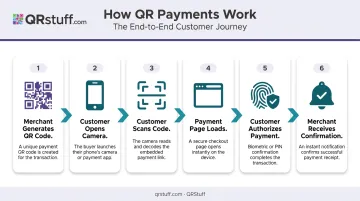
The QR code itself contains no financial data. It simply encodes a URL that routes the customer to the right place.
Two Types of Merchant Setup
Account-linked QR codes tie the code directly to a merchant account within a payment app (PayPal, Venmo, Cash App, UPI). The customer pays into that account without visiting a separate webpage. QRStuff supports dedicated QR types for Venmo, UPI, Zelle, and Bitcoin, where merchants enter their account details and the code routes payments accordingly.
Payment-link QR codes encode a URL pointing to a checkout or invoice page, where the customer enters card or wallet details. This model works with any payment platform that generates shareable links — Stripe, Square, and PayPal.me included. QRStuff's general URL payment type covers these cases.
Settlement Speed
Whichever setup type you use, settlement timing is determined by the underlying payment network — not the QR code. Once a customer authorizes payment, funds move through card rails, ACH, bank transfer, or an in-app wallet depending on the platform. Same Day ACH can settle within hours. Card network payouts follow the merchant's processor schedule. The QR code plays no role in that timeline.
Static vs. Dynamic QR Codes for Payment: Which Should You Use?
This choice has real operational consequences. Getting it wrong means reprinting materials or worse — broken payment links.
How Each Type Works
Static QR codes permanently encode the destination URL into the code's visual pattern. Once printed, it cannot be updated. If the linked payment page changes, the code breaks. The only fix is reprinting.
Dynamic QR codes encode a short redirect URL. The actual destination is stored on the QR platform's server and can be edited at any time — without changing or reprinting the physical code. When scanned, the user hits the redirect URL first (which logs the scan event), then gets forwarded to the current destination.
QRStuff's dynamic codes work this way — destination URLs are editable through the dashboard in real time, scan events are logged at the redirect layer, and the physical code stays the same indefinitely.
Side-by-Side Comparison
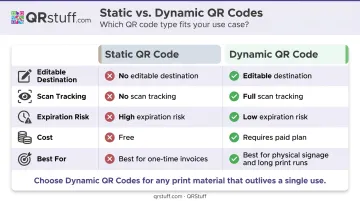
| Feature | Static | Dynamic |
|---|---|---|
| Editable destination | No | Yes |
| Scan tracking | No | Yes |
| Expiration risk | High (if destination changes) | Low (redirect is managed) |
| Cost | Free on most platforms | Requires paid plan |
| Best for | One-time invoices, fixed checkout URLs | Table tents, packaging, long print runs |
The Business Risk of Static Payment Codes
Consider a restaurant that prints 200 table tents with a static PayPal QR code. Six months later, they switch to Square. Every table tent is now dead — customers scan, get an error, and the sale is lost. Reprinting costs time and money.
Dynamic codes eliminate this risk. Merchants can switch payment providers or update checkout URLs without touching a single piece of printed material. The physical code stays in circulation; only the destination changes.
Bottom line: For any QR code printed on physical materials with a lifespan beyond a few weeks, dynamic is the practical choice — static codes are best reserved for single-use documents or fixed URLs that will never change.
Key Benefits of QR Code Payments for Businesses
Operational Advantages
- Zero additional hardware (no card reader, POS terminal, or cash drawer required)
- Instant setup (a payment link plus a QR generator is all it takes)
- Works with existing payment platforms (Stripe, PayPal, Square, Venmo, UPI, and others)
- Flexible deployment (printed signage, digital invoices, email, social media posts)
Revenue Impact
Square reported that businesses using QR-based Self-Serve Ordering saw an average 35% sales increase in the first 30 days, and restaurants enabling open tabs saw 42% higher average ticket sizes. QR ordering removes friction at the table — customers reorder without flagging down a server, which directly increases spend.
For broader digital payment adoption, Visa's research in Mexico found that 75% of micro and small businesses saw an increase in monthly revenue after accepting digital payments, with an average increase of approximately 22% among those reporting higher earnings. This covers digital payments broadly rather than QR codes specifically, but the pattern holds across payment formats.
The Analytics Advantage
Revenue gains like those above don't happen by accident — and QR codes give businesses something cash registers and card readers cannot: scan data separate from payment data. With dynamic QR codes, merchants can see:
- How many people scanned a code (even if they didn't complete payment)
- When and where scans occurred
- Which device types were used
- Geographic distribution of scans
QRStuff's analytics dashboard provides total scans, unique scans, device type breakdowns (iOS vs. Android), country and city-level geography, and time-based data — all in real time. Payment completion data lives in the payment platform; scan data lives in QRStuff. Together, they show exactly where customers drop off in the payment funnel, so merchants can fix the friction point rather than guess at it.
How to Get a QR Code for Payment: Step-by-Step
Step 1: Choose Your Payment Destination
You need a working payment-enabled URL or account before generating anything. Options include:
- PayPal.me link or PayPal business account
- Stripe payment link (created directly in the Stripe dashboard)
- Square invoice URL or Square Online payment page
- Venmo business profile
- UPI ID (for UPI-based payments)
- Any custom checkout URL from your existing e-commerce setup
A QR code is only as useful as the page it points to — so confirm your payment destination works before moving on.
Step 2: Choose a QR Code Generator with Dynamic Support
Look for a generator that offers:
- Ability to link to any URL
- Dynamic (editable) code option
- Custom branding — logo, colors, shapes
- Print-ready download formats (SVG for large-format print, PNG for digital)
- Scan analytics
QRStuff supports 40+ QR code types including dedicated payment types for PayPal, Venmo, UPI, Zelle, Bitcoin, and a general URL option for any other platform. It's trusted by Walmart, Amazon, Marriott, and JP Morgan. The platform is also GDPR and SOC2 compliant.
Step 3: Generate and Customize the Code
On QRStuff, the creation flow is straightforward:
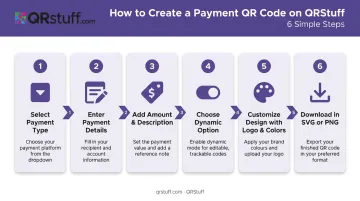
- Select your payment type (PayPal, Venmo, UPI, or general URL)
- Enter your payment email, phone number, or paste the payment URL
- Optionally specify a payment amount and item description
- Choose dynamic (recommended for business use)
- Customize the design — add your logo, select brand colors, choose module and eye shapes
- Download in the appropriate format: SVG or PNG for print, PNG for digital
Note: styling customization is available on paid plans. Free tier downloads are PNG only.
Step 4: Test Before Deploying
Scan the code from at least two devices — one iPhone and one Android — before printing anything. Verify:
- The payment page loads correctly
- The amount pre-fills if configured
- The checkout flow completes end-to-end
- The URL in the browser bar is correct and HTTPS-secured
Skipping this step is the most common mistake — and one of the most costly. Printing 500 table cards with a broken link means reprinting everything.
Step 5: Deploy and Monitor
Deployment options by use case:
- In-person: printed table cards, counter signs, receipts, product packaging
- Remote: email invoices, website banners, social media posts
- Events: lanyards, posters, tip jars
After deployment, check QRStuff's analytics dashboard to identify which placements drive the most scans. If a counter sign outperforms the receipt code 10-to-1, that's a clear signal about where customers engage most. Focus your next payment prompts there.
QR Code Payment Security: What Businesses and Customers Need to Know
What QR Codes Actually Store
The QR code itself holds no financial data — no card numbers, no bank details, no account credentials. The risk isn't the format; it's the destination. A QR code is only as safe as the payment page it points to.
That page must be HTTPS-secured. PCI DSS Requirement 4 mandates encryption of cardholder data over public networks, and Stripe's integration guidelines require TLS 1.2 or above — so never point customers to a payment URL that isn't secured.
The Primary Fraud Risk: Quishing
"Quishing" is QR code phishing — attackers place a sticker with their own QR code over a legitimate merchant's code, redirecting scans to a fraudulent payment page. The FBI issued a formal warning in January 2022 that cybercriminals were tampering with QR codes to steal login credentials and financial information.
For merchants:
- Inspect printed QR codes regularly, especially table tents and counter signs
- Use tamper-evident placement where possible
- Use dynamic QR codes so the destination can be changed immediately if compromise is suspected
- Monitor scan analytics for unusual spikes — a sudden surge in scans from unexpected locations can signal unauthorized code replacement
For customers:
- Check the URL in your browser bar before entering any payment details
- If the URL looks unfamiliar or isn't HTTPS, close the page
- Prefer scanning codes at established businesses where staff can verify the code is genuine
Platform-Level Security
The merchant and customer controls above address physical and behavioral risks. Platform infrastructure handles the rest. QRStuff includes the following security controls for businesses managing payment QR codes:
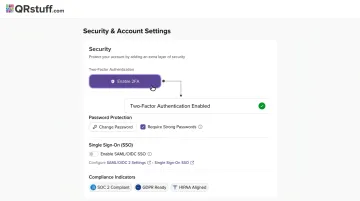
- Password-protected QR codes — requires a code before the payment destination loads, blocking unauthorized access
- Two-factor authentication (2FA) on every account
- SSO support via SAML 2.0 and OpenID Connect for enterprise deployments
- Data encryption in transit and at rest across all tiers
- GDPR and SOC2 compliance — data is used solely for QR code generation and platform operation
Frequently Asked Questions
How does the QR code payment system work?
A QR code encodes a link to a payment page or app. The customer scans it with their phone camera, which opens the payment destination automatically. They confirm the amount and authorize payment — funds move through the underlying payment network (card, ACH, or wallet). The QR code itself carries no financial data.
How do you pay with a QR code?
Open your phone camera (no separate app needed on modern iPhones or Android devices), point it at the QR code, and tap the link that appears. The payment page loads with details pre-filled where applicable — confirm the amount and pay using your card, Apple Pay, or Google Pay.
How do you get a QR code for payment?
Create a payment link through your payment platform (PayPal, Stripe, Square, or similar), then use a QR code generator like QRStuff to convert that link into a scannable, branded code. Choose dynamic for business use so you can update the destination and track scans without reprinting.
What is the difference between static and dynamic QR codes for payment?
Static codes permanently encode the payment URL and cannot be updated without reprinting. Dynamic codes use a redirect that can be edited anytime, making them the right choice for physical signage, packaging, or any scenario where the payment destination may change or scan tracking is needed.
How much does a dynamic QR code cost?
QRStuff's Lite Suite starts at $10/month (or $100/year) and includes 50 dynamic QR codes with no expiration. The Full Suite is $25/month for 250 dynamic codes. The Free tier includes 10 dynamic codes, but they expire after 30 days — not suitable for ongoing payment use.
Do I have to pay for a static QR code?
QRStuff generates static codes for free on its free tier (up to 5 codes, PNG format), and static codes never expire on paid plans. The trade-off is flexibility: if your payment destination changes, you'll need to reprint, and there's no scan tracking. For most business use, a paid dynamic code is worth it.