This scenario plays out constantly for businesses that rely on static QR codes in printed materials. The codes work fine technically — the problem is that they're permanently fixed to a single destination the moment they're printed.
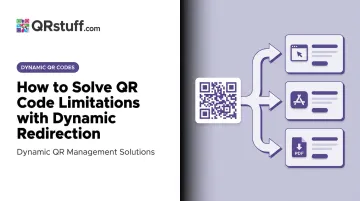
Dynamic redirection solves this at the architectural level. Instead of embedding the final URL into the code pattern, a dynamic QR code stores a short redirect URL. The actual destination lives on a server you control, editable at any time.
This article covers the most common QR code limitations businesses run into, how dynamic redirection addresses each one, the types of conditional rules you can set up, and a practical framework for choosing between static and dynamic codes.
Key Takeaways
- Static QR codes encode a fixed URL — once printed, the destination cannot be changed
- Dynamic QR codes redirect through an editable short URL, so the printed code never needs to change
- Conditional redirection lets one code serve different content based on location, device, time, or scan count — no reprint required
- Every scan through a dynamic code generates analytics: scan count, device type, location, and timing
- For printed campaigns with changing content, dynamic codes are the only viable long-term option
What Are QR Code Limitations?
A QR code limitation is any constraint that prevents a printed or distributed code from staying useful as business needs change. These aren't flaws in the QR standard itself — they're consequences of using static codes for situations that require flexibility.
Static QR codes encode the final destination URL directly into the pattern. The visual grid of squares is the URL. There's no server in the middle, no way to intercept or reroute the scan after printing. Once it's on paper, packaging, or a billboard, it's permanent.
Dynamic QR codes take a different approach. The printed pattern encodes a short redirect URL — something like go.example.com/r/abc123. When someone scans it, their device hits that redirect URL, and a server immediately forwards them to wherever you've configured the destination to be. Change the destination in your dashboard, and every future scan goes to the new URL.
Here's how the two approaches compare:
| Static QR Code | Dynamic QR Code | |
|---|---|---|
| Destination URL | Fixed at creation | Editable anytime |
| Requires reprinting to update | Yes | No |
| Scan analytics available | No | Yes |
| Redirect layer | None | Managed server redirect |
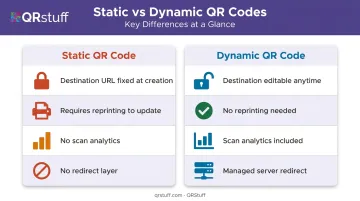
That redirect layer — a managed server sitting between the printed code and its destination — is what eliminates most of the limitations covered below.
Common QR Code Limitations That Break Campaigns
Most QR code failures follow predictable patterns. Here are the five that cause the most damage.
Fixed Destination URLs
Once a static QR code is printed, the encoded URL is locked. If the linked page moves, gets updated, or is taken down, every printed code becomes a dead end. There's no patch — the only fix is reprinting.
For businesses with large print runs (packaging, signage, catalogs), the downstream cost is real: design time, print production, distribution, and waste disposal all add up.
No Scan Tracking or Analytics
Static codes pass users directly to a URL with no tracking layer — meaning there's nothing to measure. No scan count, no device data, no geographic breakdown, no timing information.
According to eMarketer, 98% of marketers report positive QR code impact — yet only 12% actually measure revenue contribution. Without analytics built into the code itself, marketers are left correlating web traffic and guessing at attribution.
One-Size-Fits-All Content Delivery
A static code sends every user to the same destination regardless of their location, language, device, or when they scan. For global brands or multi-segment campaigns, that uniformity directly costs conversions.
McKinsey research found 71% of consumers expect personalized interactions, and 76% get frustrated when they don't receive them. Sending a French-speaking user to an English landing page — or an Android user to an iOS app download page — directly undermines campaign performance.
High Cost of Content Updates
When a promotion ends or a URL structure changes, static code users have no options. They either reprint or leave broken links in circulation.
RRD's 2024 Print Impact Report found 89% of marketers use QR codes in print marketing — meaning most businesses with static codes face exactly this problem every time something changes. Restaurants, retailers, and packaged goods brands feel this acutely: menu prices shift, seasonal promotions end, product pages get restructured.
Third-Party Domain Exposure and Brand Trust
Generic QR generators use their own short domains in the redirect path. Before reaching your landing page, users may briefly see an unfamiliar URL — which creates unnecessary friction, especially given documented increases in QR phishing attacks.
Cofense reported a 331% increase in QR code phishing threats in 2023. Users who've heard about QR scams are more likely to abandon a scan when they see an unrecognised domain in the flow.
How Dynamic Redirection Solves These Limitations
Dynamic redirection inserts a managed, editable layer between the printed code and its destination. That one change addresses every limitation above.
Solving Fixed URLs and Update Costs
The printed code never changes — only the server-side configuration does. Update the destination URL in your dashboard, and every future scan immediately goes to the new page. No reprinting, no redistribution — and no wasted inventory from outdated materials.
This is why QRStuff's dynamic codes are the default recommendation for any printed campaign. Edit the destination once in the dashboard; every future scan reflects the change instantly.
Solving the Analytics Gap
Because every scan passes through the redirect server before reaching the final destination, the platform captures data at that moment. QRStuff's analytics dashboard records:
- Total and unique scan counts — distinguishing new users from repeat engagements
- Device type and OS — iOS vs. Android breakdown
- Geographic location — country and city-level data
- Time and date — exact scan timestamps for identifying peak engagement windows
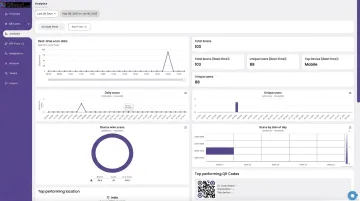
The dashboard is designed for marketing teams, not developers. It surfaces real-time scan data through line and bar charts, supports daily/weekly/custom date ranges, and includes CSV export — all without any technical configuration.
Solving Brand Trust
Dynamic QR platforms support branded short domains, so the redirect URL users briefly see reflects your brand rather than a generic service. On QRStuff, custom short URL domains are available on Full Suite and Enterprise plans, allowing something like qr.yourbrand.com in the redirect path.
As QR phishing grows more common, that familiarity matters. A recognisable domain in the scan flow is a meaningful trust signal — especially for enterprise campaigns targeting audiences who've been advised to scrutinise QR codes before scanning.
Types of Conditional Redirects You Can Set Up
Conditional redirection is where dynamic QR codes move from useful to genuinely powerful. One printed code can behave differently for different users based on rules you define — and nothing needs to be reprinted.
Location and Country-Based Redirects
Route users to a localised page based on their detected country or region. A global brand running a single QR campaign can show US customers a domestic offer page, direct European users to a regional version, and send everyone else to a default landing page — all from one code.
Device and OS-Based Redirects
QRStuff supports App Store QR codes that automatically detect a user's OS and redirect accordingly. iPhone users land on the Apple App Store, Android users on Google Play — same code, no friction.
With Android holding 67.35% of global mobile OS share and iOS at 32.55% (StatCounter, April 2026), this matters for any app promotion running at scale.
Schedule-Triggered Redirects
Route users based on the time of day, day of week, or a specific date range. A restaurant can serve a breakfast menu in the morning and a dinner menu in the evening from the same table code. A retailer can activate a sale landing page on a specific date, then automatically revert to the standard product page when the promotion ends.
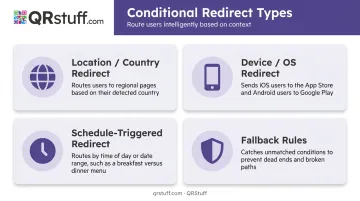
Fallback Rules
Beyond the redirect types themselves, one configuration step applies to all of them: always set a fallback URL.
When a user scans and doesn't match any defined condition — wrong country, unexpected device, outside the active time window — they should still reach something relevant. A fallback prevents dead ends and keeps the user experience intact.
Static vs. Dynamic QR Codes: Which Should You Use?
The right choice depends on your use case, not a general preference for one format over the other.
Use static QR codes when:
- The destination URL is permanent and will never change
- No scan tracking is needed
- The code only appears in digital formats where reprinting isn't a concern
- Simplicity is the priority (a one-time event invite linking to a fixed map, for example)
Use dynamic QR codes when:
- Materials will be printed and content may evolve
- Campaign performance needs to be measured
- Different audiences need different experiences based on location, device, or timing
- The code needs to remain functional across multiple campaigns over time
For enterprise use cases — product packaging, retail signage, loyalty programmes, multi-market campaigns — dynamic codes are the only practical choice. Nearly 60% of organisations plan to increase QR code investment with a focus on dynamic codes (Uniqode, 2025), and that shift reflects exactly this logic.
QRStuff is built around this reality, offering dynamic QR codes across every subscription tier:
| Plan | Dynamic Codes | Expiry | Notable Features |
|---|---|---|---|
| Free Suite | 10 | 30-day | Basic dynamic codes |
| Lite Suite | 50 | None (active subscription) | No expiry |
| Full Suite | 250 | None (active subscription) | — |
| Enterprise | 1,000 | None | White-label, custom domains |
Frequently Asked Questions
Do redirects work on QR codes?
Yes — redirects work through dynamic QR codes, which store a short redirect URL in the code pattern rather than the final destination. When scanned, the user's device hits the redirect URL, and the server immediately forwards them to wherever the destination is currently configured.
How do I edit a dynamic QR code?
Log into your dashboard, find the code, update the destination URL or redirect rules, and save. All future scans immediately point to the new destination — no changes to the physical code are needed.
What is the difference between a static and a dynamic QR code?
A static QR code embeds the final URL directly in the pattern and cannot be changed after creation. A dynamic QR code stores only a short redirect URL — the actual destination is managed separately on a server and can be updated at any time.
Can I update a QR code link without reprinting?
Only with dynamic QR codes. Because the printed pattern encodes a redirect URL rather than the destination itself, changing the destination in the dashboard takes effect immediately for all future scans — no reprinting required.
What types of conditions can I set for dynamic QR code redirection?
Common conditional redirect types include country/location, device type or OS, time of day, day of week, specific date ranges, and scan count thresholds. Most platforms allow multiple conditions to be combined and require a fallback URL for unmatched cases.
Do dynamic QR codes expire?
On QRStuff, dynamic QR codes don't expire while a paid subscription is active. Free accounts expire after 30 days, and if a paid subscription lapses, codes expire 30 days after cancellation (monthly) or 1 year after cancellation (annual). Contact QRStuff support for campaign-specific expiration options.