Except guests pinch-zoom through a PDF that won't load properly, servers don't know how to help when something goes wrong, and no one ever checks whether the menu still reflects the current prices.
According to Hospitality Technology, 66% of restaurants now include QR codes on tables—which means the technology is mainstream, but execution quality varies wildly. This guide covers the full workflow: what to build before you launch, how to deploy correctly, and how to keep the system working well after it's live.
Key Takeaways
- QR code menus require a mobile-optimized digital menu, not a PDF link
- Dynamic QR codes let you update menu destinations without reprinting physical materials
- Where you place codes—tables, entry points, takeout packaging—determines whether guests scan at all
- Staff still matter: they shift from order-taking to hospitality when the system works properly
- Scan analytics reveal which placements work and where guests drop off
When QR Code Menus Actually Make Sense
QR codes aren't a fit for every service style or customer base. They deliver real value in specific operational conditions.
Where they work well:
- High table-turnover environments where speed through the ordering cycle matters
- Short-staffed service periods when servers can't reach every table promptly
- Restaurants with frequent menu changes—seasonal items, daily specials, price adjustments
- Multi-language customer bases where a digital menu can display multiple language options
- Venues with takeout or delivery components that benefit from off-premise menu access
Where they underperform:
- Linked to a PDF instead of a mobile-optimized page (guests abandon before ordering)
- Placed in poor lighting or at awkward angles that make scanning unreliable
- Deployed without any staff briefing, leaving guests without help when things don't work
Toast's 2025 survey of 850 US adults found 81% still prefer physical menus, with only 1% preferring QR codes—and that preference climbs to 90% among guests aged 55+.
These numbers make the case for offering both, not swapping one for the other. The strongest operators use QR codes as an additional access layer alongside physical menus, not a wholesale substitute.
What You Need Before Launching
Skipping prerequisites creates problems that no amount of placement optimisation can fix. Get these right first.
| Requirement | Why It Matters |
|---|---|
| Mobile-optimised digital menu | PDFs force pinch-zoom behaviour and reduce order completion rates |
| Dynamic QR code generator | Static codes break permanently when the destination URL changes |
| Print-ready physical display materials | Size, contrast, and quiet zone margins affect scan reliability |
| Scan analytics capability | Without data, you can't evaluate which placements are working |
On the static vs. dynamic distinction: a static code encodes your destination URL permanently into the code pattern. Change the URL even once, and every printed code becomes a dead link. Dynamic codes (like those created with QRStuff) use a short redirect URL instead, so the destination updates instantly from a dashboard without touching a single printed material.
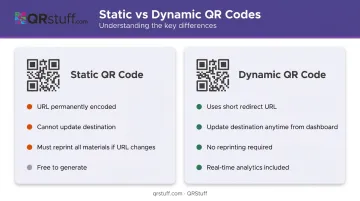
For a restaurant that adjusts prices seasonally, adds weekly specials, or migrates to a new ordering platform, that ability to update on the fly saves real money in reprint costs.
For analytics, QRStuff's platform gives you the data to evaluate every placement decision:
- Real-time scan tracking across all code locations
- Device type breakdowns (iOS vs. Android)
- Geographic data showing where scans originate
- Time-based insights to identify peak scan windows
A code at the bar that never gets scanned tells you something. So does one that drives 80% of your dinner traffic.
How to Set Up and Deploy QR Code Menus
Correct deployment follows a defined sequence. Skipping steps—especially mobile testing and staff briefing—causes poor adoption even when the code itself scans perfectly.
Build Your Digital Menu First
The menu goes live before the QR code is created. That means:
- Upload your full menu to a mobile-optimized platform
- Organise items by category with descriptions and photos where possible
- Configure any ordering or payment integrations
- Confirm the final destination URL before generating anything
The most common setup error: linking to a non-mobile-formatted page or a static PDF. Guests who can't navigate the menu cleanly won't order through it—they'll flag down a server anyway, which eliminates the efficiency gain you were after.
Generate and Customise Your QR Code
Once the destination URL is confirmed:
- Enter the URL into your QR code generator and select dynamic as the code type
- Add branding: your restaurant's logo, brand colors, and a visible call-to-action like "Scan to View Menu"
Branding the code matters. A plain black-and-white square gives guests no indication of where it leads—they're less likely to scan it. A logo, your brand colors, and a clear call-to-action tell guests exactly what to expect before they point their phone at it.
QRStuff's Full Suite plan includes QR code styling with logo integration, custom colors, and frames. For restaurant groups deploying codes across multiple locations, the bulk generation feature handles hundreds of codes simultaneously via a single Excel upload.
Place Codes Across the Right Touchpoints
In-venue placements:
- Tables: Table tents or surface stickers—the primary ordering touchpoint
- Entry/host stand: Pre-seat menu browsing or waitlist management
- Counter or bar area: Quick access during high-traffic service periods
Off-premise placements:
- Takeout packaging and receipts (scan-to-pay or loyalty sign-up)
- Social media posts and your website
- Window signage for passing foot traffic
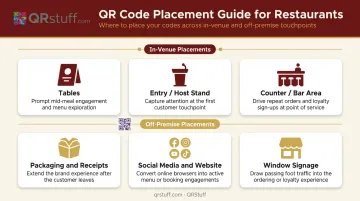
Each placement serves a different moment in the customer journey. A code on a receipt that links to a Google review prompt serves a completely different purpose than a table tent code that opens the ordering menu.
Test Before Going Live
Before placing a single code on a table, test it:
- Scan on both iOS and Android under your venue's actual lighting conditions
- Check scanning distance: Nielsen Norman Group recommends a 10:1 scan-distance-to-code-size ratio as a practical starting point
- Confirm the destination loads correctly and navigates cleanly on mobile
Going live also means briefing front-of-house staff. If a server can't explain how the menu works or help a guest who can't scan, that guest's experience suffers—and the QR system gets blamed.
How QR Code Menus Improve Restaurant Service
When the system is built correctly, QR menus change the operational dynamic in several concrete ways.
Guest Control Over Meal Pacing
Guests browse at their own pace, re-read item descriptions, and add courses or drinks without waiting to flag someone down. That reduces perceived wait time—even if actual service time is identical—because the guest is in control of the pace rather than waiting on a server's availability.
Staff Freed for Hospitality
When guests self-order and self-pay, servers stop spending time on order-taking and bill delivery. They can focus on hospitality, upsell higher-margin items, and cover more tables. The efficiency numbers from platform data back this up: Square reported restaurants enabling QR self-serve ordering saw a 35% average increase in sales within the first 30 days, with open-tab ticket sizes running 42% higher on average.
Those are vendor benchmarks, not universal guarantees—but they reflect a real dynamic: guests who browse digitally order more because they can read descriptions and see photos without time pressure.
Fewer Kitchen Communication Errors
Digitally entered orders go directly to the kitchen without a manual relay step. That removes the miscommunication layer: wrong table numbers, missed modifiers, and orders garbled under noise all become non-issues. Course timing improves because the kitchen has the full order from the moment it's placed.
Loyalty and Marketing Touchpoints
Every QR scan is a potential relationship-building moment beyond the menu itself:
- Loyalty sign-ups: Guests scan to join a rewards program or check their points balance
- Review prompts: A code on the receipt links directly to your Google review page
- Social media: Codes on packaging or signage drive follows and engagement
- Event announcements: Link to upcoming specials or seasonal menus
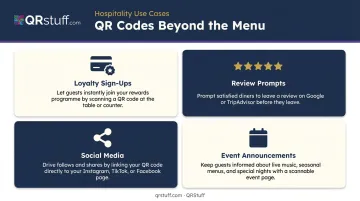
QRStuff supports dedicated QR code types for Google reviews, social media profiles, and social link pages—so these can be separate codes with their own tracking, not just additional redirects on the menu URL.
Best Practices for Running QR Code Menus Well
Getting the system live is step one. Keeping it working well is the ongoing work.
Use dynamic codes exclusively. Static codes become broken links the moment a menu URL changes. Given that the National Restaurant Association reported average menu prices increased 31% between February 2020 and April 2025, price updates alone are reason enough to avoid static codes entirely.
Assign menu maintenance ownership. Designate one team member responsible for keeping the digital menu current, and build update cycles into weekly operations. A stale menu — wrong prices, discontinued dishes — erodes guest trust fast.
Train front-of-house staff on the system. Every server should know how to help guests scan, troubleshoot a code that won't read, and explain the menu navigation. Staff who can't answer basic questions will default to paper menus.
Inspect physical codes at every shift. The FBI IC3 and FTC have documented cases of fraudulent stickers placed over legitimate codes to redirect guests to malicious sites. Check codes during opening and closing — laminated or material-printed codes are significantly harder to tamper with than paper stickers.
Use scan analytics to diagnose placement problems. If a code generates far fewer scans than expected, that's a positioning or lighting issue — not a guest adoption problem. QRStuff's analytics dashboard surfaces real-time scan volume, device breakdowns, and time-based data so you can pinpoint exactly where placement is failing.
Conclusion
A QR code menu that actually improves service isn't about the code—it's about the operational system the code connects to. Your digital menu needs to be mobile-optimized and kept current. Codes should be dynamic, branded, and placed where guests will naturally encounter them. Staff need to know the system well enough to guide anyone who struggles—and scan analytics should inform placement and design decisions on a regular basis.
Treat your QR code menu as a live operational asset. Revisit placement, check menu accuracy, and review analytics at least monthly. The technology itself is straightforward. What separates a smooth guest experience from a frustrating one is how consistently your team maintains the system behind it.
Frequently Asked Questions
How do restaurant QR codes work?
A QR code encodes a URL. When a guest points their smartphone camera at it, the device recognises the pattern and opens the linked page directly—no app required. Depending on the system in place, guests can browse the menu, place orders, and pay through that same page.
How do I scan a restaurant QR code?
On most modern iPhones and Android phones, the native camera app handles QR scanning automatically—just point it at the code and tap the link that appears on screen. No separate app needed.
How much does a QR code menu cost?
Costs vary depending on what you need. Static QR codes are free to generate and work fine for simple menus. Dynamic codes—which let you update your menu without reprinting—require a paid plan. QRStuff offers dynamic QR codes starting on paid subscription tiers, with plans designed for individual restaurants up to multi-location operations. Check the QRStuff pricing page for current rates.
Are QR code menus safe? What are the risks?
Browsing a menu through a QR code doesn't require guests to share personal data—it's no different from visiting a website. The main risk is physical tampering, where someone places a fraudulent sticker over a legitimate code. Restaurants reduce this risk by using laminated or printed codes in visible locations and checking them during regular opening and closing procedures.
Can I update my QR code menu without printing new codes?
Yes—dynamic QR codes allow you to change the destination URL at any time without generating or reprinting anything. The printed code stays the same; only the destination changes. This is the primary reason dynamic codes are the recommended choice for restaurant menus.
What are the benefits of QR code menus over paper menus?
Key advantages include:
- Instant menu updates without reprinting costs
- Reduced physical contact between guests and staff
- Photos and item descriptions built into the menu
- Optional integration with ordering and payment systems that cut wait times and improve table turnover