A digital menu QR code solves this directly. It's not a pandemic-era workaround that outlived its usefulness — the National Restaurant Association's 2024 Technology Landscape Report found that 59% of full-service and 57% of limited-service customers would access a menu via smartphone QR code. That's a majority. And for restaurants still running purely on printed menus, the question isn't whether to consider QR codes — it's how long they can afford not to.
Key Takeaways
- A digital menu QR code directs customers from a small printed image to a live, mobile-optimized menu — no app needed
- Dynamic QR menus cut print costs, allow instant updates, and drive more revenue per table
- Static QR codes lock your menu in place: dynamic codes let you edit, track, and optimise without reprinting
- Treat the QR code as a sales tool — update it regularly and review scan data to maximise return
What Is a Digital Menu QR Code?
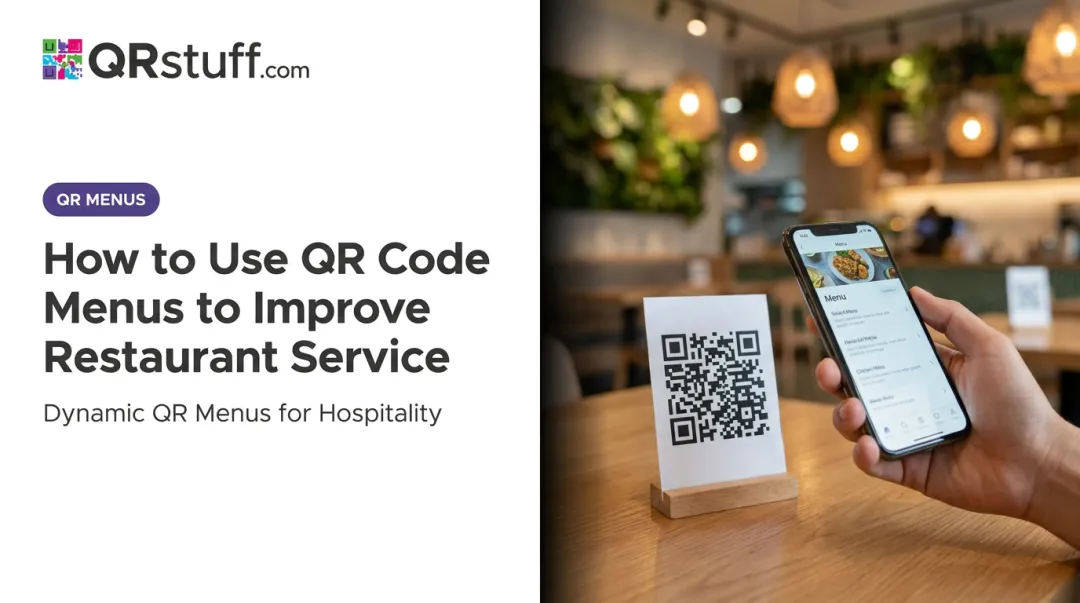
A digital menu QR code is a scannable image — printed on a table tent, placemat, receipt, or window cling — that opens your menu directly in a customer's smartphone browser when they point their camera at it. No app download required.
Modern iPhones (iOS 11+) and Android phones (8.0+) scan QR codes natively through the built-in camera. The customer points, holds steady, taps the notification banner, and the menu loads. Start to finish, it takes under five seconds.
Static vs. Dynamic: The Distinction That Matters
Not all QR codes work the same way, and the difference has real operational consequences:
| Static QR Code | Dynamic QR Code | |
|---|---|---|
| URL encoded | Fixed at creation | Redirects via a short URL |
| Menu updates | Require a new code | Update in the dashboard instantly |
| Reprinting needed? | Yes, every change | Never |
| Scan analytics | Not available | Full tracking included |
| Best for | One-time, permanent content | Restaurant menus |
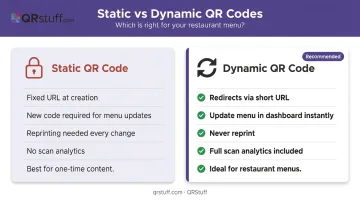
For any restaurant that changes prices, runs specials, or wants scan data, dynamic codes are the practical choice. They work by embedding a short redirect URL inside the printed code — so when you update your menu in the dashboard, every scan of that same physical code pulls up the new content automatically. Platforms like QRStuff handle this through a central redirect, which means no reprinting, ever.
Key Advantages of Digital Menu QR Codes
The advantages below connect to metrics restaurant operators actually track — not abstract technology benefits. Each one maps to a measurable outcome.
Advantage 1: Eliminates Recurring Printing and Design Costs
Every price change, seasonal update, or dish removal on a printed menu triggers the same cycle: edit the file, send to design, approve the proof, place the print order, wait, pay, distribute. With a digital QR menu, that cycle ends permanently.
The menu lives on a hosted page or web platform. Changes are made in a dashboard and go live for every customer scanning the code from that moment forward — no print vendor involved.
Per-menu print costs vary by format and volume. A QSR Magazine analysis noted typical ranges of $0.50–$3.00 per menu for standard orders, rising to $5–$10 per menu for laminated or waterproof versions. For a restaurant printing 200 laminated menus twice a year, that's $2,000–$4,000 annually on printing alone — before design fees.
Budget freed from reprints can redirect toward staff training, kitchen equipment, or marketing. There's also an environmental consideration worth noting: the NRA's 2022 sustainability data found that sustainable, reusable, and recyclable materials ranked as the No. 1 food and menu trend — eliminating disposable printed menus aligns with what a growing share of diners expect.
KPIs this affects:
- Printing cost per quarter
- Design vendor spend
- Paper menu replacement frequency
- Operational waste volume
This advantage is highest-impact for restaurants running daily specials, adjusting prices seasonally, or operating across multiple locations where every reprint multiplies.
Advantage 2: Real-Time Menu Control Without Reprinting the QR Code
With a dynamic QR code, the physical printed code never changes. Only the destination URL updates in the backend. A staff member logs into the menu dashboard, makes the change, and every subsequent scan reflects it — no wait, no reprint, no cost.
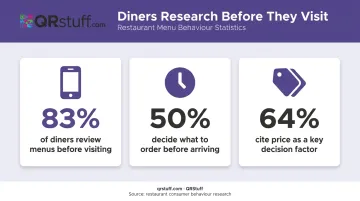
This matters more than it sounds. A US Foods survey of 1,003 Americans found that 83% review menus before visiting a restaurant and 50% decide what to order before they arrive. Nine in ten diners look for clear pricing, with 64% calling price a key decision factor.
When your physical menu lists items that are sold out or prices that no longer apply, you're not just creating server friction — you're breaking a promise to customers who planned their visit around what they read. Real-time control eliminates that class of error entirely.
QRStuff's dynamic QR codes allow unlimited URL destination changes with no restriction on update frequency. A restaurant can shift from a lunch menu to a dinner menu mid-afternoon, pull a sold-out dish at 7pm on a Friday, or update pricing across all tables simultaneously — all without touching the printed code.
KPIs this affects:
- Customer complaint rate
- Order error rate
- Menu accuracy
- Staff time spent handling menu correction requests
Rotating seasonal menus, daily specials, split happy hour and dinner pricing, multi-language menus for international guests — any of these makes real-time control a daily operational asset rather than a nice-to-have.
Advantage 3: Drives Higher Revenue Per Table
Digital menus create conditions that consistently push average order values higher. Customers browse at their own pace without feeling rushed, high-margin items can be displayed with photography, and add-on suggestions surface automatically — none of which a paper menu does reliably.
Square's data on QR Self-Serve Ordering found that businesses using the system saw a 35% average sales increase in the first 30 days, with 42% higher average ticket sizes when open tabs were combined with QR ordering. These figures apply to QR-enabled ordering setups, not passive menu display alone — but they reflect what happens when the friction between "I want another drink" and "I've ordered another drink" is removed.
Olo's platform data separately shows digital ordering interfaces increase check averages by roughly $2–$4 per cover, or about 12%. Higher check averages, though, are only part of the revenue picture.
The other lever is table turnover. When customers can browse immediately on arrival and re-order without waiting for a server, service cycles shorten. More covers per shift, same floor space.
QRStuff's analytics dashboard gives restaurant managers the data to optimize this actively. The platform tracks:
- Scan volume by time of day — identify peak service windows
- Device type — iOS vs. Android breakdown, informs menu UX decisions
- Geographic data — useful for multi-location operators comparing performance across sites
- Unique vs. total scans — distinguishes repeat engagement from new customers
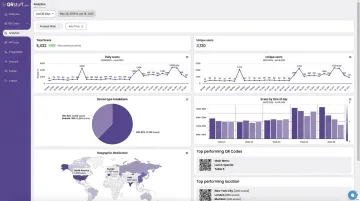
Analytics are only available on dynamic QR codes — another reason static codes aren't suited for restaurant operations.
KPIs this affects:
- Average order value (AOV)
- Table turnover rate
- Revenue per cover
- Upsell conversion rate
- Scan frequency by time of day
What Happens When You Skip the Digital Menu QR Code
Restaurants sticking exclusively to printed menus absorb costs that are easy to underestimate because they're spread across the year in small, recurring hits.
The ongoing costs stack up:
- Every price change, seasonal update, or new dish requires a full reprint — at $0.50–$10 per menu depending on quantity and update frequency
- Menu accuracy errors create direct service friction: servers fielding complaints about unavailable items, or explaining price discrepancies between what was printed and what's currently charged
- Missed upsell opportunities build over time — a well-structured digital menu surfaces add-ons and featured items on every single scan; a server cannot do that consistently at scale
Those operational costs hit harder when you consider who's walking through the door. NRA 2024 data shows 78% of Millennials in full-service settings would access a menu via QR code — compared to just 30% of Baby Boomers. Limited-service QR menu willingness reaches 71% for Gen Z and 76% for Millennials.
One important nuance: research does show that some diners prefer physical menus, and a 2024 peer-reviewed study in the Journal of Hospitality and Tourism Management found QR menus can reduce customer loyalty when perceived as inconvenient. QR menus work best as an option alongside physical menus, not a wholesale replacement for guests who prefer paper.
How to Get the Most Value from Your Digital Menu QR Code
Setup is the easy part. Sustained return comes from treating the QR code as an operational tool, not installed signage.
Three habits that drive compounding value:
Link to a dynamic destination, never a static PDF : a PDF uploaded once and never updated defeats the purpose. The menu should be a live page that reflects current offerings. Do a quick test scan every time you make a menu change to confirm the update is showing correctly.
Review scan analytics regularly — QRStuff's dashboard shows peak scan times, device breakdowns, and geographic data. Use this to identify underperforming placement spots (a code that's never scanned is probably positioned poorly or not visible), and to time promotional content around your actual high-traffic windows.
Treat the digital menu as a sales tool — rotate featured dishes, push high-margin items with food photography, and update limited-time offers in real time. An active QR menu consistently drives higher average order value than a passive one.
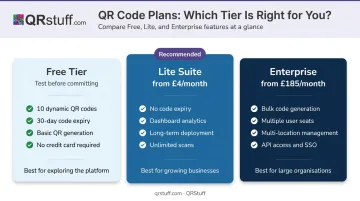
QRStuff offers a tier for every stage of adoption:
- Free tier — 10 dynamic QR codes with a 30-day expiry, enough to test the format before committing
- Lite Suite (from £4/month) — removes the expiry and unlocks dashboard analytics, the minimum setup worth deploying long-term
- Enterprise tier — bulk code generation across sites with multiple user seats for location-level management
Conclusion
A digital menu QR code isn't a setup-and-forget technology decision. It's an ongoing operational practice that compounds in value: lower print costs, fewer menu errors, and measurably higher table revenue over time.
The investment works when restaurants commit to dynamic codes, keep their menu content current, and review scan performance regularly. Treat it as core operational infrastructure, and the returns accumulate well beyond the initial setup cost.
Frequently Asked Questions
What is a QR code menu?
A QR code menu is a digital version of your restaurant's menu, accessed by scanning a small printed code with a smartphone camera. It opens a live, mobile-optimized menu page directly in the phone's browser — no app download required.
Can I create a QR code for my menu?
Yes. Use an online QR code generator, link it to your hosted menu URL, and download the code for printing. Always use a dynamic QR code rather than a static one, so you can update your menu without generating a new code.
Can I update my menu without changing the QR code?
Only with a dynamic QR code. The printed code stays the same — you update the destination URL in your dashboard backend, and every subsequent scan reflects the change instantly.
Do customers need to download an app to use a QR code menu?
No. Most modern smartphones scan QR codes natively through the built-in camera app, opening the menu directly in the browser. No download means nothing standing between a customer and your menu — regardless of their tech comfort level.
How much does it cost to implement a digital menu QR code?
Generating a QR code can be free or low-cost depending on the platform — QRStuff, for example, offers a free tier alongside paid plans starting at £4/month. The main investment is a mobile-optimized menu page and optional design for printed table displays. Most businesses recover these costs quickly once print and reprint expenses are eliminated.
Are QR code menus suitable for all types of food businesses?
Yes — restaurants, cafés, bars, hotel room service, food trucks, and event caterers all benefit. The value is highest for businesses that change their menu frequently, run regular specials, or operate across multiple locations where printing costs add up fast.