Introduction
Running QR code campaigns across 50 stores is straightforward until location 23 sends customers to last quarter's promotion and you have no idea which sites are driving scans. Without the right platform, that scenario plays out as wasted print runs, stale destinations, and scan data scattered across spreadsheets with no clear picture of what's working where.
According to the National Restaurant Association's 2024 Technology Landscape Report, First Watch processed QR-based payments from 125,000+ customers across 420 locations in a single week — and the infrastructure managing those codes is what made it operationally viable.
This guide evaluates five platforms built for exactly that challenge — QRStuff, Bitly, Uniqode, QRCodeKIT, and Branch — comparing how each handles bulk code generation, per-location analytics, and dynamic destination updates at scale.
Key Takeaways
- Dynamic QR codes are essential for multi-location campaigns — static codes lock you out of updates and tracking the moment they're printed
- Per-location analytics (not aggregate totals) are what make campaign data actionable
- Enterprise tools earn their price through bulk creation, centralized dashboards, and branded code design — basic generators don't offer these
- Platform choice should match your use case — whether that's deep mobile attribution, structured campaign organization, or compliance-grade infrastructure
- Reprinting across dozens of locations when campaigns change is an avoidable operational cost
What Are Multi-Location Trackable QR Code Campaigns?
A multi-location QR code campaign deploys unique, individually tracked codes across different physical sites — retail stores, restaurant branches, hotel properties, clinics — all managed from one platform. The operational key is "unique per location." One shared code tells you total scans; unique codes per site tell you which locations are driving engagement and which aren't.
What Makes a QR Code "Trackable"
Trackability requires dynamic codes. Static QR codes embed the destination URL directly into the code pattern — once printed, the destination is fixed and no scan data is captured. Dynamic codes route scans through platform infrastructure, keeping the printed pattern stable while logging:
- Total scans and unique scans per code
- Device type (iOS, Android, desktop)
- Geographic data (country and city level)
- Time-of-scan and peak scanning periods
That per-code granularity enables location-level comparisons — not just aggregate totals that obscure which sites are underperforming.
Industries Driving Adoption
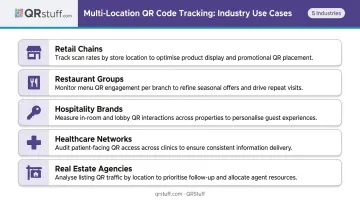
Any business running the same campaign across multiple physical sites benefits from per-location tracking. The strongest use cases include:
- Retail chains — compare in-store engagement across locations to identify top-performing displays
- Restaurant groups — track menu QR code scans by branch to spot ordering pattern differences
- Hospitality brands — measure guest interaction rates across hotel properties
- Healthcare networks — monitor patient-facing QR codes across clinics and waiting rooms
- Real estate agencies — track property listing scans by office or region
Best Solutions for Multi-Location Trackable QR Code Campaigns
These platforms were selected based on their ability to handle scale, provide location-level analytics, support dynamic QR codes, and offer centralized campaign management — not just single-code generation.
QRStuff
QRStuff has been building QR infrastructure since 2008, serving 250,000+ businesses globally including Walmart, Coca-Cola, and Marriott International. It supports 40+ QR code types and holds GDPR and SOC2 compliance certifications — relevant for any enterprise with regulatory requirements around data handling.
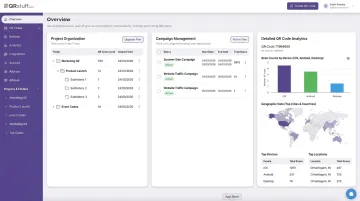
For multi-location campaigns, the platform's analytics go deep. The dashboard tracks scans at the individual code level across six dimensions: total scan count, unique scans, device type (iOS/Android/Desktop/Tablet), country-level geography, city-level geography, and time-of-scan. That's per-location granularity without manual segmentation.
Organizationally, QRStuff uses a Project Folder system — codes are grouped by campaign or location during the creation workflow, separating store-level data without cluttering the dashboard. Google Campaign Tracking (UTM parameter appending) is built into the same creation step, so Google Analytics integration requires no additional configuration.
The Enterprise tier adds API access for programmatic code management, bulk batch processing for high-volume creation, and white-label capabilities including a branded dashboard interface, removal of QRStuff branding, and custom short URL domains.
| Dynamic QR codes | 40+ code types, bulk batch creation |
| Analytics | Scan count, unique scans, device type, city/country geo, time-of-scan — per individual code |
| Organization | Project folders, Google Campaign Tracking/UTM support |
| Enterprise features | API access, white-label dashboard, custom domains, SSO and 2FA support |
| Compliance | GDPR and SOC2 certified |
| Pricing | Free Suite ($0), Lite Suite ($10/month or $100/year), Full Suite ($25/month or $270/year), Enterprise ($250/month or $2,700/year) |
| Best for | Enterprise and mid-market teams needing audit-level analytics, bulk workflows, and compliance-ready infrastructure |
Bitly
Bitly combines URL shortening, branded QR code generation, and link analytics in one dashboard — useful for teams that already use Bitly for link management and want QR codes folded into the same workflow.
For multi-location use, Bitly's key differentiators are UTM parameter support (built into Core and above), dynamic QR codes that allow post-print destination edits, and scan analytics that scale with plan tier. City-level geographic data and device-type tracking are available on Premium and above.
| Dynamic QR codes | Yes (paid plans) |
| Analytics | Country-level (Core), city-level + device type (Premium+), data retention from 30 days to 2 years depending on plan |
| Bulk creation | 10 codes per CSV upload (Growth), 200 per upload (Premium) |
| UTM support | Core and above |
| Pricing | Free ($0), Core ($10/month billed annually), Growth ($29/month annual), Premium ($199/month annual), Enterprise (custom) |
| Best for | Marketing teams already using Bitly for link management who want consolidated QR and link analytics |
Uniqode (The QR Code Generator)
Uniqode operates The QR Code Generator platform with a focus on structured campaign organization. Campaign folders group codes by location or channel, subfolders are supported, and folder-level analytics allow cross-campaign comparisons — for example, comparing poster performance versus flyer performance across different locations.
Google Analytics UTM integration is available through custom UTM parameter support, and team collaboration tools allow shared access with editor roles. The platform documents 204M+ scans processed globally.
Note on pricing: Uniqode's pricing page confirms annual-only billing with a 14-day free trial for dynamic features. The QR Code Generator (TQCG) publishes a separate Free and Flex structure. Check the-qrcode-generator.com for current tier pricing before committing.
| Dynamic QR codes | Yes |
| Organization | Campaign folders, subfolders, custom naming and tagging |
| Analytics | Location, device, time, top-performing code filters, cross-campaign comparisons |
| UTM support | Custom UTM parameters passed through to destination |
| Team collaboration | Editor roles, shared analytics reports |
| Pricing (TQCG) | Free ($0/month, 2 dynamic codes), Flex ($5/month billed yearly) |
| Best for | Small-to-mid-size teams and agencies needing organized dashboards and campaign-level performance comparisons |
QRCodeKIT
QRCodeKIT is built around volume and organization. Project folders group codes by campaign or business unit, bulk CSV generation handles up to 1,000 codes per file, and the Enterprise tier supports 5,000 dynamic codes with 50 team members and role-based access controls.
Analytics on paid plans cover unique scans, daily data, countries, cities, operating systems, and device types — comparable to the other platforms at the individual code level.
| Dynamic QR codes | Up to 5,000 (Enterprise) |
| Organization | Project-based folders |
| Bulk creation | CSV upload, up to 1,000 codes per file |
| Analytics | Unique scans, daily data, country, city, OS, device type |
| Team permissions | Up to 50 members with role-based access (Enterprise) |
| Pricing | Free ($0), Starter ($20/month annual), Pro ($50/month annual), Enterprise ($150/month) |
| Best for | Operations teams and agencies generating high volumes of uniquely tracked codes across many locations |
Branch
Branch is a different category of tool. It's an enterprise mobile measurement and deep linking platform — QR code tracking is one capability within a broader mobile attribution infrastructure.
Where other platforms measure scan counts, Branch attributes what happens after the scan: app installs, purchases, sign-ups, and downstream conversions. Deep linking routes users to specific in-app content rather than a generic homescreen, and deferred deep linking preserves campaign metadata through the app install process on both iOS and Android.
Clients include Etsy, PUMA, Domino's Indonesia, Jersey Mike's, and Peet's Coffee — consumer brands where the post-scan journey through mobile apps is the conversion event.
| QR capabilities | Branded dynamic QR codes with campaign-level attribution |
| Deep linking | Routes to specific in-app content, not app homescreens |
| Attribution | Post-scan conversions: installs, purchases, sign-ups, ROAS, LTV |
| Metadata persistence | Preserved through iOS and Android app install process |
| Pricing | Basics (free trial), Essentials and Enterprise (demo/contact sales — no public pricing) |
| Best for | Enterprise brands with mobile apps needing to attribute QR scans to downstream conversions, not just scan volume |
How to Choose the Right Platform
Not every QR platform is built for multi-location work. The right choice comes down to five criteria: dynamic QR support at scale, location-level analytics, centralized campaign management, custom branding tools, and compliance or security requirements. Getting these wrong early costs time and money later.
Common Selection Mistakes
- Choosing based on free-tier availability: free tiers typically cap dynamic codes at 2–10, which falls well short of any real multi-location deployment
- Ignoring per-code vs. aggregate analytics — some tools report only total campaign scans, with no per-location breakdown
- Using static QR generators: if destinations change — seasonal promotions, menu updates — you'll reprint codes across every location without dynamic support
Matching Platform to Use Case
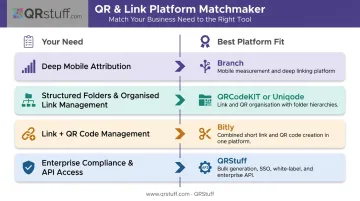
| Need | Best Fit |
|---|---|
| Deep mobile attribution + app conversion tracking | Branch |
| Structured folders + moderate analytics | QRCodeKIT or Uniqode |
| Link management + QR in one dashboard | Bitly |
| Compliance (GDPR/SOC2) + bulk workflows + API + enterprise scale | QRStuff |
Conclusion
The platform running your multi-location QR campaign determines whether you get location-level intelligence or a scan number you can't act on. Code generation is the easy part — the differentiator is per-location analytics, dynamic editing, bulk management, and centralized control that doesn't break as you add more sites.
Match your choice to what your operation actually requires: how many locations, how deep your analytics need to go, whether compliance or API integration is on the table, and whether mobile app attribution is part of the conversion model.
Teams that need to meet all of those criteria in one platform have a shorter list than they might expect. QRStuff covers 40+ QR code types, per-code analytics with city-level geographic data, bulk batch creation, and project folder organization — with GDPR and SOC2 compliance built in. Brands like Coca-Cola, Walmart, and Marriott already run on it. If your evaluation is still open, that's a reasonable place to start.
Frequently Asked Questions
What is the difference between a static and dynamic QR code for multi-location campaigns?
Static codes embed the destination URL permanently, so they can't be updated after printing and capture no scan data. Dynamic codes route scans through platform infrastructure, allowing destination edits at any time and logging scan data per code. For multi-location campaigns where content changes, dynamic codes are the standard approach.
How do I track which location is generating the most QR code scans?
Platforms like QRStuff, Bitly, and QRCodeKIT assign unique dynamic codes per location. Their dashboards display scan counts, geographic breakdowns, and device data for each code, so you can compare location performance without manual data reconciliation.
Can I update QR code destinations across all locations without reprinting?
Yes — dynamic codes allow destination URL changes from the platform dashboard at any time without altering the printed code. A seasonal promotion swap, menu update, or campaign pivot propagates immediately across all locations with no reprint cost.
What analytics should I expect from a multi-location QR code platform?
Look for total scans vs. unique scans per location, device type breakdown (iOS/Android/Desktop), geographic data at city and country level, and peak scan times. QRStuff includes all of these out of the box; platforms like Branch extend further into post-scan conversion events such as app installs and purchases.
How many QR codes can I manage in a single platform dashboard?
Most paid tiers support hundreds to thousands of codes. QRCodeKIT's Enterprise plan handles 5,000 dynamic codes; QRStuff's Enterprise tier supports 1,000 with unlimited batch processing and API access for programmatic management at scale. When evaluating platforms, bulk CSV import is the key feature to confirm for multi-location operations.