Introduction
Static printed menu boards have a real operational cost — every price change, limited-time offer, or seasonal update means reprinting, rehung signage, and lag time measured in days rather than minutes. For a single-location café, that's inconvenient. For a 50-location franchise, it's a genuine problem.
Digital menu board software solves this by moving menu management to the cloud. Operators can push updates to every screen across every location instantly, schedule daypart transitions automatically, and maintain brand consistency without touching a single display in person.
According to Grand View Research, the global hospitality digital signage segment generated $4.15 billion in 2025 and is projected to reach $8.2 billion by 2033 (an 8.9% CAGR). Wendy's alone committed $20 million in 2024 to complete its digital menu board rollout across company-run stores.
This guide covers the best digital menu board software for restaurants in 2026 — what features actually matter for day-to-day operations, and how to match a platform to your size and budget.
Key Takeaways
- Digital menu board software lets restaurants manage screens remotely, push updates in real time, and automate daypart scheduling
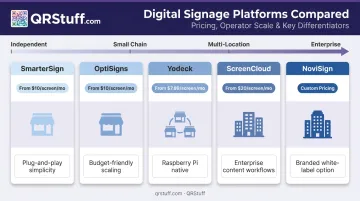
- Top platforms in 2026: SmarterSign, OptiSigns, Yodeck, ScreenCloud, NoviSign — each suited to different budgets and operational scales
- Pricing runs from free (single-screen entry tiers) to $45+/screen/month for enterprise
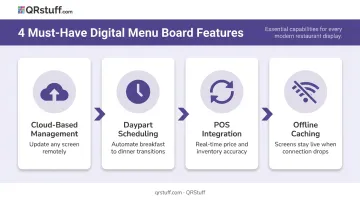
- Must-have features: cloud management, POS integration, daypart scheduling, offline caching
- Many restaurants pair digital boards with QR code menus at the table to cover every ordering touchpoint — from the counter to the seat
What Is Digital Menu Board Software and Why It Matters in 2026
Digital menu board software is a cloud-based platform that lets restaurants design, schedule, and remotely manage what appears on their in-restaurant screens — no reprinting, no manual staff updates, no on-site IT visits required.
The category has evolved well beyond basic slideshows. Modern platforms connect directly to POS systems, trigger automatic content updates when inventory changes, and let marketing teams manage creative assets for hundreds of screens from a single dashboard.
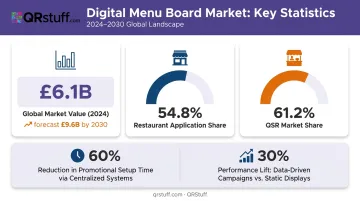
Research from Strategic Market Research puts the global digital menu boards market at $6.1 billion in 2024, forecast to reach $9.6 billion by 2030, with restaurants accounting for 54.8% of application share. QSRs alone represent 61.2% of the market — a clear signal that digital boards have moved from differentiator to baseline infrastructure.
For multi-location operators, QSR Magazine reports that centralized digital signage systems can reduce promotional setup time by over 60% compared to print-based workflows — and data-driven campaigns can outperform static ones by up to 30% in revenue efficiency.
With the market this mature, the platform you choose determines how much of that efficiency you actually capture. Here's how the top options compare.
Best Digital Menu Board Software for Restaurants in 2026
Each platform below was evaluated on restaurant-specific feature depth, pricing transparency, hardware flexibility, and customer support quality. Five options are covered — from entry-level tools for independents to enterprise platforms built for large franchise networks.
SmarterSign
SmarterSign has operated in the digital signage space since 2006, with food service accounting for approximately 60% of its business. Restaurant customers include Junior's Cheesecakes, Dallas BBQ, and Dairy Queen franchisees — giving it deeper food service experience than most platforms in this category.
Key differentiators:
- Native POS integrations with Square, Clover, and Heartland
- Dayparting and drive-thru signage support built into the core product
- Multi-location rollout management with consistent branding across thousands of sites
- 14-day full-feature trial; enterprise tier supports up to 5,000 screens
| Feature | Details |
|---|---|
| Key Features | Dayparting, POS integration (Square, Clover, Heartland), remote management, drive-thru signage, multi-location control |
| Pricing | From $30/screen/month; small-business plans cover 1–20 screens; volume pricing for enterprise |
| Best For | Mid-to-large restaurant groups, multi-location operators, food service management companies |
OptiSigns
OptiSigns is a cloud-based platform with strong adoption among restaurant and QSR operators. Super Chix, a QSR franchise, used OptiSigns to move from static to digital menus across locations in 14 states.
Key differentiators:
- 160+ app and integration library, including Toast, Square, and Clover via OptiSync API
- Inventory-triggered content updates — sold-out items can display strike-throughs automatically
- Browser-based player option eliminates dedicated hardware for basic deployments
- Runs on Android, Windows, Raspberry Pi, Chrome OS, LG webOS, and more
| Feature | Details |
|---|---|
| Key Features | Content scheduling, POS data integration, kiosk support, 160+ app integrations, multi-screen management |
| Pricing | Free plan (limited); Standard $10/screen/month; Pro $12.50; Pro Plus $15; Enterprise $45 (25-screen minimum) |
| Best For | Multi-location restaurants, franchise operators, QSRs wanting cross-platform hardware flexibility |
Yodeck
Yodeck is built on Raspberry Pi and offers the lowest cost-of-entry in this comparison, including a free single-screen tier. It's a natural fit for independent operators piloting digital signage for the first time.
Key differentiators:
- Free single-screen tier; annual paid plans from $8/screen/month
- Free Yodeck Player hardware bundled with annual plans
- 30-day trial covering up to 5 screens, no credit card required
- Restaurant menu board templates with automatic time-of-day scheduling
| Feature | Details |
|---|---|
| Key Features | Drag-and-drop editor, scheduling, Raspberry Pi player, remote management, restaurant template library |
| Pricing | Free (1 screen); Basic $8/screen/month; Premium $11; Enterprise $15 (annual billing) |
| Best For | Independent restaurants, single-location cafés, food trucks, first-time digital signage deployments |
ScreenCloud
ScreenCloud is the enterprise-grade option here, used by large restaurant groups and franchise brands that need centralized content governance with role-based access control.
Key differentiators:
- Granular user roles: Owner, Admin, Manager, Creator, Publisher, Viewer
- Custom roles and permissions for managing groups across large accounts
- Supports Android, Chrome OS, iOS, Linux, macOS, Windows, and BrightSign
- Dedicated QSR and franchise resources; enterprise tier includes professional design support and onboarding
| Feature | Details |
|---|---|
| Key Features | Centralized content governance, role-based permissions, API and data integrations, analytics, enterprise SSO |
| Pricing | Core $20/screen/month; Pro $30/screen/month; Enterprise by quote |
| Best For | Large restaurant chains, franchise networks, enterprise food service brands with IT and marketing teams |
NoviSign
NoviSign sits in the mid-market — more capability than entry-level tools, without the complexity (or cost) of full enterprise platforms. The Mia's Table case study demonstrates its practical use across 7 restaurant locations to improve consistency, speed, and guest experience.
Key differentiators:
- Food service template library covering cafés, QSR, fast casual, bakery, and pizza formats
- Hardware-agnostic: supports Android, Chrome OS, Windows, Samsung Tizen, LG webOS, BrightSign, and Amazon Signage Stick
- Scheduling features and interactive kiosk mode available alongside standard menu boards
| Feature | Details |
|---|---|
| Key Features | Food service templates, content scheduling, multi-location management, interactive kiosk support, analytics |
| Pricing | Business from $18/screen/month (annual billing); check current tiers at novisign.com |
| Best For | Growing restaurant chains, regional franchises, mid-market operators scaling from single to multi-location |
Key Features to Look for in Digital Menu Board Software
Cloud-Based Management and Remote Updates
The ability to push menu changes, price updates, and promotional content from any device — without being on-site — is the most operationally critical feature. For a single location, it saves a trip. For a 30-location chain, it means a same-day price correction across every screen instead of a three-day rollout.
Look for platforms that offer true cloud management rather than requiring a local server or on-premises software update.
Daypart Scheduling and Automation
Automated time-based switching handles breakfast-to-lunch-to-dinner transitions, weekday vs. weekend specials, and happy hour promotions without any staff involvement. According to QSR Magazine, time-sensitive flash promotions paired with real-time messaging can increase transaction frequency by up to 20%.
This is one of the highest-ROI features in daily restaurant operations — it removes manual overhead and eliminates the guest confusion of seeing a lunch menu at 8am.
POS Integration and Content Accuracy
When digital boards sync with the POS, price discrepancies disappear. More advanced platforms (OptiSigns via OptiSync, SmarterSign via Square/Clover/Heartland) can trigger inventory-based content updates — automatically flagging or hiding sold-out items.
That same accuracy principle extends beyond the overhead screen. Many operators pair digital boards with QR code menus at the table — and when prices change or items rotate, those codes need to stay current too. QRStuff's dynamic QR codes let staff update the linked menu destination from the dashboard without reprinting any physical codes, keeping the overhead display and table-side QR in sync.
Uptime Reliability and Offline Caching
The best platforms cache content locally, so screens continue displaying the last-known menu even when the internet goes down. A blank screen during a Friday dinner rush is not a recoverable situation — offline caching is essential for any live deployment. Platforms that lack it introduce real business risk every time the connection drops.
How to Choose the Right Platform
Match the Platform to Your Operational Model
The lowest monthly price per screen often isn't the lowest total cost. Common pitfalls include:
- Hardware lock-in: Some platforms require proprietary players. If you already own commercial screens or smart TVs, verify compatibility before signing.
- Integration gaps: Confirm your specific POS system is officially supported, not just "compatible via API" — integration depth varies significantly.
- Startup risk: Choosing a venture-backed platform with uncertain long-term stability is a real risk for infrastructure that restaurants depend on daily. Provider longevity matters.
Tie Your Decision to Operational Outcomes
The right platform should deliver measurable results across three areas:
- Reduces staff overhead through automated scheduling and dayparting
- Maintains brand consistency across all locations from a single dashboard
- Creates upsell opportunities through timely, targeted promotions
A general signage tool repurposed for restaurants will handle the display side. It won't handle dayparting, POS sync, or drive-thru configurations without significant workarounds.
For restaurants exploring lower-cost or contactless alternatives, QR code-based digital menus — where customers scan a code to view a live, updatable menu on their phone — can complement or replace screen-based boards entirely, especially for independent cafés and food trucks where hardware costs are a barrier.
Quick selection guide:
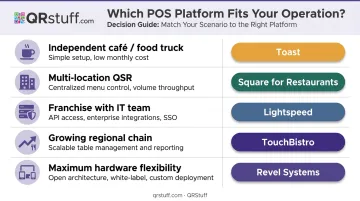
| Scenario | Best Fit |
|---|---|
| Independent café or food truck, tight budget | Yodeck |
| Multi-location QSR needing POS sync | SmarterSign or OptiSigns |
| Franchise with IT and marketing teams | ScreenCloud |
| Growing regional chain (5–50 locations) | NoviSign |
| Maximum hardware flexibility, low entry cost | OptiSigns |
Test free trials before committing. Beyond the per-screen subscription fee, evaluate hardware compatibility, support tiers, and contract terms to get a clear picture of total cost.
Conclusion
The best digital menu board software isn't the most feature-rich option or the cheapest per screen. It's the one that fits how your operation actually runs, works with the tools you already rely on, and comes from a provider you can count on long-term.
Here's where each platform lands:
- SmarterSign — best for multi-location operators with complex POS integrations
- OptiSigns — broadest flexibility at the lowest published entry price
- Yodeck — practical starting point for independent operators
- ScreenCloud — enterprise governance for larger chains
- NoviSign — mid-market fit for growing regional brands
Restaurants building a complete digital guest experience often combine overhead screen management with table-level QR code menus. QRStuff's dynamic QR codes let operators update the linked menu destination — PDF, ordering platform URL, or branded landing page — without reprinting. With free and paid plans available, it's a practical complement to any digital menu board setup.
Frequently Asked Questions
What is the best digital menu board software for restaurants in 2025 and 2026?
Top-rated options include SmarterSign, OptiSigns, and ScreenCloud, each suited to different operational scales. SmarterSign is strongest for restaurant-specific POS integrations; OptiSigns offers the most flexible hardware support; ScreenCloud is the go-to for enterprise franchise governance. Single-location operators typically get the most value from OptiSigns or Yodeck; multi-unit chains should evaluate ScreenCloud or SmarterSign first.
What are the menu design trends in 2025?
High-contrast layouts (dark backgrounds, bold typography) dominate for readability, and looping food video has largely replaced static images on new installs. The National Restaurant Association's What's Hot 2025 report highlights AI integration and streamlined menus as top macro trends, while FDA-covered chains (20+ locations) are increasingly embedding calorie disclosures directly into board layouts.
How much does digital menu board software cost per month?
Pricing ranges from free (Yodeck's single-screen tier) to $45+/screen/month for enterprise platforms. Most mid-market options fall in the $10–$30/screen/month range. Hardware, installation, and support costs are separate — always factor these into your total budget alongside the subscription fee.
Do I need special hardware to run digital menu board software?
Most modern smart TVs can run digital menu board software via a browser or a low-cost media stick. Drive-thru and outdoor environments typically require dedicated commercial displays rated for higher brightness and weather resistance. OptiSigns and NoviSign are hardware-agnostic; Yodeck is purpose-built for Raspberry Pi.
Can digital menu board software integrate with my POS system?
Yes — most leading platforms support POS integrations. SmarterSign officially supports Square, Clover, and Heartland; OptiSigns supports Toast, Square, and Clover via its OptiSync API. Integration depth varies, so confirm your specific POS is supported before purchasing.
What is the difference between a digital menu board and a QR code menu?
Digital menu boards are overhead or wall-mounted screens managed centrally, visible to all guests simultaneously. QR code menus are accessed individually on a guest's smartphone after scanning a code at the table. Many restaurants use both — boards for immediate visibility and upsell messaging, QR codes for detailed browsing, allergen information, or direct ordering.