Introduction
Picture this: a patron finds the perfect title in the catalog terminal, jots the call number on a scrap of paper, heads into the stacks — and can't read their own handwriting. Or they locate a record on a desktop computer but have no easy way to carry that information to their phone before navigating three floors of shelving.
These friction points are small but consistent. QR codes solve them directly — putting catalog records, shelf locations, and digital resources one scan away from whatever device a patron already has in hand.
According to Pew Research Center, 97% of U.S. adults under 50 own a smartphone, and 95% of U.S. teens have access to one. The technology is already in nearly every patron's pocket. Libraries simply need to connect it to their collections.
This guide covers the primary uses of QR codes in library catalogs, how to implement them effectively, and how tools like QRStuff make the process scalable for libraries of all sizes.
Key Takeaways
- QR codes connect physical catalog records directly to mobile devices
- Libraries use them for availability checks, subject guides, digital access, and wayfinding
- Dynamic QR codes let staff update destinations without reprinting anything
- Scan analytics provide data to support technology budgets and grant applications
- Placement, sizing, and labeling determine whether patrons actually scan
Why Libraries Are Adopting QR Codes
Libraries face a structural mismatch at the heart of their catalog systems. Static outputs — printed records, shelf labels, physical signage — can't keep pace with what patrons actually need: real-time availability, digital editions, subject guides, event registration links. QR codes close that gap without requiring libraries to overhaul their existing systems.
What makes this practical now — rather than before 2020 — is near-universal smartphone penetration. Both iOS and Android handle QR scanning natively through their built-in camera apps, no separate download required. That removes the single biggest adoption barrier that stalled earlier mobile library technology initiatives.
Three forces are converging to make QR adoption the practical choice for libraries right now:
- Static-to-dynamic bridge: QR codes connect printed materials to live digital content without reprinting
- Native smartphone support: No app installs needed — just point and scan
- Growing digital collections: More ebook and audiobook content means more to link patrons to
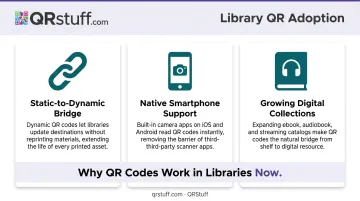
The scale of digital collections makes this particularly timely. The ALA's 2023 Public Library Technology Survey found that 95% of public libraries offer ebooks and/or e-audiobooks, yet many patrons still don't know how to access them. A QR code on a shelf sign or catalog printout becomes a direct on-ramp to those collections.
Top Uses of QR Codes in Library Catalogs
Linking Catalog Records to Mobile Pages
When a patron researches at a desktop catalog terminal, they shouldn't have to re-enter the same search on their phone to navigate the stacks. A QR code embedded in the printed or on-screen catalog record lets them scan once and open the same item record in the mobile catalog — title, call number, location, and all.
LibraryThing demonstrated this workflow with their Library Anywhere platform, which dynamically added a QR code to each catalog page. Scanning sent patrons directly to that record in the mobile catalog, ready to save or share. The concept applies equally to any OPAC that can generate item-specific URLs.
This use case matters most in academic and large public libraries, where the path from the catalog terminal to the correct shelf can span multiple floors.
Displaying Book Details and Availability
A QR code on a catalog item record can deliver title, call number, floor location, and current availability straight to a patron's phone. No pencil needed.
The real advantage is what patrons can do with that information once it's on their phone:
- Copy the call number to clipboard for easy reference in the stacks
- Send the details via SMS or email to a colleague or family member
- Save the record for a return visit when the item is checked out
- Share the link directly with a study group
This turns a single scan into a persistent, portable piece of information rather than a note that gets lost in a coat pocket.
Shelf-End QR Codes Linking to Subject Guides
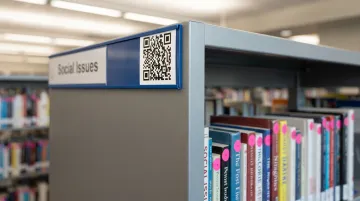
Half Hollow Hills Community Library in New York placed QR codes on shelf ends so patrons browsing the cooking section could scan immediately to a curated food and drink subject guide. The result: passive shelf browsing becomes an active discovery experience.
The benefit extends beyond convenience. Subject guides contain context, recommendations, database links, and related resources that no physical shelf label can hold. A patron who wouldn't think to ask a librarian for reading recommendations may scan a QR code without hesitation.
Connecting Physical Items to Digital Counterparts
QR codes on book records or shelf tags can link directly to the ebook, audiobook, or OverDrive/Libby page for the same title. OverDrive has specifically documented how libraries can create QR codes linking to title details, specific genres, or curated collections on their digital platforms.
The highest-impact application is waitlisted items. A patron who can't check out a popular print copy can scan to access the digital version immediately — reducing frustration and increasing digital collection usage without any additional staff involvement.
Personalized Reading Recommendations
Contra Costa County Library tagged popular books with QR codes pointing to read-alike lists. Each physical book becomes a starting point for discovery — a patron who loved one title can scan to find a librarian-curated list of similar reads without asking at the desk.
This approach scales well. Once codes are printed and placed, they deliver recommendations around the clock — no desk interaction required, and no ongoing maintenance unless the linked lists are updated.
Expanding Beyond the Catalog
Patron Wayfinding and Floor Maps
QR codes posted at library entrances, elevator banks, and department boundaries can link to an interactive floor map or a summary of services available on that floor. Patrons orient themselves quickly; staff handle fewer directional interruptions.
For larger systems, location-specific codes are more useful than a single generic map — a code near the periodicals section should link to periodicals information, not a general building overview.
Promoting Digital Collections in Physical Spaces
San Antonio Public Library used large-format printed posters with QR codes linking directly to digital titles on OverDrive. Boston Public Library went further, installing sidewalk decals at 20 bus stops where riders could scan to borrow audiobooks, ebooks, and e-newspapers from the MBTA — no library website URL required.
Placing codes on community bulletin boards or bus shelters reaches people who never set foot in the branch — turning everyday commutes into access points for the digital collection.
Event Marketing and Registration
QR codes on flyers, shelf talkers, and posters link directly to event registration pages — eliminating manual sign-up sheets and giving staff real-time attendance data. A patron scans, registers, and the confirmation lands in their email automatically.
Center Check-In and Program Tracking
In school libraries, QR codes at each activity station link to a short Google Form. Students scan to check in, recording their name and center choice automatically — the librarian facilitates learning instead of collecting data.
Public libraries can apply the same approach to any workflow currently relying on paper sign-in sheets:
- Program attendance tracking at recurring events
- Room booking confirmations for community spaces
- Equipment loan logging for cameras, hotspots, or laptops
- Summer reading challenge check-ins at participating branches
How to Generate and Deploy QR Codes for Your Library
Choosing Between Static and Dynamic QR Codes
The choice between static and dynamic codes shapes how much ongoing work your library takes on every time a URL changes.
| Feature | Static | Dynamic |
|---|---|---|
| Destination URL | Fixed permanently | Editable anytime |
| Analytics | None | Full scan tracking |
| Reprinting required to update | Yes | No |
| Best for | Permanent, stable content | Catalog records, events, collections |
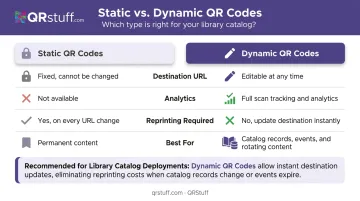
For library catalogs, dynamic codes are almost always the right choice. Catalog systems change, digital collection URLs shift, and event pages expire. A dynamic code lets staff update the destination in the platform dashboard without touching a single printed label.
QRStuff's dynamic codes let library staff update destination URLs at any time — when a catalog system migrates, when an OverDrive link changes, or when an event page moves. For a collection of several thousand labeled items, that means avoiding costly reprint runs every time a destination shifts.
Generating Codes: Step-by-Step
For individual codes, the process is straightforward:
- Copy the catalog record or resource URL
- Paste it into QRStuff's generator and select URL as the data type
- Customize the design — add the library logo, match brand colors, select shapes
- Download in SVG or high-resolution PNG (300 DPI minimum for print)
For large catalogs, manual one-at-a-time generation isn't realistic. QRStuff's batch processing accepts an Excel (.xlsx) file of URLs and generates up to 500 codes per batch, delivered as a ZIP archive. Libraries with over 20,000 codes can arrange bulk processing at reduced per-code rates.
Once your codes are generated, the next step is getting them onto shelves, signs, and labels in a way that actually scans reliably.
Print Specifications and Placement
Follow these specs for reliable scanning across your library environment:
- Minimum size: At least 2 cm × 2 cm for close-range scanning. For shelf-end signs viewed from across an aisle, apply the 10:1 rule — a code scanned from 1 meter away needs to be at least 10 cm wide.
- Contrast: Dark modules on a light background. Avoid inverted colors or patterned backgrounds behind the code.
- Placement height: Follow ADA signage guidance — between 48 and 60 inches from the floor baseline. Avoid placement behind glass or in poorly lit corners where camera autofocus struggles.
- Durability: Use matte lamination in high-traffic areas. Glossy surfaces create glare that can block scanning.
Version Control
Every QR code file should be saved with a descriptive name tied to its destination — for example, CookingSection_SubjectGuide_QR.png. Maintain a simple spreadsheet tracking each code's destination URL, physical location, and last-verified date. Dynamic codes reduce broken-link risk significantly, but a log prevents orphaned codes from accumulating across a large deployment.
Best Practices and Measuring Impact
Design for Your Patron Audience
Always add a brief text label beneath each QR code. Nielsen Norman Group's research confirms that QR codes lack inherent "information scent" — patrons need to know what they'll get before they scan. Labels like "Scan to check availability" or "Scan for related titles" give patrons a clear reason to act.
Before deploying library-wide, run a pilot with 10–15 codes in a high-traffic area. The Topeka & Shawnee County Public Library's Big Read QR pilot found that while the first page received 323 views, only 8 people completed the full experience — partly due to design friction. Small pilots surface these issues cheaply.
Once your codes are designed and tested, tracking how patrons actually use them is the next step toward informed decisions.
Tracking Performance with Analytics
Dynamic QR codes capture scan-level data — count, time, device type, and geographic location. QRStuff's analytics dashboard presents this data in table and graph formats, with CSV and PDF export for reporting.
For library administrators, this data has concrete institutional value:
- Identify which catalog sections or collections generate the most engagement
- Demonstrate digital access metrics in annual reports
- Support grant applications with quantified usage data
- Justify technology budget decisions with real scan counts rather than estimates
Even the best analytics setup won't help if the codes themselves fail in the field. These three placement and design mistakes are the most common culprits.
Avoiding Common Pitfalls
Most QR code problems in libraries come down to three avoidable mistakes:
- Sending patrons to pages not built for mobile — they scan once, pinch to zoom in frustration, and don't return
- Using static codes for content that changes — a broken link erodes trust faster than having no code at all
- Poor physical placement on glossy surfaces, in low light, or at awkward heights, where scans consistently fail
Frequently Asked Questions
What is the best app to scan books for a library?
Most modern smartphones scan QR codes natively through the built-in camera app, so no separate download is needed. For ISBN barcode scanning to catalog personal collections, Libib works well on both iOS and Android.
How do you create a QR code for a library catalog entry?
Copy the URL of the catalog item record and paste it into QRStuff. For libraries managing many records, use batch processing — upload an Excel file of URLs and receive all codes at once rather than generating them individually.
Can QR codes in a library catalog be updated without reprinting?
Only dynamic QR codes support updates after printing. The physical code stays the same, but the destination URL can be changed in the platform dashboard at any time. This makes dynamic codes essential for catalog records linked to content that may move or change.
How do libraries use QR codes for wayfinding?
Libraries post QR codes at entrances and section boundaries linking to digital floor maps, department pages, or service descriptions. Patrons orient themselves without interrupting staff, and the linked pages can be updated whenever floor layouts or services change.
Are QR codes in libraries accessible to all patrons?
QR codes require a smartphone, which not every patron has. Always pair a QR code with a printed URL or short link as an alternative, and ensure linked pages are screen-reader compatible and mobile-optimized. Section508.gov recommends providing a text alternative adjacent to any QR code used in public-facing contexts.