Introduction
Product packaging used to be a one-way conversation. A customer buys, the box gets recycled, and the brand loses the relationship entirely. That's a significant gap — considering 76% of shoppers want more information to inform their purchases, and a 2023 GS1 survey found 66% would scan a QR code on food packaging to access ingredients, freshness data, or shelf-life details.
A single QR code on your product label closes that gap. It turns static packaging into a direct channel that educates customers, drives repeat purchases, and captures first-party data — all without a label redesign.
This article covers four practical ways to make that happen: replacing paper manuals with interactive content, converting packaging into a repeat purchase engine, telling your sustainability story, and building a customer feedback channel. It also covers what to know about dynamic vs. static codes before you print anything.
Key Takeaways
- QR codes on product labels keep your brand relationship active long after the purchase
- Four use cases covered: interactive education, repeat purchases, sustainability storytelling, and feedback collection
- Dynamic QR codes are essential — they let you update destinations without reprinting
- Every code needs a targeted destination and a clear call-to-action — linking to your homepage wastes the scan
Why Your Product Label Is a Missed Marketing Opportunity
Most brands treat label real estate as a compliance exercise. Net quantity here, ingredients there, legal text squeezed into the bottom 30% of the panel. The brand creative gets the rest. And when the product is purchased, that's where the relationship ends.
It doesn't have to. The moment a customer opens a product is one of the highest-intent moments in the entire customer lifecycle — they've already committed to the purchase and are actively looking for reasons to stick with it. A QR code captures that moment and converts it into something actionable.
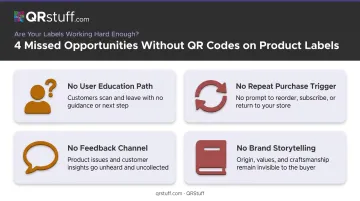
What's at stake without it:
- No mechanism to educate first-time users who might return the product out of frustration
- No path to a second purchase from a customer who's actively using the first
- No way to gather feedback from buyers who'll never find your review page on their own
- No channel to tell your brand story beyond what fits on a 3-inch label
None of this requires a packaging redesign. A dynamic QR code fits into existing artwork, takes up minimal space, and can point customers to a tutorial, a loyalty signup, a review form — whatever your next conversion goal actually is.
4 Innovative Ways to Use QR Codes on Product Labels
Replace Paper Instructions with Interactive Video Tutorials
Paper manuals have a well-documented problem: nobody reads them. Research cited by the Safety and Human Factors Society found that only 6.8% of respondents reported reading their vehicle owner's manuals in full. For complex products, that gap between "unboxed" and "confident user" is where returns and support tickets pile up.
A QR code eliminates that friction entirely. Instead of a dense booklet, the customer scans and lands on a mobile-formatted video that walks them through setup, assembly, or proper use — exactly when they need it.
What brands link to:
- Step-by-step assembly walkthroughs
- Recipe demonstrations using the specific product
- Care and maintenance instructions
- Troubleshooting guides for the most common issues
LEGO already does this well. Buyers can scan the QR code on physical building instructions to open the exact set in the LEGO Builder app — interactive 3D guidance that replaces the need to flip through a printed booklet. Diageo took a similar approach with Ketel One, using packaging QR codes to unlock recipe suggestions and accessibility information directly from the can.
Business outcomes:
- Fewer inbound support requests from confused first-time users
- Reduced returns from customers who couldn't figure out the product
- Higher satisfaction scores from buyers who felt supported from day one
For brands generating these codes at scale, QRStuff supports Video QR Codes and URL QR Codes across all paid tiers — both work well for linking to hosted tutorial content.
Turn Packaging Into a Repeat Purchase Engine
The window right after a first purchase is the most underused moment for driving a second one. The customer has just experienced your product, they're engaged, and they're holding the packaging in their hands. A QR code on that packaging can trigger the next transaction before the moment passes.
McKinsey research found that top-performing loyalty programs can lift annual revenue from active redeeming customers by 15% to 25%. Redeemers spend 25% more than enrolled-but-inactive members. The bottleneck isn't interest — it's activation friction.
How it works in practice:
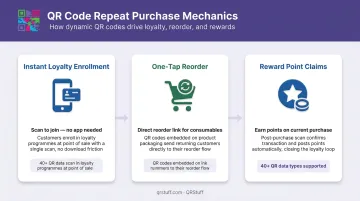
- Instant loyalty enrollment — scan to join, no app download, no account creation required
- One-tap reorder links — particularly effective for consumables like supplements, coffee, or skincare running low
- Reward point claims — scan to earn points on the current purchase, creating an immediate reason to come back
Ambev demonstrated this directly by adding QR codes to Brahma beer bottle caps, giving consumers a direct path to a loyalty program from the physical product itself.
Why friction reduction matters: MIT Sloan cites a global cart abandonment rate of 71.7% — rising to 77.4% on mobile. Removing even one step from the reorder path can shift conversion rates measurably.
For this use case, QRStuff's Coupon QR Codes and URL QR Codes can link directly to loyalty enrollment pages, Shopify product pages, or subscription checkout flows. The Shopify integration is particularly clean for brands running direct-to-consumer commerce.
Tell Your Sustainability Story Through the Label
A 2-inch label cannot hold a supply chain story. It can't explain your carbon methodology, list your third-party certifications, or show the specific farm that grew your ingredients. But a QR code can link to all of it.
This matters because consumer expectations have shifted. First Insight research shows 62% of Gen Z shoppers prefer sustainable brands, with 73% willing to pay more for sustainable products. Separately, a Label Insight study found 94% of consumers are more likely to be loyal to brands offering complete transparency.
What brands can link to:
- Third-party sustainability certifications
- Carbon footprint breakdowns by product life cycle stage
- Supply chain origin maps showing where ingredients or materials came from
- Recycling instructions specific to the actual packaging materials used
Cocokind does this precisely. A QR code on their secondary packaging links to a full sustainability breakdown — including carbon footprint measured in grams of CO2e, calculated using Life Cycle Assessment methodology. That level of specificity is what separates genuine transparency from vague green claims.
For recycling specifically, How2Recycle Plus (adopted by Danone on Silk cartons) lets customers scan a QR code, enter their ZIP code, and receive localized recycling instructions from a database of more than 9,000 community programs.
QRStuff's GS1 Digital Link QR Code Generator supports this natively — it creates GS1-standard codes that work at retail POS checkouts (Sunrise 2027 compliant) while simultaneously connecting consumers to sustainability data and Digital Product Passport information.
Capture Customer Feedback and Build a First-Party Data Channel
Most customers never leave reviews. The friction is too high — searching for the product page, creating an account, writing something coherent. A QR code on the packaging removes most of that friction by taking them directly to a review form or NPS survey with one scan.
Research from the Spiegel Research Center found that displaying reviews can increase conversion by up to 270%. The reviews exist. Getting customers to write them is the actual problem.
The mechanics:
- Link the QR code directly to your review platform, brand feedback form, or NPS survey
- Pair it with a small incentive — 10% off the next order, early access to a new product
- Cochrane research shows monetary incentives nearly double survey response rates (OR 1.88)
Beyond reviews, every scan generates first-party data. QRStuff's dynamic codes capture:
- Total and unique scan counts
- Scan time and date (peak engagement windows)
- Device type (iOS vs. Android, mobile vs. desktop)
- Geographic location (country and city level)
That data connects directly to CRM workflows. QRStuff integrates with Zapier, Monday.com, Meta Pixel, and Google Ads — so scan behavior can trigger follow-up sequences, retargeting campaigns, or segmentation updates automatically based on how and where customers engage.
This matters more now than it did three years ago. McKinsey noted the $152B U.S. digital advertising industry was losing access to the third-party data that powered programmatic targeting. Packaging becomes a collection point that most competitors overlook — and the data it generates belongs entirely to you.
Static vs. Dynamic QR Codes: What Product Brands Need to Know
This distinction determines whether your QR codes stay useful for the life of the product — or become dead links six months after printing.
| Feature | Static QR Code | Dynamic QR Code |
|---|---|---|
| Destination | Encoded directly in the pattern — fixed forever | Redirects through an editable short URL |
| Updateable? | No — requires reprinting | Yes — update anytime, no reprint needed |
| Scan analytics | None | Full scan data (time, location, device, unique scans) |
| Best for | Fixed URLs, internal tools, one-time-use content | Product labels, packaging, printed materials, campaigns |
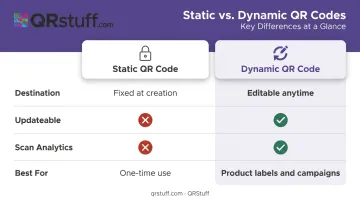
For product labels specifically, dynamic codes are non-negotiable. A static code linking to a seasonal promotion becomes useless when the promotion ends. A broken URL on a printed label stays broken until you reprint thousands of units.
That's where a platform like QRStuff makes the difference. Dynamic codes can be updated as many times as needed across Lite, Full, and Enterprise tiers — destination changes take effect immediately without touching the physical label. QRStuff's 99.9% uptime guarantee, backed by a tracked record of 99.968% since 2008, means codes printed today remain scannable years from now.
How to Add QR Codes to Your Product Labels
Step 1: Define the destination first
Before generating anything, decide what the scan should accomplish. Build or identify the specific landing page, confirm it loads on mobile, and verify it serves one clear action. Every scan will happen on a smartphone — a page that loads slowly or requires pinch-to-zoom will lose the customer immediately. A Google/Deloitte study on mobile speed found that a 0.1-second improvement in mobile load time correlates with retail conversions rising 8.4%.
Step 2: Generate a dynamic, branded QR code
Use a platform that supports dynamic codes, custom branding, and scan analytics. QRStuff supports 40+ QR code types, lets you design codes with brand colors, logos, and custom shapes on all paid tiers, and provides real-time analytics from the Full Suite upward.
Pricing reference for product brands:
- Lite Suite — £4/month: 50 dynamic codes, limited analytics
- Full Suite — £15/month: 250 dynamic codes, full scan analytics including GPS, device type, and Google Analytics integration
- Enterprise — £185/month: 1,000+ dynamic codes, GS1 Digital Link, unlimited analytics, API access, white-label options
Brands that trust QRStuff include Coca-Cola, Walmart, PepsiCo, and Amazon.
Step 3: Optimize placement on the label
- Avoid folds, curved surfaces, and low-contrast backgrounds
- Minimum recommended size: 2cm × 2cm for close-range scanning (use vector formats like SVG or EPS for print)
- Use 300 DPI minimum for raster exports; dark code on light background is the most reliable contrast
- Add a short benefit-driven CTA next to the code: "Scan for setup video" or "Scan to earn rewards"
- Test on multiple devices and lighting conditions before committing to a full print run
Best Practices to Maximize QR Code Performance
Getting a QR code onto a label is the easy part. Getting customers to scan it — and actually act — takes a bit more thought. These four practices make the difference.
- Always include a CTA. A code with no context gets ignored. Be specific: "Scan for a recipe" outperforms "Scan here" every time.
- Update your destination, not your label. Dynamic QR codes let you swap landing pages, refresh seasonal content, and respond to drop-off data without reprinting a single unit. Review your scan analytics monthly.
- Never link to a generic homepage. Every scan should land somewhere with one clear next step. A homepage gives the customer nowhere to go — and no reason to stay.
- Test a physical sample before the full print run. QR codes can scan perfectly on screen and fail in print due to ink bleed, label finish, or low contrast. Catch it before it costs you.
Frequently Asked Questions
How do I integrate QR codes into product labels?
Generate a dynamic QR code using QRStuff, design it into your label artwork with sufficient size and contrast, and pair it with a clear call-to-action. Confirm the destination page is mobile-optimized before sending files to print.
What is the difference between static and dynamic QR codes for product labels?
Static codes encode a fixed URL directly into the pattern — once printed, the destination cannot change. Dynamic codes redirect through an editable short URL, allowing content updates and providing scan analytics without reprinting.
Do I need to reprint labels if I want to change what my QR code links to?
No. With dynamic QR codes, you update the destination through your QR management platform and the change takes effect immediately. The printed code remains unchanged.
How small can a QR code be on a product label and still scan reliably?
QRStuff recommends a minimum of 2cm × 2cm for simple URLs scanned at close range. Final minimum size depends on print quality, contrast, and scanning distance — always test a printed sample before producing at scale.
Can QR codes on product labels track customer data?
Dynamic QR codes capture aggregate scan data including total scans, unique scans, scan time, device type, and geographic location — without requiring personal identification from the scanner.
What should a QR code on a product label link to?
The destination should match a single, measurable objective — a tutorial video to reduce returns, a loyalty sign-up for repeat purchases, a sustainability page for brand transparency, or a review form for customer feedback. Pick one goal per label and build the landing page around it.