QR code tickets have become the standard entry method across events of every size, from 50-person corporate workshops to massive multi-day conferences. The shift isn't just about convenience — the global online event ticketing market is projected to reach USD 89.44 billion by 2030, growing at a 6% CAGR, with digital delivery formats driving much of that growth.
Key Takeaways
- QR tickets work by linking each unique code to a single attendee record, validated in real time at the door
- Check-in speeds up significantly — fraud drops, paper disappears, and your organizer workflow stays intact
- Dynamic codes update after distribution, so venue changes or corrections never require a reprint
- Setup follows five steps, from platform selection to staff briefing
- Real-time scan analytics show exactly who checked in, when, and from which entry point
How QR Code Tickets Work: From Registration to Entry
The process is straightforward, but understanding each step helps organizers avoid the gaps that cause problems on event day.
The Attendee Journey
- Attendee registers or purchases — their details are saved to the event database
- A unique QR code is generated — tied specifically to that registration record
- The code is delivered via confirmation email, SMS, or saved to Apple Wallet or Google Wallet
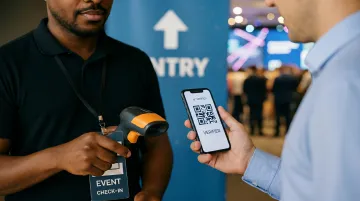
- At the venue, staff scan using a smartphone app — no specialist hardware needed
- The system returns one of three results — Valid, Duplicate, or Invalid — and updates the attendance dashboard instantly
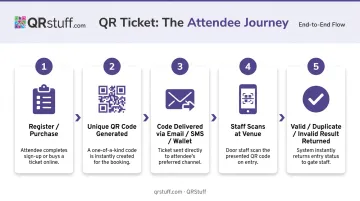
That's the complete loop. Each code stays connected to a live record — which is exactly why the type of code you choose determines how much control you keep after distribution.
Static vs. Dynamic: Which One You Actually Need
The difference has real operational consequences.
Static QR codes embed data directly into the code pattern itself. Once printed or distributed, that data cannot change. If your venue shifts or a session time moves, you're reprinting every ticket.
Dynamic QR codes work differently. As Scantrust explains, they encode a short redirect URL that points to a server-managed destination — meaning you can update where the code leads at any time, without touching the code itself. Attendees scan the same code they received originally and land on current information automatically.
For most events, dynamic codes are the right choice. QRStuff's dynamic QR codes support post-distribution editing, real-time scan tracking, and branded design, starting with the Lite Suite plan.
One Common Misconception Worth Clearing Up
Attendees need no app whatsoever. They simply display the QR code — from their email, their phone's wallet app, or a printed copy. Only check-in staff need a scanning tool, which is typically a free smartphone app.
5 Ways QR Code Tickets Are Transforming Event Entry
Faster Check-In and Shorter Queues
The speed difference between QR scanning and manual name lookup is significant in practice. Bizzabo's event operations research indicates that modern QR check-in with real-time registration sync can cut check-in time in half compared to manual processes. For a 500-person event where peak arrivals cluster in the first 30 minutes, that difference determines whether entry is chaotic or smooth.
Multi-gate scanning eliminates single-point bottlenecks. Multiple staff members can scan simultaneously from different entry points on any smartphone, all synced to the same attendance database. A ticket scanned at Gate A is immediately marked as used at Gate B, preventing duplicate entry entirely.
The attendee experience matters too. According to Bizzabo's 2025 State of Events report, 71% of attendees said ease of check-in could make or break their event experience. That's not a minor operational detail — it's the first impression your event makes.
Contactless, Hygienic Entry
QR tickets eliminate physical touchpoints entirely:
- No paper ticket exchanges
- No shared clipboards or sign-in sheets
- No staff handling attendee documents
- No pens passed between strangers
Contactless entry became urgent during the pandemic but has since become a permanent expectation. Attendees now associate it with a well-run event, not a health precaution.
Eco-Friendly and Cost-Effective
Every QR ticket distributed digitally is a printed ticket, envelope, and postage cost that doesn't exist. For a 1,000-person event, that's a meaningful reduction in both paper waste and logistics overhead.
The operational cost savings extend further:
- Fewer entry staff needed to manage a QR-based queue
- No printing lead times or reprinting costs if details change
- Distribution via email or wallet passes is instant and free
Works at Any Event Scale
The same QR ticket process that serves a 50-person workshop scales without friction to a 10,000-person music festival or a multi-day conference with dozens of concurrent sessions. The organizer workflow doesn't change as headcount grows; only the number of codes generated and scanning stations deployed increases.
That scalability extends to code generation itself. QRStuff's bulk processing supports up to 500 codes per batch on the Full Suite plan, with unlimited batches at Enterprise tier. Each code carries a unique attendee identifier, uploaded via Excel file — ready to deploy as fast as your headcount grows.
Sets a Positive First Impression
The entry experience is your event's opening statement. A smooth 3-second scan signals competence and care. A chaotic queue leaves attendees frustrated before the program even begins.
There's a practical upside for attendees too. QR codes are nearly impossible to lose — they live in an inbox, a phone wallet, and a printed backup, any of which can be pulled up in seconds at the door.
How QR Code Tickets Prevent Fraud and Protect Your Event
Ticket fraud is a genuine financial risk. Lloyds Bank reported that UK fans lost an estimated £1 million to Taylor Swift ticket scams in 2024, with victims losing £332 on average — a pattern that mirrors ticket fraud trends globally. QR-based entry addresses the mechanisms that make this possible.
How the Security Works
Each QR code resolves to a unique record in the event database. When scanned:
- The system checks the code against that live record
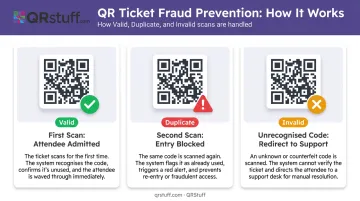
- A code that didn't originate from the official ticketing system returns Invalid immediately
- No staff judgment required — the system decides
Duplicate detection is the critical fraud-prevention mechanism. If an attendee screenshots their QR code and shares it, the second scan triggers a Duplicate alert, blocking unauthorized entry. Cvent's platform documentation confirms this directly: a repeated scan signals failure and displays a warning on the device. This closes the most exploited loophole in paper ticketing, where photocopied tickets were nearly undetectable.
Beyond duplicate detection, QR codes encode a unique identifier rather than raw personal data, making them resistant to reverse engineering. Dynamic codes strengthen this further: the system checks validity against a live record, not the printed code alone.
Visual Alerts for Non-Technical Staff
Colour-coded scan results allow even volunteers with minimal training to manage entry confidently:
- Green — valid, wave through
- Red/Amber — duplicate or invalid, escalate or redirect
The result is a consistent entry process that doesn't depend on staff experience or judgment calls.
Real-Time Analytics: The Data Advantage of QR Ticketing
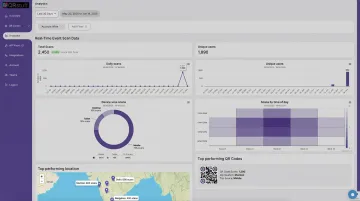
Every scan during check-in generates data. With QR-based entry, that data is available in a live dashboard as the event unfolds — not reconstructed from paper sign-in sheets three days later.
What Gets Captured in Real Time
QRStuff's analytics dashboard tracks:
- Scan timestamp and date
- Device type (mobile/desktop, iOS/Android)
- Geographic location at country and city level
- Total scans vs. unique scans
- Peak engagement windows
This visibility has direct operational value. If arrivals are clustering at one gate faster than expected, you can redirect staff before a queue forms.
The Post-Event Reporting Value
Bizzabo's 2025 data shows that 70% of organizers struggled to demonstrate event ROI for in-person B2B conferences in 2024 — and 69% share event data with exhibitors to help prove it. Actual scan data, not estimated attendance, gives sponsors and stakeholders something concrete.
QRStuff's Full Suite and above allow scan data export as CSV or PDF/Excel reports — ready for post-event sponsor decks or planning the next edition. Basic tracking is available from the Lite Suite ($5/month), with full analytics (including advanced geolocation, device breakdown, and CSV export) unlocked at the Full Suite tier ($19/month).
How to Create and Deploy QR Code Tickets for Your Event
Step 1: Choose a Platform with Event-Ready Features
The criteria that matter for event use:
- Dynamic QR code support — so content can be updated post-distribution
- Bulk generation — for large attendee lists without manual effort
- Custom branding — logo, colors, shapes to match event identity
- Real-time scan analytics — to monitor check-in as it happens
QRStuff supports all of these. The platform offers 40+ QR code types including a dedicated Event type, dynamic codes with post-distribution editing, branded design customisation across all paid tiers, and scan analytics with geographic and device-level data.
Step 2: Generate a Unique Code for Every Attendee
Generic event-wide codes create a security gap: anyone with the code can walk in. Each code must be tied to a specific registration record to prevent this.
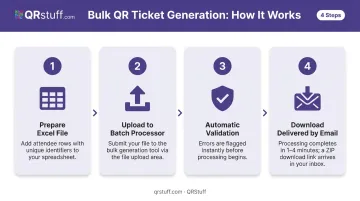
For large events, QRStuff's batch processing handles this at scale:
- Prepare an Excel (.xlsx) file with a row per attendee, including unique identifiers
- Upload the file to the batch processor
- Validation runs automatically, flagging any errors
- Processing takes 1–4 minutes; download link arrives by email in a ZIP file
The Full Suite supports batches of up to 500 codes. Enterprise handles unlimited volume.
Step 3: Distribute Through the Right Channels
| Channel | Best For |
|---|---|
| Primary confirmation tickets — most reliable | |
| SMS/WhatsApp | Last-minute registrants needing fast delivery |
| Apple Wallet / Google Wallet | Easy phone storage, no email hunting at the door |
| Downloadable PDF | Attendees who prefer printing |
Include clear instructions in every delivery message on how to locate and display the code at entry.
Step 4: Plan and Test Your Entry Setup
Use Bizzabo's staffing formula as a starting point: peak arrivals per hour ÷ attendees processed per staff member per hour = minimum scanning stations needed.
Before event day:
- Test the full scan-to-result cycle with real sample tickets on every device
- Verify internet connectivity specifically at entry point locations (indoor venues often have dead zones)
- Confirm whether your platform supports offline scanning as a fallback, and what functions it covers without a connection
Step 5: Brief Check-In Staff
A five-minute briefing prevents significant confusion at the door. Staff need to know:
- Valid scan: wave the attendee through
- Duplicate scan: escalate to a supervisor immediately
- Invalid scan: redirect the attendee to a dedicated support point
Cover edge cases too: dead phone batteries, forgotten QR codes, and how to perform manual attendee lookup. Confirm all devices are charged, logged in, and connected before doors open.
Mistakes to Avoid
Skipping pre-event system testing. The most preventable failure in QR-based entry is discovering a misconfiguration at the door. Run a full end-to-end test — generate a sample ticket, scan it on the actual devices your staff will use, verify the result appears in the dashboard. Do this at least 48 hours before the event.
Using static codes when dynamic codes fit better. If there's any chance event details will change, static codes lock you into reprinting everything. Dynamic codes update automatically without requiring a reprint. For most events, dynamic is the safer default.
Underestimating connectivity requirements. QR validation systems require an active internet connection to check codes against the live database. Test signal specifically at entry points — indoor venues frequently have dead zones. Arrange dedicated Wi-Fi if needed, and confirm whether your platform supports offline scanning with later sync.
The FIFA World Cup 2022 mobile ticketing failures — which delayed hundreds of fans across multiple matches — show what happens when connectivity planning and fallback procedures are skipped.
Overlooking plan-tier limits. On QRStuff, dynamic code allocations vary by tier — 10 dynamic codes on the Free Suite, 50 on Lite Suite, 250 on Full Suite. For events generating hundreds of unique attendee codes, verify your plan supports the volume before generating.
Frequently Asked Questions
How does a QR code ticket prevent duplicate or fraudulent entry?
Each QR code is tied to a single attendee record in the event database. When scanned a second time, the system instantly flags it as a duplicate and blocks entry — closing the screenshot-sharing loophole that made paper ticket fraud so difficult to catch.
What is the difference between a static and dynamic QR code ticket?
Static codes embed fixed data that cannot change after generation. Dynamic codes link to a server-managed destination that can be updated post-distribution — making them the better choice for events where details might shift or scan tracking is needed.
Do attendees need a special app to show their QR code ticket?
No. Attendees only need to display the QR code — from an email, digital wallet, or printed copy. The scanning app is only required by check-in staff at the entry point.
Can QR code tickets work if there is no internet at the venue?
Most QR validation systems require internet to check codes against the live database in real time. Confirm whether your platform supports offline scanning with later sync before committing to a venue with unreliable connectivity.
How can I create branded QR code tickets that match my event's look?
QR code platforms with design customization allow you to add brand colors, logos, and custom shapes to each code. QRStuff's paid plans — Lite, Full Suite, and Enterprise — all include these styling options while keeping codes fully scannable.
What data can I collect from QR code ticket scans at my event?
Each scan captures a timestamp, device type, and geographic location. QRStuff's dashboard shows total and unique scans in real time, with peak entry windows visible as the event unfolds. Full Suite and Enterprise plans support CSV and PDF export for post-event reporting.