Introduction
Clinic staff, pharmacists, and discharge coordinators are increasingly placing QR codes on patient materials — but most of those codes deliver far less value than they could. A printed square linking to a broken page, an English-only PDF, or a document that hasn't been updated since last year's protocol revision isn't patient education. That's a missed opportunity — and one that quietly erodes patient trust over time.
Pew Research found that 90% of US adults own smartphones, making QR-based education broadly viable. And clinical pilots show the demand is real: in a 2025 urology outpatient study, 80% of patients chose QR-delivered information leaflets over printed alternatives, despite a mean patient age of 76.
Those numbers signal real patient readiness. What they don't guarantee is that your implementation will work. This guide covers the full sequence — code type selection, content design, placement, and post-deployment tracking — so your patient education program delivers measurable results.
Key Takeaways
- Use dynamic QR codes for all patient education materials so you can update content without reprinting
- Before creating any code, define the content, target patient group, and physical placement point
- Deploy codes at the moments patients need education most: pre-visit, in-clinic, and post-discharge
- Track scan volume, device type, and timing to see which materials patients actually use
- Assign one named staff member as the owner of each QR code campaign
When Should You Use QR Codes for Patient Education?
QR codes aren't the right tool for every patient communication scenario. They work best when specific conditions are met.
When QR Codes Make Sense
Use them when:
- The educational content is too detailed or lengthy for a printed handout
- Patients need ongoing access to the material after leaving your facility
- Multilingual versions are required and a single code can route to a language-selection page
- Clinical guidelines change frequently, making printed materials expensive to maintain
- You need to track whether patients are actually accessing the information
When to Use a Different Approach
Skip QR codes as the primary channel when:
- A significant portion of your patient population lacks smartphone access (this applies particularly to patients 80+, where research shows a clear print preference)
- Clinic Wi-Fi is unreliable and patients can't load content on cellular data
- The patient population has low health or digital literacy and no support staff nearby to assist
QR vs. Paper: Where the Evidence Points
A 2025 quality improvement project at a fracture clinic found that only 62% of patients reported reading their printed leaflets previously. In the same project, 80% found digital versions easier to access and save for later reference. Being able to pull up discharge instructions three days later at home is where QR codes outperform paper — and it's a gap that compounds across every visit.
That patient-level benefit translates directly to operational gains for larger health systems. QR codes cut print costs and let one content update reach every physical location at once — no reprinting, no version drift.
What You Need Before Getting Started
Three prerequisites determine whether a QR patient education program succeeds or stalls.
1. A Dynamic QR Code Platform with Analytics
Static QR codes lock in a permanent URL. When that page moves or the protocol changes, every printed code becomes a broken link. Dynamic QR codes use a short redirect that you can update anytime without generating a new code — the printed code stays the same while the destination changes.
The platform also needs built-in scan analytics. Without data on who's scanning, when, and from where, you have no way to evaluate whether patients are actually using the materials.
QRStuff supports dynamic codes with real-time scan analytics across its Lite, Full Suite, and Enterprise tiers. The dashboard captures total scans, unique scans, device type, geographic location, and time-of-day patterns — no separate analytics tool required.
2. Verified, Mobile-Optimized Destination Content
Before any code goes live, confirm that the linked content:
- Loads in under 3 seconds on a cellular connection (53% of mobile visits are abandoned after 3 seconds, per Google's mobile speed research)
- Displays correctly on a small screen without zooming
- Has been reviewed for clinical accuracy by the relevant clinical or pharmacy team
- Is accessible to patients with low health literacy — the CDC notes that nearly 9 in 10 adults struggle with complex health information
3. A Named Owner for Every Code
Without one person responsible for each QR code campaign, expired links persist for months. The named owner checks that destinations remain active, content stays accurate, and scan data is reviewed on schedule.
How to Use QR Codes for Patient Education: Step-by-Step
Step 1: Choose Your QR Code Type and Create It
Match the code type to the content format:
| Content Type | QR Code Type | Use Case |
|---|---|---|
| Web page or patient portal | URL QR code | Appointment prep, condition resources |
| Downloadable care guide | PDF QR code | Discharge instructions, medication guides |
| Procedure demonstration | Video QR code | Injection technique, wound care |
| Provider contact details | vCard QR code | Follow-up contacts, specialist referrals |
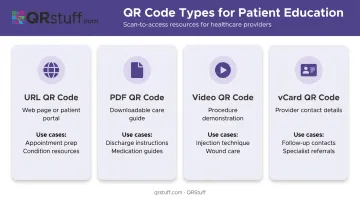
For healthcare, use dynamic codes for every type except permanent content (a physical clinic address, for example). QRStuff supports 40+ QR code types with dynamic functionality across all the formats above.
Once the type is selected, customize the code design — add your clinic logo, brand colors, and a brief label like "Scan for your discharge instructions." Patients scan more readily when they can see exactly where a code leads and recognize the source.
Step 2: Set Up and Verify Destination Content
Make content sign-off mandatory before printing any code. A QR code on a prescription label linking to outdated dosage guidance creates both a patient safety concern and a compliance risk.
Before publishing:
- Test load time on both clinic Wi-Fi and a 4G cellular connection
- Check mobile rendering on iOS and Android — text should be readable without zooming
- Confirm clinical accuracy with the relevant clinical team or pharmacist
- Check file size — PDFs should be under 2MB for patients on limited data plans
- Verify language access — for multilingual populations, link to a page with language selection, not English-only content
Step 3: Deploy Codes at the Right Patient Journey Touchpoints
Generic placement produces generic results. Match each code to a specific moment in the patient journey:
- Waiting room posters → condition-awareness education, seasonal health topics
- Prescription bags and labels → medication instructions, side-effect information
- Discharge paperwork → post-procedure care, follow-up schedules
- Appointment confirmation cards → pre-visit preparation, what to bring
Next to every printed code, include a one-line description of what patients will access, plus an alternative access method (a short URL or text number) for patients who can't or prefer not to scan. This removes the barrier for less tech-familiar patients without eliminating the efficiency of the QR approach.
Step 4: Monitor Scans and Track Engagement
Scan data tells you whether your patient education program is actually reaching patients — or whether materials are being ignored.
Key metrics to review regularly:
- Total scan volume per code (overall reach)
- Unique scans vs. repeat scans (are new patients accessing it?)
- Device type breakdown (iOS vs. Android affects content rendering priorities)
- Geographic distribution (relevant for multi-site health systems)
- Time-of-day patterns (are patients scanning at home, or only in-clinic?)
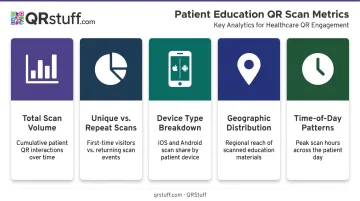
QRStuff's real-time dashboard surfaces all of these data points with daily, weekly, and custom date range views, plus CSV export for integration with reporting workflows.
A near-zero scan count on discharge paperwork doesn't automatically mean patients aren't interested. The code may be placed where patients don't notice it, the label text may be unclear, or the link may be broken. Investigate the cause before pulling a campaign.
Step 5: Update Content and Retire Outdated Codes
Those scan insights directly inform when content needs updating. Set a review cadence and stick to it — dynamic QR destination URLs should be audited:
- Quarterly as a minimum review cycle
- Immediately when a clinical guideline changes
- Seasonally when topic-specific content becomes relevant (flu season, allergy season)
- Whenever a linked web page is retired
When a code is no longer needed, don't leave it as a dead link. Redirect it to a "this resource has been updated" landing page with a link to current content. A patient scanning a broken link while managing a health condition at home will lose trust — and won't scan again.
With QRStuff's dynamic code management, updating a destination takes seconds — no reprinting required, and every physical code in the field immediately reflects the change.
Best Practices for Patient Education QR Codes
Getting QR codes into patient hands is straightforward. Getting them to actually work — every time, for every patient — takes a bit more discipline. These five practices keep programs on track:
- Scan every code on both iOS and Android, on clinic Wi-Fi and on cellular, before anything goes to print. Most failed QR programs trace back to codes that were never tested on the device a patient would actually use.
- Link to short videos or illustrated guides for patients with low health literacy, not dense text documents. The QR code is only as effective as what it delivers.
- Route multilingual populations to a language-selection landing page, not a default English page.
- Assign one staff member per code campaign who is accountable when content changes or links go offline. A process without an owner is a broken link waiting to happen.
- Provide a printed alternative for patients without smartphone access or reliable internet. QR codes should be the convenience layer, not the only education channel.
Frequently Asked Questions
What is a QR code for patient education and how is it used?
A QR code is a scannable square barcode that connects patients instantly to health information (medication instructions, discharge guidelines, or condition-specific resources) via their smartphone camera. Patients scan the code printed on paperwork, labels, or posters and land directly on the linked content without typing a URL.
Do patients need a special app to scan a QR code?
No. Most modern iOS and Android smartphones can scan QR codes natively through the built-in camera app , with no additional download required. That means zero setup on the patient's end.
What is the difference between static and dynamic QR codes for healthcare?
Static codes permanently encode a URL that cannot be changed after printing. Dynamic codes use a short redirect, so the destination can be updated anytime without generating a new code. For healthcare , where medication instructions and clinical guidelines change regularly, dynamic codes are the practical default.
How do I track which patients are scanning my QR codes?
Dynamic QR code platforms capture aggregate scan analytics including total scans, unique scans, device type, geographic location, and scan time. This gives healthcare teams clear insight into content engagement without requiring patients to log in or identify themselves.
Are QR codes in healthcare compliant with data privacy requirements?
QR codes themselves don't store personal health data, but the platforms tracking them must meet compliance standards — QRStuff is both SOC2 and GDPR compliant. Per HHS guidance, raw scan logs capturing IP addresses or device identifiers may require HIPAA review; aggregate, non-identifiable scan counts carry lower risk.
Can a QR code be updated without reprinting it?
Yes. With a dynamic QR code, updating the destination URL takes seconds in your dashboard. Every printed code — on posters, labels, or discharge papers — automatically points to the new content with no reprint needed.