A QR code changes that equation. One scan connects a prospect directly to your listings, your contact file, or a home valuation tool—turning a passive piece of cardstock into a measurable lead-generation touchpoint.
According to eMarketer, 38% of people in the US scan a QR code at least once per year, representing over 100 million users. That's a ready audience—if your card gives them a reason to scan.
This guide covers everything you need: what your card must legally include, what your QR code should link to, how to build and customize it, and how to measure results.
TL;DR: Key Takeaways
- One tap takes a prospect from your business card to your listings, bio, or contact form — no typing required
- Link to a targeted landing page, not your homepage—destination choice drives conversions
- Dynamic QR codes let you update the destination after printing, protecting your print investment
- Print at 0.8–1 inch square minimum, and always run a scan test before ordering in bulk
- Scan analytics show which events and locations generate the most leads
What Every Realtor Business Card Must Include
Before adding a QR code, get the legal foundation right. Most state licensing boards treat business cards as advertising materials with specific disclosure requirements.
Legal Minimums by State
Requirements vary significantly. Here's what verified state regulations require:
| State | Required Elements | License Number? |
|---|---|---|
| California | Licensee name, responsible broker identity | Yes — 8-digit license number required |
| Texas | License holder or team name, broker name | Not required on cards |
| New York | Full licensed name, business address, office phone, license type, brokerage name | Not listed as required |
| Washington | Firm's licensed name, broker or managing broker name as licensed | Not identified as required |
| Florida | Licensed brokerage firm name; registered last name if personal name appears | Not stated as required |
Always verify your specific state's rules before going to print. California is the strictest of the verified states—agents there must include their 8-digit license number in a font no smaller than the smallest text on the card.
Recommended Professional Elements
These elements strengthen your card beyond what state law requires:
- Professional headshot — NAR research shows headshots project likability and trustworthiness before a prospect ever meets you
- Primary market or specialty: luxury, first-time buyers, investment properties, or a specific neighborhood
- Website URL: a visible URL reinforces credibility even when someone doesn't scan
- Phone and email — still essential for prospects who won't scan
Your QR code gives these details a digital destination. It doesn't replace your name, brokerage, or contact information — it extends them.
What Your QR Code Should Link To
The single biggest mistake agents make is linking their QR code to their homepage. A homepage has multiple navigation paths, competing calls to action, and no single next step — visitors arrive and leave without converting.
A dedicated landing page with one clear action always outperforms. Unbounce's Q4 2024 benchmark found a 6.6% median conversion rate across 41,000 landing pages and 464 million visitors—and that's with focused pages. Homepages perform worse.
Audience-Matched Destinations
Match your QR code destination to who you're handing the card to:
- Sellers: Link to a home valuation page ("What Is Your Home Worth?"). An instant valuation tool creates immediate value — they get useful information, you get contact details.
- Buyers: Link to a first-time buyer guide, a neighborhood market report, or an active listings page filtered to a specific area. Starting with a useful resource beats asking for a form fill.
- General networking: Use a vCard QR code that saves your full contact details directly to the prospect's phone in one scan — no form, no friction.
- Open houses: Link to a specific property page with photos, floor plans, disclosure documents, and a showing request form. It replaces a paper brochure and captures visitor intent at the same time.
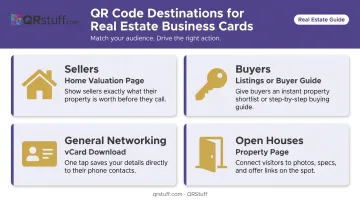
Each destination serves one audience and asks for one action. That focus is what turns a scan into a conversation.
How to Create a QR Code for Your Real Estate Business Card
Static vs. Dynamic: Choose Carefully
The type you choose determines whether your card stays useful six months from now — or becomes obsolete the moment your brokerage changes platforms.
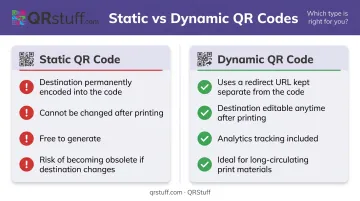
- Static QR codes encode the destination permanently. Once printed, it cannot be changed. If your landing page URL changes, your phone number updates, or your brokerage switches platforms, the card becomes useless.
- Dynamic QR codes use a short redirect URL. You can update the destination anytime from a dashboard without touching the physical card. For a card that may circulate for months or years, dynamic is the only practical choice.
QR Code Types for Real Estate
QRStuff supports 40+ QR code types, but three are most relevant for business cards:
| Type | Best For | When to Use |
|---|---|---|
| vCard QR Code | Saving contact info directly to phone | General networking, casual exchanges |
| Website URL QR Code | Linking to listings, landing pages, virtual tours | Targeted campaigns, buyer/seller audiences |
| Social Profile QR Code | Directing to LinkedIn or Instagram | Brand-building, younger audiences |
For most agents, a URL QR code pointed at an audience-specific landing page will outperform a vCard in terms of lead capture. Use the vCard type when you want zero friction and are not yet at the stage of asking for information.
Once you've settled on the right code type, the next step is making it look like it belongs on your card — not just tacked on as an afterthought.
Customization and Branding
A plain black-and-white code works, but a branded code looks deliberate and professional. QRStuff's platform lets you:
- Apply brand colors using hex codes (customize foreground, background, finder patterns, and gradients separately)
- Upload your brokerage logo to embed in the center of the code
- Choose module shapes—square, round, dot, and connected dot styles
- Add a short center text label (up to 16 characters)
One important note: when you add a logo, the system automatically raises the error correction level to maintain scan reliability. QRStuff's platform handles this automatically, and a logo can safely cover up to 30% of the code surface without affecting scan reliability.
Test Before You Print
Download your finished code in SVG or EPS format for print (vector files scale without quality loss; use 300 DPI minimum for PNG). Then:
- Print a proof at the exact size you plan to use
- Scan on both iOS and Android devices
- Test in standard indoor lighting and lower light conditions
- Confirm the destination loads correctly and quickly
A code that looks fine on screen can fail at small sizes. Catch that before ordering 500 cards.
If you're using a dynamic code, QRStuff's dashboard lets you update the destination URL at any time after printing. The platform backs this with a 99.9% uptime guarantee — it has maintained 99.968% uptime since 2008. When a listing sells or a landing page gets redesigned, the card stays current.
QR Code Design: Size, Placement, and Branding
Minimum Size
The practical minimum for reliable scanning on a business card is 0.8 inches (approximately 2 cm) square. In real-world conditions—mixed lighting, older devices, glancing scans—1 inch is a safer target.
Below 0.8 inches, scan reliability drops noticeably, especially for codes with logos or heavy customization.
Placement
Back of the card is the preferred location. It keeps the front clean and professional while giving the code adequate space and quiet zone margins.
Wherever you place it, leave at least 4mm of clear space on all four sides—this is the "quiet zone" that allows scanners to detect the code boundaries. Cutting into this margin is one of the most common causes of scan failure on printed materials.
Contrast and Color Rules
- Keep the foreground (dark modules) significantly darker than the background (light areas)
- Never place the code over patterned backgrounds, watermarks, or photos
- Brand colors are fine—just test contrast rigorously before printing
- Higher error correction levels tolerate more visual customization
QRStuff automatically selects the right error correction level when you customize your design.
Add a Scan Prompt
Without a short instruction line, many people won't know to scan—or won't understand what they'll get.
Good examples:
- Scan for Listings
- Scan to Save My Contact
- Scan for Your Home's Value
Place it directly below or beside the code. Four words is enough.
How to Track QR Code Scans and Measure Results
Unlike a phone number or email address, a QR code generates data every time someone scans it. That data tells you which events produced the most engaged prospects, which neighborhoods responded, and whether your card is actually working.
What Analytics Reveal
QRStuff's analytics dashboard tracks:
- Total scans and unique scans — distinguishes reach from repeat visits
- Device type — iOS vs. Android, mobile vs. desktop
- Geographic data — country and city level
- Scan time and date — identifies peak engagement windows
- Real-time reporting — data appears in the dashboard as scans happen
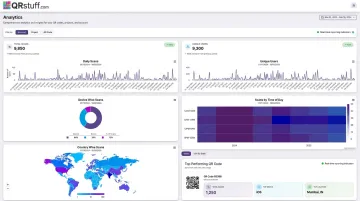
Over time, this builds a clear picture of where your outreach is landing — and where it isn't.
UTM Parameters for Multi-Campaign Tracking
If you distribute cards at multiple events or locations, UTM parameters let you compare performance directly inside Google Analytics. Google's Campaign URL Builder lets you append parameters like utm_source=open_house&utm_campaign=march_listings to your destination URL.
A card from a neighborhood open house gets different UTM tags than one from a broker networking event — when someone scans either, Google Analytics records exactly where that lead came from. QRStuff also supports campaign tagging within its own dashboard, so you can filter performance across card batches and property campaigns without touching Google Analytics.
Tier Availability
Scan analytics are included across QRStuff's paid tiers:
| Tier | Scan Limit | Analytics Features |
|---|---|---|
| Lite Suite | 200/month | Dashboard access, basic scan data |
| Full Suite | Unlimited | Advanced analytics, CSV export |
| Enterprise | Unlimited | Extended data retention, advanced geolocation |
For a single agent managing business card campaigns, the Lite Suite covers the essentials. The Full Suite makes sense when managing multiple listings or running parallel campaigns.
Frequently Asked Questions
Should real estate agents put a QR code on a business card?
Yes. A QR code converts a passive card exchange into a measurable touchpoint—prospects get an immediate next step, and you get trackable data on engagement. It works best when linked to a targeted landing page rather than a homepage.
What is required on a realtor business card?
Most states require at minimum the agent's name, brokerage name, and some form of contact information. California additionally requires an 8-digit license number. Requirements vary by state, so verify your licensing board's current rules before printing.
How small can a QR code be and still work on a business card?
The practical minimum is 0.8–1 inch square. Below that, scan reliability drops—particularly in lower light or with older devices. Always print a test proof and scan it before ordering a full batch.
What should a QR code on a realtor business card link to?
Avoid homepages. Link to an audience-matched destination: a home valuation page for sellers, a buyer guide or listings page for buyers, or a vCard contact file for general networking. One destination, one call to action.
Should I use a static or dynamic QR code on my business card?
Dynamic codes are the better choice. They let you update the destination after printing—useful when listings change, contact details update, or landing pages get redesigned—without reprinting a single card.
How do I track how many people scan my business card QR code?
QRStuff's built-in analytics dashboard tracks scan counts, device types, geographic data, and time-based trends. For deeper attribution, add UTM parameters to your destination URL and monitor card-sourced traffic inside Google Analytics.