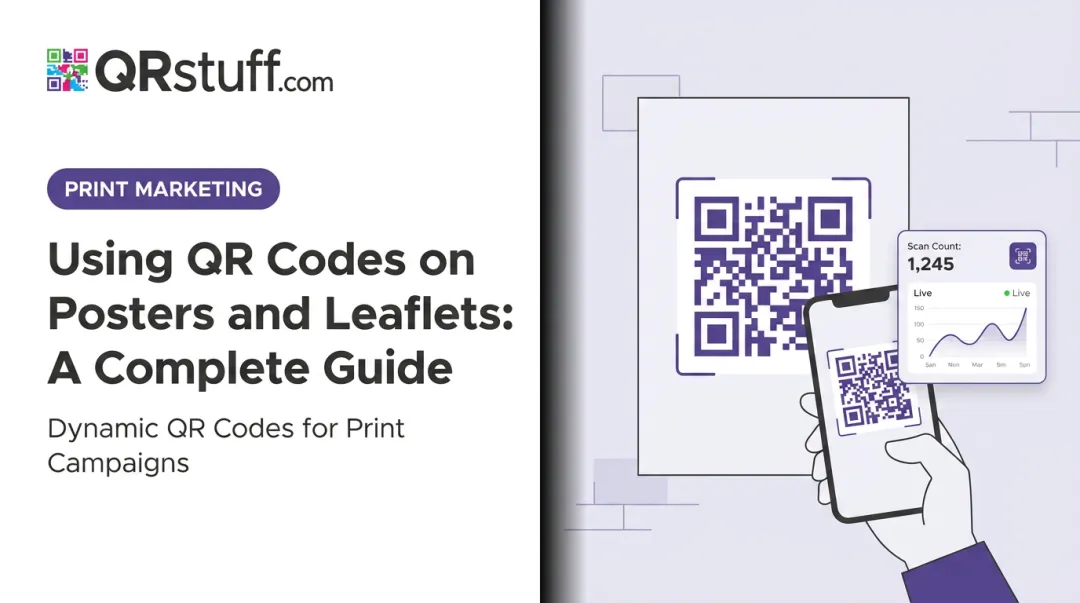
QR codes change that. A well-placed code on a lobby sign, storefront window, or waiting room wall turns a passive surface into an interactive channel — one that can link to a menu, booking page, product catalog, or check-in form, and that tracks every scan.
This guide covers exactly how to add QR codes to building signage: the right code type to choose, how to create and customise it, which technical parameters determine whether a code actually gets scanned, and the mistakes that cause otherwise well-designed signs to fail.
Key Takeaways
- Choose dynamic QR codes for any permanent or semi-permanent building sign — they let you update the destination without reprinting
- Download in SVG or 300 DPI+ PNG format; low-resolution files pixelate at sign sizes and fail to scan
- Maintain dark modules on a light background — low contrast is the most common cause of scan failure on custom-designed signs
- Include a CTA like "Scan to view our menu" — codes with logos and CTAs earn up to 70% more scans than bare codes
- Eye-level placement in high-dwell spots — lobbies, storefronts, waiting areas, and service counters — drives the most consistent engagement
How to Incorporate QR Codes into Building Signage
Step 1: Define Your Goal and Choose the Right QR Code Type
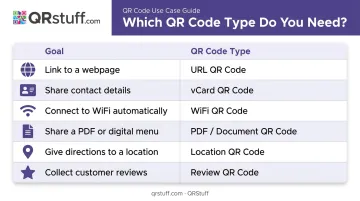
Before generating anything, decide what the code should actually do. The destination determines which QR code type to create:
| Goal | QR Code Type |
|---|---|
| Send visitors to a webpage | URL |
| Share business contact details | vCard |
| Connect guests to Wi-Fi | WiFi |
| Display a menu or catalog | |
| Show directions | Location |
| Collect reviews or feedback | Google Review / Feedback Form |
Once the code type is set, confirm the destination is mobile-optimized. Nearly every scan from a building sign happens on a smartphone — a page that loads slowly or renders as a desktop layout will lose visitors after the scan.
Step 2: Create and Customize the QR Code
Use a platform like QRStuff to generate the code. With 40+ QR code data types available, you can select the exact type that matches your goal, then apply brand colors, upload a logo to the center, and adjust module shapes and eye patterns to match the sign's visual identity.
Two settings matter most at this stage:
Choose dynamic over static. When creating the code, enable the dynamic option — in QRStuff, this appears as an "Update Later" toggle. A dynamic code encodes a short redirect URL rather than the final destination directly. This means you can change where the code points at any time — no new code, no reprinting the sign.
Set error correction to H (High). When adding a logo or applying heavy customization, the logo covers part of the code pattern. DENSO WAVE's QR code specification defines four error correction levels — H (High) allows up to 30% of the code to be obscured or damaged while still scanning correctly. QRStuff automatically raises the error correction level when a logo is added, but verify this is active for heavily customized codes.
On contrast: QRStuff recommends the foreground modules be at least 70% darker than the background. Pale or brand-colored dots on a similarly toned background is the most common cause of scan failure in customized designs.
Step 3: Download in the Correct Format for Print
Format selection is where many building sign projects go wrong.
- SVG or EPS — vector formats that scale to any size without quality loss; the correct choice for storefront signs, lobby displays, or any large-format output
- PNG at 300 DPI minimum — acceptable for smaller signs and indoor print; QRStuff's paid plans support up to 600 DPI PNG
- Low-resolution JPEG or 72 DPI PNG — only available on QRStuff's free plan; these degrade severely when scaled up, producing fuzzy edges that cameras can't resolve
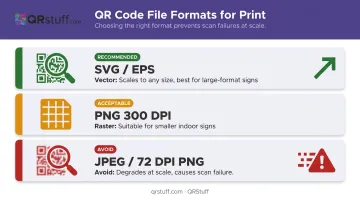
Vector formats (SVG, EPS, PDF, DXF) are available on QRStuff's paid tiers. For any sign larger than A4, a vector file is the only safe choice.
Step 4: Integrate the QR Code into the Sign Design
With the correct file in hand, place the code in a visually clear area of the sign, away from competing design elements. Two technical requirements must be maintained:
Quiet zone: A minimum blank margin surrounding the entire code — DENSO WAVE specifies at least four modules wide on all sides. Never crop or bleed into this border. The quiet zone is how camera software isolates the code from the surrounding design.
Call-to-action: Place a short, specific instruction directly above or below the code. "Scan to view our menu" outperforms a generic "Scan here" because it tells visitors exactly what they'll get. Specific CTAs consistently drive higher scan rates.
Step 5: Test, Print, and Install
Test the code on multiple devices before sending to print — at minimum, one iOS and one Android device — and in varying light conditions. Indoor fluorescent, bright daylight, and low-light environments can all produce different results.
After installation, re-test at normal scanning distance. Lamination and reflective surfaces can introduce glare that wasn't present in the design file. If the code fails post-installation:
- Check for reflective laminate — switch to matte finish if possible
- Verify the quiet zone wasn't trimmed during production
- Confirm the dynamic destination URL is still active and mobile-responsive
When Should You Add QR Codes to Building Signage?
QR codes on building signage work in locations where visitors have a moment to stop. The key condition is dwell time — a person needs a few seconds to notice the code, understand the CTA, and raise their phone.
High-value locations:
- Storefronts and window displays
- Building lobbies and reception areas
- Waiting rooms and queuing areas
- Service counters and checkout points
- Wayfinding signs in multi-tenant buildings
These locations share one thing: people naturally pause there. That pause is your window.
Strong use cases by industry:
- Restaurants — linking to digital menus and ordering; 59% of full-service diners would use a QR code to access a menu, per the National Restaurant Association's 2024 Technology Landscape Report
- Retail — seasonal promotions, loyalty program sign-ups, and product information at point-of-sale
- Healthcare providers — contactless intake forms, appointment booking, and wayfinding in large facilities
- Real estate — property listings, virtual tours, and agent contact from For Sale signs or office windows
- Corporate buildings — visitor check-in, wayfinding maps, and meeting room booking
Not every location is a good fit, though. Placement matters as much as the code itself.
Where QR codes create friction instead of value:
- Fast-moving traffic locations (highway billboards, overhead directional signs)
- Areas with no stopping space
- Positions in direct sunlight on glass, where glare prevents scanning
- Any location where the linked page isn't mobile-friendly
Key Parameters That Affect QR Code Performance on Building Signage
The same QR code can scan reliably on one sign and fail completely on another — four variables determine which outcome you get.
Size and Viewing Distance
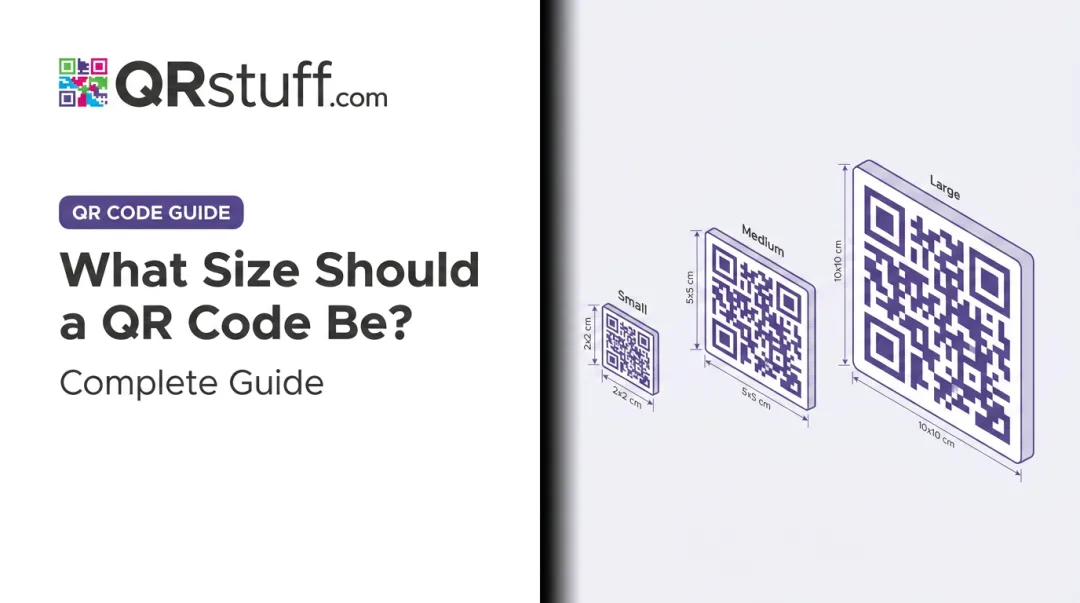
Nielsen Norman Group's 2024 QR usability guidance gives a clear scaling rule: increase code size by 1 cm for every 10 cm of expected scanning distance. At a typical indoor scanning distance of 50 cm, that means a minimum 5 cm × 5 cm code. For a storefront window where someone scans from 80–100 cm away, plan for 8–10 cm minimum.
NN/g also recommends a minimum of 2 cm × 2 cm for any indoor building sign, even at close range. Smaller than this and older camera systems will struggle, regardless of image quality.
Colour Contrast and Background
Dark modules on a white or pale background remain the reliable default. GS1's 2025 guidance confirms that black-on-white contrast is always best for modules, background, and quiet zone.
Common mistakes to avoid:
- Brand-coloured modules on a similarly toned background (e.g., dark blue on navy)
- Light code on a dark background — technically possible with proper inversion, but more prone to failure on older devices
- Any combination where module-to-background contrast is too low to decode reliably
If using custom brand colours, test on three or more devices before committing to print.
Static vs. Dynamic Code Type
For building signage, dynamic codes are the practical choice for any sign displayed longer than a few weeks. The functional difference:
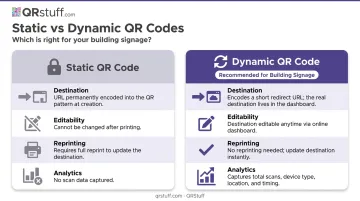
- Static codes permanently encode the destination into the pattern — the URL can never change without generating a new code and reprinting
- Dynamic codes encode a short redirect URL; the destination updates via a dashboard without altering the physical code
With QRStuff's dynamic QR codes, a single lobby sign can point to a seasonal promotion one month and an updated service menu the next — all without touching the sign. Dynamic codes also capture scan analytics: total scans, unique scans, device type, geographic location, and scan timing.
Surface Type and Placement Height
Reflective surfaces — polished metal plaques, high-gloss acrylic, glass — scatter light and reduce the contrast a camera needs to decode the pattern. Dynamsoft's scanner research flags reflection and glare as top causes of real-world scan failure.
Surface recommendations:
- Matte-finish vinyl, paper-based print, or anti-glare laminate over standard acrylic
- Avoid placing the code on textured or uneven substrates that distort the module pattern
- For glass-mounted signs, position the code away from direct sunlight angles
For placement height, eye level works best for interior signs. Aim for approximately 48 to 60 inches from the floor, which puts the code in natural scanning position. Exterior signs should place the code at a height accessible to a standing adult holding a smartphone at chest or face level.
Common Mistakes When Adding QR Codes to Building Signage
Low-resolution file exports. A 72 DPI PNG looks fine on screen but produces fuzzy edges at sign scale. Camera software reads module edges — blur causes decode failure even when the pattern looks intact. Export as SVG or 300 DPI+ PNG.
Using a static code on a permanent sign. When the URL changes or a campaign ends, the whole sign needs reprinting. Dynamic codes let you update the destination without touching the physical sign — and cost nothing extra to set up from the start.
Poor placement or sizing. A code behind glass, inside a display case, or mounted above comfortable reach prevents reliable scanning. Place codes at eye level in open, accessible areas with enough stopping space for a pedestrian to pause and scan.
Skipping the post-installation test. Protective coatings and glass mounting can introduce glare that wasn't visible during design. Test on-site in actual lighting conditions from normal scanning distance — if a reflective surface is causing failures, a matte overlaminate fixes it quickly.
Frequently Asked Questions
Should I put a QR code on a yard sign?
Yard signs work well for real estate, contractors, and local businesses when the code links to a listing, portfolio, or contact form. Print the code at a minimum of 1.5 inches square with high contrast, and position it at a height accessible to someone standing near the sign.
What is replacing the QR code?
Nothing has displaced QR codes for physical-to-digital signage. NFC tags and short URLs are sometimes discussed as alternatives, but QR codes require no special hardware, work natively with all modern smartphone cameras, and are free to generate.
What is the minimum size a QR code should be on building signage?
At least 0.8 inches square (roughly 2 cm × 2 cm) for close-range indoor signs. For exterior or wayfinding signs, scale up proportionally — about 1 cm of code width per 10 cm of scanning distance — and always maintain the quiet zone margin.
Should I use a static or dynamic QR code for building signs?
Use dynamic codes for any sign displayed longer than a few weeks. They allow destination updates without reprinting and provide scan analytics. Static codes are only practical for temporary or single-use signage where the destination will never change.
How do I make a QR code scannable on an outdoor building sign?
Use a matte or anti-glare finish to prevent glare, download in vector format for sharp edges at scale, maintain strong dark-on-light contrast, and position the code at standing eye level away from direct sunlight angles.
What should a QR code on a building sign link to?
A mobile-optimized page directly relevant to a visitor at that specific location — a digital menu, booking page, property listing, WiFi login, or contact form. Generic homepage links consistently underperform compared to purpose-built landing pages.