Not if you're using a dynamic QR code. With a dynamic code, you can swap the destination URL at any time — the printed image stays exactly the same. No reprinting, no waste, no scrambling.
That said, results depend on one critical factor: whether your QR code was set up correctly from the start. This guide covers exactly how to redirect a QR code, what you need before you begin, and how to avoid the mistakes that catch most people off guard.
Key Takeaways
- Only dynamic QR codes can be redirected — static codes have the destination permanently baked in
- Redirecting means updating the destination URL in your platform dashboard, not touching the printed code
- Changes go live almost immediately; always test on both iOS and Android after saving
- Free plan QR codes often expire and break the redirect chain; paid plans keep codes active indefinitely
- When updating a destination URL, manually carry over UTM parameters to preserve campaign attribution
What Is a QR Code Redirect (and Why It Only Works with Dynamic Codes)
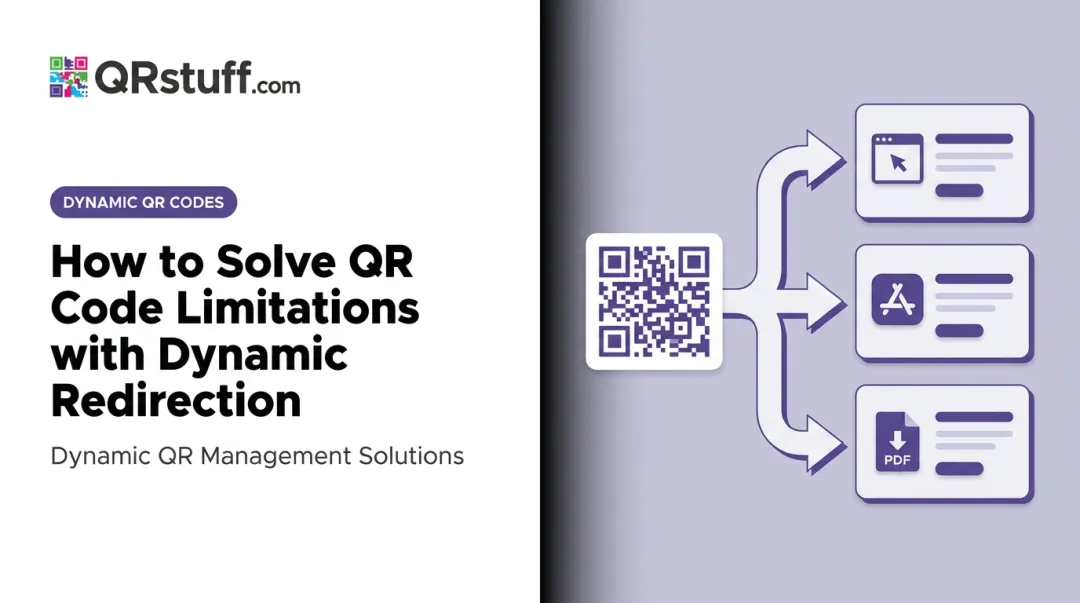
A QR code redirect routes the person scanning through a managed short URL to a destination you control. Because the short URL sits in the middle, you can change where it points without altering the QR code image itself.
Static vs. Dynamic QR Codes
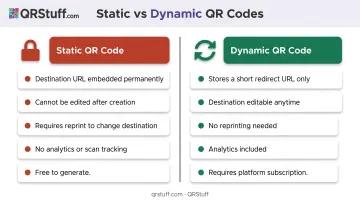
Static QR codes embed the final destination URL directly into the code pattern — permanently. Change the URL and you need a completely new code. Multiple free generators, including QR Code Generator and QRCode Monkey, document this explicitly: once generated, the content cannot be edited.
Dynamic QR codes store only a short redirect URL in the code pattern. The actual destination lives on your platform dashboard, where it can be updated at any time without reprinting.
301 vs. 302 Redirects
Most platforms handle this automatically, but the distinction affects campaign strategy:
- 301 (Permanent): Signals the destination has changed for good. Search engines treat it as a canonicalization signal.
- 302 (Temporary): Appropriate for time-limited campaigns or A/B tests. The source URL stays indexed.
For rotating campaigns — seasonal promotions or event pages — a 302-style redirect is the safer choice. Switching to permanent redirects mid-campaign can break analytics continuity.
How to Redirect a QR Code: Step-by-Step
This process applies to dynamic QR codes only. The steps below are nearly identical across major platforms, including QRStuff — the interface varies, but the logic doesn't.
Step 1: Log In and Access Your QR Code Dashboard
Log in to your QR code platform and navigate to the QR Codes section. If you manage multiple codes, use available filters — search by name, tag, or campaign — to locate the right one quickly.
Step 2: Confirm the Code Is Dynamic
Before editing anything, verify the code type. Most platforms label this clearly in the list view. On QRStuff, dynamic codes include analytics tracking data (scan counts, device info, location), which is one way to confirm type at a glance. If the code is static, no edit option will be available — you'll need to create a new dynamic code instead.
Step 3: Open the Edit Settings
Find the edit option for the selected code. This is commonly a pencil icon, an "Edit" button, or a "Redirect" option depending on the platform. Navigate to the destination or URL field — where the current target URL lives.
Step 4: Enter the New Destination URL and Save
- Clear the existing URL
- Paste the new destination
- Confirm it uses HTTPS — HTTP URLs trigger security warnings on modern browsers
- Save the changes
The redirect typically goes live within seconds. Any new scan will immediately route to the updated destination.
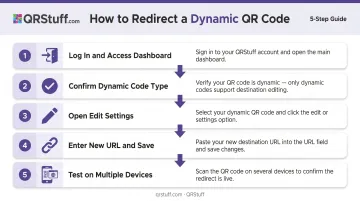
Step 5: Test on Multiple Devices
Test on at least one iOS and one Android device and confirm:
- The correct page loads
- The page renders properly on mobile
- Any UTM parameters in the URL are preserved correctly
Most QR code scans happen on smartphones, so a page that breaks on mobile undermines the whole effort.
When Should You Redirect a QR Code?
Redirecting isn't only for fixing broken links. There are proactive, planned reasons to update a destination — and knowing when to redirect versus when to create a new code saves time and protects your data.
High-Value Use Cases for Redirecting
- Rotating seasonal promotions on product packaging or printed signage
- Updating restaurant menus — pricing, specials, or hours — without reprinting table cards
- Swapping a "coming soon" page for a live product launch page once it's ready
- Replacing a sold real estate listing on a yard sign with a contact form or new listing
- Reusing event materials across multiple dates or locations
The value is highest when printed materials are expensive, already widely distributed, or time-consuming to replace. A QR code on 50,000 brochures that still works — just pointing somewhere new — is far cheaper than ordering a reprint run.
When to Create a New Code Instead
That said, redirecting isn't always the right call. Create a new code when:
- The original code's branding no longer matches the new campaign
- You need to separate analytics data cleanly between two distinct campaigns
- The short URL domain has changed
- The content type needs to change and your platform doesn't support type-switching within an existing dynamic code
Key Factors That Affect QR Code Redirect Success
Updating a destination URL is straightforward. What's less obvious are the variables that determine whether the redirect holds up over months or years.
Platform Link Longevity
The short URL encoded in your QR code must remain active indefinitely. If the platform deactivates it, the code stops working — no matter what destination you've set.
This is a documented risk with free plans. QR Code Generator's support documentation confirms that dynamic codes created during a 14-day free trial are deactivated at the end of the trial, with scanners redirected to a service page instead of the intended destination.
Paid plans remove that risk. On QRStuff's paid plans, dynamic QR codes don't expire for the duration of an active subscription — backed by a 99.9% uptime guarantee (documented uptime since 2008: 99.968%). For codes printed on packaging or long-lived signage, that continuity is what keeps campaigns functional years after launch.
Analytics Continuity
Uptime keeps your code alive — but what happens to your scan data when you update the destination? On most platforms, nothing. Changing the destination URL doesn't erase historical scan data. QRStuff preserves scan history — total scans, unique scans, device data, and geographic breakdowns — because the analytics are tied to the short redirect URL, not the destination.
What won't carry over automatically: UTM parameters. Google Analytics requires UTM tags like utm_source, utm_medium, and utm_campaign to be present in the destination URL itself. If you update the destination and forget to include them, your attribution breaks in Google Analytics and your CRM.
Destination Page Performance
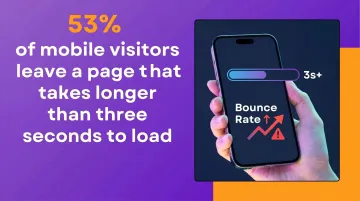
After any redirect update, test the destination page on a smartphone before going live. Google/SOASTA research found that bounce probability rises 123% as mobile page load time increases from 1 second to 10 seconds — and Deloitte found that a 0.1-second improvement in mobile speed correlates with 8.4% higher retail conversions. A clean redirect to a slow or desktop-only page still fails the user.
Redirect Chain Length
Keep the path short. Every additional hop adds latency, and on slower mobile connections, chains of three or more redirects can time out. To minimize this risk:
- Use a single hop: short URL → final destination
- Avoid intermediate tracking URLs that re-redirect
- Audit redirect chains after any destination update
Common Mistakes and Troubleshooting When Redirecting QR Codes
Mistake 1: Attempting to Redirect a Static QR Code
This is the most common source of confusion. Users create a code with a free static generator, then look for an edit option that doesn't exist. Static codes encode the destination permanently — there's nothing to update.
Create a new dynamic QR code and replace the printed image. Going forward, always verify the code type before printing at scale.
Mistake 2: Skipping Post-Redirect Testing
Changes go live quickly, but platforms occasionally cache the previous destination briefly. Scanning immediately after saving — on at least two device types — catches URL formatting errors (typos, missing slashes, broken query strings) before users encounter them.
Mistake 3: Redirecting to a Non-Secure or Non-Mobile URL
HTTP URLs trigger browser security warnings. Pages not optimized for mobile create a poor scan experience. Always confirm HTTPS is active on the destination and test the full page load on a smartphone.
Problem: Redirect Not Working After Saving
Likely causes:
- The code is static (no redirect capability)
- The URL contains a typo or unsupported character
- Brief platform sync delay
What to check: confirm the code type, re-enter the URL manually rather than pasting, and wait 30–60 seconds before testing again.
Problem: Analytics Data Disappearing After a Redirect
Likely cause: UTM parameters weren't carried over to the new destination URL. On QRStuff, scan-level data (counts, device, location) is preserved after destination updates. Campaign parameters in the URL, however, are your responsibility to maintain — review the new destination URL for UTM tags and confirm they're formatted correctly before saving.
Frequently Asked Questions
Can a QR code be redirected?
Yes, but only if it's a dynamic QR code. Static QR codes have the destination permanently encoded into the pattern and cannot be updated. A new code must be created and reprinted.
Does redirecting a QR code affect previous scan analytics?
On most platforms, historical scan data is preserved when you update the destination URL. UTM parameters must be manually added to the new URL — they don't transfer automatically, which will break attribution tracking if omitted.
How many times can I redirect a dynamic QR code?
Most dynamic QR platforms allow the destination to be changed as many times as needed with no impact on the QR code image itself. On QRStuff's paid plans, you can update a single code's destination without any restrictions on the number of changes.
Will the printed QR code image change when I redirect it?
No. The printed image stays identical. Updating the redirect only changes where the short URL sends users — not the code pattern itself.
Can I redirect a QR code to a different type of content?
Yes. As long as the destination is a valid URL, you can point the code to a PDF, video, app store listing, contact form, or any other web-accessible content. QRStuff supports 40+ destination types, including audio files, event pages, and social media profiles.
What happens if the short URL behind my QR code expires?
The QR code stops working. Scanners hit a dead link regardless of where the destination is set. This is a real risk with free generators — paid plans from reputable platforms typically guarantee no expiration, which matters for any code used on printed materials with a long shelf life.