The appeal is straightforward: no cash handling, faster boarding, and a ticket that lives on a phone. The friction, though, is real on both sides. Operators need to generate, deploy, and manage codes at scale while keeping validators synced with a ticketing backend. Riders need to know how to buy, store, and present a QR ticket without causing a queue at the door.
This guide covers the full picture — from operator setup to passenger boarding — including what to prepare, how each step works, and how to avoid the scan failures that frustrate both drivers and riders.
Key Takeaways
- Bus QR ticketing links a scannable code to a verified digital fare shown on a rider's smartphone at the door
- Operators need a QR generation platform, a ticketing system, and onboard validators
- Riders need a valid digital ticket, a charged phone, and full screen brightness — boarding isn't the time to troubleshoot
- Dynamic QR codes are non-negotiable — static codes can't be expired, tracked, or updated remotely
- Most scan failures come down to low screen brightness, expired tickets, or requiring an internet connection at the gate
When Should You Use Bus QR Code Mobile Ticketing?
QR ticketing works well in specific conditions. It's not a universal replacement for every fare format.
Where It Adds Clear Value
- High-frequency urban routes where boarding speed directly affects schedule adherence
- Event-day services with pre-sold ticket pools and predictable passenger volumes
- Multi-operator or multi-modal networks where a single digital ticket reduces system complexity
- Tourist corridors where visitors want app-free access via email or SMS delivery
Where QR-Only Creates Gaps
Cash reliance remains significant. Research across three U.S. cities found that roughly 30% of bus riders pay fares with cash on-board. FTA docket materials go further, citing evidence that 8% of riders would be unable to use transit at all in a fully cashless scenario.
QR-only rollouts also run into friction on specific route types:
- Low-smartphone ridership routes — Pew Research puts U.S. smartphone ownership at 91% overall, but rates drop among older adults and lower-income groups
- Underground or low-connectivity corridors where data-dependent validation fails at the point of scan
- Areas with high unbanked or underbanked ridership where riders can't purchase digital tickets in the first place
These gaps don't disqualify QR ticketing — they define where it needs a fallback. QR works best as a parallel channel alongside cash and card options, not as a standalone fare method during initial rollout.
What You Need Before Using Bus QR Codes for Mobile Ticketing
Operator Requirements
| Requirement | Why It's Needed |
|---|---|
| QR code generation platform with dynamic code support | Enables expiration control, real-time updates, and scan tracking without reprinting |
| Ticketing or payment backend | Issues QR codes on purchase and stores validation status to prevent duplicate boarding |
| Onboard validators compatible with the QR format | Connects the physical scan event to the backend status check |
Dynamic codes are essential for fare ticketing. A static QR code encodes data directly into the pattern, and once printed, it can't be expired, updated, or tracked — that's a security gap operators can't afford. Dynamic codes use a redirect URL instead, meaning the operator controls what the scan does even after deployment.
Rider Requirements
- A smartphone with a functioning camera
- A purchased digital ticket accessible in an app, email, or as a saved image
- Screen brightness set to full (the most common fixable cause of scan failures)
- Sufficient battery to reach the validator (a phone at 5% battery with auto-brightness on will fail in direct sunlight)
How to Use Bus QR Codes for Mobile Ticketing: Step-by-Step
Most real-world scan failures don't come from hardware problems — they come from skipped configuration steps and passengers who didn't save their ticket before boarding.
Setting Up QR Code Ticketing (Operator Side)
Step 1: Generate unique dynamic QR codes per ticket type or fare product.
Each ticket needs its own code. Bulk generation handles this at scale. QRStuff's platform supports batch creation up to 500 codes per session online, with a large-volume service for operators generating 20,000+ codes (processed at $2.50 per 1,000 codes with a 48–72 hour turnaround).
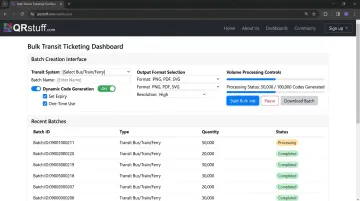
Output formats include PNG, SVG, PDF, and EPS, covering both digital delivery and print-ready production.
Step 2: Configure the validator workflow.
Each code should be registered in the ticketing backend so a scan triggers a real-time status check: valid, used, or expired. The validator (onboard hardware scanner, driver app, or gate reader) must return a pass/fail result within 1–2 seconds. Longer response times create boarding delays.
Step 3: Test before deployment.
Scan generated codes on both Android and iOS, in direct sunlight and low interior bus lighting. Common setup failures at this stage:
- Insufficient contrast in custom-branded codes (dark code on light background is the reliable standard)
- Quiet zone violations — never crop the white border surrounding the code
- Dynamic codes pointing to an incorrect or unpopulated URL
Presenting and Scanning a QR Ticket (Passenger Side)
Before boarding: Purchase a ticket via transit app, mobile website, or email confirmation. Save the QR code offline (as a screenshot or downloaded pass) before you get to the bus door. Mobile data at a bus stop is not guaranteed.
At boarding:
- Open the QR code on your screen
- Raise brightness to maximum
- Hold the screen toward the validator at a steady distance — typically 10–20cm for onboard readers
- If the first scan fails, tilt the screen slightly to reduce glare and hold it still
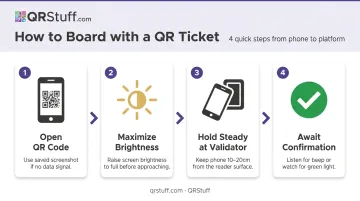
Cracked screens, excess movement, and low brightness cause the majority of passenger-side failures.
Completing and Validating the Journey
A successful scan returns a visual or audio confirmation (a green light or audible beep) and marks the ticket as used in the backend. The same code cannot successfully scan again.
Edge cases to plan for:
- If a scan fails after two attempts, passengers should have a visible ticket reference number as a fallback
- For routes with intermittent connectivity, build in an offline validator mode that accepts codes without a live data check
- Train drivers to instruct passengers to adjust brightness or distance instead of issuing a system override
Where Bus QR Code Mobile Ticketing Is Used in Practice
QR ticketing deployments span networks of different sizes, with meaningfully different implementation approaches.
Recent deployments illustrate the range of approaches in use:
- Omnitrans (San Bernardino Valley, CA) launched onboard QR validators in December 2023. Riders activate app tickets and scan a personalized code at the validator — the operator reports faster boarding and contactless interaction, though no specific time-reduction figure has been published.
- Madison Metro Fast Fares (Madison, WI) uses QR or barcode scanning at bus doors and BRT stations via a dedicated mobile app with fare capping and transfer handling built in.
- Austin MetroRapid deployed QR readers at every door. NACTO's boarding report cites an 80% smartphone penetration rate among riders as a key driver, alongside lower capital costs compared to alternatives.
- PMPML Pune (India) rolled out QR-based ticketing across approximately 2,000 buses in May 2026 — one of the larger recent deployments by fleet size.
How Deployment Context Shapes Implementation
| Context | Typical QR ticketing approach |
|---|---|
| Large metro system | Fare validation layer within a dedicated transit app |
| Regional or rural network | Pre-purchased PDF or email tickets with a static or dynamic QR code |
| Tourist or event service | Single-use passes generated in bulk for a specific journey or date |
One adjacent application: QR codes at bus stops — separate from boarding tickets — link to live timetable data when scanned. This is a passenger information tool, not fare validation, but it's frequently deployed alongside ticketing infrastructure on the same stop furniture.
Best Practices for Running a Reliable Bus QR Code Ticketing System
Use Dynamic Codes for All Operational Tickets
Static codes cannot be expired, invalidated, or tracked after issuance. A used static ticket looks identical to a valid one unless you're maintaining a central scan log.
Dynamic codes solve this. Operators can invalidate tickets remotely, update destination URLs without reprinting, and pull per-route scan analytics — capabilities that make real-time ticket management possible at scale.
Size Codes Correctly for the Scanning Distance
Nielsen Norman Group's QR usability guidelines recommend a minimum of 2cm x 2cm and roughly 1cm of additional width per 10cm of scanning distance. Applied to transit:
- Onboard validator at 10–20cm: 3–4cm square minimum
- Stop shelter panel at 1 metre: 12–15cm square minimum
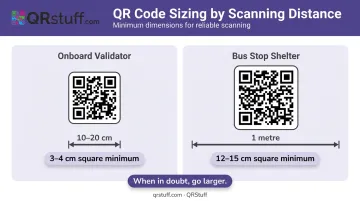
Undersized codes are a consistent source of reader failures. When in doubt, go larger.
Monitor Analytics to Catch Problems Early
Low scan rates at a specific stop usually point to a placement or sizing problem, not low ridership. QRStuff's analytics dashboard tracks scan volume by time of day, device type, and location — so anomalies are visible before they compound.
A route that normally logs 200 ticket scans between 7–9am dropping to 40 on a Tuesday is a maintenance flag worth investigating the same morning.
Maintain Cash and Accessibility Fallbacks
With roughly 30% of bus riders still relying on cash payment, removing non-digital options during a QR rollout creates a real access problem. Clearly communicate which routes accept QR-only boarding versus hybrid payment — and keep cash accepted until ridership data shows the digital share has reached a stable majority.
Train Drivers on Common Scan Failures
The most frequent passenger-facing issue is a scan that fails due to screen glare or wrong device distance. How a driver responds makes a significant difference:
- Trained response: "Raise your brightness and hold it still" — resolves the issue in three seconds
- Untrained response: Wave the passenger through or call for support — both create delay or revenue loss
Frequently Asked Questions
How do you scan a QR code on a bus?
Open your digital ticket in the transit app, from your email, or as a saved screenshot. Set screen brightness to maximum, then hold the QR code steady toward the onboard validator, usually 10–20cm away. Wait for the confirmation beep or green light before boarding.
Do I need a special app to use QR code bus tickets?
Most transit systems deliver QR tickets through their own app or by email and SMS. No separate QR scanning app is needed: the transit app displays the code for you, and the validator handles the scan.
Can bus QR code tickets be faked or reused?
Modern transit QR tickets use dynamic, single-use codes that are invalidated after one successful scan. NJ Transit's mobile tickets, for example, have fixed activation windows: bus tickets expire 30 minutes after activation, and accounts are restricted to a single device to prevent sharing.
What happens if my phone dies before I can show my QR ticket?
Save a screenshot of your QR code to your camera roll before boarding as a standard habit. Most systems also display a ticket reference number that a driver or customer service channel can verify if the screen won't turn on.
How do transit operators generate QR codes for bus ticketing at scale?
Operators use a QR generation platform with bulk creation and dynamic code capabilities. QRStuff supports batch generation up to 500 codes per session and handles 20,000+ code jobs at enterprise scale, with output in PNG, SVG, PDF, or EPS. A central dashboard lets operators update destinations and monitor scan data across routes.
What's the difference between a QR ticket code at a bus stop versus one on my phone?
Stop-mounted QR codes typically link to live timetable or route information, serving as a passenger information tool. The QR code on your phone is a validated fare token tied to a specific purchased ticket in the ticketing backend. They look similar but serve entirely different functions.