QR codes change that equation. A single scan bridges your physical card and your entire digital presence, whether that's a contact-saver, a portfolio, a LinkedIn profile, or a live booking calendar.
The commonly cited figure that roughly 88% of business cards get discarded within a week is widely repeated across marketing publications — though no primary study has been located to verify it. Verified or not, the underlying problem is real: paper cards without a clear next action are easy to forget.
This guide covers what your QR code should link to, six card design concepts for different professions, technical best practices for print-ready codes, and a step-by-step walkthrough for creating your own.
Key Takeaways
- A QR code turns a static business card into a live link to your portfolio, booking page, or contact saver
- Dynamic QR codes let you update the destination URL without reprinting your cards
- Minimum code size for reliable scanning: 1 × 1 inch (2.5 × 2.5 cm) on a standard card
- Always test your code at print size on both iOS and Android before sending to print
- QRStuff supports 40+ QR code types for business cards, including vCard, LinkedIn, URL, and Calendly
Why QR Codes on Business Cards Actually Work
A printed card is a one-way transaction. You give someone your details, and they either remember to follow up or they don't. A QR code makes the card two-way — the recipient can act immediately, right there in the conversation.
The Static Card Problem
Standard cards force recipients to manually type a URL, search for your LinkedIn, or re-enter your contact details into their phone. Each step is friction. Each friction point is a lost follow-up.
A QR code removes those steps entirely. One scan, and the recipient lands exactly where you want them — whether that's saving your contact, browsing your portfolio, or booking a call.
Why Dynamic Codes Are Worth It
There are two types of QR codes:
- Static codes — permanently encode a destination. If anything changes, you reprint.
- Dynamic codes — point to a redirect URL that you control. The printed code never changes; only the destination does.
For business cards specifically, dynamic codes solve a practical problem. Reprinting 250 standard cards at providers like VistaPrint starts around $10–$21.99, and that cost repeats every time a detail changes. With a dynamic code, you update the destination in your dashboard and every card already in circulation reflects the change instantly.
The Analytics Advantage
Unlike any other element on a printed card, a dynamic QR code gives you feedback. QRStuff's scan tracking captures:
- Total scans and unique users
- Device type (iOS vs. Android)
- Geographic location (country and city level)
- Time and date of each scan
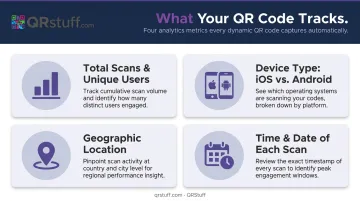
That data tells you which events drove the most scans, which cities showed interest, and exactly when people engage after a conversation — insight no printed card has ever offered.
What Can Your Business Card QR Code Link To?
The QR code itself is neutral — its value depends entirely on the destination. Here are the most effective options for professionals.
vCard / Digital Contact Saver
A vCard QR code encodes your full contact details directly into the code. When someone scans it, their phone prompts them to save you as a contact instantly. No typing, no searching, no errors.
It's particularly useful for sales reps and event attendees who meet a high volume of contacts quickly. A conversation that ends with a saved contact is far more likely to produce a follow-up than one that ends with a pocketed card.
A standard vCard can include:
- Name, job title, and company
- Phone, email, and website
- Physical address and social profiles
QRStuff supports dynamic vCard codes, so you can update your details later without reprinting cards.
Portfolio, Website, or Case Studies
For designers, photographers, consultants, and real estate agents, linking to a portfolio replaces descriptions with proof. A recipient who scans your card and immediately sees your work has a distinctly different impression than one who only reads your job title.
The destination must be mobile-optimized. Most scans happen on a phone, and a desktop-formatted site that requires pinching and zooming undermines the whole experience.
LinkedIn Profile or Social Hub
Linking to a LinkedIn profile keeps the relationship warm long after the first meeting. Connections compound — someone who follows you sees your updates, shares your content, and may engage months after the initial introduction.
For professionals with presence across multiple platforms, a social hub (a single landing page combining LinkedIn, Instagram, newsletter, and website) is often more useful than any single profile. QRStuff's native Social Link feature handles this without requiring a third-party tool like Linktree.
Booking or Scheduling Page
For consultants, coaches, real estate agents, and healthcare providers, a QR code linking directly to a Calendly or booking portal collapses the typical gap between introduction and next action. The person who scanned your card at 3pm can have a meeting booked by 3:05pm — no back-and-forth email required.
QRStuff supports Calendly-specific QR codes with full customization for this use case.
Promotional Offer or First-Time Discount
Retailers, restaurant owners, and service businesses can link to an exclusive offer — a discount, a free consultation, or a first-visit promotion. This increases the immediate value of handing out the card and, because the code is trackable, lets you measure ROI per batch of cards distributed.
6 Creative Business Card Ideas with QR Codes
1. The Minimalist QR-First Card
Design concept: the QR code occupies the visual center of the card. The brand name, a short tagline, and the code. That's it.
The psychology is straightforward — limited information creates curiosity. When a card doesn't explain everything, recipients scan to find out more. This approach works particularly well for architects, UX designers, and creative directors whose work communicates more than any title could.
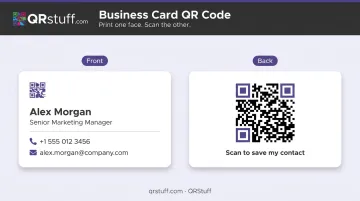
2. The Two-Sided Card (Front Brand, Back QR)
The most versatile layout for most professionals:
- Front: Name, title, company logo, phone, email
- Back: Full-width QR code with a single call to action — "Scan to save my contact" or "Scan to see my work"
The front stays clean and professional. The back gives the QR code the space to be visually prominent and properly sized. If you're unsure which layout to use, start here.
3. The vCard Contact-Saver Card
A focused design where the QR code's sole job is saving a contact. Pair a clean code with the label "Scan to add me to your contacts" — the explicit instruction removes any ambiguity.
Best for: Trade show attendees, conference speakers, and anyone at large networking events where follow-up speed matters. The recipient doesn't need to remember who you were or type anything — the contact lands directly in their phone.
4. The Portfolio Showcase Card for Creatives
Designers, photographers, writers, and marketers benefit from a card that links directly to a portfolio gallery or specific case study. The card itself can be minimal — name, specialty, and a code. The work does the rest.
This sidesteps the URL length problem. Linking to yourname.com/portfolio/selected-projects-2024 via a QR code is far cleaner than printing a long URL that recipients won't type.
5. The Booking-Ready Card for Service Professionals
A card specifically built for conversion. The QR code links to a scheduling page — Calendly, a practice booking portal, or a real estate showing scheduler. The call to action does the heavy lifting: "Scan to book a free consultation."
Best for: Healthcare providers, financial advisors, coaches, and real estate agents. This design converts a first introduction directly into a booked appointment — no back-and-forth email required.
6. The Social Hub Card for Entrepreneurs and Personal Brands
Content creators, entrepreneurs, and professionals with active multi-platform presences benefit from a card linking to a single hub that aggregates everything — LinkedIn, Instagram, YouTube, newsletter signup, and main website.
Best for: Personal brands and multi-platform creators who don't want to pick one channel to prioritize. QRStuff's Social Link feature builds this hub natively — one QR code, every platform, no third-party tools needed.
QR Code Design Best Practices for Business Cards
Size and Scannability
The practical minimum for reliable scanning on a standard business card is 1 × 1 inch (approximately 2.5 × 2.5 cm), as recommended by VistaPrint and other major print providers. Smaller codes risk scan failure, particularly in poor lighting or with older devices.
QR codes also require a quiet zone — a clear margin of at least four modules wide on all sides. Crowding the code against text or the card edge disrupts scanning.
Contrast Rules
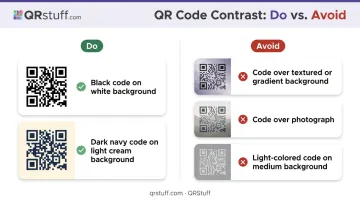
Dark modules on a light background is the most reliable combination. The GS1 2D Barcode Verification guidelines define Symbol Contrast thresholds, with Grade A requiring 70%+ contrast. In practical terms:
- Do: Black or dark navy code on white or light cream background
- Avoid: Code placed over textured backgrounds, gradients, or photographs
- Avoid: Light-colored codes on medium backgrounds, even if they appear readable on screen
Custom Branding Without Breaking Scannability
QR codes can be customized with brand colors, rounded module shapes, and a centered logo (QRStuff supports all of these). The key constraint is that customization should enhance the design without reducing contrast or obscuring the code's data regions.
The claim that branded QR codes increase scans by 80% is widely repeated but lacks a verifiable primary source. What's consistent in practice: a code that matches your brand colors and includes your logo gets scanned more often than a plain black-and-white grid dropped onto a card as an afterthought.
Always test after customizing. Generate the code, export at print size, and scan with multiple devices before sending to the printer.
Placement: Front vs. Back
| Placement | Pros | Cons |
|---|---|---|
| Back of card | Keeps front clean; gives code space | Recipient must flip card |
| Front corner | Immediately visible | Can feel cluttered if design is busy |
| Front center | Works for minimalist QR-first designs | Limits space for other info |
Regardless of placement, avoid positioning the code near the card's edges, where bending and wallet wear degrade the pattern over time.
Always Test Before Printing
Test the QR code at its intended print size on:
- An iPhone (via native Camera app)
- An Android device (via Camera or Google Lens)
- In normal indoor lighting and dimmer conditions
The destination matters as much as the code. A slow-loading mobile site, a broken URL, or a desktop-only page wastes the scan entirely.
How to Create a QR Code for Your Business Card with QRStuff
QRStuff has been serving businesses since 2008 and is trusted by over 250,000 brands worldwide — including Fortune 500 companies like Coca-Cola, Walmart, and Amazon. The platform supports 40+ QR code types, covering every business card use case covered in this guide.
The Creation Process
- Choose your QR code type — select vCard, URL, LinkedIn, Calendly, Social Link, or whichever destination fits your card concept
- Enter your content — fill in contact fields, paste a URL, or configure your social hub
- Customize the design — adjust colors, add your logo, and select module shapes to match your branding (advanced styling available on paid plans)
- Download in the right format — SVG or high-resolution PNG (300 DPI minimum) for print-ready business card files; vector formats scale without quality loss
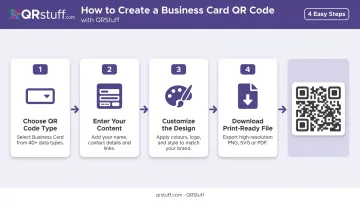
For professional print applications, SVG is the recommended format. It stays sharp at any size and works cleanly with standard design software.
Dynamic Code Management
QRStuff's dynamic QR codes let you update the destination URL at any time through the dashboard. When contact details change or your booking platform switches, the printed code on existing cards keeps working — no reprinting needed.
For long-term business card use, a paid plan is worth it. The Lite Suite starts at £4/month for 50 dynamic codes with no expiration. The Free Suite includes 10 dynamic codes but they expire after 30 days — fine for testing, not for cards you'll hand out for months.
Scan Analytics
Once your cards are in circulation, QRStuff's analytics dashboard shows:
- Total and unique scan counts to separate overall reach from distinct individuals
- Device breakdown across iOS, Android, mobile, and desktop
- Geographic data at country and city level
- Daily, weekly, or custom date range trend views
- CSV export for deeper analysis or CRM integration
You can see which networking events drove the most scans, which cities are converting, and whether a new card design is outperforming the old one.
Frequently Asked Questions
What should I put on a business card with a QR code?
Keep the essentials on the card — name, title, company, email, and phone — and use the QR code to extend into digital content: portfolio, vCard, LinkedIn, or booking page. The QR code works alongside your printed details, adding a layer of interactivity without cluttering the card.
Are QR codes on business cards a good idea?
Yes. They convert a passive card into an interactive touchpoint, give recipients an immediate next action, and allow you to update linked content or measure engagement without reprinting. Dynamic QR codes let you track scans and swap destinations long after the cards are printed.
Should a QR code go on the front or back of a business card?
Back placement is the most common approach — it keeps the front clean for branding and contact details. Front placement works well when the QR code is intentionally part of the card's design concept, as in a minimalist or QR-first layout.
What size should a QR code be on a business card?
A minimum of 1 × 1 inch (2.5 × 2.5 cm) is the practical standard for reliable scanning. Smaller is technically possible, but scan failure risk increases, especially in poor lighting or with lower-resolution phone cameras.
Can I update my QR code after my business cards are printed?
Only with a dynamic QR code. Dynamic codes, available on QRStuff's paid plans, allow you to change the destination URL at any time without altering or reprinting the physical card. Static codes are permanent and cannot be redirected.
Do I need a special app to scan a QR code on a business card?
No. Apple's native Camera app has supported QR scanning since iOS 11, and Android's Camera app uses Google Lens for the same function. Older devices may need a dedicated scanner app, but the vast majority of modern smartphones handle it natively.